444CEMM1 - 第50页
Page 38 HANDLING FLOPPY DISK Data and program for this machine, basically managed by PT, are saved to and loaded from a floppy disk. This section describes the protection and handling of such floppy disks. NOTICE Only 3.…
Page 37
SAFETY PRECAUTIONS
Be sure to observe
About Interlock
444C-E-XXA00-A04-00
About Safety Cover Interlock
1. Basic feature of safety cover interlock
Before starting regular automatic production on this machine, close all safety covers.
Since a screen displays the message prompting you to supply a member when it needs to be
supplied, open the corresponding cover according to the member to be supplied and then conduct
the work.
If you accidentally open a safety cover during automatic production, the machine comes to an
emergency stop to ensure the safety of operators.
2. How to use servo switch
Since an operator needs to put the hands or part of body into the machine for the purpose of model
changeover or maintenance, the operating panel is equipped with the servo switch in order to
ensure on-the-job safety. When this servo switch is turned OFF, all of the drive shafts of the ma-
chine will be inactive. For information about the operations above, refer to the instruction manuals
for each model.
About Key Switch for Maaintenance
1. Key switch for maintenance at our company
This switch, which is targeted for the technician belonging to our company or the commissioned
maintenance technician, can release all of the safety cover interlocks. It is used for such an exten-
sive maintenance work as you cannot perform.
2. Feature of key switch for maintenance at our company
It is dangerous to use this maintenance key, because the safety cover interlock function will be
disabled and both the hardware and software judge that the safety covers are closed; eventually,
the safety features will be disabled in all modes.
If you need to put your hands or part of body into the machine while the safety cover interlock is
released, be sure to turn OFF the servo switch and restrict each shaft action before work.
3. Handling of maintenance key
We basically do not deliver this maintenance key to you.
If you should make a request for the maintenance key, we will deliver it after exchanging the
certificates of delivery acknowledgement.
In that case, we assume no responsibility for any accidents caused by your unsafe acts, for ex-
ample, releasing the interlock function.
Your safety manager should manage the maintenance key adequately.
Page 38
HANDLING FLOPPY DISK
Data and program for this machine, basically managed by PT, are saved to and
loaded from a floppy disk. This section describes the protection and handling
of such floppy disks.
NOTICE
Only 3.5-inch 2HD floppy disks (1.44 MB format) can be used for this machine.
2DD disks cannot be used.
1 Backing up the Data and Program
A floppy disk is a compact and light weighted data storage medium convenient for storage and
transport, but data may be erased or may not be loaded by improper handling.
Make sure to back-up the program and data on a disk to protect against the loss of data. To back-
up the program and data, make another copy disk of the same contents.
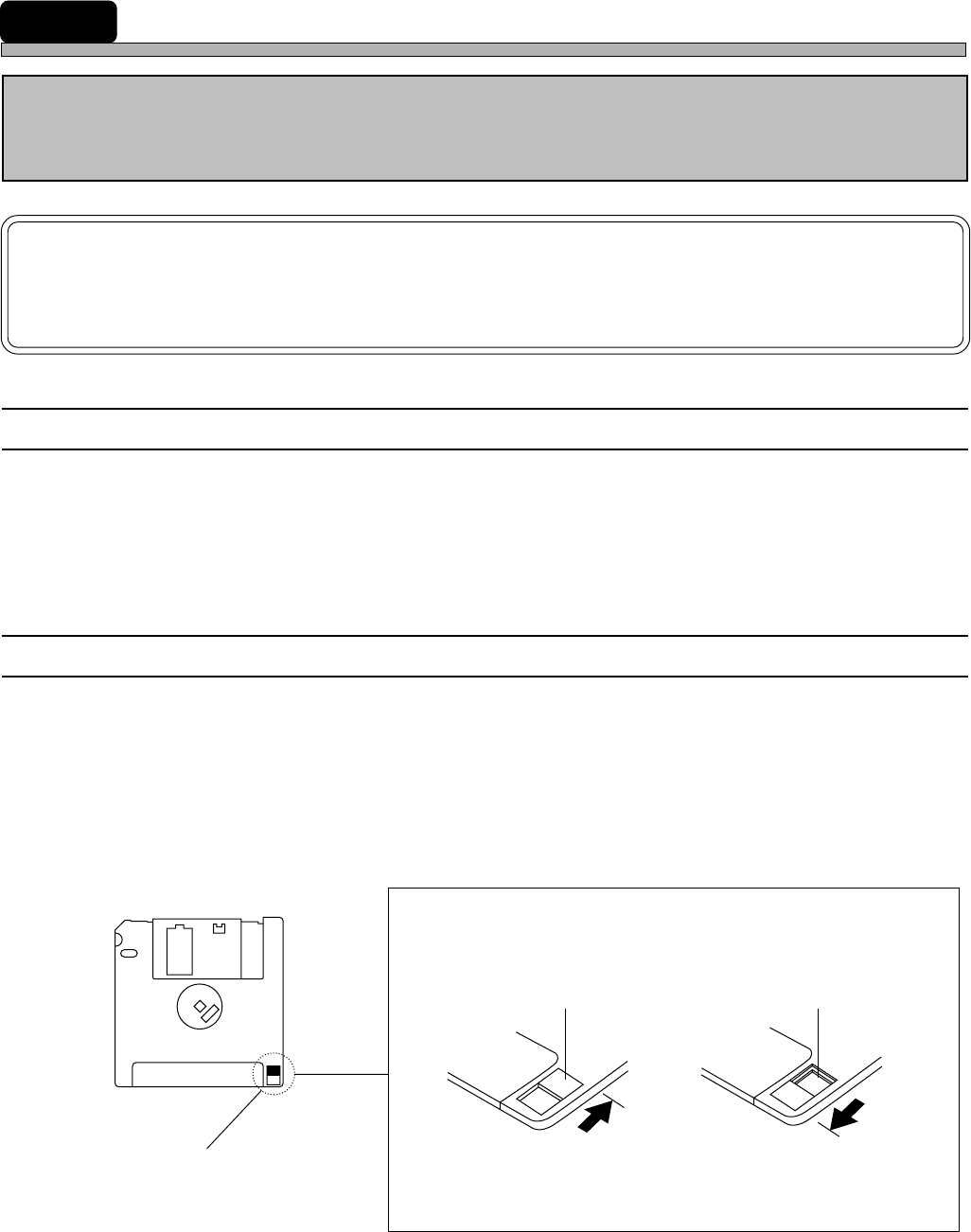
2 Write Protection
The stored data may be mechanically protected from accidental erasure or rewriting.
• Write protection may be set or disabled by sliding the write protect tab located at the lower part of
the floppy disk with a ball pen tip, etc.
Slide the tab with a ball point
pen tip or something similar.
The hole is open.
The hole is closed.
“Protected” position
Inhibits deleting or
saving
“Release” position
Permits deleting or
saving
Write protect tab
Reverse side
444C-E-XXA00-A05-04
Page 39
3 Precautions for Handling Disks
M37E
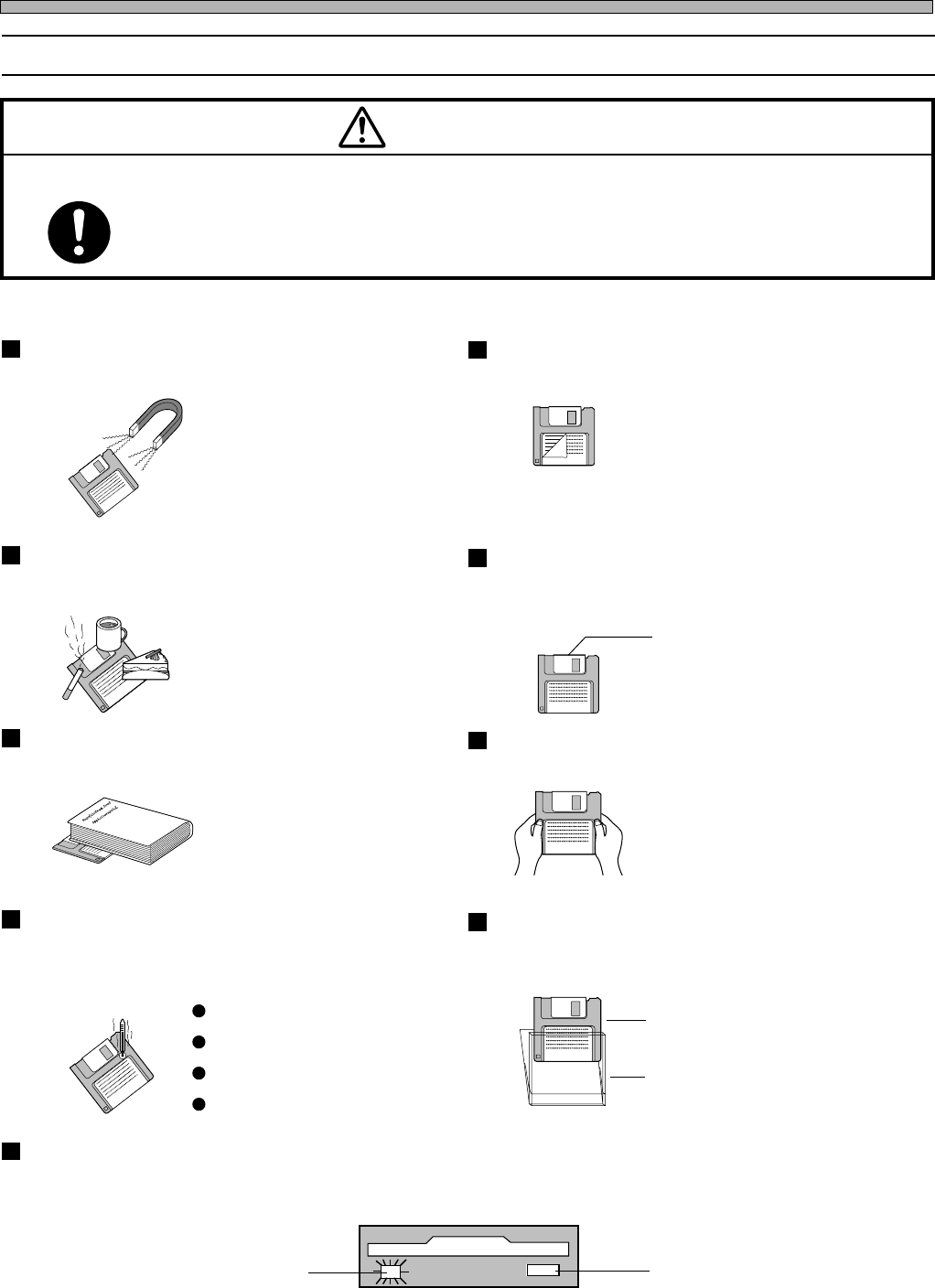
OBSERVE THE FOLLOWING ITEMS WHEN HANDLING FLOPPY DISKS.
Floppy disks and the data in them can be destroyed.
CAUTION
Eject button
Do not press this button
while the access indicator
lamp is lit.
Access indicator lamp
Do not eject the disk or turn off the power supply while the disk drive access indicator
lamp is lit.
Direct sunshine
Dust
Case
Disk
High or low temperature
Do not use the case that is not provided
for safekeeping and carrying.
A disk should not be stored or left in
areas exposed to the following
conditions:
Do not apply excessive force to the disk.Do not place heavy objects on the disk.
Automatic shutter
The automatic shutter should not be
opened. Do not touch the magnetic circu-
lar disk inside.
Refrain from smoking, drinking and
eating close to the disk.
Any loose labels should be re-
placed with new ones.
Do not place the disk in the
vicinity of a motor, CRT, or
anything that may generate a
magnetic field.
Do not attach a new label over an old one.Do not bring a magnet close to the
disk.
High humidity
HANDLING FLOPPY DISK
444C-E-XXA00-A05-02