OM-1352-003_w.pdf - 第54页
6-5 Tg1357-ID-SO 0703-003 Feeder Alternate Select "Enable" or "Disable" to determine whether or not the feeder alternate function should be used. Disable : The feeder alternate function is not used. E…
6-4
Tg1357-ID-SO
0703-003
Component ID
Component IDs can be specified in each text box.
When one of the unit No. buttons ([Unit #1] through [Unit #4] buttons)
is selected, the corresponding dispensing unit No. is displayed like
"FLUX. UNIT #1" to "FLUX. UNIT #4".
C
Set a control command.
Notice
If a control command other than the following ones is used, the
step becomes invalid.
- (hyphen) :
This command handles the steps as those for the
placement feeder location data.
E : This command shows the end of the placement feeder
location data.
The step where "E" is set is valid.
S : This command invalidates the steps specified as
placement feeder location data.
X : This command invalidates the steps specified as
placement feeder location data and shows the end of
the data.
Comment
Set a comment for each Fdr No.
Up to 32 characters can be used.
Alphanumeric characters and symbols can be used.
Note
(a) The performance of the machine is not affected by these
commands. In other words, it has nothing to do with or without
these comments.
(b) It is recommended to set helpful information on components
related to the feeder Nos. (Fdr Nos.).
Feeder Fixed
Select "Enable" or "Disable" to determine whether or not the feeder
positions should be fixed in place.
When "Enable" is selected, the feeder Nos. (Fdr Nos.) and the
component IDs are not affected by any insert and delete operations of a
component.
Disable :
The feeder position is not fixed.
Enable : The feeder position is fixed.
6.1 Pattern Program

6-5
Tg1357-ID-SO
0703-003
Feeder Alternate
Select "Enable" or "Disable" to determine whether or not the feeder
alternate function should be used.
Disable :
The feeder alternate function is not used.
Enable :
The feeder alternate function is used.
Fdr No.
When "Enable" is selected for the feeder alternate function, set the
destination feeder No. (Fdr No.) of the feeder that will work in place of
the feeder where a component pickup error has occurred in succession.
Reference
Refer to "1.4 Placement Feeder Location Data" in "Chapter 3" of the
instruction manual (Vol. 3 for the main machine) for details.
Setting Procedure of Placement Feeder Location Data
Procedure
(1) Press the icon ( ) when the "Placement Feeder Location" tab sheet is
active. The "Feeder Base" subtab sheets become valid and can be used
to specify each flux dispensing unit.
(2) Select each unit No. button ([Unit #1] through [Unit #4] buttons) in the
required "Feeder Base #" subtab sheet.
(3) Specify parameters (number of rotations) in the "No. of Rot. [rot.]" text
boxes for the specified unit No.
6.1 Pattern Program
6-6
Tg1357-ID-SO
6.1.2 Setup for the Component Library "Control Data" for Top
Components
The mark coordinates are set to recognize the land for the bottom
components.
•
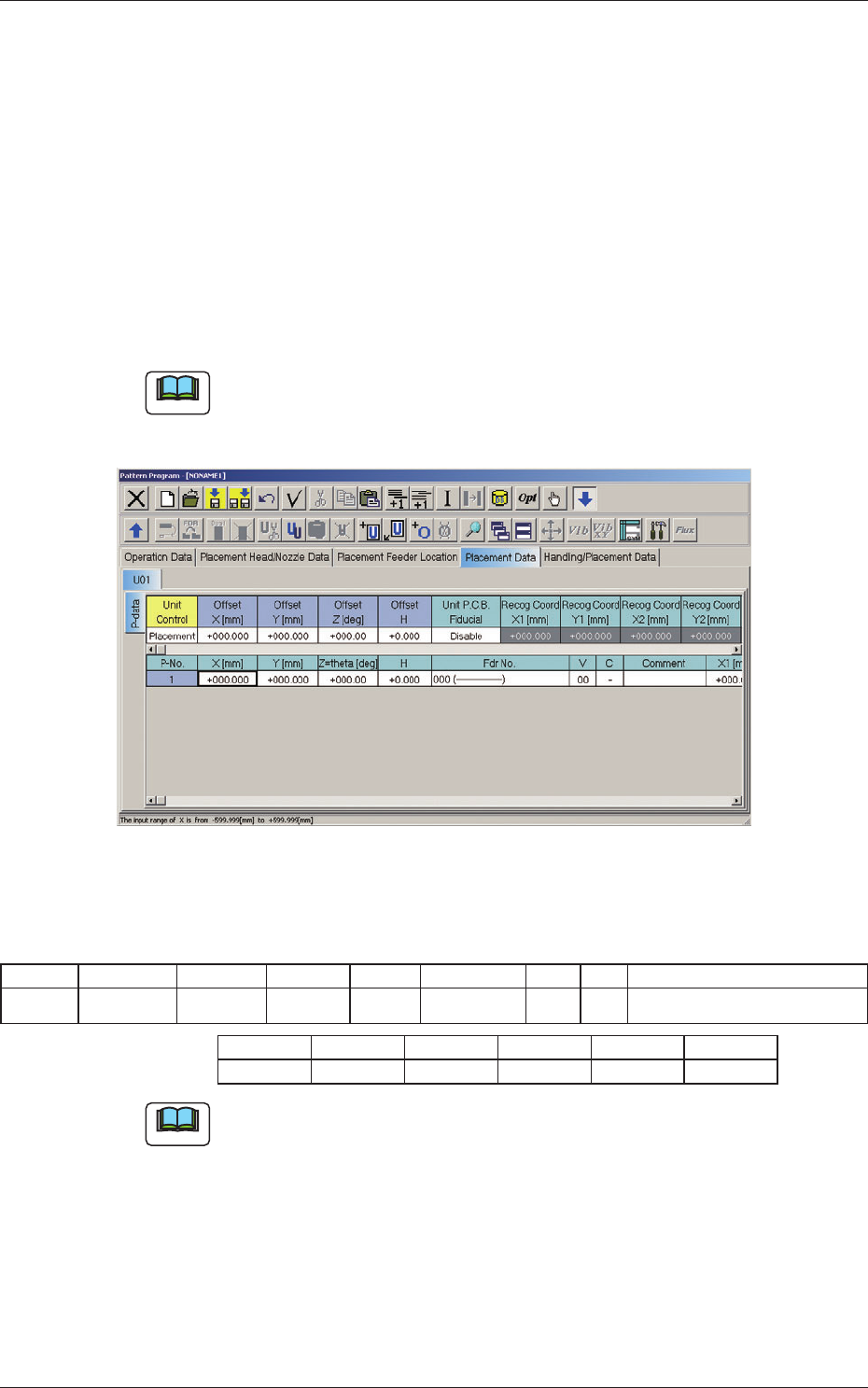
Set the pattern program as follows:
Set "Individual Recognition" to "Enable" and "V Data" to "11".
(X1 to X2 and FM2 are invalid data items).
11: Individual Recognition (2-point recognition) is performed.
Note
The "V Data" for using this machine should be set to "11".
Fig.22 "Placement Data" Tab Sheet
Table
2
P-No X [mm] Y[mm] Z[°] H Fdr No. V C Comment
2 +020.000 +025.000 +045.00 +1.200 703(TOP) 11 - Placement of top component
X1 [mm] Y1 [mm] X2 [mm] Y2 [mm] FM1 FM2
+000.000 +000.000 +000.000 +000.000 02 02
Note
The focus range for the PEC recognition camera is limited, so when the V
Data is set to "11" and "H < -1.5 mm", or in the case of "+ 1.5 mm < H" (H
is not within the range of +/- 1.5 mm), an error message is received.
0703-003
6.1 Pattern Program