OM-1352-003_w.pdf - 第62页
6-13 Tg1357-ID-SO Flux type Select one from "Not Designated" and "T ype 1" through "T ype 9". The flux is dispensed from the flux dispensing unit appropriate for the set flux type, in the flux d…
6-12
Tg1357-ID-SO
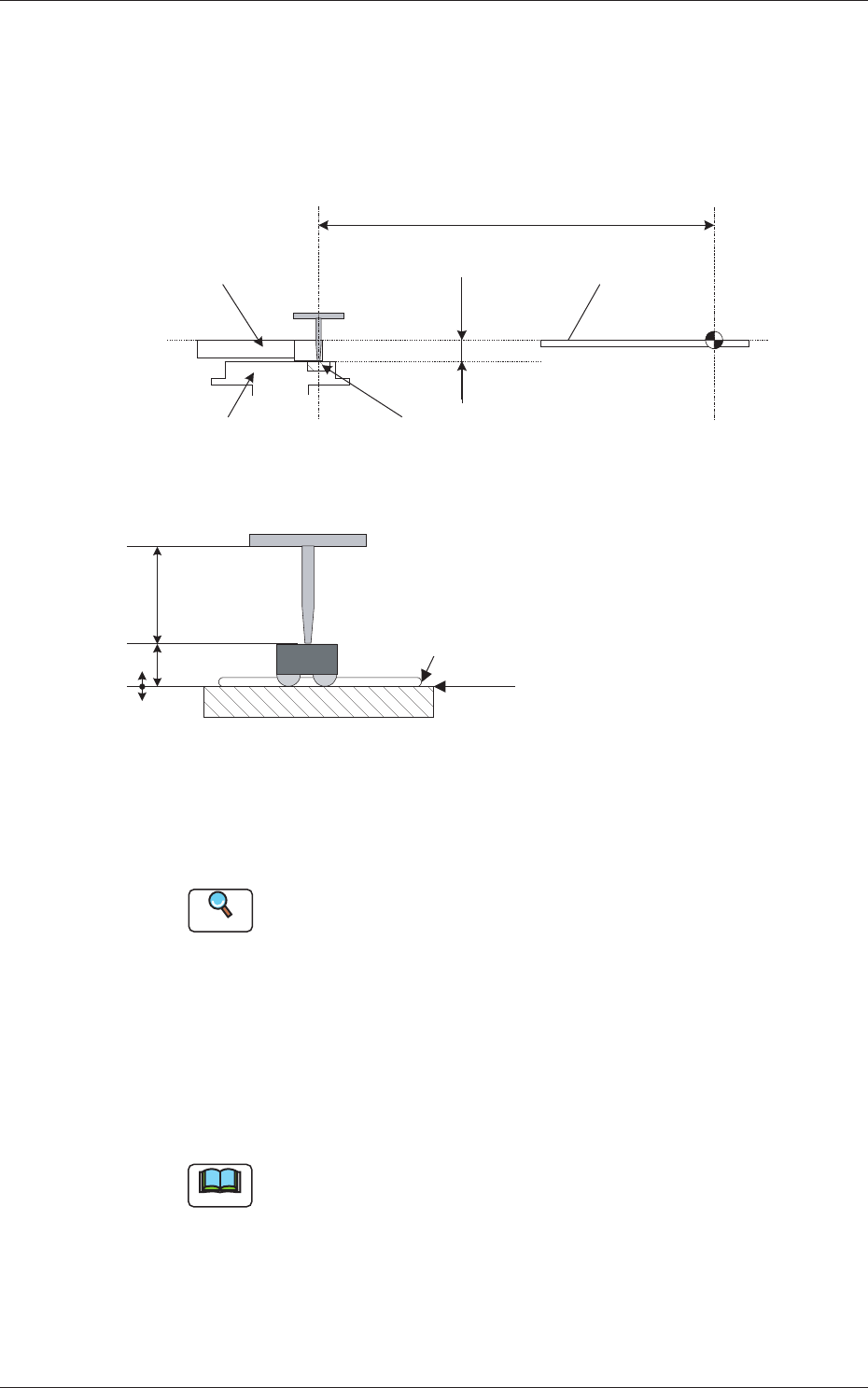
Dispensing Level [mm]
A dispensing level from the drum (rotational disk) surface must be
specified for fine adjustment.
The figure below shows the dispensing level from the upper surface of
the PCB.
PCB Positioning
Upper Surface
Dispensing Reference
Surface
Squeegee
Drum (Rotational Disk)
Flux Dispensing Unit
Stage Center
Reference
Dispensing Reference Surface
Dispensing Level
Component
Thickness (t)
Nozzle Length
At the time of component dipping
Dispensing Position
523.0
9.5
Flux (Coating Pressure: 10 to 100 �m)
Fig. 30
•
Unit:
mm
•
Data Input Range:
-0.999 to +0.999 [mm]
Reference
Refer to "Chapter 4 Component Library" in the instruction manual
(Vol. 3) of the main machine and "Component Library for GXH
Series" for how to set the carrier data.
Flux Coating Thickness [mm]
Set the flux coating thickness.
The flux is dispensed from the unit appropriate for the set flux coating
thickness in the flux dispensing units.
•
Data Setting Range:
0 to +0.999 [mm]
Note
When it is set to "0 mm", it is regarded as "Not Designated".
0703-003
6.1 Pattern Program
6-13
Tg1357-ID-SO
Flux type
Select one from "Not Designated" and "Type 1" through "Type 9".
The flux is dispensed from the flux dispensing unit appropriate for the
set flux type, in the flux dispensing units.
Note
When it is set to "Not Designated", the flux is dispensed from the
unit with the smallest slot No. in the mounted flux dispensing units.
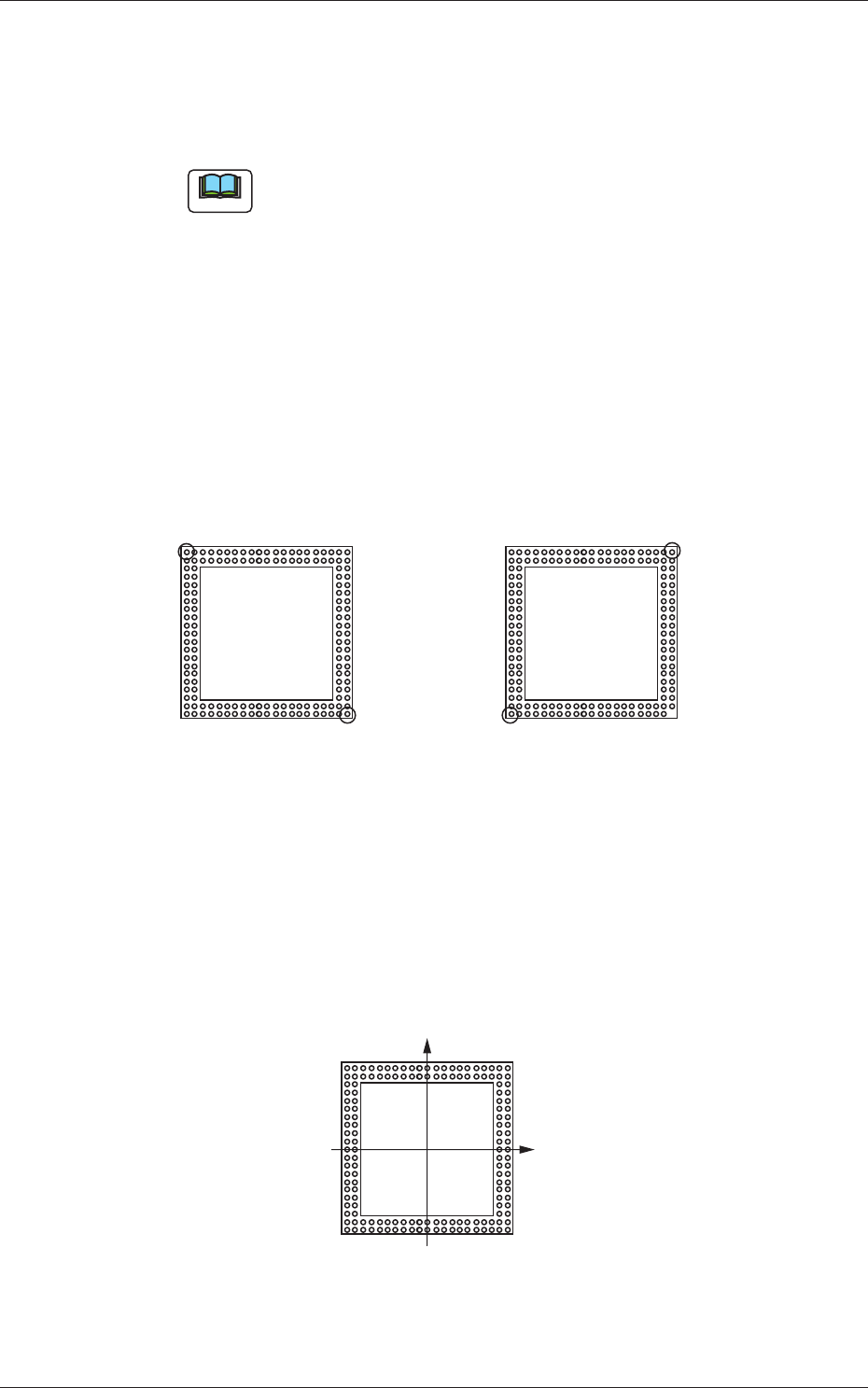
Local recog. mark
The individual recognition mark is set.
"Automatic"
As the ball arrangement for the top component is the same as the land
arrangement on the upper surface of the bottom component, in the case
that the mode is set to "Automatic", the optimum ball is selected in the
ball arrangement in the top component library and the ball position is
used as individual recognition mark position (coordinates).
Top View Top View
Normal
The positions of upper left and
lower right balls are selected as
individual recognition mark coordinates.
In the case that there is no lower right ball:
The optimum positions, such as those of upper
right or lower left balls, are selected automatically.
Fig.31 Automatic
"Manual"
The first and second mark coordinates are entered with the symbol as
shown in the following figure.
Top View
(+)
(+)
Fig.32 Manual
0703-003
6.1 Pattern Program

6-14
Tg1357-ID-SO
0703-003