00193688-03.pdf - 第128页
5 Deinstallation Installation and Configuration Guide SIPLACE Explorer 5.4 Remo ve Edition 02/2005 EN 128
Installation and Configuration Guide SIPLACE Explorer 5 Deinstallation
Edition 02/2005 EN 5.4 Remove
127
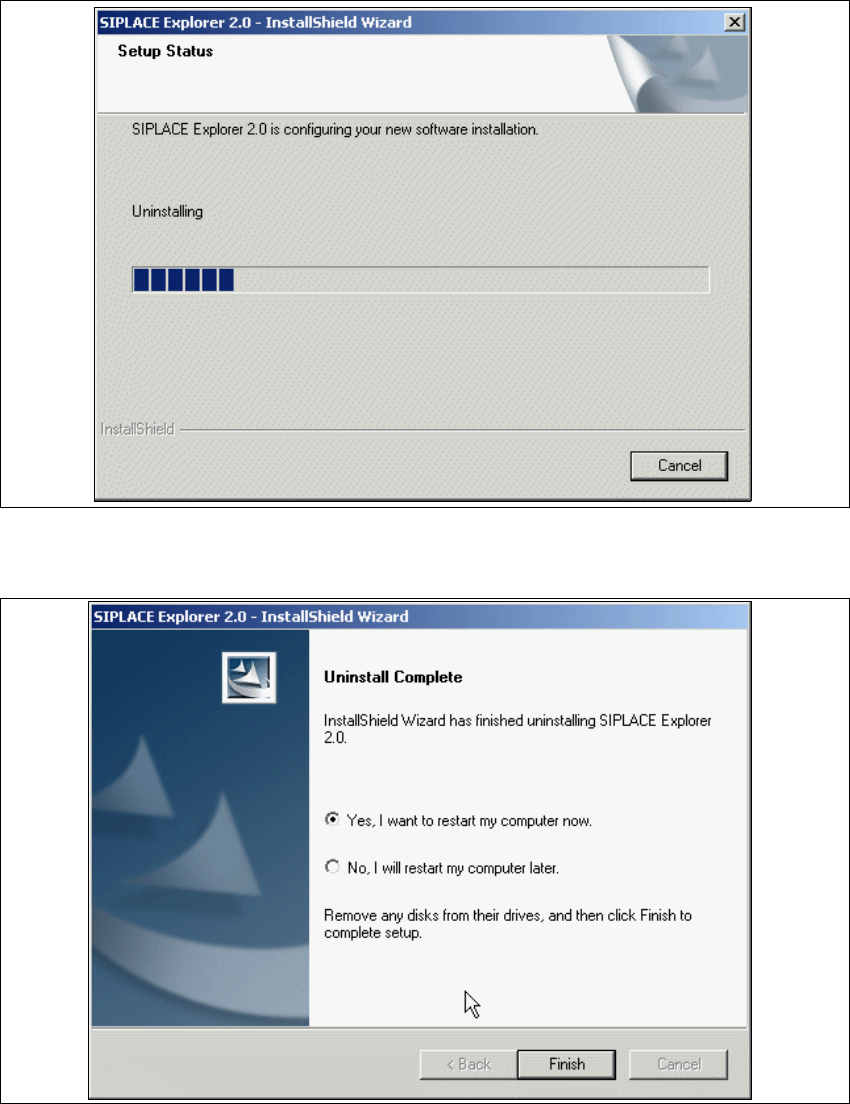
The Setup Status dialog box will show the deinstallation status. 5
5
Fig. 5 - 11 Deinstallation process
→ SIPLACE Explorer V2.0 deinstallation has been completed.
5
Fig. 5 - 12 Deinstallation complete
→ Click on Finish to close the SIPLACE Explorer 2.0 - InstallShield Wizard.
→ After you have rebooted your computer, SIPLACE Explorer 2.0 will not be available.
5 Deinstallation Installation and Configuration Guide SIPLACE Explorer
5.4 Remove Edition 02/2005 EN
128

Installation and Configuration Guide Index
SIPLACE Explorer Edition 02/2005 EN
129
Index
A
Access Factory Website
. . . . . . . . . . . . . . . . . .107
Add Line
. . . . . . . . . . . . . . . . . . . . . . . . . . . . . .102
add line
. . . . . . . . . . . . . . . . . . . . . . . . . . . . . . . .64
Add Production Lines
. . . . . . . . . . . . . . . . . . . .102
Add User
. . . . . . . . . . . . . . . . . . . . . . . . . . . . . .108
Administrator privileges
. . . . . . . . . . 28, 34, 44, 50
Adobe Reader 6.0
. . . . . . . . . . . . . . . . . . . . . . . .22
Apache Tomcat setup
. . . . . . . . . . . . . . . . . . . . .45
Application Logic
. . . . . . . . . . . . . . . . . . . . . . . . .19
Application Wizard
. . . . . . . . . . . . . . . . . . . . . . .83
Application Wizard,
Application features loading
. . . . . . . . . . . . .87
Application Wizard,
Configuring the database
. . . . . . . . . . . . . . .92
Application Wizard,
Configuring the production line
. . . . . . . . . . .88
Application Wizard,
Generating the website
. . . . . . . . . . . . . . . .98
Application Wizard,
Selecting application features
. . . . . . . . . . .90
Application Wizard, starting
. . . . . . . . . . . . . . . .83
architecture
. . . . . . . . . . . . . . . . . . . . . . . . . . . . .12
Archive Browser
. . . . . . . . . . . . . . . . . . . . . . . . .16
archiving schedule
. . . . . . . . . . . . . . . . . . 78, 113
B
Backflush
. . . . . . . . . . . . . . . . . . . . . . . . . . . . . .22
Bean Factory
. . . . . . . . . . . . . . . . . . . . . . . . . . . .19
Beans
. . . . . . . . . . . . . . . . . . . . . . . . . . . . . . . . .18
Build configuration
. . . . . . . . . . . . . . . . . . . . . . .82
C
Calendar
. . . . . . . . . . . . . . . . . . . . . . . . . . . 71, 91
calendar
. . . . . . . . . . . . . . . . . . . . . . . . . . . . . .105
Central Database/Web Server
. . . . . . . . . . . . . .25
change the port number
. . . . . . . . . . . . . . . . . . .60
Changing Tomcat Port Number
. . . . . . . . . . . . .60
Choose destination location,
SIPLACE Explorer setup
. . . . . . . . 37, 38, 46
Choose folder’ dialog box,
SIPLACE Explorer setup
. . . . . . . . . . . . . . .38
client LAN
. . . . . . . . . . . . . . . . . . . . . . . . . . . . . .11
Closed Loop
. . . . . . . . . . . . . . . . . . . . . . . . . . . 22
completely remove SIPLACE Explorer V2.0
. . 119
Configuration
. . . . . . . . . . . . . . . . . . . . . . . . . . . 63
Configuration of the system database
. . . . . 75, 95
configuration type
. . . . . . . . . . . . . . . . . . . . . . . 86
Configurations
. . . . . . . . . . . . . . . . . . . . . . . . . . 11
Configure Line Host
. . . . . . . . . . . . . . . . . . . . 107
configure production line
. . . . . . . . . . . . . . . . . . 68
configure system database
. . . . . . . . . . . . . . . . 73
Configuring Production Lines
. . . . . . . . . . . . . 101
Configuring the database
. . . . . . . . . . . . . . . . 115
Configuring the database, Application Wizard
. 92
Configuring the production Line
. . . . . . . . . . . . 88
Configuring the production line,
Application Wizard
. . . . . . . . . . . . . . . . . . . 88
Configuring Your Web Server
. . . . . . . . . . . . . . 53
connect to the MS SQL Server
. . . . . . . . . . 75, 95
Connectivity properties of the machines
. . . . . . 18
Console
. . . . . . . . . . . . . . . . . . . . . . . . . . . . . . . 16
Creation of custom applications
. . . . . . . . . . . . 63
Custom
. . . . . . . . . . . . . . . . . . . . . . . . . . . . . . . 86
D
Database
. . . . . . . . . . . . . . . . . . . . . . . . . . . . . . 19
database backup
. . . . . . . . . . . . . . . . . . . . . . . . 79
Database components
. . . . . . . . . . . . . . . . . . . 19
Database Connection Wizard
. . . . . . . . . . . 74, 94
Database connection, configure
. . . . . . . . . . . 117
Database connection, test
. . . . . . . . . . . . . . . . 117
Database settings
. . . . . . . . . . . . . . . . . . . . . . 115
Database/Web Server
. . . . . . . . . . . . . . . . . . . . 25
DB Administrator Login
. . . . . . . . . . . . . . . 78, 112
DB error
. . . . . . . . . . . . . . . . . . . . . . . . . . . . 73, 94
DB Maintenance
. . . . . . . . . . . . . . . . . 18, 78, 112
DE Windows Start menu
. . . . . . . . . . . . . . . . . . 42
default maintenance schedule
. . . . . . . . . 78, 113
Default user rights
. . . . . . . . . . . . . . . . . . . . . . 109
Default web server
. . . . . . . . . . . . . . . . . . . . . . 60
Deinstallation
. . . . . . . . . . . . . . . . . . . . . . . . . . 119
deinstallation
. . . . . . . . . . . . . . . . . . . . . . . . . . 119
Deinstallation process
. . . . . . . . . . . . . . . . . . . 127
Descriptor
. . . . . . . . . . . . . . . . . . . . . . . . . . . . . 66
Developer Tools
. . . . . . . . . . . . . . . . . . . . . . . . 83
Development Environment
. . . . . . . . . . 15, 17, 21
Development Environment, installation option
. 39