00193688-03.pdf - 第80页
4 Configuration Installation and Configuration Guide SIPLACE Explorer 4.1 Standard Monitoring Application (SMA) Edition 02/2005 EN 80 4.1.1.7 Step 6 - Modify Application Parameters → Parameters for the application you ha…

Installation and Configuration Guide SIPLACE Explorer 4 Configuration
Edition 02/2005 EN 4.1 Standard Monitoring Application (SMA)
79
→ Click on the Edit button to enable the entry fields. The following details can be defined:
– The file and path for the archived data
– A schedule specifying the intervals and times when data is to be removed from the line
system database and stored in the archive.
– When to execute the maintenance schedule.
– The archiving schedule defined here will be stored in the database and can be called up
when required.
→ You must start the SQL server agent for the MSDE or MS SQL server installation, otherwise
the DB maintenance schedule can not be performed.
→ Once you have defined all settings in Step 5, click on Next to continue with the next step.
NOTE
Remember to regular perform a database backup for the line database. This can be carried out
with the database tool on your computer e.g. with the Enterprise Manager for the MS SQL server.4
4 Configuration Installation and Configuration Guide SIPLACE Explorer
4.1 Standard Monitoring Application (SMA) Edition 02/2005 EN
80
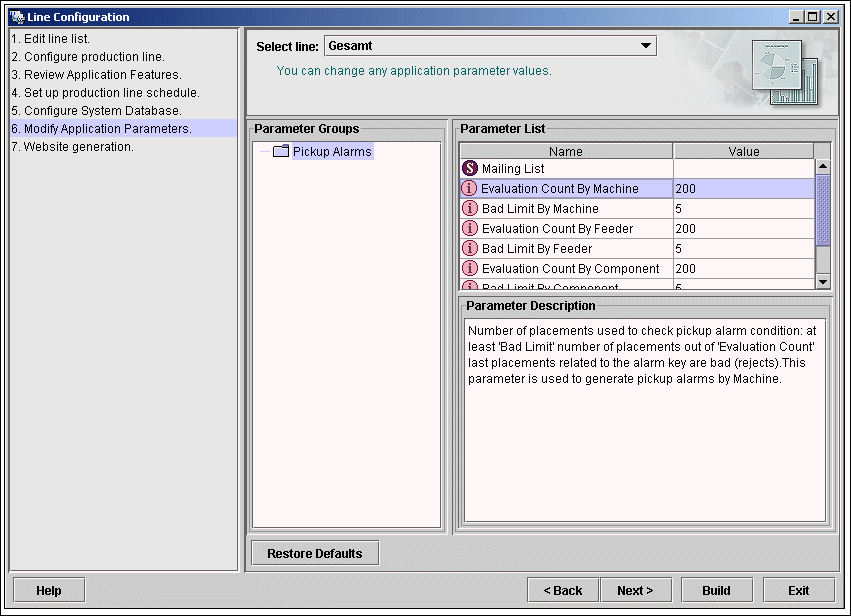
4.1.1.7 Step 6 - Modify Application Parameters
→ Parameters for the application you have created can be checked and edited here.
4
Fig. 4 - 18 Step 6: modify application parameters
→ Once you have made all modifications, click on Next to continue with the next step.
Installation and Configuration Guide SIPLACE Explorer 4 Configuration
Edition 02/2005 EN 4.1 Standard Monitoring Application (SMA)
81
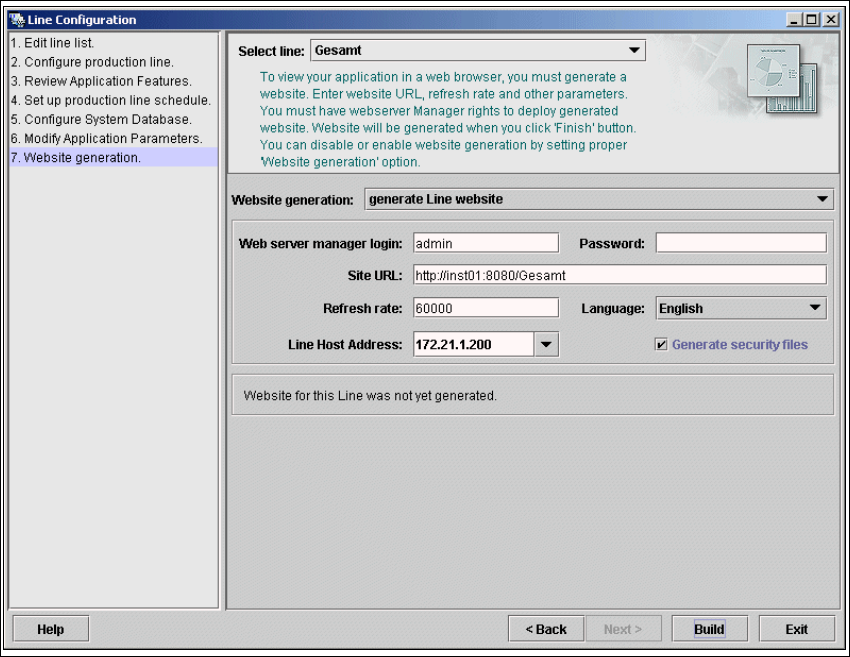
4.1.1.8 Step 7: Website Generation
→ In order to monitor your production line in the web browser, you will need to generate a website.
For this purpose, you require web server manager privileges (Tomcat administrator) and the
corresponding password.
4
Fig. 4 - 19 Step 8: generating the website
→ At Website Generation, specify whether and when the website is to be generated. The
following options are available:
– Generate line website
The website will be generated for the selected line.
– If changes to line settings were made
A website will only be generated if changes have been made to the line configuration.
– Do not generate line website
Website generation will not be performed. This can be performed later, while editing the
generated application.
→ Specify the access data for the Tomcat administrator. If you entered admin and an empty
password during Tomcat configuration, this data will be automatically used as a default login.
If this is not the case, use the data you specified during Tomcat configuration.