OM-1606-006w_GT-28x.pdf - 第85页
OM-1606 4-7 4. Operation Panel 4.2.7 Cover T ape T ake-up Operation Procedure (1) Press the button to select the lane. (Only for 8 mm width T ape Feeder) (2) Press the button. While the button is being pressed, the cover…
OM-1606
4-6
4. Operation Panel
4.2.6 Minimum Pitch Returning Operation
When returning operation is to be performed, loosen the cover tape tension in
advance.
In the case that the cover tape tension is not loosened, the tension is loosened
automatically when the returning operation is performed. However, when the
returning operation is continued several times repeatedly, the tape might be
damaged. Pay attention to the tape.
Note
In the case of the minimum pitch return, the tape is not fed in the rst start
operation. This is because servo-ON processing is performed for the tape feed
servo-motor to return to the home position from any other position.
In this case, repeat the operation within 1 second.
The servo ON condition is continued for 1 second.
Procedure
(1) Press the button to select the lane.
(Only for 8 mm width Tape Feeder)
(2) Press the
button and at the same time, press the button.
(3) Within 2 seconds, release your nger from the
button only and keep
pressing the
button.
(4) Using the ON/OF operation of the
button, execute the minimum pitch
returning operation.
Repeating the ON/OFF operation of the
button can continue the
minimum pitch returning operation.
(5) Release your nger from the
button.
(6) Press the
button to take up the cover tape and set it to the specied
tension before ending the operation.
0907-001
OM-1606
4-7
4. Operation Panel
4.2.7 Cover Tape Take-up Operation
Procedure
(1) Press the button to select the lane.
(Only for 8 mm width Tape Feeder)
(2) Press the
button.
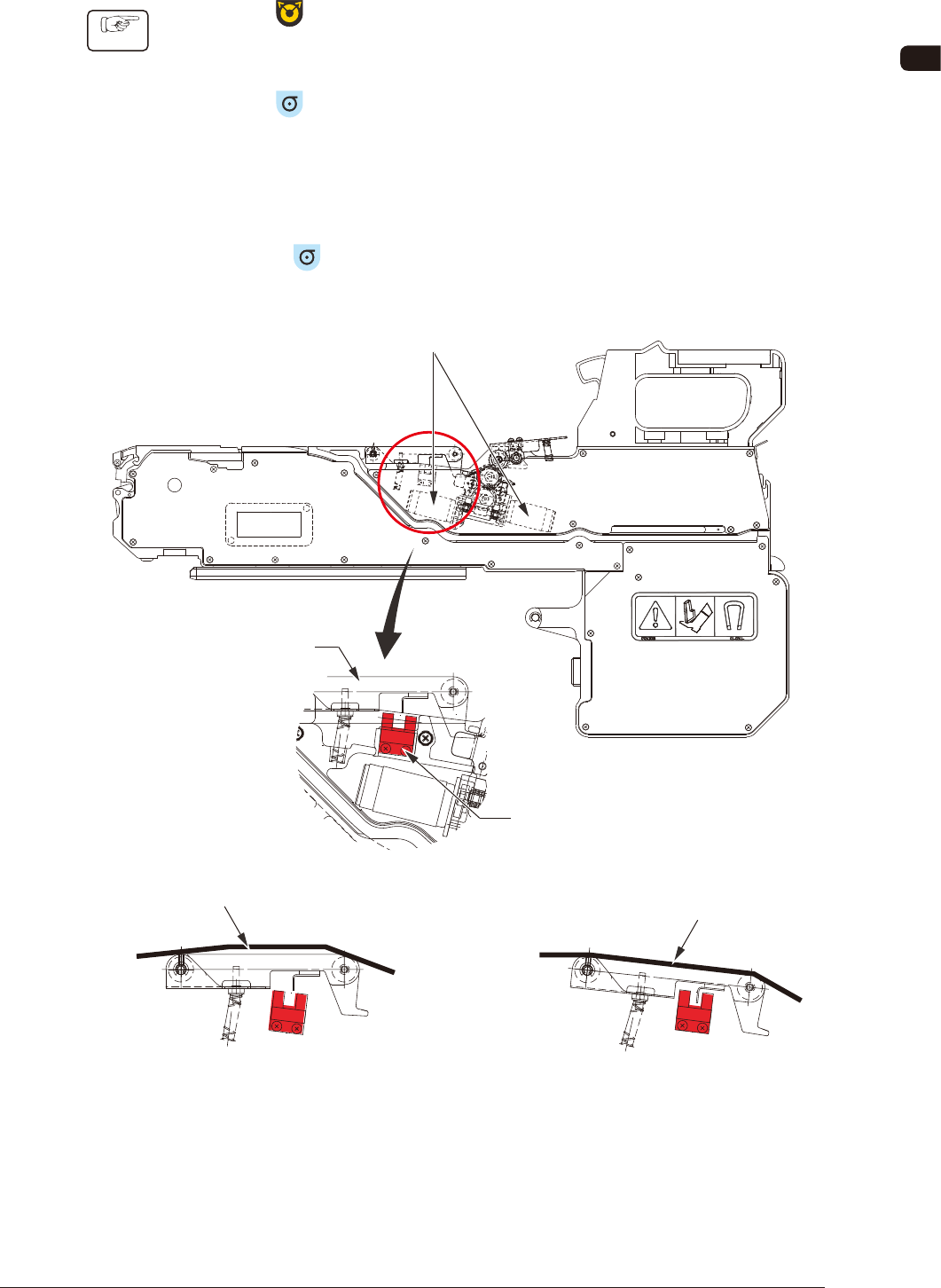
While the button is being pressed, the cover tape take-up motor continues to
be driven.
However, if the cover tape tension detection sensor on the cover tape take-up
section is activated, then the motor is automatically stopped.
Also, if the
button is pressed while the sensor is activated, then the cover
tape take-up motor is not activated.
Cover Tape Tension Detection Sensor
Cover Tape
Tension Lever
Cover Tape Take-up Motor
Cover Tape
Cover Tape
Slack Cover Tape
(Tension Detection Sensor OFF)
Tensed Cover Tape
(Tension Detection Sensor ON)
FD2
0907-001
OM-1606
4-8
4. Operation Panel
4.2.8 Continuous Feeding Operation
This operation repeats the minimum pitch feeding continuously.
Procedure
(1) Press the button to select the lane.
(Only for 8 mm width Tape Feeder)
(2) In the tensed cover tape condition (tension detection sensor ON), press the
button and keeping this condition, press the button.
While both the
button and button are being pressed at the same time,
the continuous feed is performed.
(3) Release your nger from either of the two buttons.
At that time, the minimum feed pitch operation is ended.
Note
In the case of slack cover tape, when the button is pressed (cover
tape tension detection sensor OFF), the cover tape take-up operation is
preceded.
4.2.9 Cancel the tape feed speed deceleration to return
When the tape feeding speed has been set to "Deceleration" in the component
library data, the dot indication
of the subject Fdr. No. ashes and the feed
pitch setup operation is disabled.
It is necessary to cancel the feed speed deceleration to return it to normal.
Procedure
(1) Press the button to select the lane.
(Only for 8 mm width Tape Feeder)
(2) Press the
button and within 2 seconds, press the button. Keep this
condition (two buttons are being pressed) for 2 seconds.
After the above operation for 2 seconds is conrmed, the dot display
is changed from ashing to lighting and the feed pitch setting operation is
enabled.
0907-001