00196932-02 SM S-Feeder Repair DE+EN multilang.pdf - 第90页
4 S-Feeder Test Software 4.1 Checking of 2x8mm S-Feeder 90 SIPLACE S-Feeder Repair SIPLACE S-Förderer Reparatur F7. Hand (Component cover) 1. Start the test with "compo nent cover" with the key F7. The "co…
4 S-Feeder Test Software
4.1 Checking of 2x8mm S-Feeder
SIPLACE S-Feeder Repair SIPLACE S-Förderer Reparatur 89
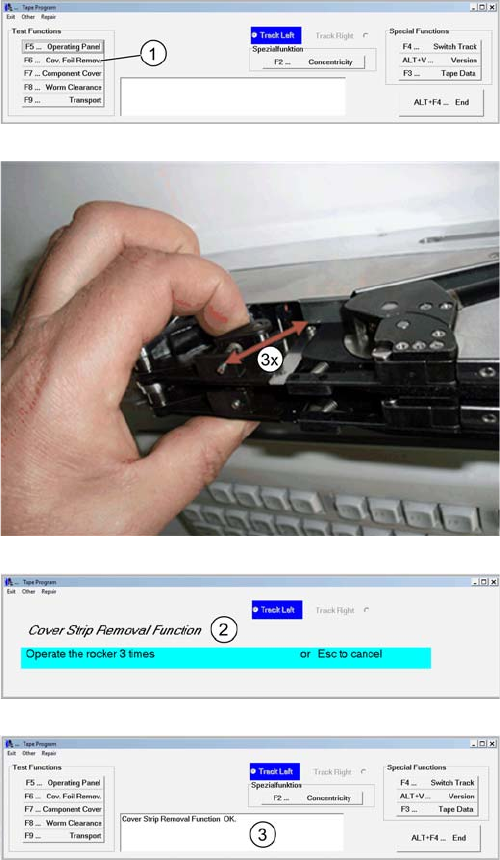
F6 Cover strip
1. Start the test "cover strip" by pressing the key F6
Move the rocker of the activated foil removal till the motor
stops. Run this movements for 3 times. The picture dis
-
play the rocker in the right track
2. On the feeder, move the swinging bracket of the left
track 3x manually.
3. The result is shown at the comment field.
4. Press F4 to the right Track and repeat the steps 1 to 3 ..
4 S-Feeder Test Software
4.1 Checking of 2x8mm S-Feeder
90 SIPLACE S-Feeder Repair SIPLACE S-Förderer Reparatur
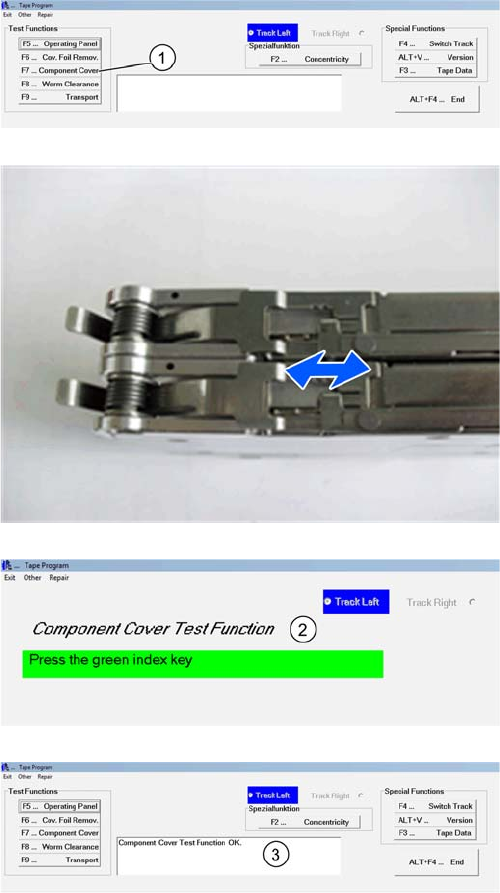
F7. Hand (Component cover)
1. Start the test with "component cover" with the key F7.
The "component cover" (BE-cover) opens and closes 10
times. You can delay the process or stop by pressing the
green and then yellow button. .
2. Please Note during the test the software only checks
the communication with the selected Track.
3. The result is shown at the comment field.
4 S-Feeder Test Software
4.1 Checking of 2x8mm S-Feeder
SIPLACE S-Feeder Repair SIPLACE S-Förderer Reparatur 91
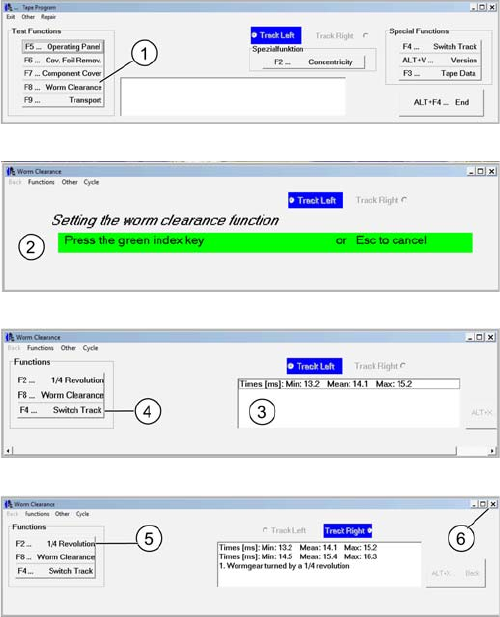
F8 Worm gear clearance
1. Start the test "worm clearance" with the F8 key. The pin
wheel in the left track starts
2. Press the green key to start the measuring process.
3. In the comment field times appear. If an error occurs,
the worm clearance set.
4. Switch of the track with F4 and repeat steps 1 to 3 for
the right track.
5. With the F2 key you can overclock the pin wheel a
quarter turn.
6. Close the menu worm clearance