00900085-04_IG_ASMProcessEngine_2.0-R18-1_EN - 第14页
4 Installation 4.2 Installing ASM ProcessEngine 14 Installation Guide ASM ProcessEngine 2.0 (Pre-Placement) (R18-1) 10/2018 4.2 Installing ASM ProcessEngine ► Install and use the ASM NET Support Media 2.7 Hotfix 01 as in…

4 Installation
4.1 Prerequisites
Installation Guide ASM ProcessEngine 2.0 (Pre-Placement) (R18-1) 10/2018 13
4 Installation
The software components that are required for ASM ProcessEngine 2.0 are available on the ASM
ProcessEngine installation CD or the Support Media.
NOTICE
Compatibilty of software components
To ensure a reliable data quality from ASM ProcessEngine, make sure that the versions of
all supported data sources match the version of ASM ProcessEngine installed. 3.4 "Suppor-
ted Data Sources" [}11]
For a first installation of ASM ProcessEngine, proceed with section 4 "Installation" [}13].
For an upgrade installation of ASM ProcessEngine, proceed with section 6 "Upgrade to Process-
Engine 2.0" [}27].
4.1 Prerequisites
Make sure that the following prerequisites are fulfilled, before the installation:
●
You have Windows administrator privileges to perform the installation.
●
ASM License Manager is installed on your computer. If necessary, install this software
component via the Support Media.
●
ASM Studio is installed on your computer. If necessary, install this software component via
the Support Media.
●
ASM OIB User Manger is installed on your computer if you want to deploy the ASM OIB User
Role concept to restrict the access to ProcessEngine to users that are assigned to the Pro-
cessEngineUsers role.
●
ASM ProcessEngine uses host bound licenses. You need a license for every computer on
which you want to install ASM ProcessEngine.
4 Installation
4.2 Installing ASM ProcessEngine
14 Installation Guide ASM ProcessEngine 2.0 (Pre-Placement) (R18-1) 10/2018
4.2 Installing ASM ProcessEngine
► Install and use the ASM NET Support Media 2.7 Hotfix 01 as instructed in the ASM Net Sup-
port Media Administration Manual, item no. [00900053‑xx].
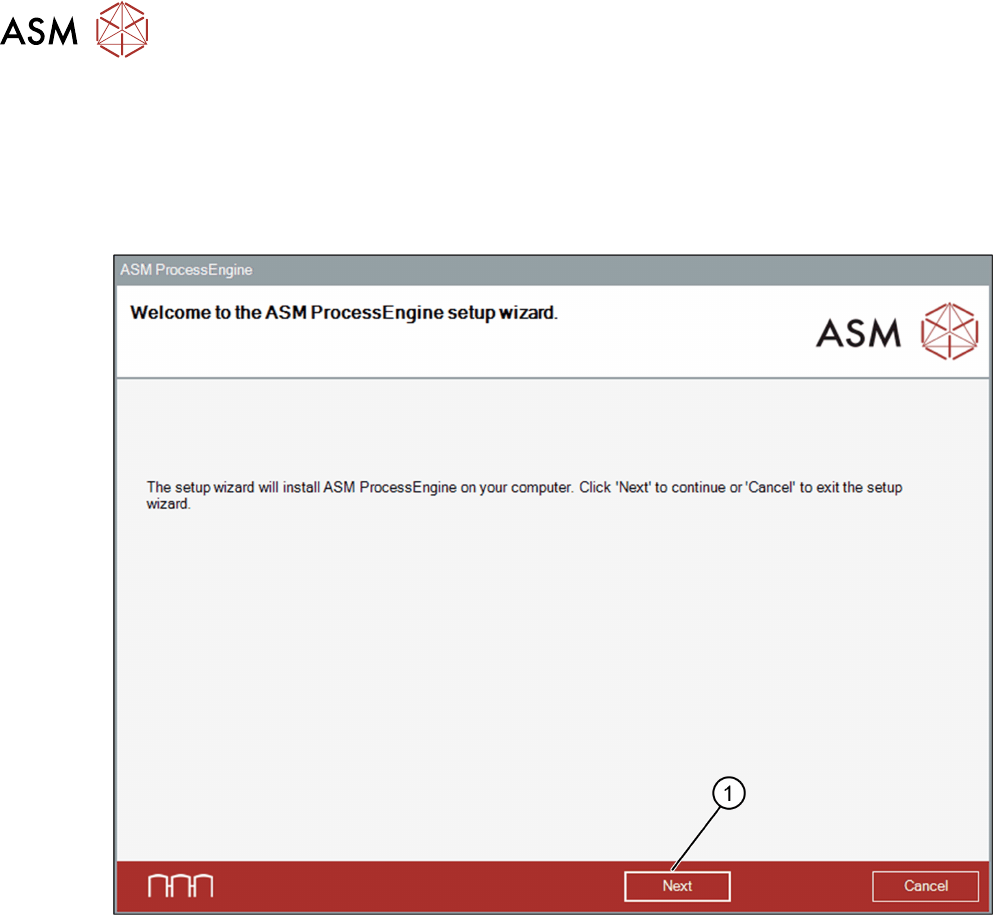
► Place the ASM ProcessEngine CD in your CD-ROM drive.
The Setup Wizard opens.
► Exit all other programs and click Next (1).
You will be guided through the ASM ProcessEngine installation procedure.
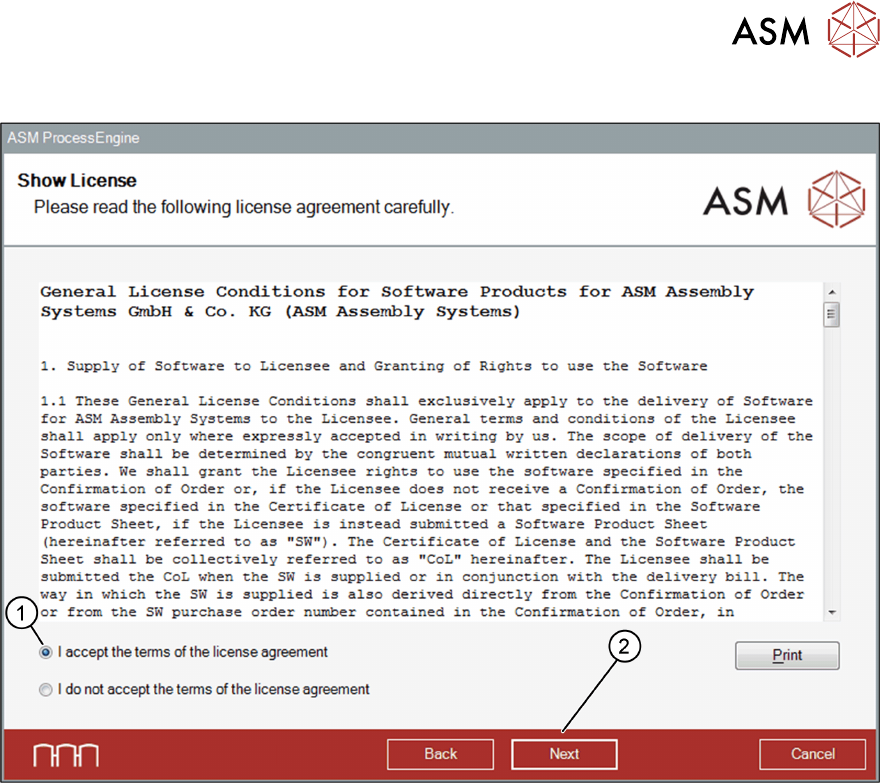
The Show License dialog box opens.
4 Installation
4.2 Installing ASM ProcessEngine
Installation Guide ASM ProcessEngine 2.0 (Pre-Placement) (R18-1) 10/2018 15
Show License dialog box
► Read the license agreement and select the I accept ... option (1).
► Click Next (2).
The Packages and Features dialog box opens.