00900085-04_IG_ASMProcessEngine_2.0-R18-1_EN - 第27页
6 Upgrade to ProcessEngine 2.0 6.1 Renaming the SiplaceProcessExpert Database Installation Guide ASM ProcessEngine 2.0 (Pre-Placement) (R18-1) 10/2018 27 6 Upgrade to ProcessEngine 2.0 Upgrading from ProcessEngine 1.0 Up…
6 Upgrade to ProcessEngine 2.0
6.1 Renaming the SiplaceProcessExpert Database
Installation Guide ASM ProcessEngine 2.0 (Pre-Placement) (R18-1) 10/2018 27
6 Upgrade to ProcessEngine 2.0
Upgrading from ProcessEngine 1.0
Upgrading from ProcessEngine 1.0 to ProcessEngine 2.0 comprises the following tasks:
●
Uninstalling ProcessEngine 1.0
5 "Uninstallation" [}23]
●
Renaming the SiplaceProcessExpert Database
6.1 "Renaming the SiplaceProcessExpert Database" [}27]
●
Running the Support Media 2.7 Hotfix 01 to start the Prerequisite Analyzer and select the
Profile for ProcessEngine 2.0.
Detailed information on the installation procedure can be found in the ASM Net Support Media
Administration Manual, item no. [00197793‑xx].
●
Installing ProcessEngine 2.0
4 "Installation" [}13]
Upgrading from ProcessEngine 1.1
Upgrading from ProcessEngine 1.1 to ProcessEngine 2.0 comprises the following tasks:
●
Uninstalling ProcessEngine 1.1
5 "Uninstallation" [}23]
●
Running the Support Media 2.7 Hotfix 01 to start the Prerequisite Analyzer and select the
Profile for ProcessEngine 2.0.
Detailed information on the installation procedure can be found in the ASM Net Support Media
Administration Manual, item no. [00197793‑xx].
●
Installing ProcessEngine 2.0
4 "Installation" [}13]
6.1 Renaming the SiplaceProcessExpert Database
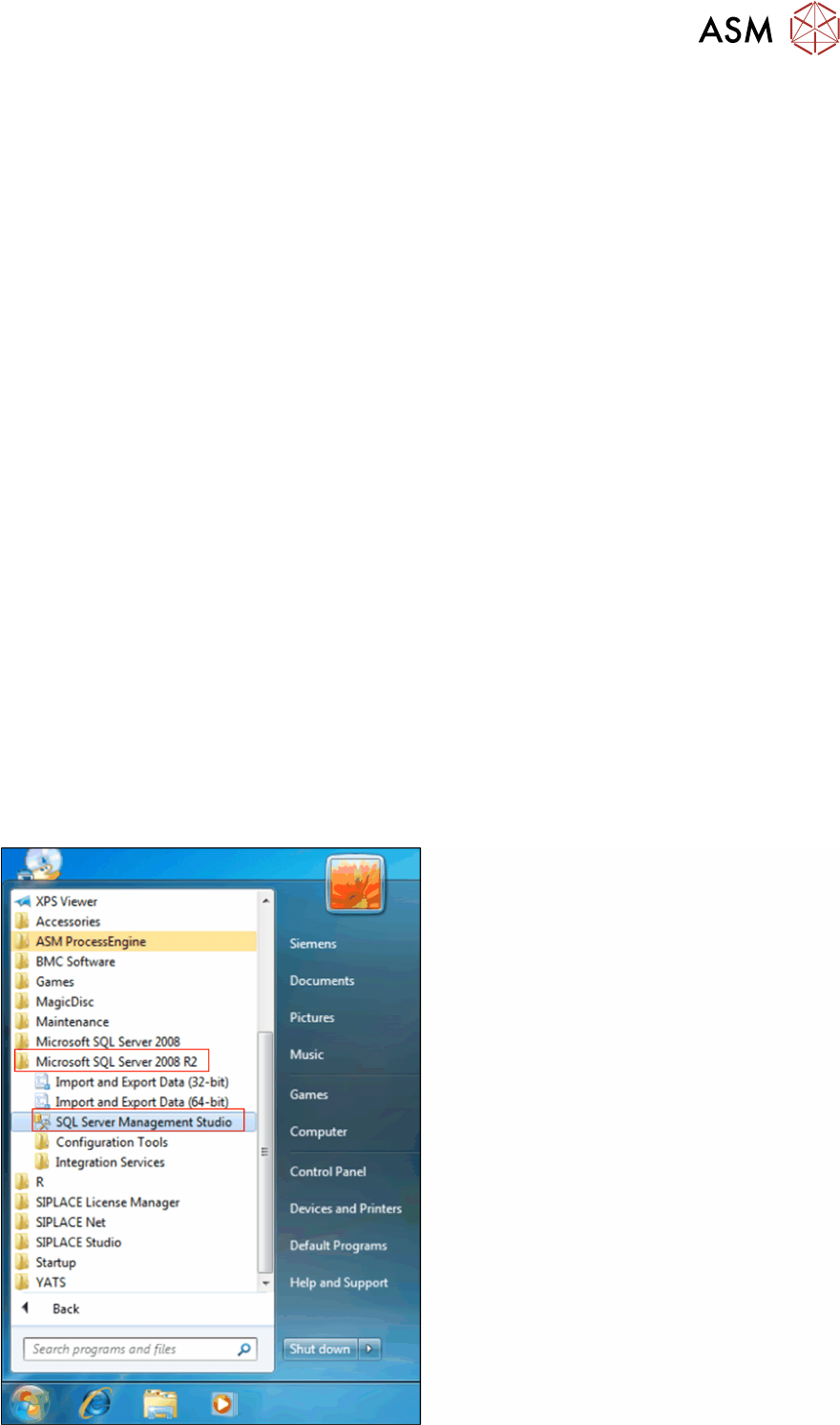
► From the Windows Start Menu, choose Microsoft SQL Server 2008 R2 -> SQL Server Man-
agement Studio.
6 Upgrade to ProcessEngine 2.0
6.1 Renaming the SiplaceProcessExpert Database
28 Installation Guide ASM ProcessEngine 2.0 (Pre-Placement) (R18-1) 10/2018
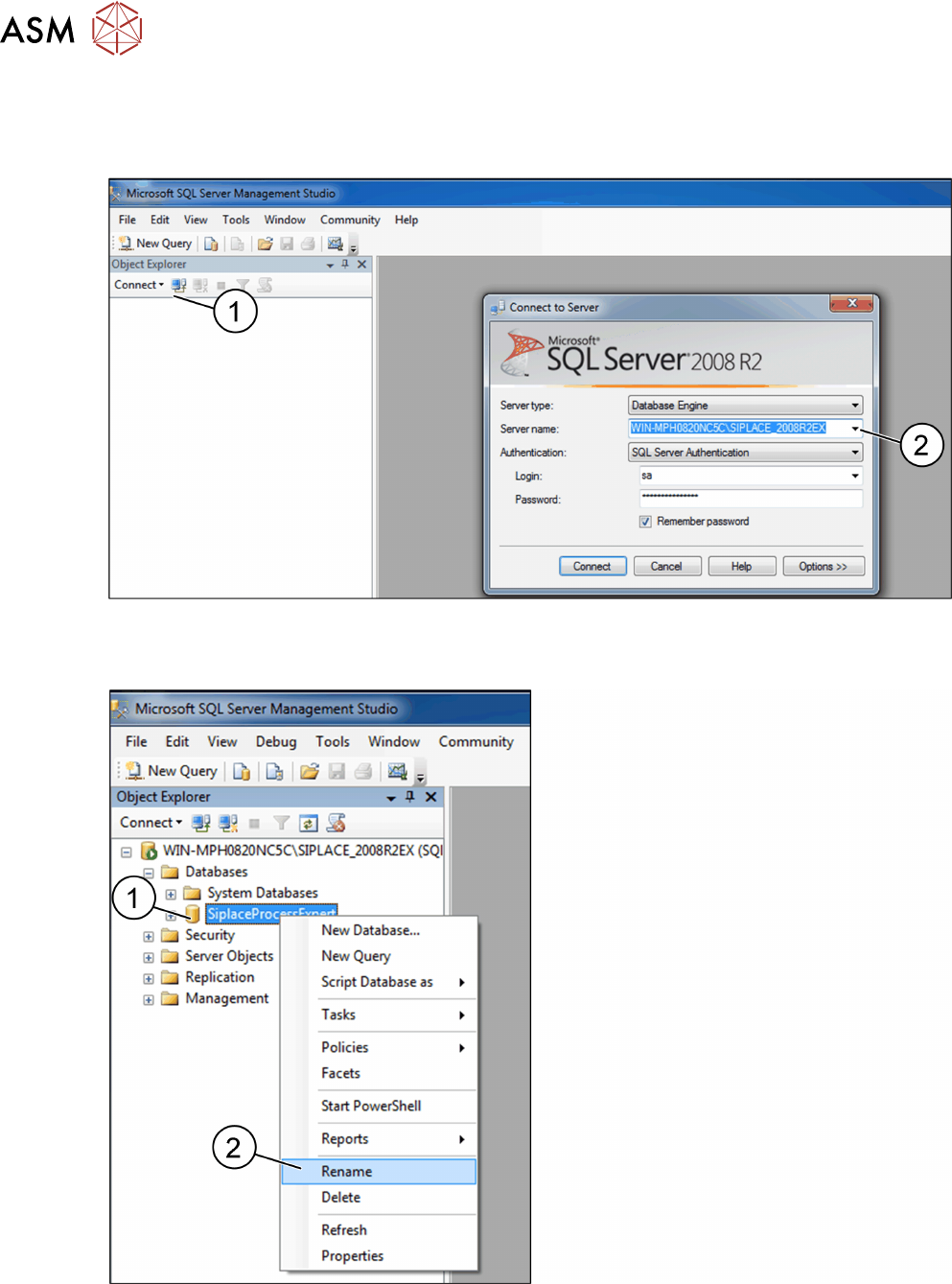
The Microsoft SQL Server Management Studio opens.
► In the Object Explorer, click Connect (1).
The Connect to Server dialog box opens.
► From the Server name: list, Select the SQL server on which the ProcessExpert database is
installed (WIN-MP0820NC5C\SIPLACE_2008R2EX in this example) (2).
► The WIN-MP0820NC5C\SIPLACE_2008R2EX database is displayed in the Object Explorer.
► Expand the Databases folder.
► Right-click the SIPLACEProcessExpert database icon (1).
► From the context menu, choose Rename (2).
The database name is editable.