西门子SIPLACE HS 60-设备参数_EN - 第13页
11 PCB Conveyor: Flexible Dual Conveyor Technical Data Description Thanks to reduced non-productive times the dual PCB conveyor can substantially increase the through- put, depending on the program. It makes it possible …
10
PCB Conveyor:
Single Conveyor
Technical Data
PCB dimensions See table on page 3
PCB thickness 0.5 to 4.5 mm
Max. PCB weight 3 kg
Max. PCB warpage Top: 4.5 mm - PCB thickness
Bottom: 0.3 mm + PCB thickness
Free space on PCB bottom side 40 mm
PCB conveyor height
830 ± 15 mm (Standard)
900 ± 15 mm (Option)
930 ± 15 mm (Option)
950 ± 15 mm (Option) SMEMA
Fixed conveyor edge Right (standard); left (option)
Type of interface Siemens (standard); SMEMA (option)
Component-free PCB
handling edge
3 mm
PCB loading time 2.5 s
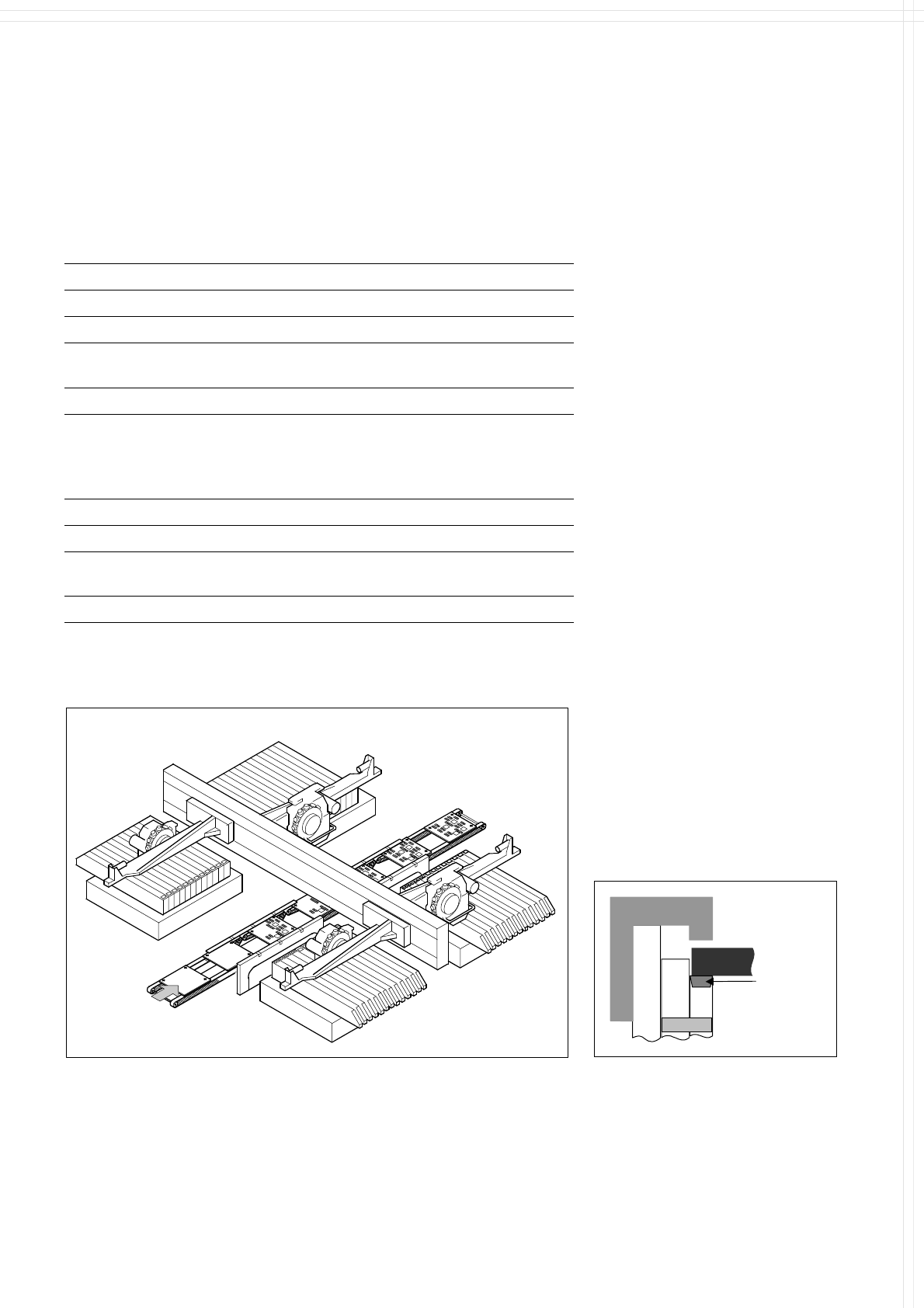
Description
On SIPLACE HS-60 the in-line
conveyor system guarantees a
quick adjustment to new PCB
widths. The change is made either
at the station computer using the
menu function or from the line
computer via the automatic width
adjustment unit.
The PCB is clamped from the
bottom to the top side of the
conveyor. This offers several
advantages:
Higher real placement rate
Robust PCB recognition (cam-
era focus point)
Shorter PCB change time
Easier change of fixed conveyor
edge right/left also in field
Quicker learning function, as the
PCB height does not effect the
Z-stroke, resulting in higher
placement rates
The conveyor can be ordered with
a fixed rail on right or left. As stan-
dard the SIPLACE placement sys-
tems are available with a single
conveyor system.
PCB Transport
Direction
PCB
Axle
Clamp
Conveyor
belt
Clamping of PCB
PCB Conveyor
11
PCB Conveyor:
Flexible Dual Conveyor
Technical Data
Description
Thanks to reduced non-productive
times the dual PCB conveyor can
substantially increase the through-
put, depending on the program. It
makes it possible to transport two
PCBs through the machine.
PCB dimensions See table on page 3
Fixed conveyor edge Right (standard), left (option)
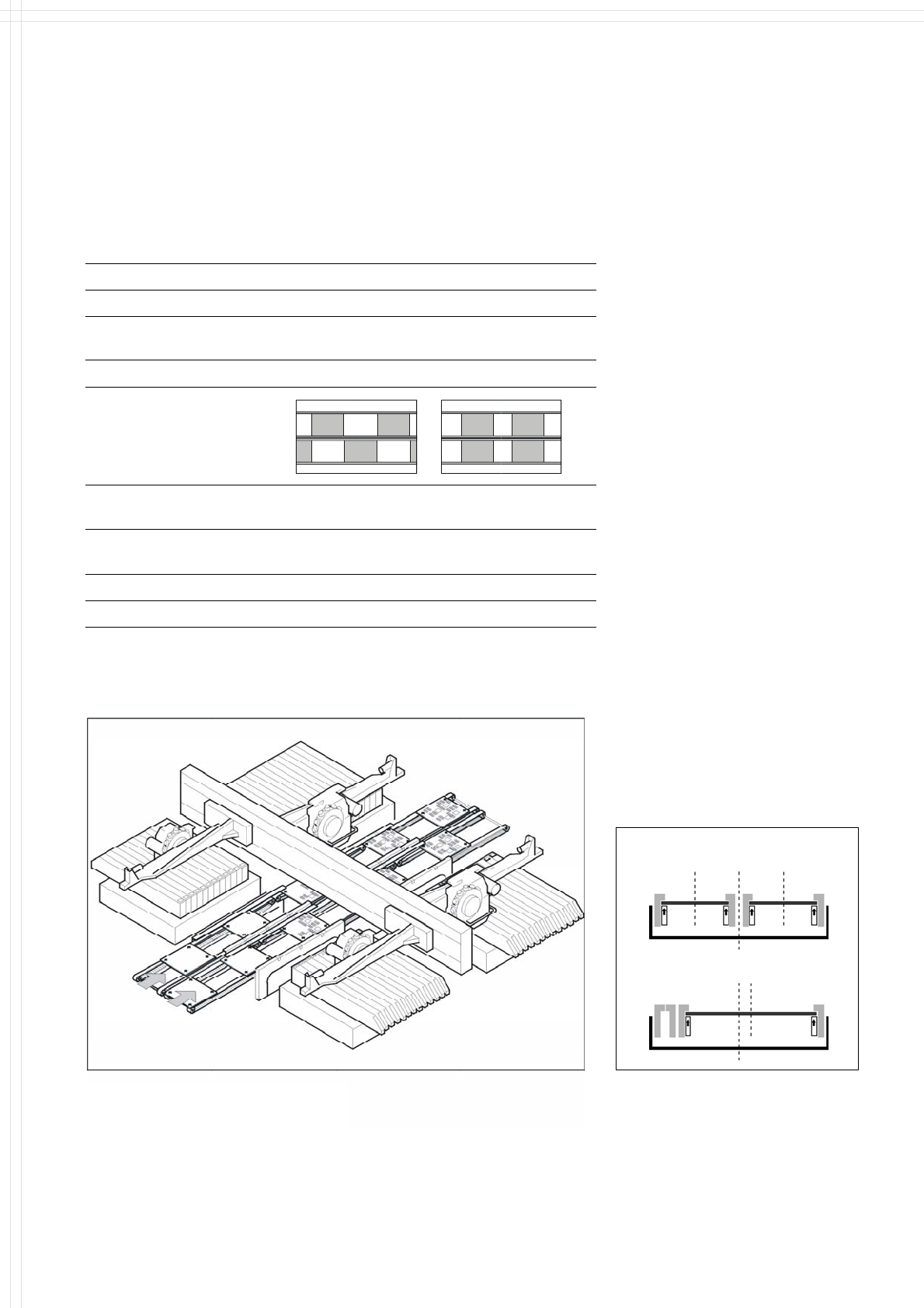
Asynchronous and Synchronous Transport on Dual Conveyor
Transport mode Asynchronous Synchronous
View
Placement program
per conveyor
same or different same or different
PCB width
per conveyor
same same or different
Ink spot recognition possible not possible
Automatic width adjustment possible not possible
Asynchronous transport
A PCB is moved into the machine
in “slack time” while the other
PCB is being populated. The non-
productive time caused by the PCB
transport is completely eliminated.
The increase in placement speed
reaches 30%, depending on the
components placed on the PCB.
Synchronous transport
Two PCBs are populated simul-
tanously. The real placement rate
can be increased, especially when
boards with only a few compo-
nents are handled.
PCB
Transport Direction
By use of Station Computer Soft-
ware 505.02 (or higher) the dual con-
veyor can be processed in single
conveyor mode, which allows the
handling of PCBs with a maximum
width up to 380mm (see table on
page 3).
Modus 1: Dual Conve
y
or
Modus 2: Single Conveyor
Dual Conveyor with Asynchronous Transport
Flexible Dual Conveyor
12
PCB Conveyor:
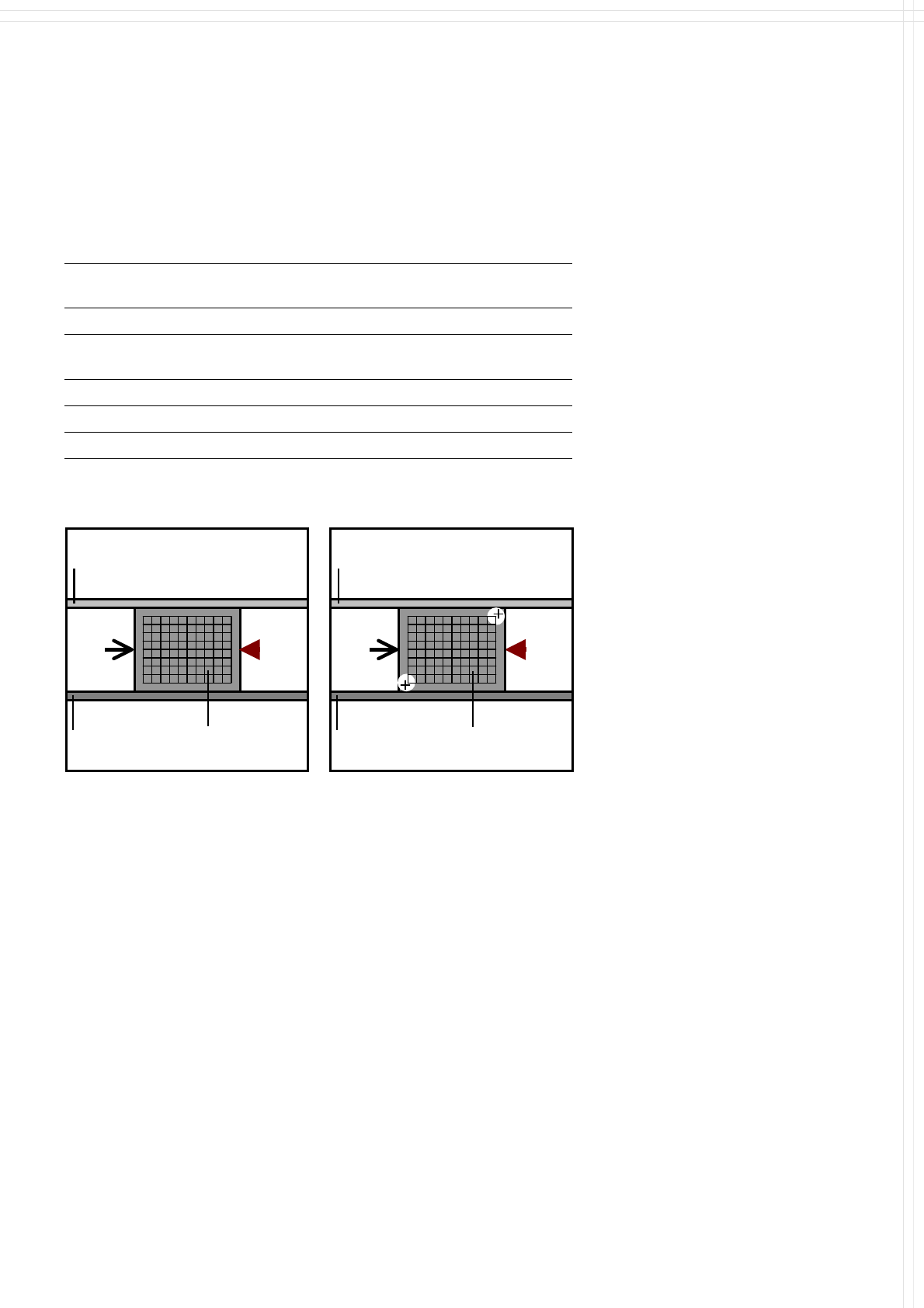
Ceramic Substrate Centering (Option)
Stopper
Technical Data
Stopper
Ceramic
Substrate
Movable
Conveyor Side
Movable
Conveyor Side
Stationary
Conveyor Side
Stationary
Conveyor Side
Ceramic
Substrate
X-
Centering
X-
Centering
Description
Some ceramic substrates can
be damaged by standard PCB
clamping. In this case the Ceramic
Substrate Centering can be used,
which fixes the substrate mecha-
nically. In general there is no need
for additional optical centering,
but nevertheless the accuracy will
be increased by using the PCB
camera to detect reference marks
(fiducials) on the substrate. For
ceramic substrate the SIPLACE
Multicolor Fiducial Camera (see
page 23) is recommended.
50 x 50 mm
2
to 101.6 x 177.8 mm
2
/
2" x 2" to 4" x 7"
Substrate dimensions
Substrate thickness 0.5 to 4.5 mm
Substrate model Unscribed (no difficulty)
Scribed (after test)
Contact in conveyor 2.5 mm
Substrate bottom clearance 12 mm
Compressed air connection 5.5 bar
X-Centering
Mechanical Centering Optical Centering via PCB Camera