3_AVS-V2_MCT-UM-internal_EN_07-2019 - 第105页
ASM AVS - U SER M ANUAL P AGE 105 OF 182 In addition to the abo v e the Printing m achine should have the following settings : • Maintenance / Ma chine Setup / Tran sport Mode – Left t o Left • Maintenance / Ma chine Set…
ASM AVS - USER MANUAL
PAGE 104 OF 182
5.2.25 Projects for Printer MCT
5.2.25.1 General
The main difference from a Printer MCT to a MCT on placement equipment is, that one print-
ing at least means nearly nothing.
On a placement machine, one board gives you already a result for the MCT,
because each placement (of each component) is a repetition of the whole process.
But for the Screen Printer, one printed board is just like one placed component.
Although you have up to ~50 printed dots, you have just one printing process.
For this reason, a printer MCT must be carried out in a different way.
5.2.25.2 Printer Preparation
Copy the AVS product file “AVS_Printer-MCT.PR1” from the Folder D:\SOFTWARE\DEK and load
it on to the printing machine.
If no USB memory devices are allowed on-site then the customer should be contacted to pro-
vide a suitable alternative.
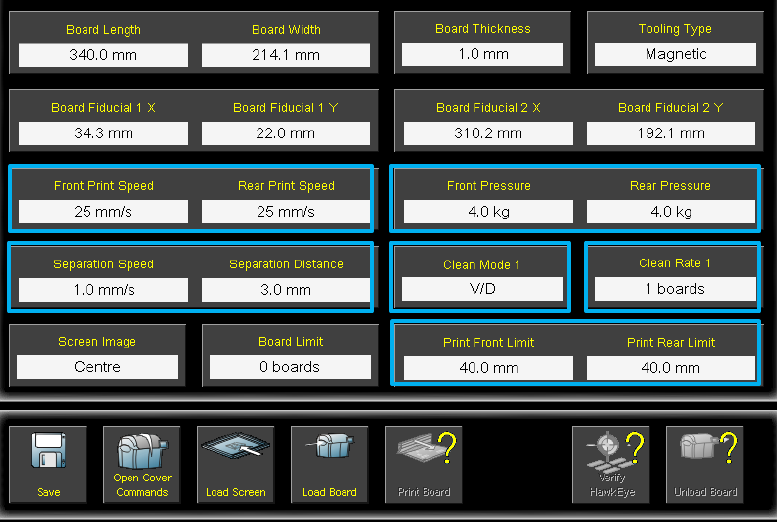
The AVS product file has the following recommended process parameters (See screen shots be-
low)
• Print Speed (Front and Back) – 25mm/s
• Print Pressure (Front and Back) – 4kg
• Separation Speed – 1mm/s
• Separation Distance – 3mm
• Front and Back Print Limit – 40mm
ASM AVS - USER MANUAL
PAGE 105 OF 182
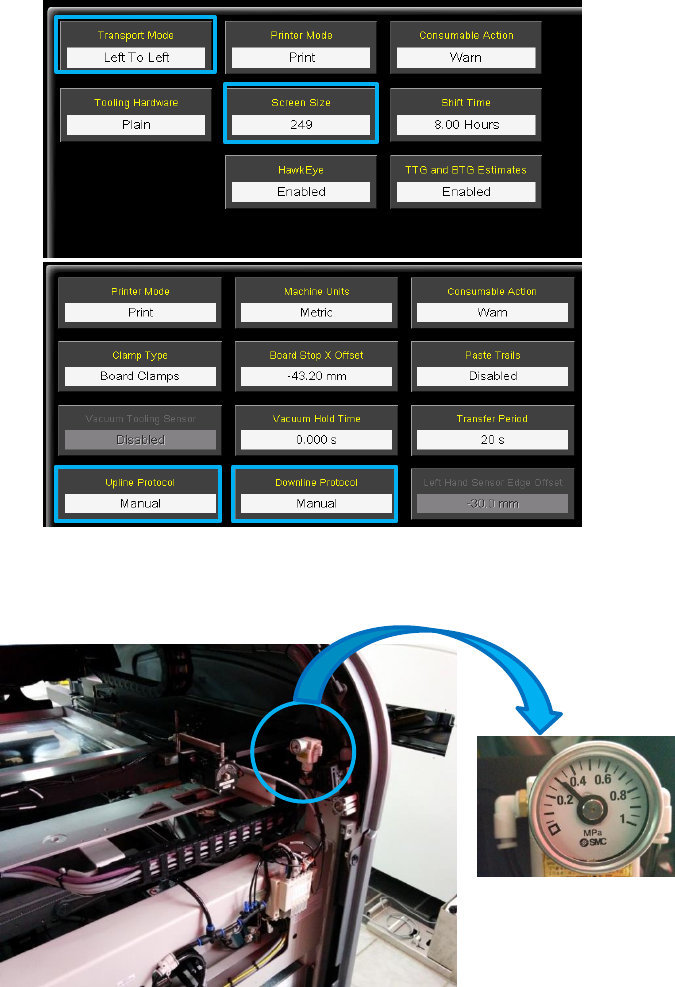
In addition to the above the Printing machine should have the following settings:
• Maintenance / Machine Setup / Transport Mode – Left to Left
• Maintenance / Machine Setup/ Screen Size - ensure set correctly (typically 249)
• Maintenance / Machine Setup / Basics /Upline and Downline – Manual
• Chase Clamp pressure set to 0.35MPa (3,5 bar) – this should be adjusted on the regulator at
the back left of machine.
• Ensure that sufficient cleaning material is available on the role.
For the MCT 1m is needed.
• If a blue USC is used, then set it to "Dry / Dry every board".
• Ensure when using a Cyclone cleaner that "Dry / Dry with Oscillate" is set.
ASM AVS - USER MANUAL
PAGE 106 OF 182
• If no USC is present, refer to the settings in the following table.
Parameter
Recommended Setting
Parameter
Recommended Setting
FRONT PRINT SPEED
25mms
-1
CHASE CLAMP PRESSURE
3 - 4 bar (nominal 3.5 bar)
REAR PRINT SPEED
25mms
-1
CLEAN REGIME
Double Dry Oscillate
PRINT FRONT LIMIT
40.0000 mm
CLEAN SPEED
Default
PRINT REAR LIMIT
40.0000 mm
STENCIL
FG Stainless 100µm
FRONT PRINT FORCE
39.24N (4.00 kg setting)
STENCIL FRAME
HTVG
FRONT PRINT FORCE
39.24N (4.00 kg setting)
PRINT MEDIA
Loctite 3616
SNUG FORCE
40N
SQA Width
250mm
BOARD CLAMP PRESSURE
3 bar
SQA Overhang
25mm
PRINT GAP
0.00mm
SQA Material
Stainless
SEPARATION SPEED
1.0000 mm/s
SQA Angle
60 degree
SEPARATION DISTANCE
3.0000 mm
Apply the glue
Insert the Stencil with the label (serial no., barcode) in the left front corner.
Ensure the glue has been removed from the fridge at least 8 hours before the test, and allowed to
warm up to ambient temperature.
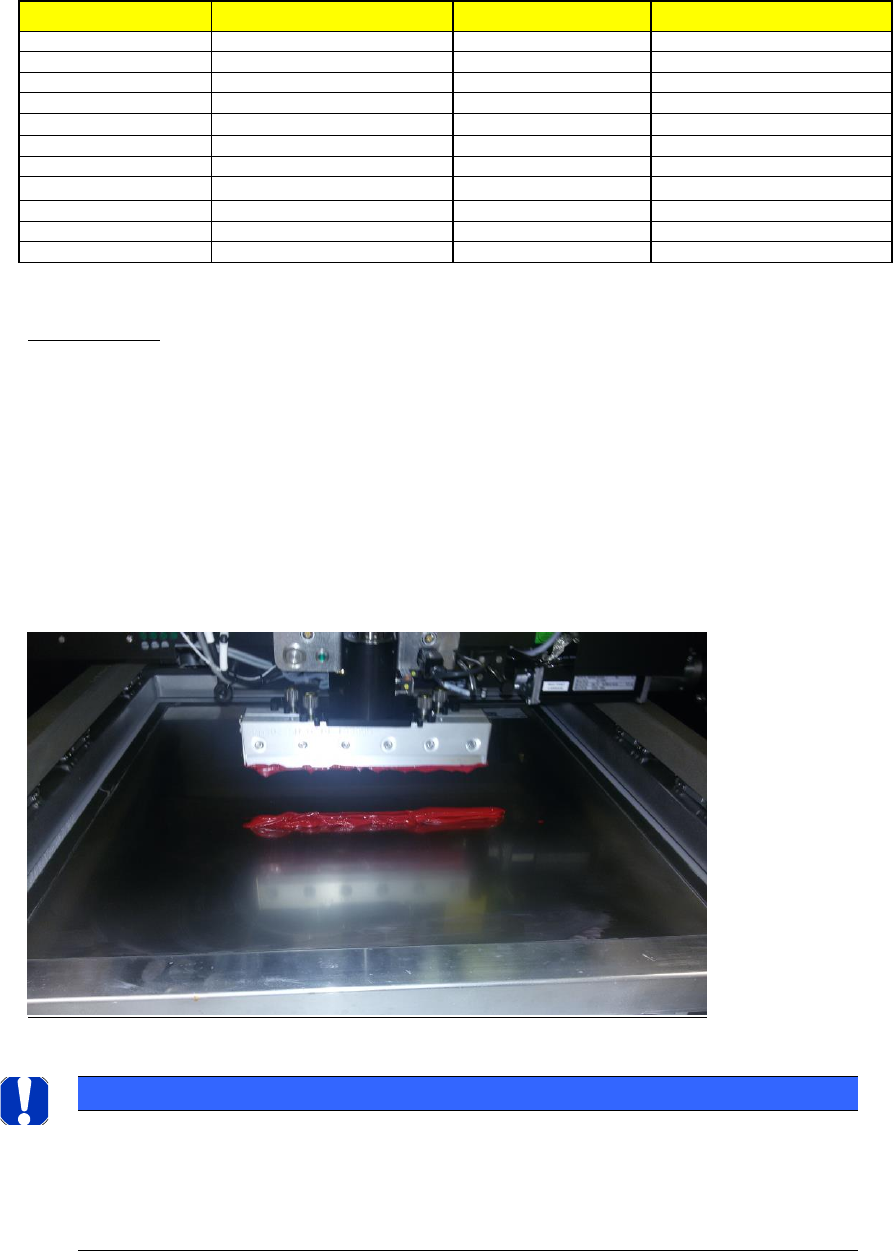
A bead of glue (print material) can now be added to the front of the image, this can be positioned
just in front of the first row of apertures and be around 15mm in diameter (see picture below).
Ensure the print direction is Front to Back.
NOTICE
Stencil and Glue recommendation
We recommend a Stencil with either 800µm circles or with 1mm Squares.
For the Paste material we recommend a Glue LOCTITE 3616 red, which can be purchased in a 400ml
cartridge, which can be clamped into a silicone-filled syringe from the hardware store.