3_AVS-V2_MCT-UM-internal_EN_07-2019 - 第118页
ASM AVS - U SER M ANUAL P AGE 118 OF 182 6. Re sult ar ea a. Rec ipe : Thi s s hows the rec ipe (mea sure pl an) as a n ima ge, whic h is u sed in t he p roje ct. Thi s i s th e on ly t ab w hich is not depen ding on the…
ASM AVS - USER MANUAL
PAGE 117 OF 182
Single Value chart for the whole MCT:
The printer mode „Acculumate“ is also used to show a single value chart with all meas-
urement points and to list this chart in the report.
The statistics cannot be considered here, since in such evaluation, the stencil quality influ-
ences the measuring result.
- Printer mode “Point2Point”:
As already described in 5.2.25.1, the capability of a printer cannot be analyzed with one
board, because 1 board means only one time executing the printing process.
For a printer MCT, many boards, means many measurements (min. 20), must be carried
out and analyzed together in 1 calculation.
This is the “Point2Point” calculation.
On the “Point2Point” calculation, the X- and Y- Offsets of the single measurement points,
over the number of selected measurements are being evaluated regarding standard devia-
tion and mean.
The average of all these standard deviation and mean values is being calculated and the
cm and cmk values are determined.
This is also, to take out the Quality of a Stencil from the assessment.
Example:
In a template with 7x4 measurement points, so the standard deviation and the mean value
is calculated with 28 points over 20 measurements.
Subsequently, the average is taken from these 28 standard deviations and the 28 mean
values and thus determines the Cm and Cmk.
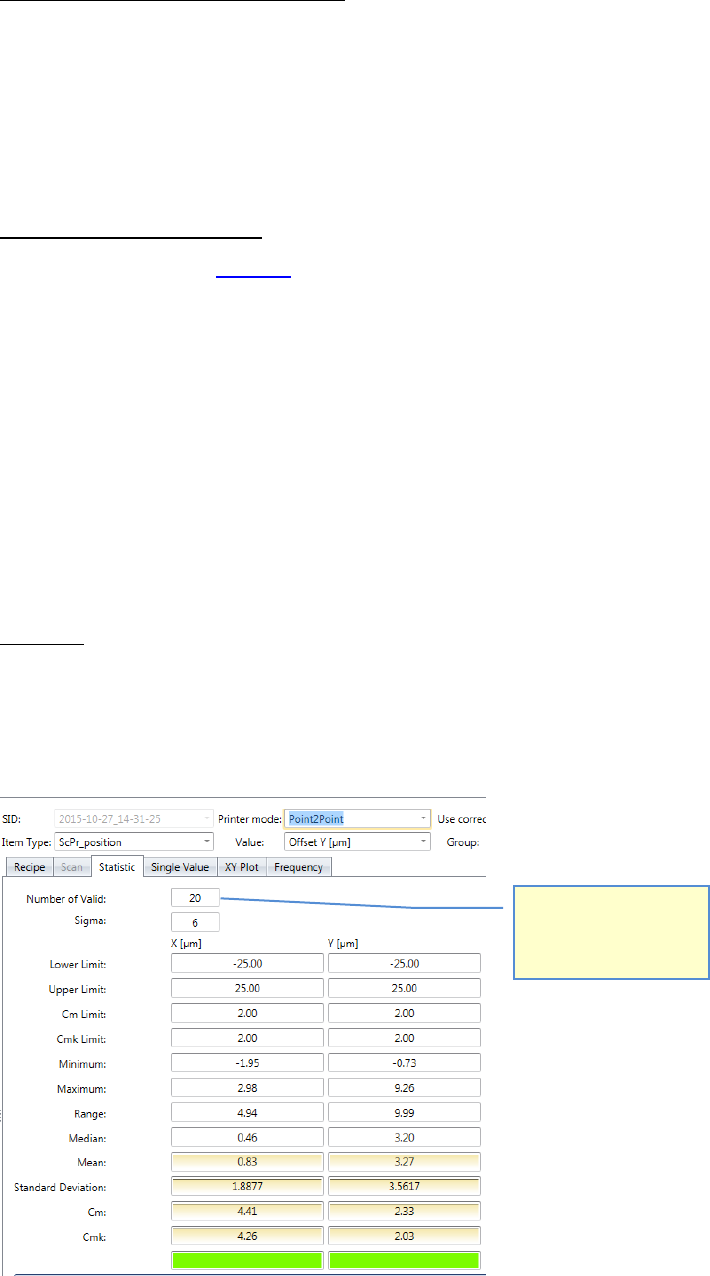
The ”number of Valid:”
means the number of
boards in case of
Point2Point mode.
ASM AVS - USER MANUAL
PAGE 118 OF 182
6. Result area
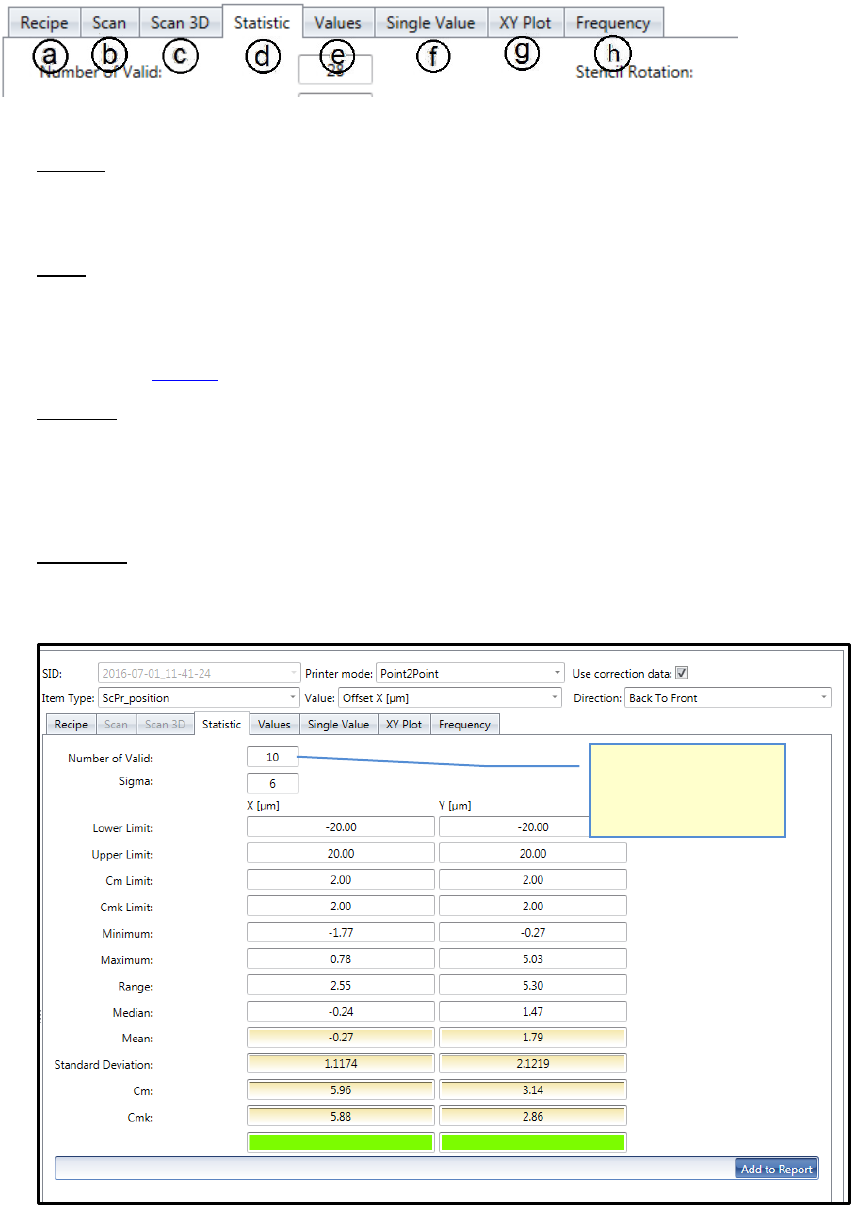
a. Recipe:
This shows the recipe (measure plan) as an image, which is used in the project.
This is the only tab which is not depending on the filter settings above.
b. Scan:
This view is only active in the printer mode “Single”!
The evaluation is the same as with placement machines.
See also b Scan:
c. Scan 3D:
This view is only active in the printer mode “Single”!
The evaluation is the same as with placement machines.
See also c. Scan 3D:
d. Statistics:
Show the mathematical result of the selected measurement(s), depending on the filter
settings above.
The ”number of Valid:”
means the number of
boards in case of
Point2Point mode.
ASM AVS - USER MANUAL
PAGE 119 OF 182
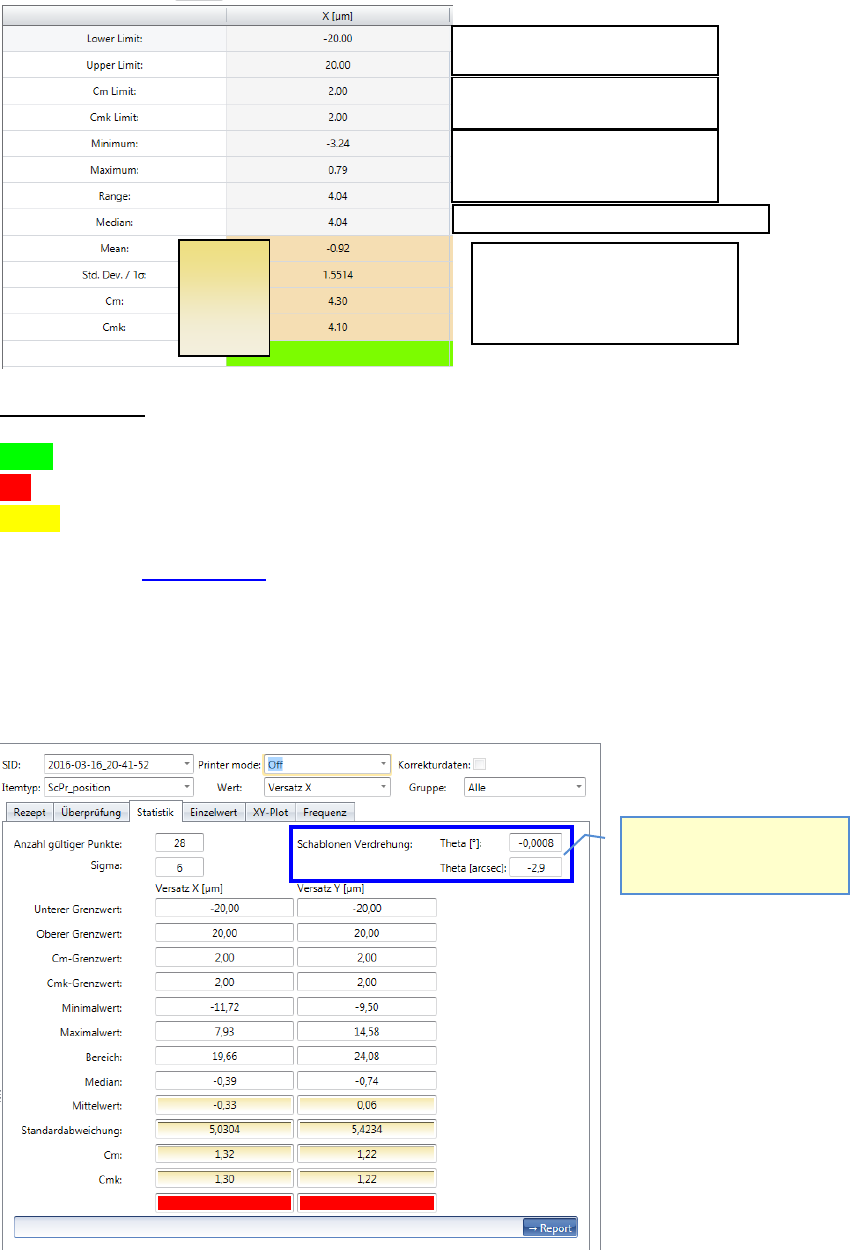
Average of all values
Standard Deviation
Cm
Cmk
Fast evaluation:
green = c
mk
inside the specification limits (Sigm a Limit inside Spec. Limits))
red = c
m
and c
mk
outside the specification limits (Sigma Limit outside Spec. Limits)
yellow = c
m
inside, but c
mk
outside => Offset Correction required.
Please see also 6.4.1 Statistik.
Depending on the "Printer Mode" the measured value for the stencil rotation is displayed
in the "Statistics" on the top right.
Specification limit; dimensions
Specification limit; Sigma Limits
Lowest measured value.
Highest measured value.
Distance min. to max.
Is only shown in printer
mode „Single“ and „Accumu-
late“!
The middle value of all values sorted by size.
Values used
for the
calculation
of the cm,
cmk.