3_AVS-V2_MCT-UM-internal_EN_07-2019 - 第123页
ASM AVS - U SER M ANUAL P AGE 123 OF 182 5.3 » AVS _Sc an« (me asu ring sof tw are ) 5. 3.1 »Cu rr ent Proj ect « and st ruc ture of » AV S_Sc an « Aft er switc hin g to t he m eas ureme nt sof tware , yo u see t he f ol…
ASM AVS - USER MANUAL
PAGE 122 OF 182
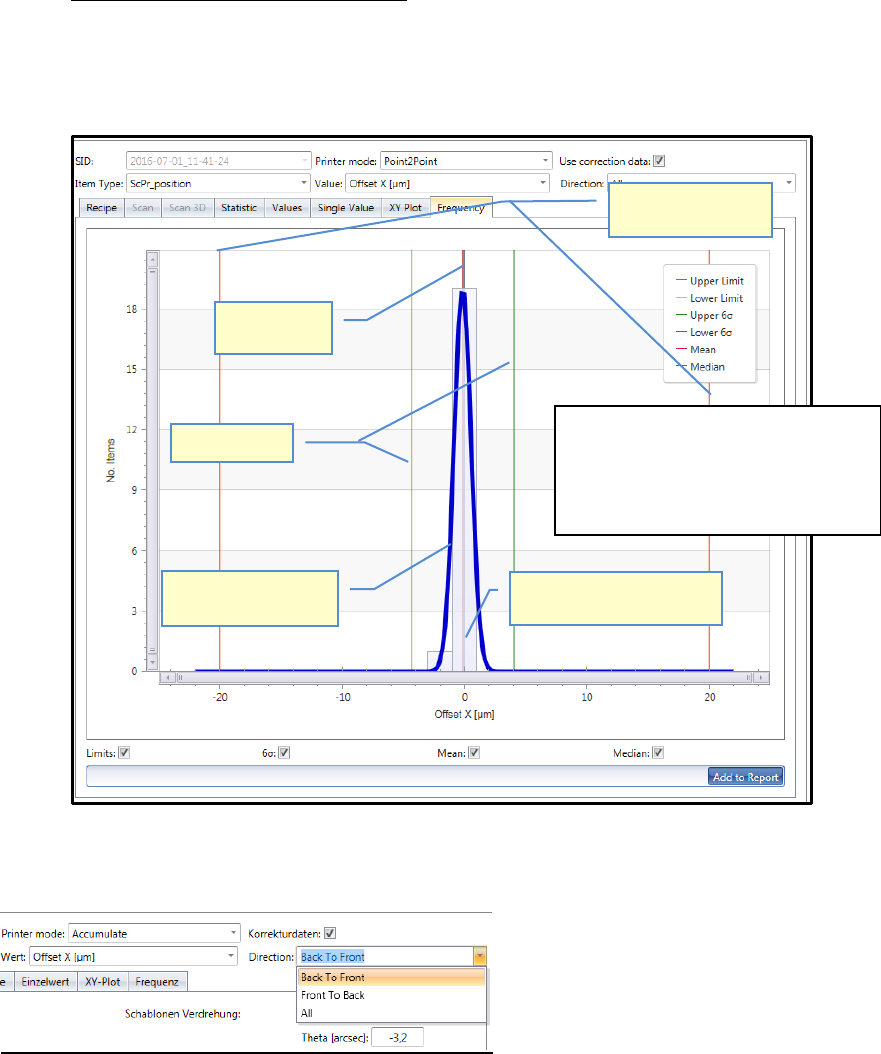
h. Frequency Chart (Gauss’ bell curve):
Shows the result of the selected measurement depending on the Filter settings above.
With the view of »Frequency« the »bell-shaped curve« (normal distribution) can be
shown (Gauss). The same principles apply for evaluating the chart and in respect of the
meanings of the auxiliary lines as for the "Single Value Chart".
7. Printing direction:
At placement machines, more different heads can be measured with one project and the heads
are assigned to groups.
These groups are allocated to the printing directions at printer projects. This makes it possible, in
each evaluation with more than one measurement activated, to filter the result according the
printing direction.
Sigma limits
Bell-shaped curve
(Normal distribution)
Specification limits
(Nominal value)
Numbers measuring points
(here in 4µm steps)
Mean value
(Mean)
As a fundamental principle:
• The narrower and higher the bell curve,
the better the result.
• The curve should ideally be centered
arround zero.
ASM AVS - USER MANUAL
PAGE 123 OF 182
5.3 »AVS_Scan« (measuring software)
5.3.1 »Current Project« and structure of »AVS_Scan«
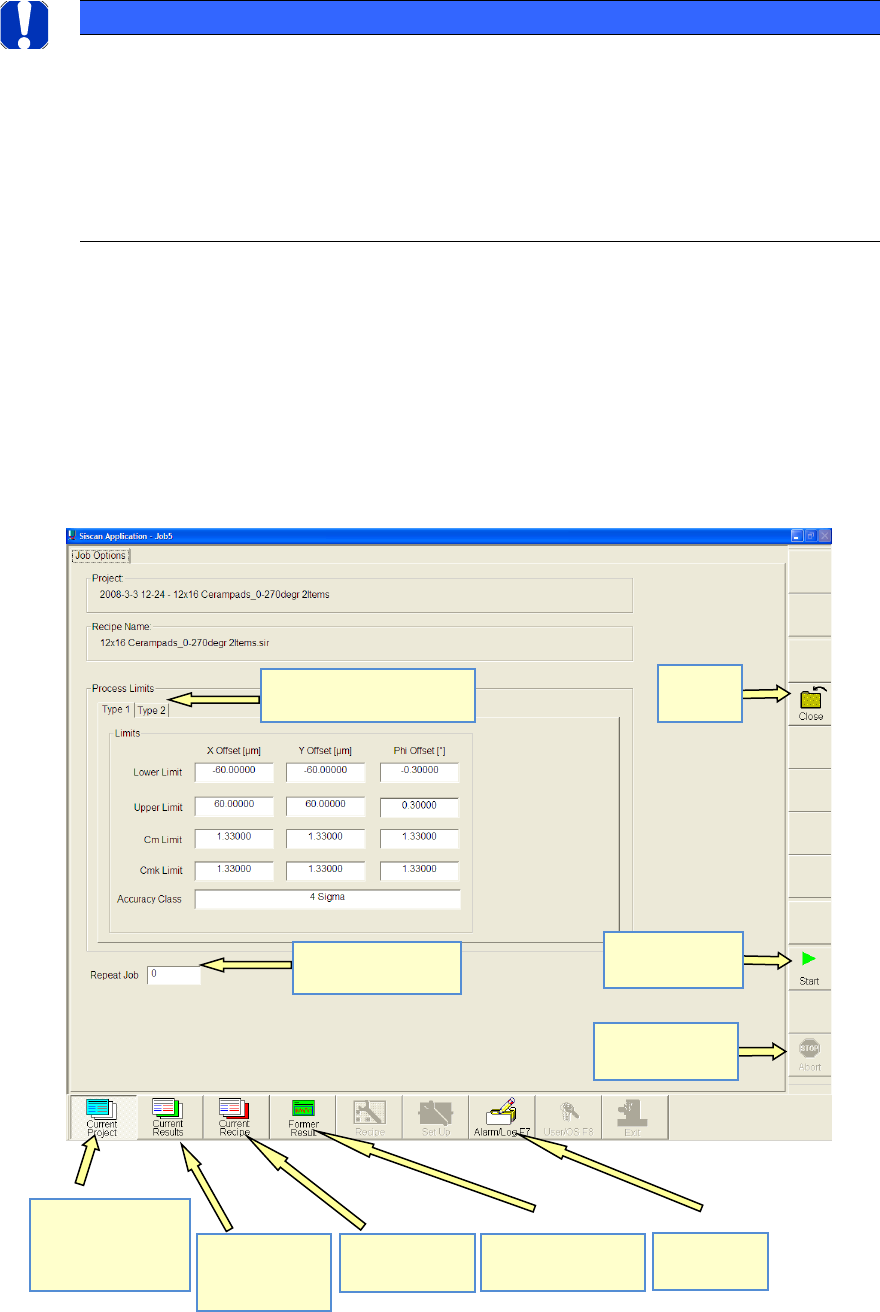
After switching to the measurement software, you see the following view.
This page displays not only the project name and recipe name but also the process limits (speci-
fication limits).
There is a separate specification for each component (item).
You can also specify the number of times the measurement is to be repeated.
NOTICE
Meaning of AVS_Scan Software
With the Software ASM AVS 4.x the calculations and reports are carried out in the ASM AVS part.
The AVS_Scan Software (previously SiScanApplication) is only used for the measuring.
But the chapter from the AVS_Scan Software keeps being part of this document in the full version.
The AVS_Scan software can always be used after forwarding a project or a recipe from the ASM AVS 4.x
Software, by changing to the application via Alt+Tab.
Number of repeat
measurements
Different specifications for
the different items
Start page.
Start measure!
Stop measure.
Close project
Measurement
results of
current pro-
ject.
View recipe for
current pro-
ject.
View previous (not
current) pro-jects.
View error
(event) list.
Start a
measurement
Stopp
measurement.
Close
Project
ASM AVS - USER MANUAL
PAGE 124 OF 182
5.3.2 »Current Results«
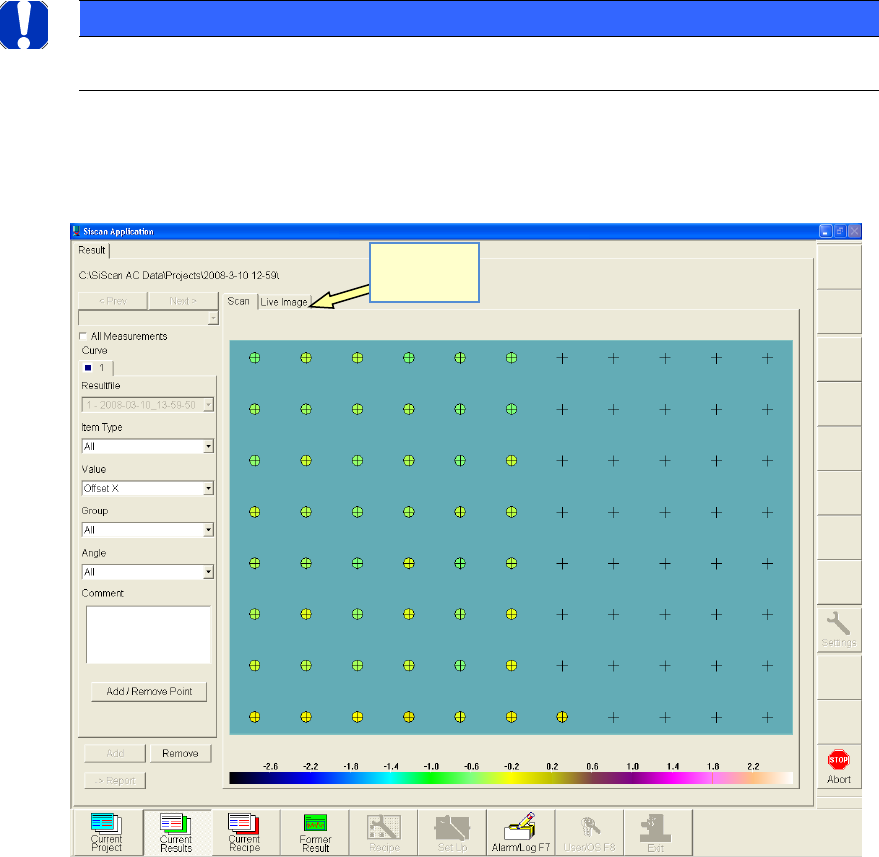
The »Current Results« page is explained here using the example of the self-test project.
5.3.2.1 »Current Results« during the measurement«
When you start the measurement, the following screen is displayed.
• The turquoise rectangle in the center of the view represents the size of the glass board.
• The gray crosses indicate the measurement points (placement positions).
• The colored circles indicate the measurement results. The assigned color matches the scale displayed
below.
• The colored circles that have already been created make it possible to identify the progress of the
measurement.
For control purposes, you can also activate a »live Image«.
NOTICE
Please note that viewing the live image slows down the measurement!
The selection boxes on the left-hand side allow you, for example,
to switch between X-axis, Y-axis and angle
Switch to
live image!