3_AVS-V2_MCT-UM-internal_EN_07-2019 - 第128页
ASM AVS - U SER M ANUAL P AGE 128 OF 182 5.3.2.5 »Current Results « – »Reci pe « Her e yo u c an vi ew t he p roje ct to t he co rres pon ding rec ipe 5.3.2.6 »Current Results « – »Sta tistic« The ta bles sho wn i n st a…
ASM AVS - USER MANUAL
PAGE 127 OF 182
5.3.2.4 »Current Results«, »Scan view«
The Scan view has already been presented in the previous sections.
The present section simply indicates certain special characteristics of this view.
5.3.2.4.1 Detailed information on the measurement points
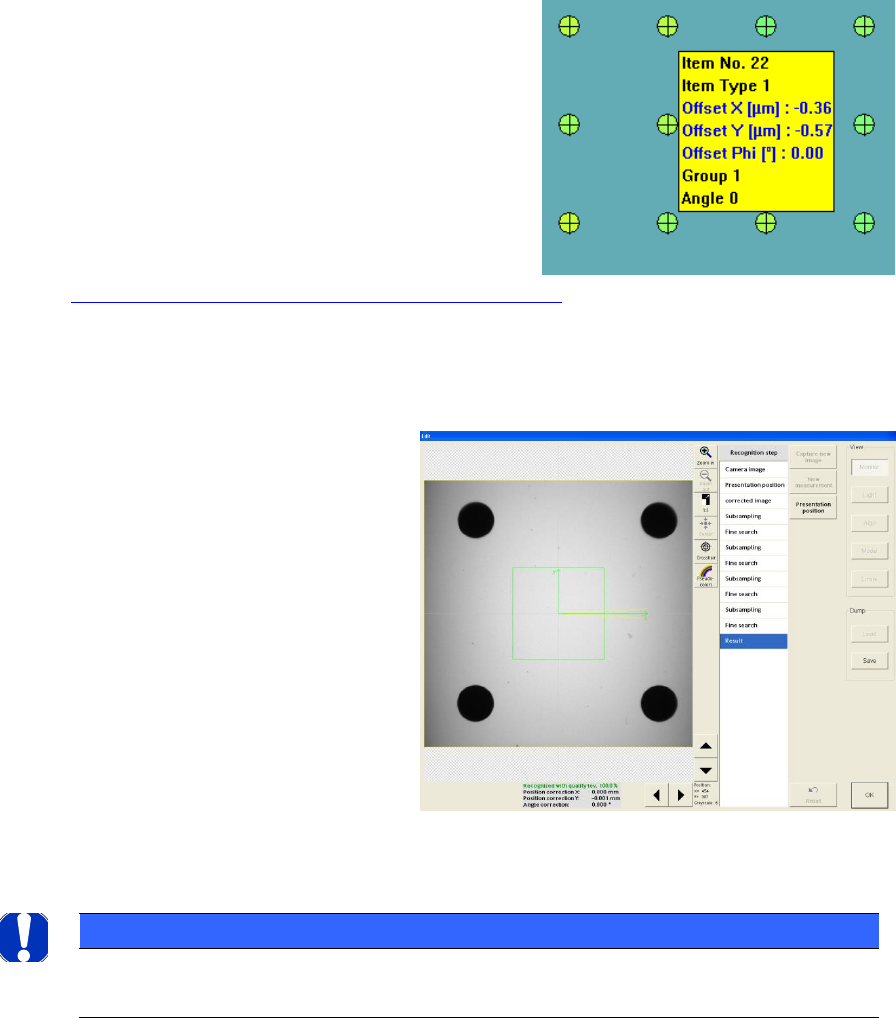
If you move the mouse over a colored point in
the result view then you will see a pop-up menu
containing detailed information on the corre-
sponding measurement point.
In this way, it is also possible to determine the
number of the measurement point, for example
in order to remove a measurement point from
the result.
See »Add/Remove Point« in
4.3.2.3 »Current Results«, selecting the result display.
5.3.2.4.2 Viewing Vision dumps
When you click on the correspond-
ing measurement point (colored
circle), the system switches to the
Siplace Vision software and the cor-
responding Vision dump is dis-
played.
In this way, it is possible, for exam-
ple, to examine a point that was not
measured or was measured badly
and draw conclusions concerning
the measurement result
NOTICE
Due to the large data volumes involved, the Vision dumps are only stored temporarily and are only availa-
ble for the last "current" measurement.
ASM AVS - USER MANUAL
PAGE 128 OF 182
5.3.2.5 »Current Results« – »Recipe«
Here you can view the project to the corresponding recipe
5.3.2.6 »Current Results« – »Statistic«
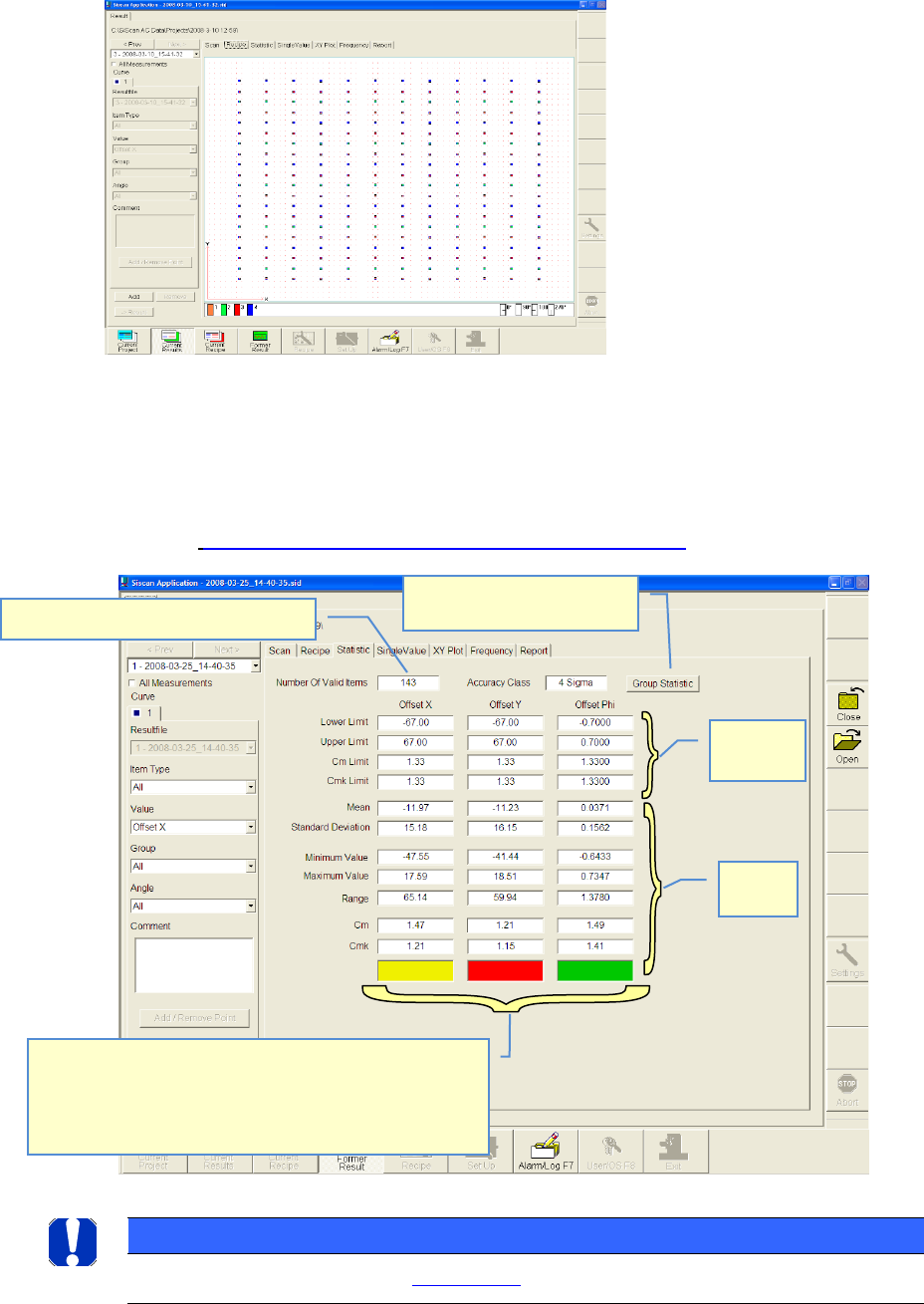
The tables shown in statistic view, are resulting from the settings on the left side of the win-
dow.
See also 4.3.2.3 »Current Results«, selecting the result display
NOTICE
Details on the result assessment see: 6.4.1 Statistics
Numbers of valid measuring points
Nominal
values
Actual
values
Fast result evaluation:
gn = cmk-value within nominal value
rd= cm-value out of nominal value
ye= cm- value OK, but cmk-value out of nominal value
→ Offset correction is necessary
Overview of all the single
groups and items
ASM AVS - USER MANUAL
PAGE 129 OF 182
5.3.2.6.1 Group Statistic
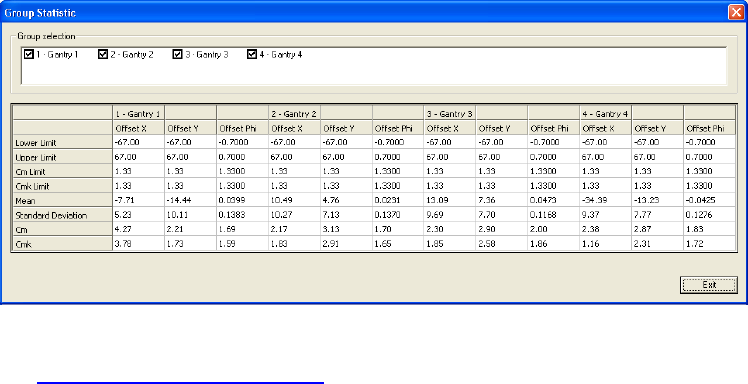
The fields of the view »Statistic« are presenting only one result. Therefor only the result of
the overall measurement, or a single item, respectively
a single group can be displayed.
With the function »Group Statistic« all different groups can be displ. at once.
For correction of Offsets on the Siplace machines,
see 6.1 Corrections of Offset values.