3_AVS-V2_MCT-UM-internal_EN_07-2019 - 第132页
ASM AVS - U SER M ANUAL P AGE 132 OF 182 5.3.2.9 »Current Results « – »Frequency« The ta bles show n in » Fre quen cy« vie w, ar e r esul tin g from the sett in gs on t he lef t side of the win dow See also 4 .3.2 .3 »Cu…
ASM AVS - USER MANUAL
PAGE 131 OF 182
5.3.2.7.1 Settings
With settings it is possible to turn on and off the
support lines for the graphical view
This is available for all graphs except
the regression line. The regression line
is only available at single value graph.
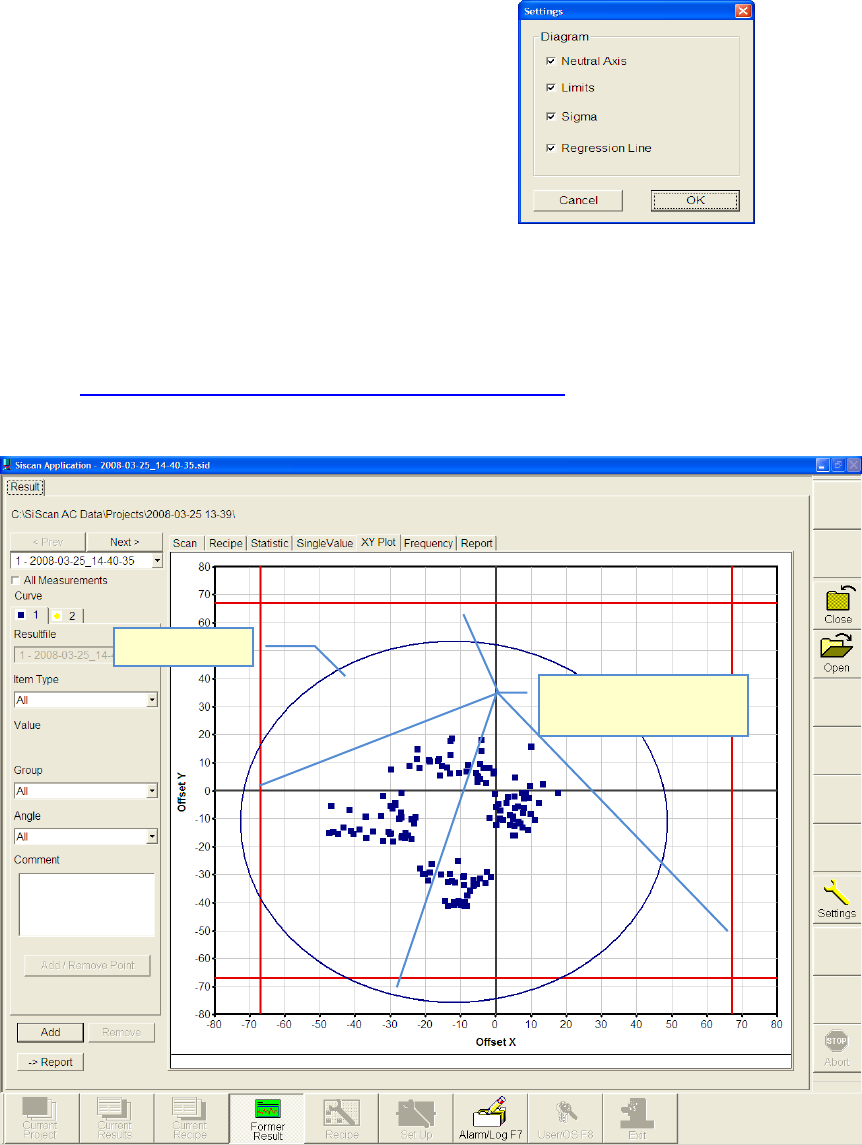
5.3.2.8 »Current Results« – »X-Y-Plot«
The tables shown in »X-Y-Plot« view, are resulting from the settings on the left side of the
window
See also 4.3.2.3 »Current Results«, selecting the result display
This view shows the result of X- and Y-axis together in one graph
The same principles apply for evaluating the chart and in respect of the meanings of the auxil-
iary lines as for the "Single Value Chart".
Sigma limit
Specification limits (Nom-
inal value)
ASM AVS - USER MANUAL
PAGE 132 OF 182
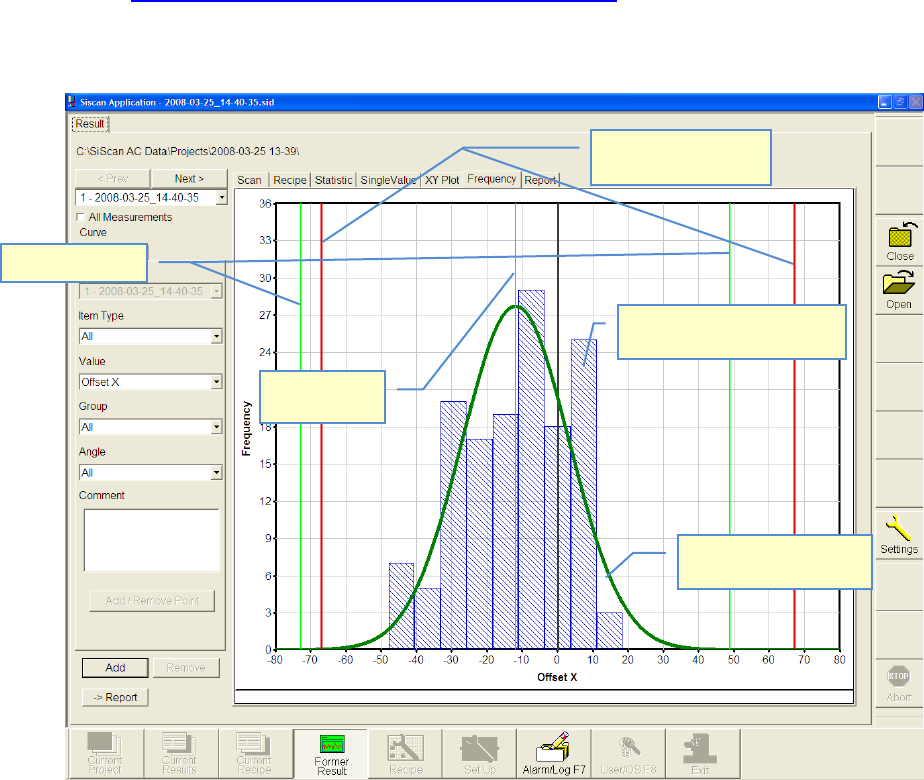
5.3.2.9 »Current Results« – »Frequency«
The tables shown in »Frequency« view, are resulting from the settings on the left side of the
window
See also 4.3.2.3 »Current Results«, selecting the result display
With the view of »Frequency« the »bell-shaped curve« (normal distribution) can be shown.
(Gauss)
As a fundamental principle:
• The narrower and higher the bell curve, the better the result.
• The curve should ideally be centered on zero.
The same principles apply in respect of the meanings of the auxiliary lines as for the "Single
Value Chart".
Sigma limits
Bell-shaped curve
(Normal distribution)
Specification limits
(Nominal value)
Numbers measuring points
(here in 10µm steps)
Mean value
(Mean)
ASM AVS - USER MANUAL
PAGE 133 OF 182
5.3.2.10 »Current Results« – »Report«:
In this window all results are listed which are selected to be a part of the final
certificate (report).
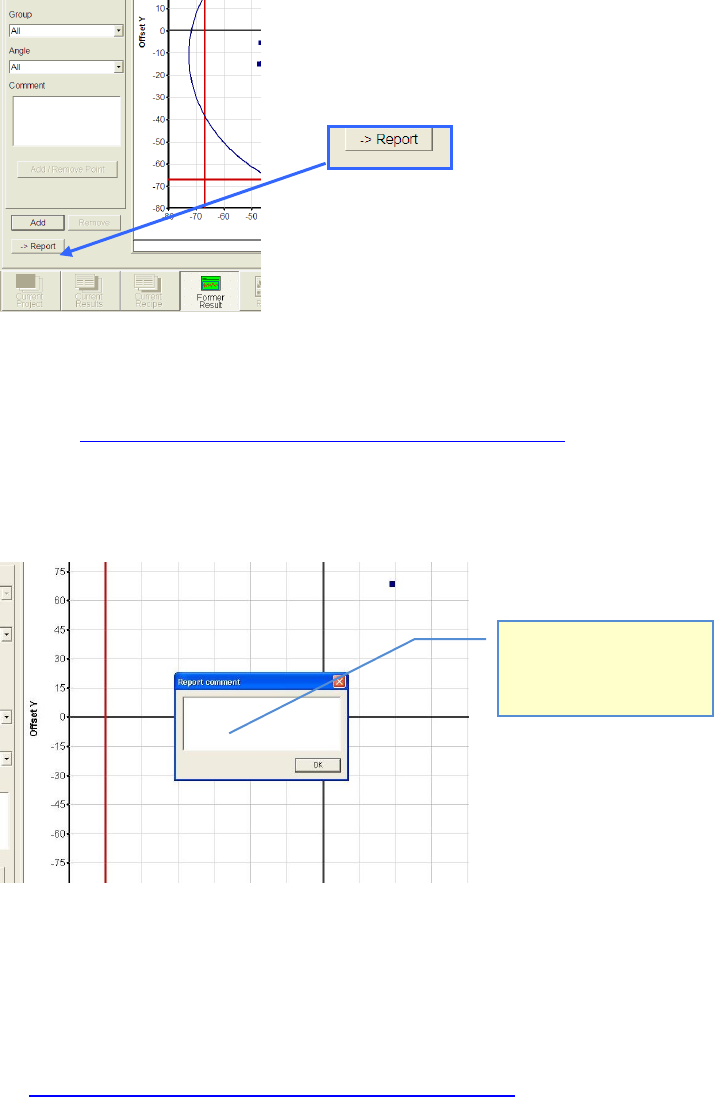
This list will be created and filled by pushing the »→ Report« Button.
In each partial view where this button is active the shown result can be added to the report.
See also 4.3.2.3 »Current Results«, selecting the result display
After Click on the » → Report« Button, a dialog to to insert the comment, appears.
This comment is going to be placed, directly after the selected table or graph.
Specials:
• If you choose only one group, instead of “All Groups” in the »Statistic« view, because, e.g.,
you like to see the result of one single head, out of a placement from four heads (see
4.3.2.3 »Current Results«, selecting the result display) then, a special design is going to be
used in the report.
Some parts of the standard statistic view will be obsolet then.
Hier können Sie zur ausge-
wählten Tabelle, bzw.
Grafik, einen Kommentar
hinzufügen.