3_AVS-V2_MCT-UM-internal_EN_07-2019 - 第135页
ASM AVS - U SER M ANUAL P AGE 135 OF 182 5. 3.3 »Cu rr ent Rec ipe « The rec ipe (mea suri ng p lan) whi ch belo ngs to t he p rojec t ca n be se en h ere, but it can not be c han ged. The fu ncti ons for the nav igatio …
ASM AVS - USER MANUAL
PAGE 134 OF 182
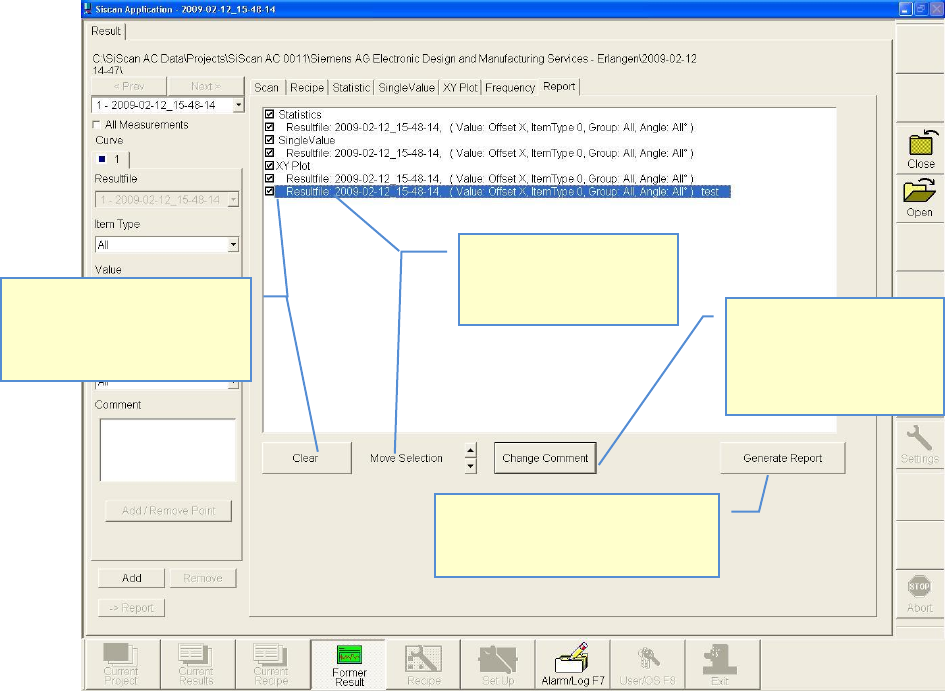
1. Highlight row (blue)
2. Highlighted rows can be
moved with the arrow
buttons.
1. Select (deselect) entry with
check box
2. All selected entrys can be
deleted by the Clear-Button
Certificate will be generated as an
Adobe Acrobat PDF-File and must be
saved in the project path.
1. Highlight row (blue)
2. Clicking the button
“Change Comment”, the
comment to the graph or
the table can be changed.
ASM AVS - USER MANUAL
PAGE 135 OF 182
5.3.3 »Current Recipe«
The recipe (measuring plan) which belongs to the project can be seen here,
but it cannot be changed.
The functions for the navigation within the recipe can be used.
See also link 4.3.5 »Create/change recipes«.
5.3.4 »Former Result«
Using the main view »Former Result« a comparison between 2 measurements can be done.
Thereby the measurement in »Current Results« which should be compered, must be selected via
the windows file structure window and can`t be searched by the ASM AVS software.
The interpretation of the statistical significance of such a comparative analysis is the responsibil-
ity of the user
The advantage of this function is, that 2 results can be opened and the
respective partial views can be compared by toggling the view in the “main view bar”
ASM AVS - USER MANUAL
PAGE 136 OF 182
5.3.5 »Create/change recipes«
The creation / editing of recipes have always to be started from the ASM AVS
application! See also 4.2.2.11 Base Data – Recipes.
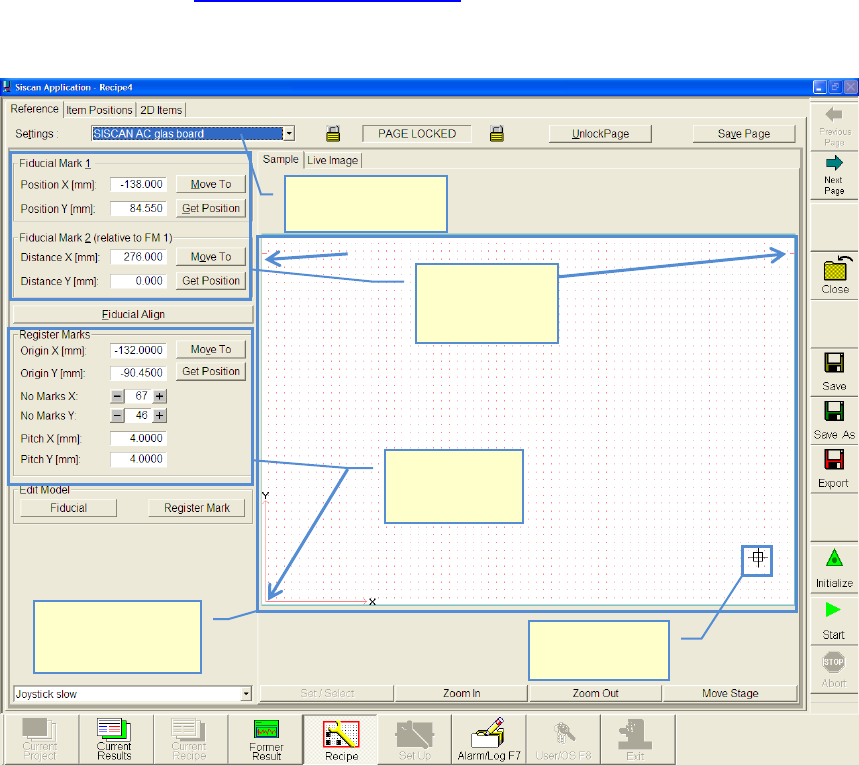
This page is to describe the glass board for the measurement.
Basically, standard boards are available. These can be selected from a list.
The standard board is locked by default, in order that no unintentional changes can be done.
To create a new recipe it is not necessary to change the settings of the board.
In case it is necessary to change the board or create a new one, follow the
next instructions.
Select glass board
from list
Glass board with
grid points.
Top view
Actual camera
position
Description of
register mark
positions.
Description of
global fiducial
positions