3_AVS-V2_MCT-UM-internal_EN_07-2019 - 第151页
ASM AVS - U SER M ANUAL P AGE 151 OF 182 6 Com muni catio n Servi ce Noteb ook ASM A VS S IPLAC E The com pute r o f the ASM AVS d evic e ha s 2 LAN ports . One LA N Con nect ion is name d REMO TE_L AN a nd it is le …
ASM AVS - USER MANUAL
PAGE 150 OF 182
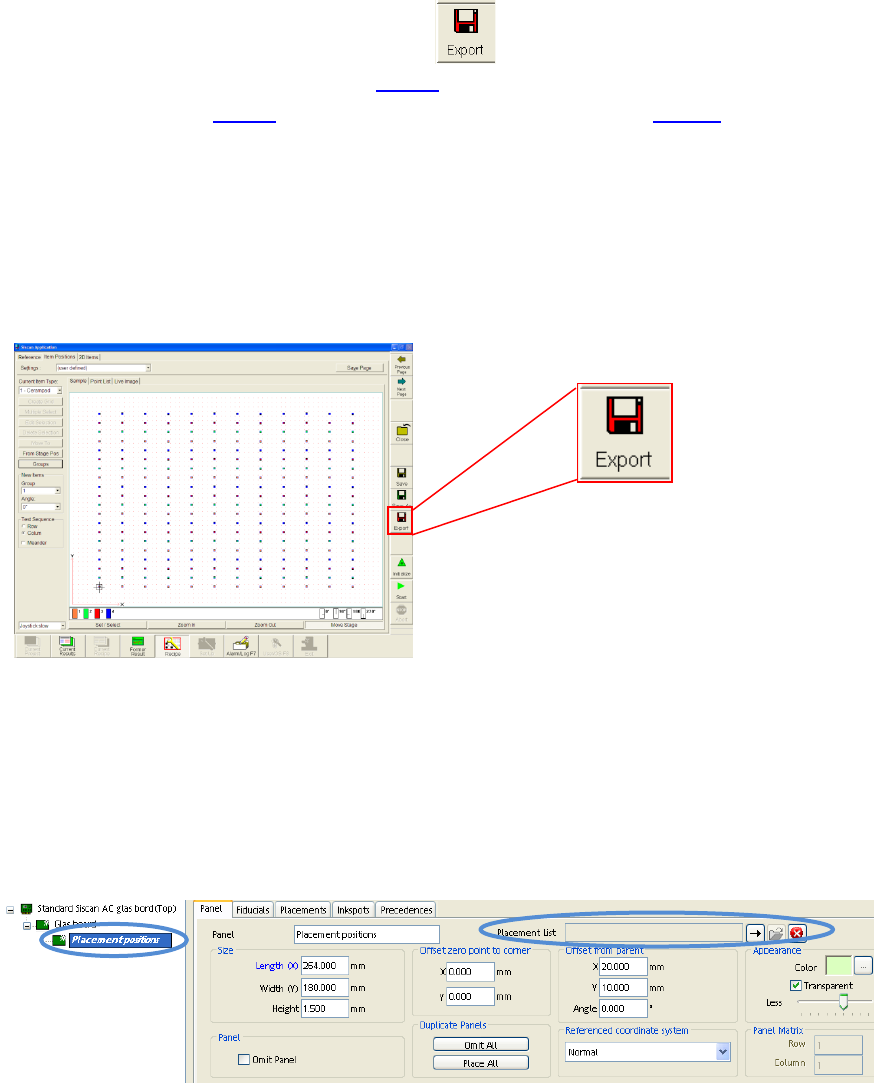
5.3.5.5 Export of the Recipe Data (CAD Data)
After the glasplate was choosen, like in 4.3.5.1, the components (Items) are loaded
into the recipe like in 4.3.5.2 and components place in a layout like in 4.3.5.3, the
data can be exported, to import it as placement positions into a SIPLACE Pro PCB de-
scription.
A Textfile is created which you can import into Siplace Pro via the
»ASCII Centroid Import Wizzard«.
You find this function in the »Recipe Editior«.
Finally this placement list has to be inserted in the template board
»Standard ASM AVS glass board« into the last sub panel called »Placement posi-
tions«.
See picture below
ASM AVS - USER MANUAL
PAGE 151 OF 182
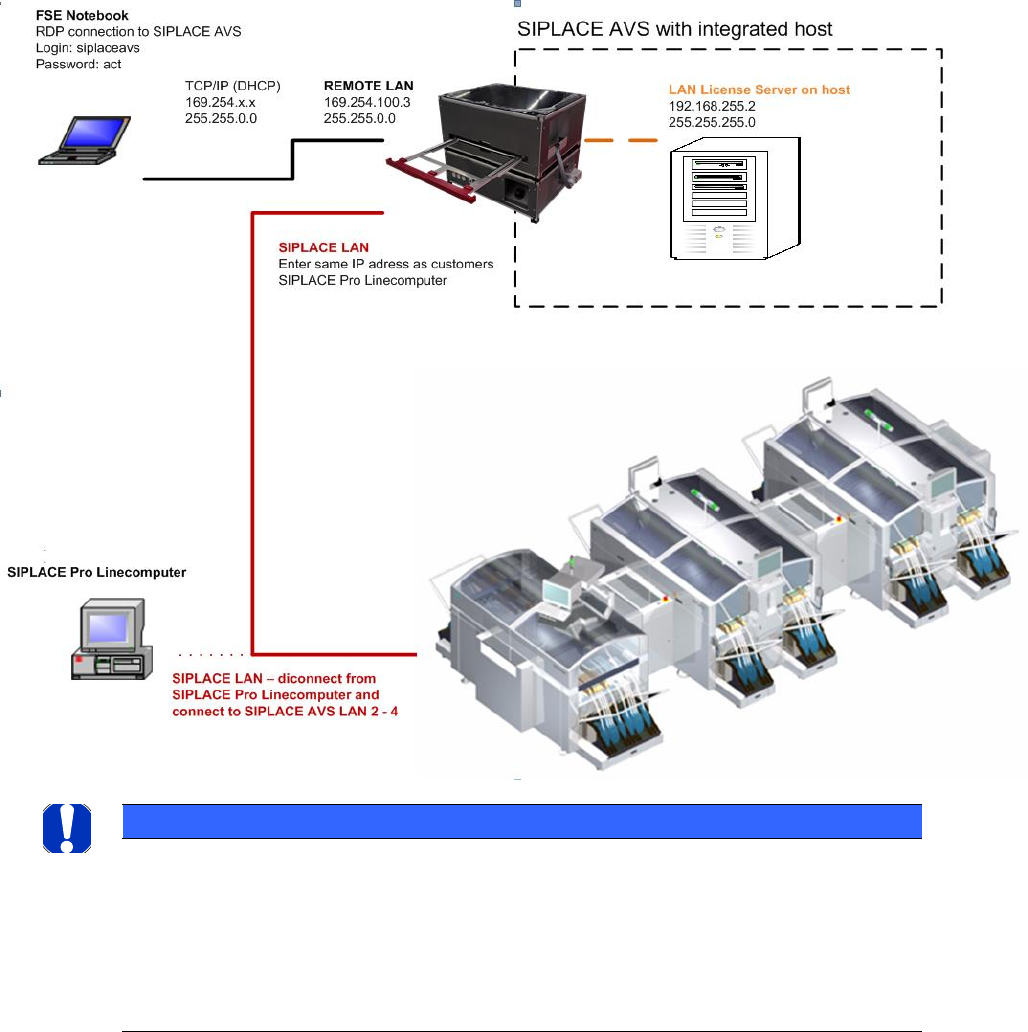
6 Communication Service Notebook ASM AVS SIPLACE
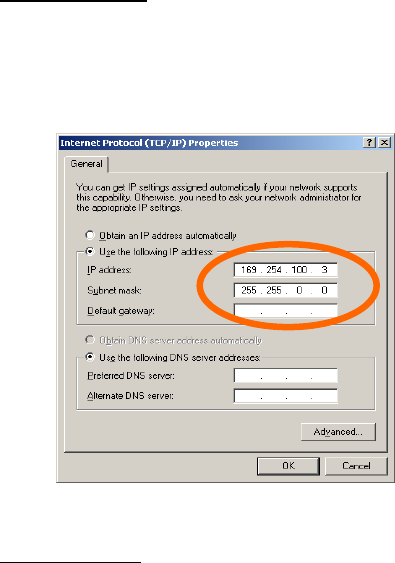
The computer of the ASM AVS device has 2 LAN ports.
One LAN Connection is named REMOTE_LAN and it is led out on the front side.
The 2
nd
LAN Connector is named SIPLACE_LAN and it is led out on the back side.
6.1 Settings of the different network adapters
To ensure error-free operation of all systems, the network adapters of the computer must have
different settings.
REMOTE_LAN:
The connecter named as REMOTE_LAN is allways set to a fixed network adress.
The address is always 169.254.100.x, with x for the device number (written on the top of the
LAN connector).
SIPLACE_LAN:
To be able to connect the SIPLACE line, the connector named SIPLACE_LAN must be set to a cor-
responding address on every line.
Enter the same address to this connector as the SIPLACE Pro computer from the customer has.
Disconnect the LAN cable from the customers SIPLACE Pro computer, which connects the
SIPLACE Pro computer to the stations in the line.
Connect this cable on your SIPLACE_LAN connector on the backside of the AVS.
ASM AVS - USER MANUAL
PAGE 152 OF 182
6.2 Procedure to establish a connection (with SIPLACE Pro)
• Disconnect the line in the GUI of the customers Siplace Pro computer in the Line control GUI!
• Move the ASM AVS Device close to the customer’s line computer (Siplace Pro).
Read out the IP- address of the line computer (Siplace Pro) (ipconfig).
• Give exactly the same address to the network adapter SIPLACE_LAN.
• Now you have to disconnect the LAN cable on the customers Siplace Pro computer and con-
nect it to the LAN plug on the backside of the ASM AVS.
• To verify the connection, try a ping to the IP address of one of the Siplace stations.
NOTICE
Import of the Setup from production
Basically, before you start to create stations, lines and setups, you should export the setup of the last
scheduled job at the customer Siplace Pro line computer. After the import of the data in a folder “Custom-
er Data”, you don`t have to take care about the configurations (nozzle changer, headtypes,IP-aress…) of all
machines in the line anymore. You can directly create a recipe with the prepared PCB’s and tables and
schedule to the line.