3_AVS-V2_MCT-UM-internal_EN_07-2019 - 第34页
ASM AVS - U SER M ANUAL P AGE 34 OF 182 4.2 SIP LAC E Pr o D at a avail ab le i n t he S DC In the ASM AS Software Download Center (SDC) you can downl oad the SIPLACE Pro data for AVS according to the re spective SIPLACE…
ASM AVS - USER MANUAL
PAGE 33 OF 182
4 Preparation in SIPLACE Pro (SIPLACE only)
4.1 General
The Recipe Layout to measure the different heads, cameras,… on placement machines are usually
created in the AVS/AVS_Scan Software and are exported from there, as CAT-files.
For SIPLACE Pro there are prefabricated setup tables and circuit board data available for different
software versions.
These are so-called * .sipro files that can be imported via data model import into the SIPLACE Pro
database.
This also includes the associated housing shapes and components.
NOTICE
Software Version of SIPLACE Pro
Remember that it is absolutely necessary, that the SIPLACE Pro software is always on
the actual released version.
You can only download SIPLACE Pro Programs on Stations Software that is lower than
its equivalent.
You cannot download programs if the Stations software version is higher than the
equivalent.
For example: equivalent to Stations Software 712.x - SIPLACE Pro 16.1.
NOTICE
Update the SIPLACE Pro AVS Data
• Recommendation: Delete the old data before importing the latest SIPLACE Pro data
to avoid confusing data.
• Or, use an empty Database (e.g. from SDC) to import data without old data!
• If you want to delete the data from a given database but still want to use this DB,
proceed as follows:
Manually remove all Recipes, Jobs and Setups for AVS.
Now you can successively delete tables, circuit boards, parts lists, components,
housing shapes, FMTs, and marks from the AVS folders.
• If deletion is not possible due to time constraints:
Rename all AVS folders of each view (Components, Enclosures, Brands, Assembly
Lists, Circuit Boards, Tables, Trays) to AVS_Old.
Importing the new data automatically brings back the AVS structure.
NOTICE
Import of Data
• Import the data WITHOUT specifying a destination folder. The data must always be
in an AVS folder and this folder structure is imported with it.
• DO NOT check the Reduced Directories option.
• Always overwrite everything (including image data / blobs, possibly resolving con-
flicts by creating new image data). This cannot be avoided, because the table and
PCB files are partially removed. redundant data (BE, GF, ...) included.
ASM AVS - USER MANUAL
PAGE 34 OF 182
4.2 SIPLACE Pro Data available in the SDC
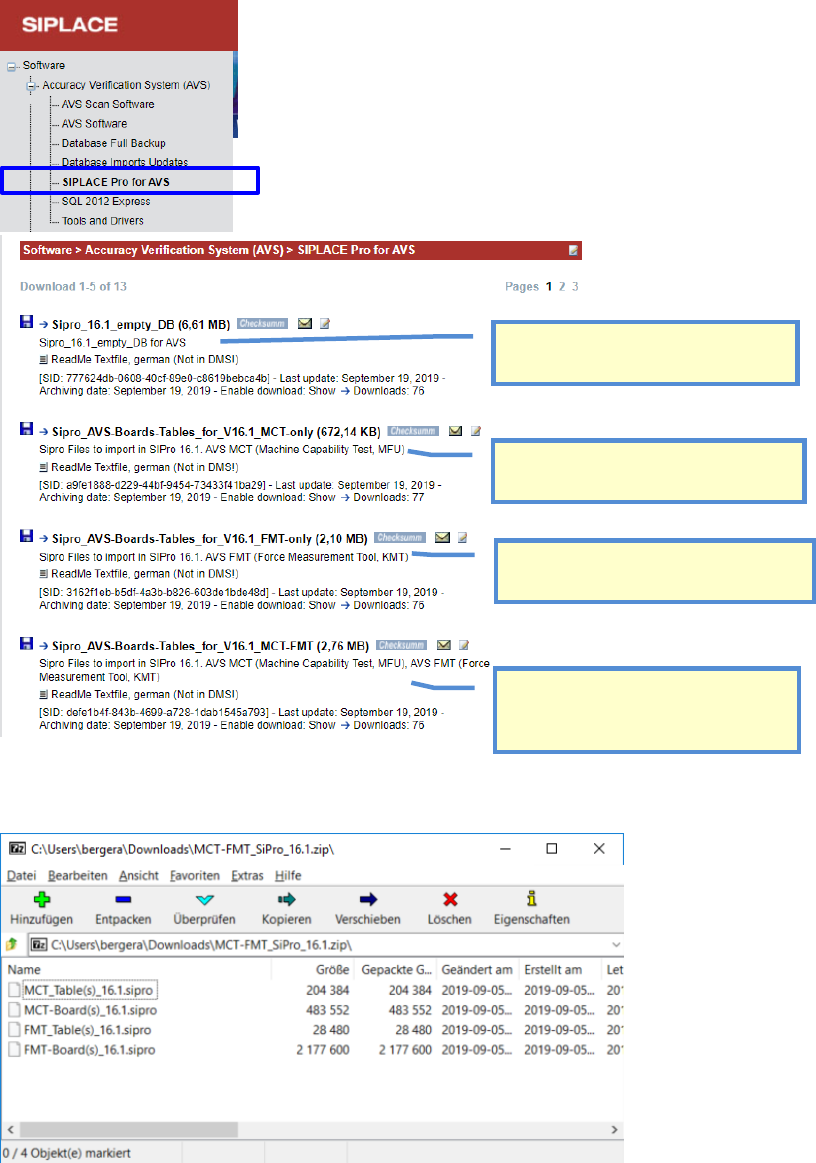
In the ASM AS Software Download Center (SDC) you can download the SIPLACE Pro data for AVS
according to the respective SIPLACE Pro version.
In the respective *.zip files for the respective software, in each case is a *.sipro file for printed cir-
cuit boards (boards) and one for tables (tables).
Example: Sipro_AVS-Boards-Tables_for_V16.1_MCT-FMT (2,76 MB)
Empty Database for respective Software
Version, to have a clean startup.
Data files to import, with Boards and
Tables for MCT measurements with AVS.
Data files to import, with Boards and
Tables for placement FORCE measure-
ments.
Data files to import, including all Boards
and Tables for MCT and placement
FORCE measurements.
ASM AVS - USER MANUAL
PAGE 35 OF 182
4.3 Import of SIPLACE Pro Data - Procedure
Following is the description for the import of printed circuit boards (boards) and tables (tables):
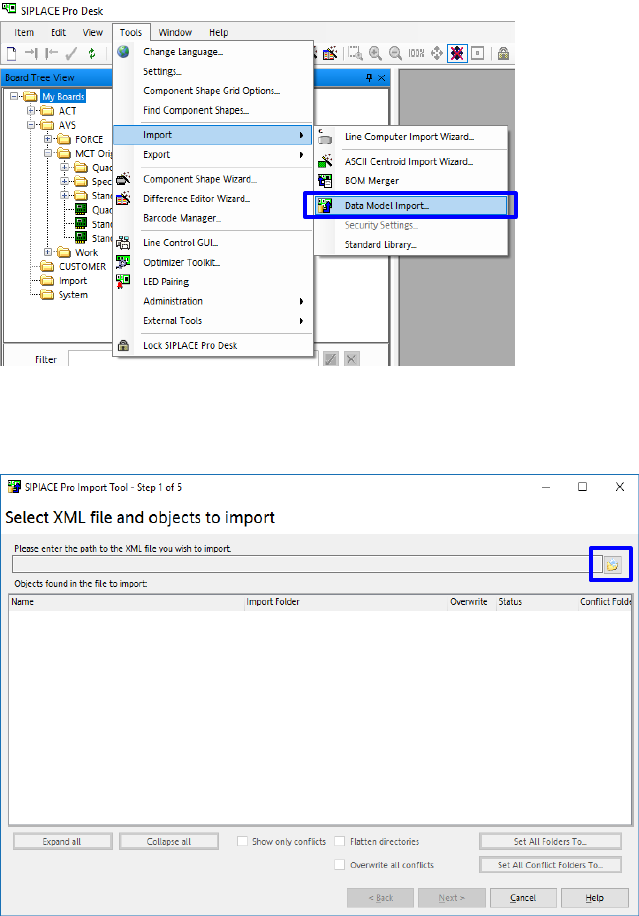
• Start the SIPLACE Pro Desktop software.
• Select Data Model Import:
Extras - Import - Data model import.
• Click on the folder button highlighted above.
4.3.1 Import of PCB’s in SIPLACE Pro
• Choose the *.sipro file according your Software Version.
• Choose the file with the Board descriptions „MCT-Board(s)….“.
• Click on „Open“.