3_AVS-V2_MCT-UM-internal_EN_07-2019 - 第66页
ASM AVS - U SER M ANUAL P AGE 66 OF 182 • Rig ht mo use c lick on t he “M ac hine Ty pe” ask y ou for a new “ Proc ess A rea…“ • Right mo use clic k o n t he “P roce ss Area” as k yo u fo r a new “ Gan try…” • Right mo u…
ASM AVS - USER MANUAL
PAGE 65 OF 182
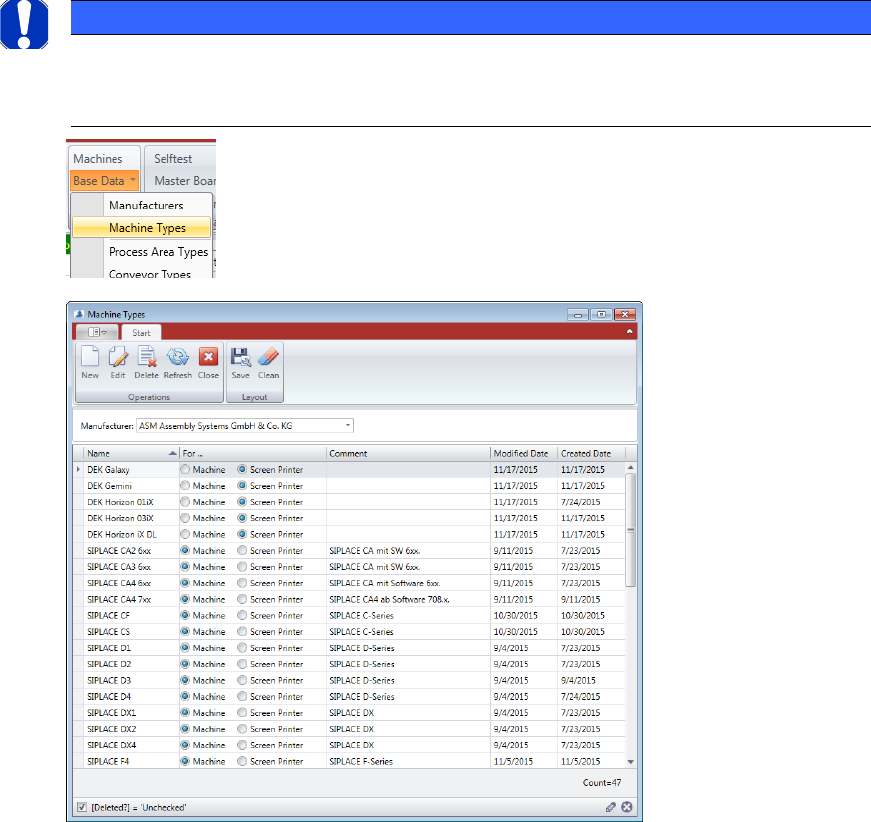
5.2.18.10 Base Data – Machine Types
Machine Type means the possible configurations of a machine.
For this purpose, however, all modules described above must have been created previously.
NOTICE
This configuration does not mean the actual machine what you like to measure.
Here, all possible modules according the specification document, including limits, must be shown in a struc-
ture tree, to be able to configure it later in a real machine.
You must select the manufacturer first, to show the list of specifications.
Double Click the machine type you want to change or mark the line and press “Edit” to open
the “Machine Type Details” view.
Press “New” if you want to add another machine type into the database.
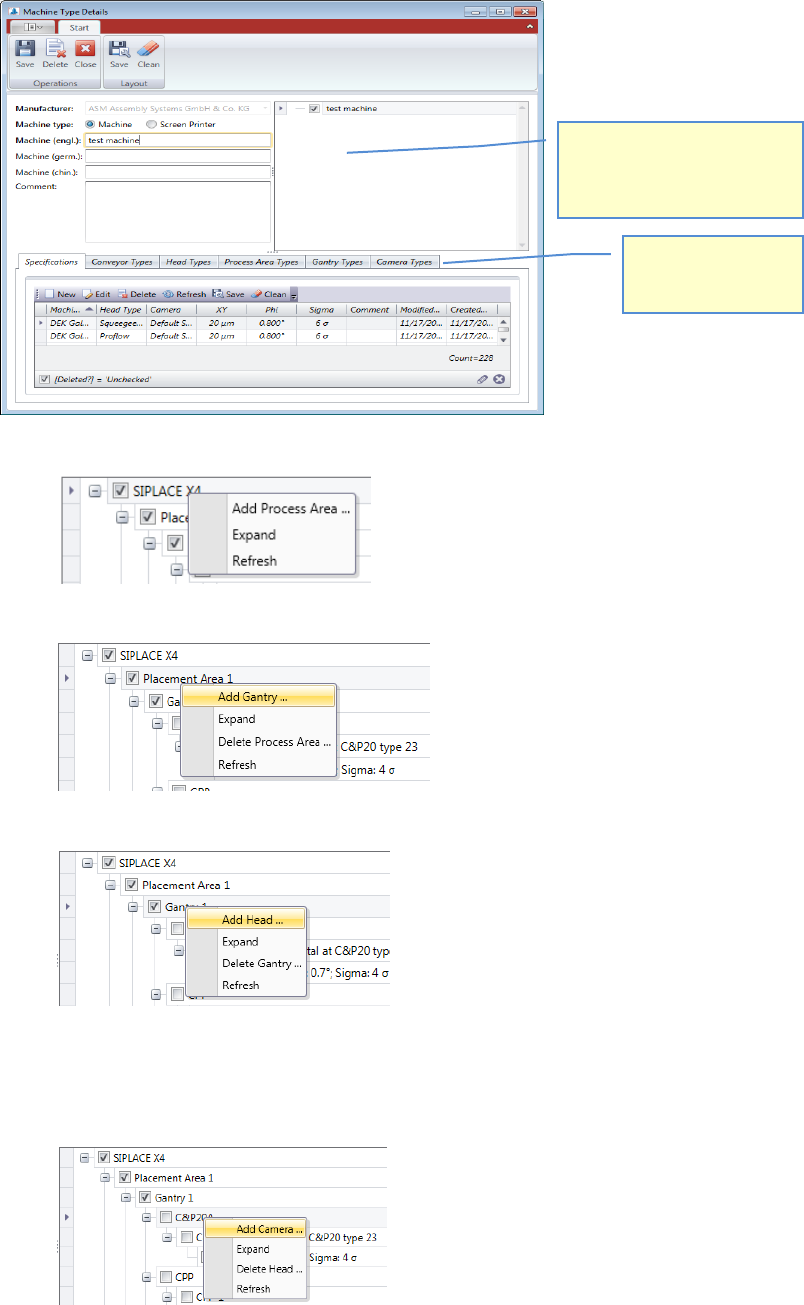
When you create a new type of machine, enter the name of the machine type. Choose whether
this is a mounter or a screen printer.
Press the "Save" button.
Once you saved the machine type, in the right half of the tree window of the machine is dis-
played, with the first level as an entry.
ASM AVS - USER MANUAL
PAGE 66 OF 182
• Right mouse click on the “Machine Type” ask you for a new “Process Area…“
• Right mouse click on the “Process Area” ask you for a new “Gantry…”
• Right mouse click on the “Gantry” ask you for a new “Head…”
Choose the head from the list with a double click, which can be used on this machine, at
this gantry.
• Right mouse click on the “Head” ask you for a new “Camera…”
Choose the camera from the list with a double click, which can be used on this machine,
at this gantry, with this head.
After saving the machine type,
this area will be visible.
With right mouse click on each
level you can add the next.
You can directly add
new or edit valid
relating data.
ASM AVS - USER MANUAL
PAGE 67 OF 182
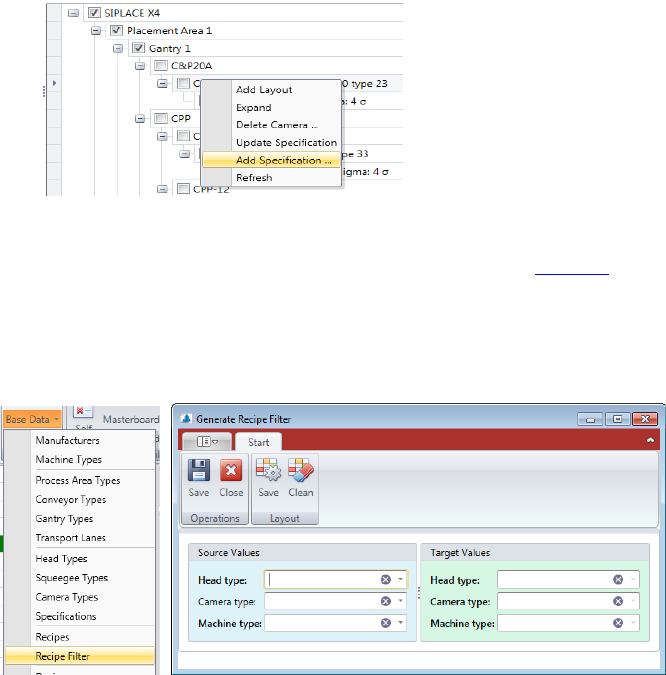
• With right mouse click on a Specification you can “Add Specification…” or “Update Speci-
fication…” if the Specification was changed before.
Now, add the corresponding limit values, which are valid for this combination, coming
from the specification document and press “save”. See 5.2.18.9
5.2.18.11 Base Data – Recipe Filter
Base Data – Recipe Filter is a feature that helps you keep the recipes in the AVS database up
to date with filter settings.
Each recipe has Recipe Filter settings that can be used to reduce the number of recipes in a
project's selection list.
These are filters for:
• machine types
• head Types
• camera Types
When a new machine, head or camera type is added to the database, it must also be entered
in the filter settings in the existing recipes, so that the corresponding recipes are later dis-
played in a project with a corresponding configuration.
In the following dialog, select on the right side a head, camera or machine type, which should
be added.
On the left side, choose an equivalent head, camera, or machine type that serves as the
source.
If you now click Save in the menu, then in each recipe in which the parameter of the left side
(source) is activated, the parameter of the right side (target) is also activated.