3_AVS-V2_MCT-UM-internal_EN_07-2019 - 第68页
ASM AVS - U SER M ANUAL P AGE 68 OF 182 5.2.18.12 Base Data – Recipes A Re cipe i s a m easu reme nt p lan , a d escr ipt ion o f t he gl ass plat e w ith t h e co mpo nent s pl aced on it, or w ith pri nted forms (c irc…
ASM AVS - USER MANUAL
PAGE 67 OF 182
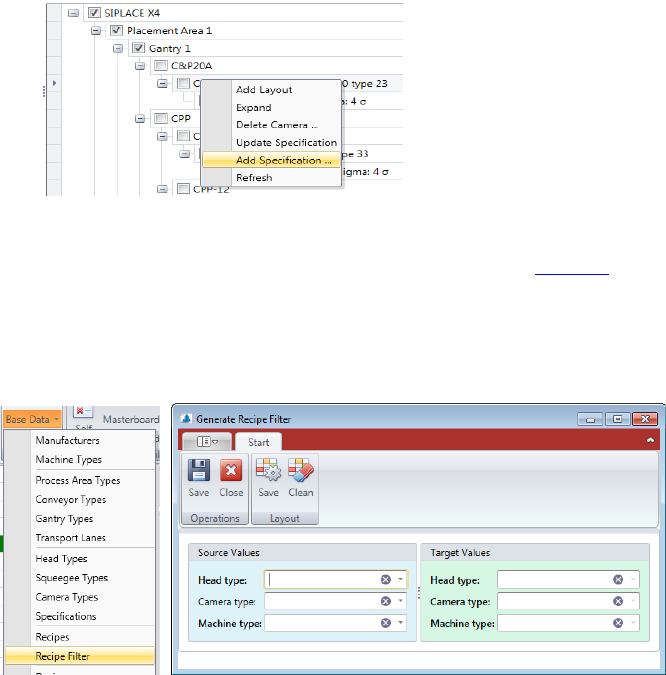
• With right mouse click on a Specification you can “Add Specification…” or “Update Speci-
fication…” if the Specification was changed before.
Now, add the corresponding limit values, which are valid for this combination, coming
from the specification document and press “save”. See 5.2.18.9
5.2.18.11 Base Data – Recipe Filter
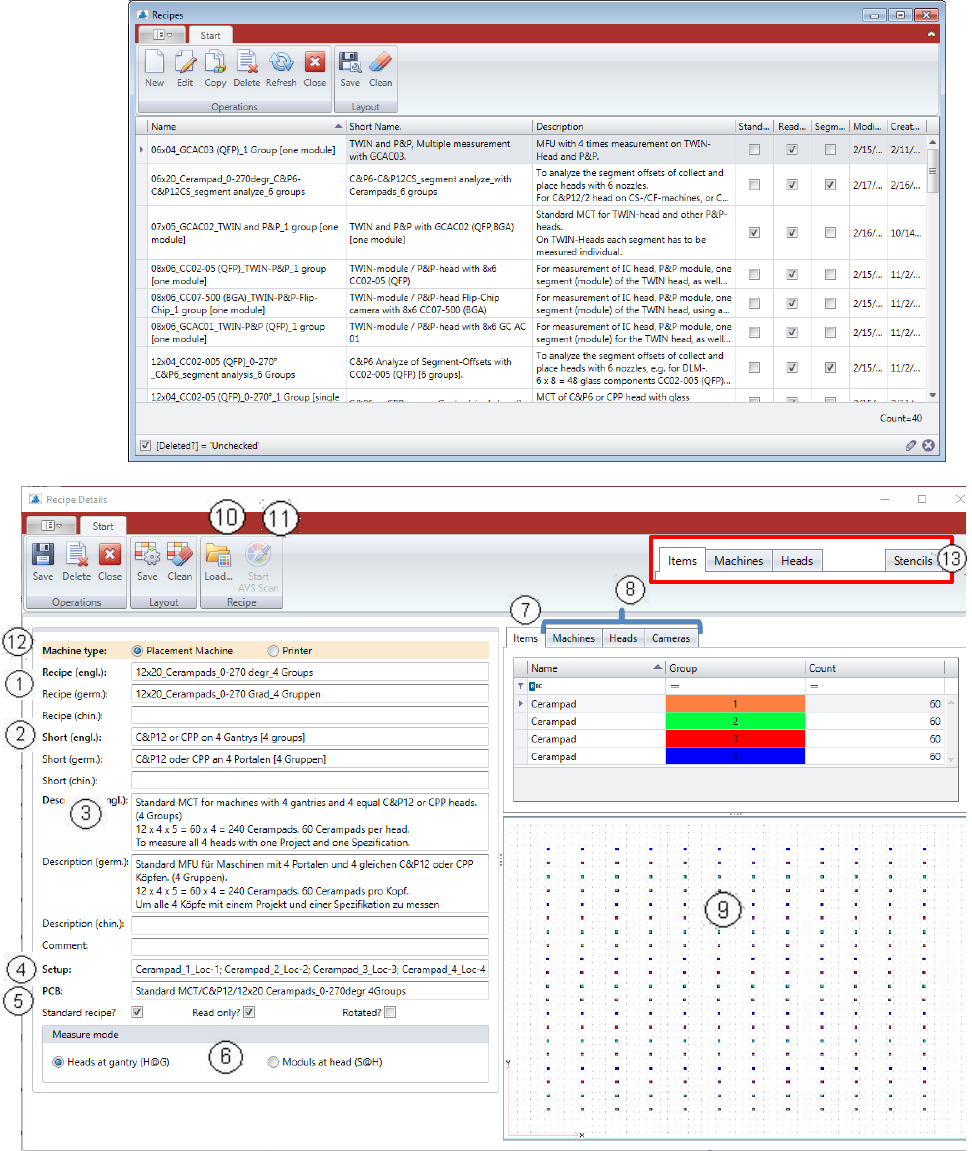
Base Data – Recipe Filter is a feature that helps you keep the recipes in the AVS database up
to date with filter settings.
Each recipe has Recipe Filter settings that can be used to reduce the number of recipes in a
project's selection list.
These are filters for:
• machine types
• head Types
• camera Types
When a new machine, head or camera type is added to the database, it must also be entered
in the filter settings in the existing recipes, so that the corresponding recipes are later dis-
played in a project with a corresponding configuration.
In the following dialog, select on the right side a head, camera or machine type, which should
be added.
On the left side, choose an equivalent head, camera, or machine type that serves as the
source.
If you now click Save in the menu, then in each recipe in which the parameter of the left side
(source) is activated, the parameter of the right side (target) is also activated.
ASM AVS - USER MANUAL
PAGE 68 OF 182
5.2.18.12 Base Data – Recipes
A Recipe is a measurement plan, a description of the glass plate with the components placed
on it, or with printed forms (circles, or rectangles) on it.
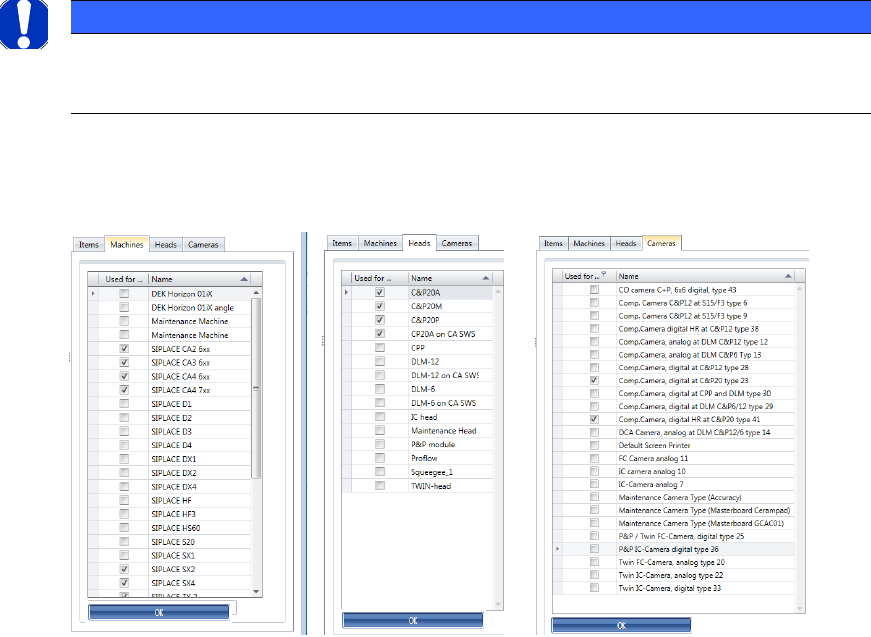
You get a list with an overview of all existing recipes. You can sort and filter as needed, with
the existing column.
Tabs in printer projects
ASM AVS - USER MANUAL
PAGE 69 OF 182
(1) Name of the recipe. Corresponds to a large extent to the folder name, or the .sir file con-
tained in the folder.
(2) Short name of the recipe. This should 1
st
contain information about the placement head,
as well as 2
nd
the number of gantries you can measure with it.
(3) Detailed description of the use and structure of the recipe.
(4) Setup and PCB are giving information to the data in SIPLACE Pro, which are prepared to
schedule the programs.
(5) Checkboxes:
a) Standard Recipe: Marking of recipes that are prepared by default for the MCT meas-
urements on different machine configurations (for the Report).
b) Read only: This is the so called write protection.
Recipes with this hook can only be copied, cannot be changed from the User but only ad-
ministrators.
c) Rotated: This parameter is only used for the MasterBoard, which is necessary for the
certification measurements. With this, the recipe MasterBoard 180° is signed for the soft-
ware as rotated.
(6) The measurement mode describes whether the recipe is used for the measurement of the
head at the gantry, or for the measurement (analysis) of the segments on the head.
The numbers in brackets (H@G) and (S@H) are also used in the project name as identifica-
tion.
(7) In the tab „Items“ all component names used and all group numbers are shown.
The number of components per group must be entered manually.
(8) The 3 tabs „Machines“, „Heads“, „Cameras“ are used to filter subsequent possibility of the
recipes in the selection for a project. In each tab, the corresponding checkboxes must be
selected, for which this recipe can be used.
NOTICE
All entries made in these tabs, must be confirmed with the Button OK, which is placed below this group
area, otherwise the changes will not be saved!