3_AVS-V2_MCT-UM-internal_EN_07-2019 - 第73页
ASM AVS - U SER M ANUAL P AGE 73 OF 182 (2) Cali br ation Dat a - Cali bratio n cert ific ate : is th e name o f the Cert ifica tion doc ume nt. Y ou fin d it in t he to p right co rner of t he d ocum ent. - Cali brat io…
ASM AVS - USER MANUAL
PAGE 72 OF 182
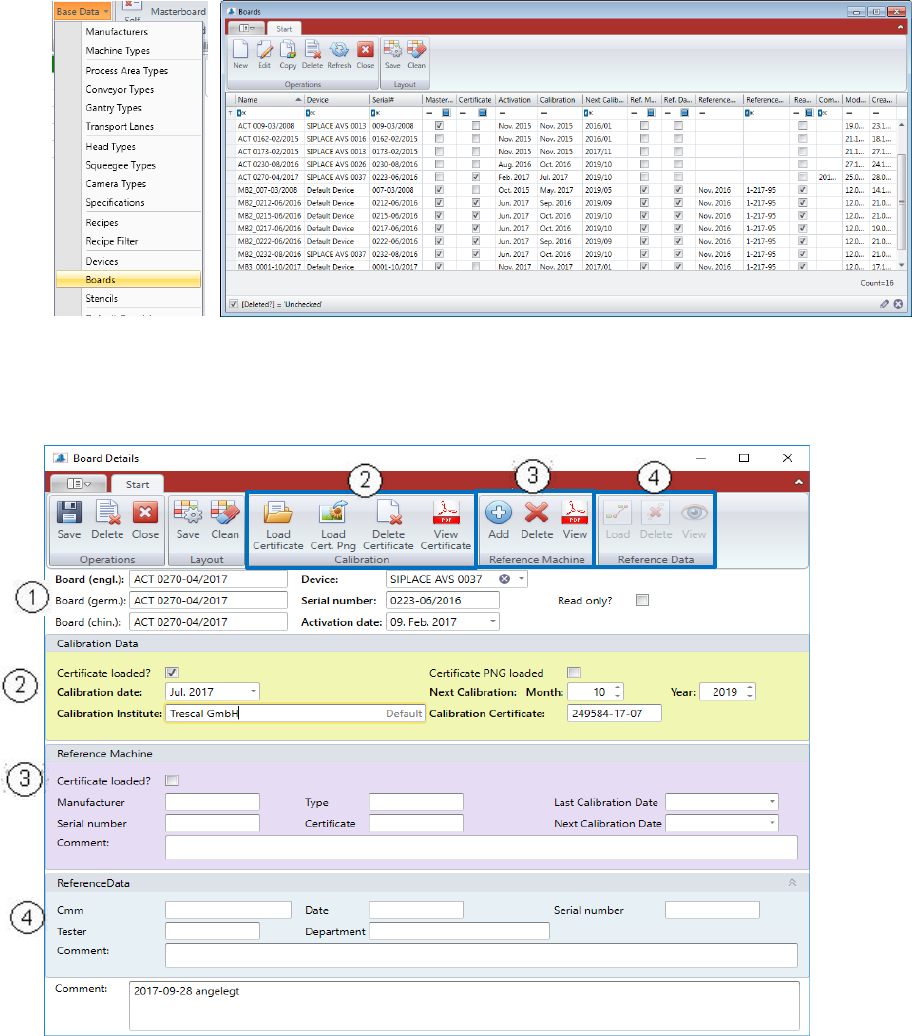
5.2.18.14 Base Data – Boards
The glass plates, which are used for MCT does also have Calibration Certificates.
All the glass plates for AVS have to be registered in the database.
Double Click the board you want to change or mark the line and press “Edit” to open the
“Board details” view.
Press “New” if you want to add another Board into the database.
(1) Standard data for glass plates.
- Name: (written on the board, between the arrows)
- Serial number: (part of the name)
- Device: Boards are always linked to AVS devices. (choose from list)
ASM AVS - USER MANUAL
PAGE 73 OF 182
(2) Calibration Data
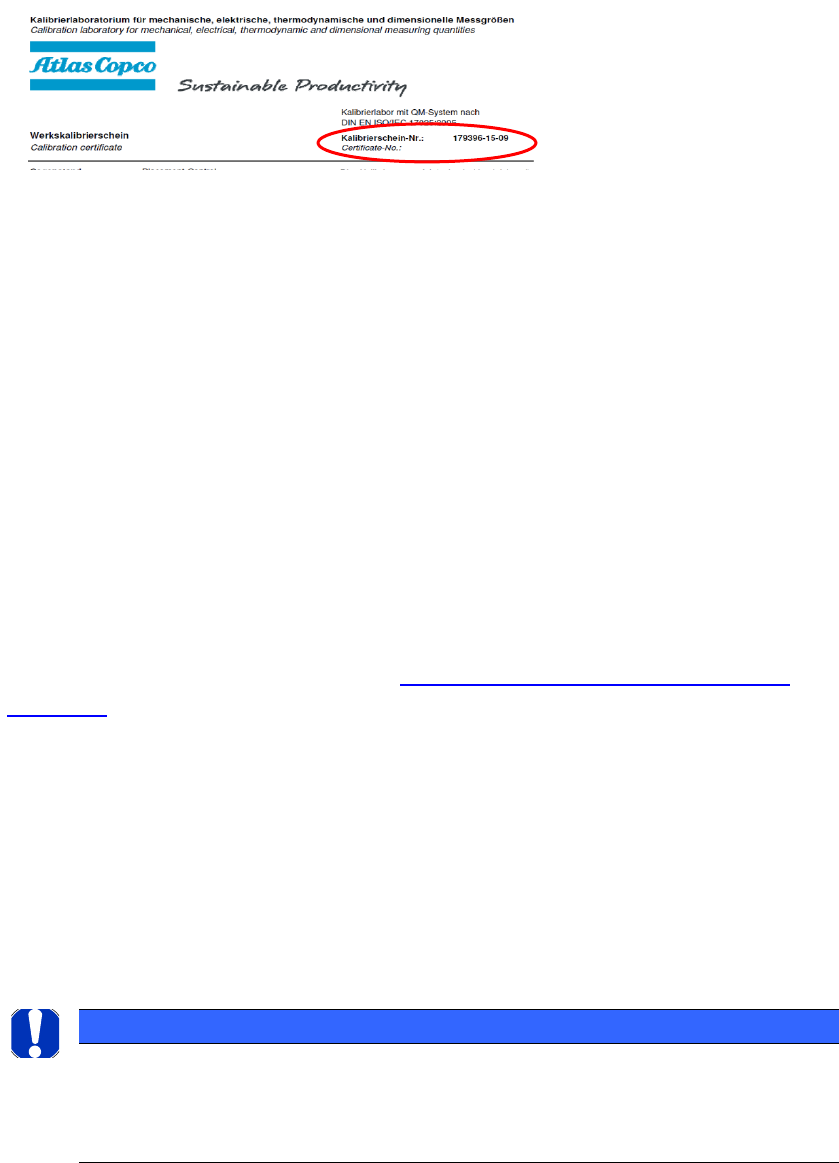
- Calibration certificate: is the name of the Certification document. You find it in the top right
corner of the document.
- Calibration date and next calibration: You can also find that information on the certifi-
cate.
- Calibration institute: (normal text field, default=KCB)
Once you save the standard data, the buttons in the menue group Calibration gets activated.
Now you can load the certificate (pdf-file) into the database.
Later in a project, the certificate can also be allocated to the whole report.
(3) Reference Machine
In case that the glass plate is a MasterBoard, relevant data for a Reference Machine must
be add. It is the information about a Coordinates Measurement Machine (CMM), which is
used to measure the reference Data of a Master Board.
The data in the purple colored area should not be edit.
Use the buttons in the menu area to load a reference machine to the board, which has
been add to the database like described in 5.2.19 Base Data - Capability of measuring
equipment.
(4) Reference Data
In case that the glass plate is a MasterBoard, the reference data measured by the refer-
ence machine must be load to the database.
Therefore, use the buttons in the menu area to read out the data from the text-file, that
comes from the reference machine.
The data in the blue colored area were automatically filled.
NOTICE
Menu area 4 is only active if the measuring plate is a "MasterBoard".
However, the button for naming a disk to the MasterBoard has been hidden.
Because a MasterBoard can only be defined and created on the central computer (server).
The data comes then via the base data import.
ASM AVS - USER MANUAL
PAGE 74 OF 182
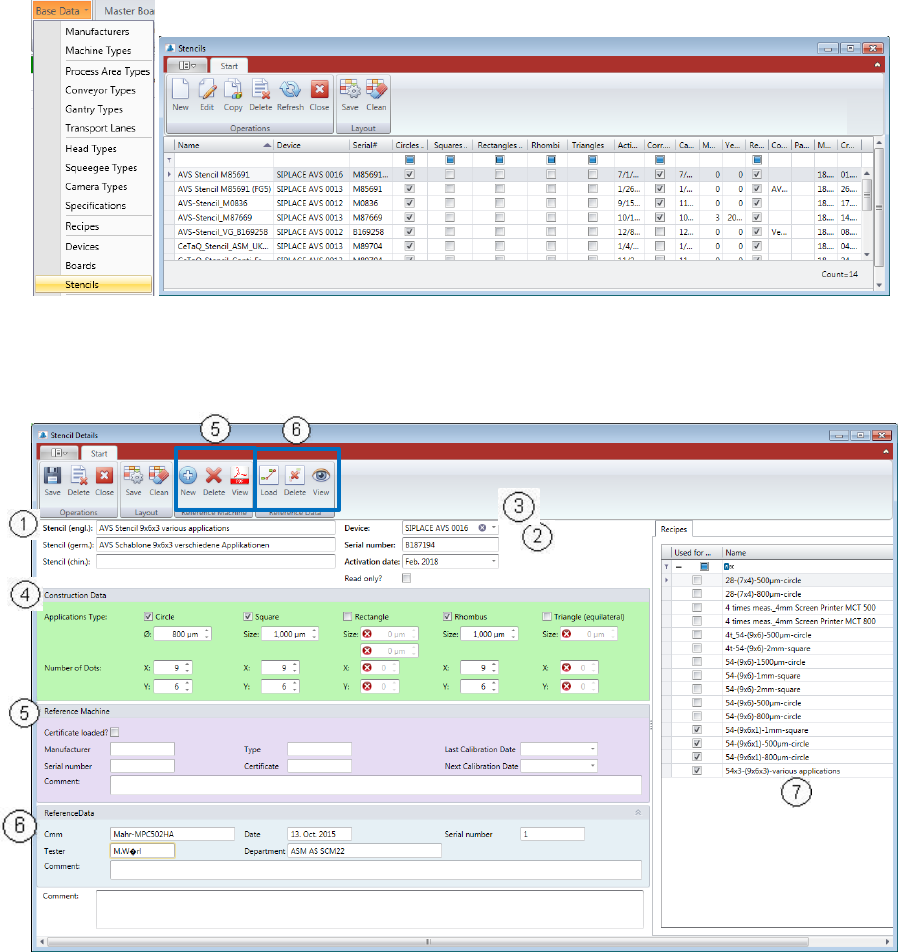
5.2.18.15 Base Data – Stencils
The stencils, which are used for MCT on a printer does have Serial numbers and possibly cor-
rection data.
All the stencils for AVS have to be registered in the database.
Double Click the stencil you want to change or mark the line and press “Edit” to open the
“Stencil details” view.
Press “New” if you want to add another stencil into the database.
For the stencil (printer) following parameters are needed.
(1) Name: (Free name in the AVS database)
(2) Serial number: (printed on the label of the template).
Activation date: When the mask was used for the first time.
(3) Device: The stencil must be assigned to an AVS device (select from list).