Service Manual SIPLACE SmartFeeder.pdf - 第15页
2 General 2.5 Creating new labels for feeder modules Service Manual SIPLACE SmartFeeder 4 - 8 mm X / Xi SIPLACE SmartFeeder 2 x 8 mm X / Xi 11/2020 15 2.5 Creating new labels for feeder modules If you need replacement la…
2 General
2.4 Safety Instructions
14 Service Manual SIPLACE SmartFeeder 4 - 8 mm X / Xi SIPLACE SmartFeeder 2 x 8 mm X / Xi 11/2020
●
Tweezers
●
Small flat nosed pliers
●
Split pin punch size 1.4
●
Sliding foil remover item no. 03075421-xx
●
Circlip pliers for outer rings 3-10 mm
●
Long clamping wrench item no. 03076659-xx
●
Sliding foil remover item no. 03075421-xx
●
Gauge for tape drive motor /X2x8, item no. 03080225-xx
●
Gauge for foil disposal motor /X2x8, item no. 03080235-xx
Materials
●
Grease Polylub GLY 801
●
Grease Klübersynth GE 14-151
●
Ethanol
●
Double-sided adhesive tape
2.4 Safety Instructions
CAUTION
Observe the ESD regulations!
When working on the feeder module, pay attention to ESD safety.
Before you open the side cover, make sure you are wearing the ESD protection wristband,
to prevent damage to the highly sensitive boards inside the feeder.
2 General
2.5 Creating new labels for feeder modules
Service Manual SIPLACE SmartFeeder 4 - 8 mm X / Xi SIPLACE SmartFeeder 2 x 8 mm X / Xi 11/2020 15
2.5 Creating new labels for feeder modules
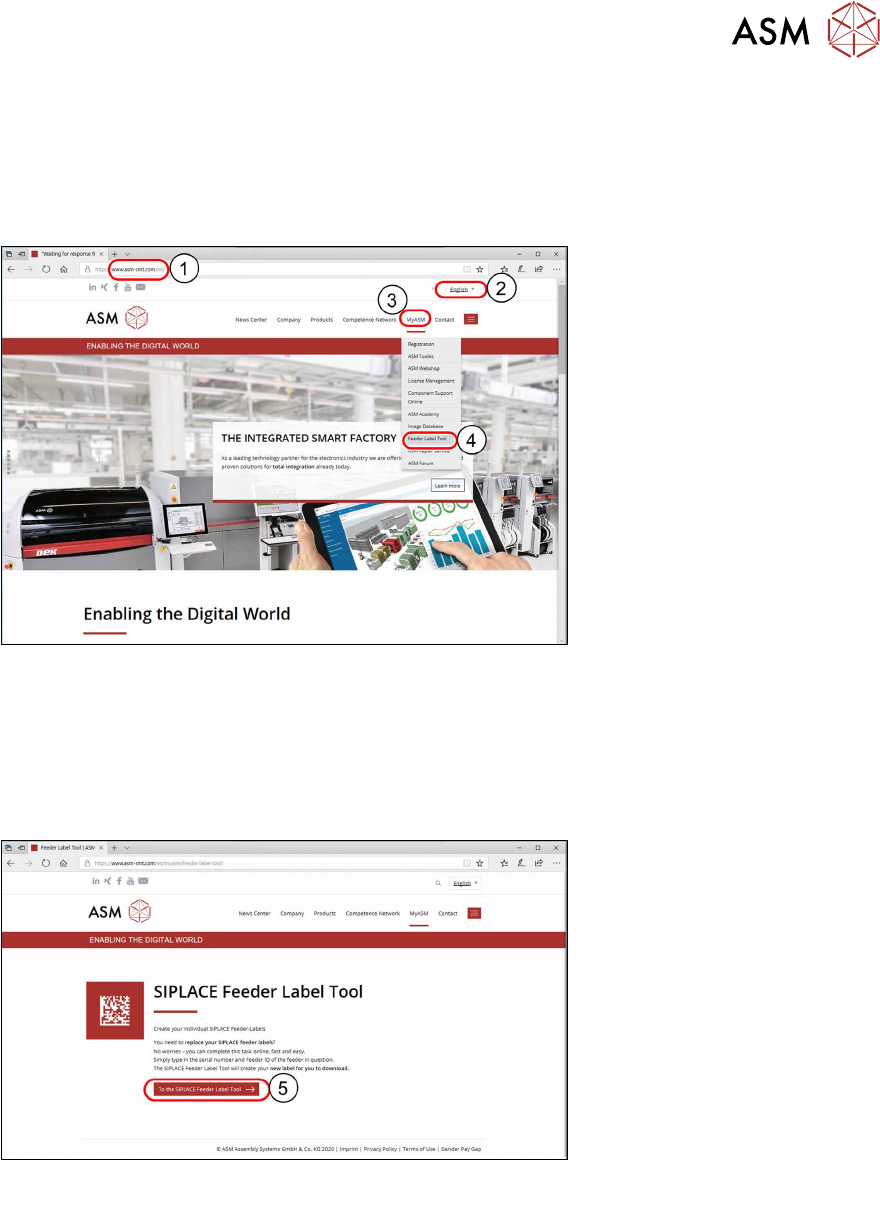
If you need replacement labels for your feeder modules, you can create these online, at the
SIPLACE website. Simply enter the serial number and the feeder ID of the SIPLACE feeder mod-
ule and the SIPLACE Feeder Label Tool will generate a new label for you to download.
► Start your internet browser.
1. Enter the URL www.asm-smt.com in the address line.
2. In the dropdown menu on the right of the header bar, select the website language: German,
English
or Chinese.
3. In the website menu bar, hover of MyASM with the mouse.
The MyASM menu will open.
4. Click on Feeder Label Tool.
5. Click on the Feeder Label Tool button.
2 General
2.5 Creating new labels for feeder modules
16 Service Manual SIPLACE SmartFeeder 4 - 8 mm X / Xi SIPLACE SmartFeeder 2 x 8 mm X / Xi 11/2020
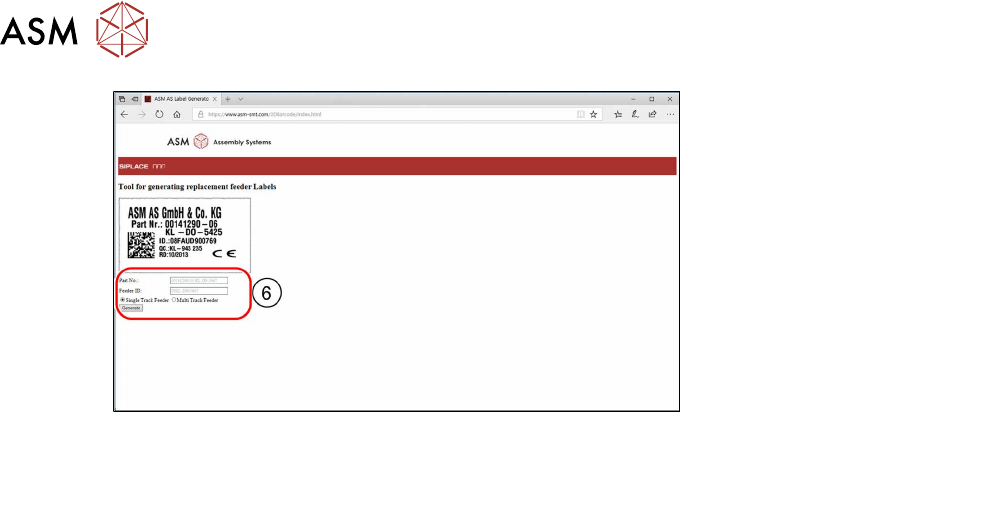
6. Enter the feeder module Part No.
Enter the feeder module Feeder ID.
Select whether it is a Single Track Feeder or a Multi Track Feeder.
Click on the Generate button.
The label for your feeder module will be generated for downloading.