Service Manual SIPLACE SmartFeeder.pdf - 第155页
7 Repairs to SmartFeeder 8 mm X / Xi 7.15 Handle with control panel Service Manual SIPLACE SmartFeeder 4 - 8 mm X / Xi SIPLACE SmartFeeder 2 x 8 mm X / Xi 11/2020 155 7.15.3.1 Removing individual parts from the handle ► …
7 Repairs to SmartFeeder 8 mm X / Xi
7.15 Handle with control panel
154 Service Manual SIPLACE SmartFeeder 4 - 8 mm X / Xi SIPLACE SmartFeeder 2 x 8 mm X / Xi 11/2020
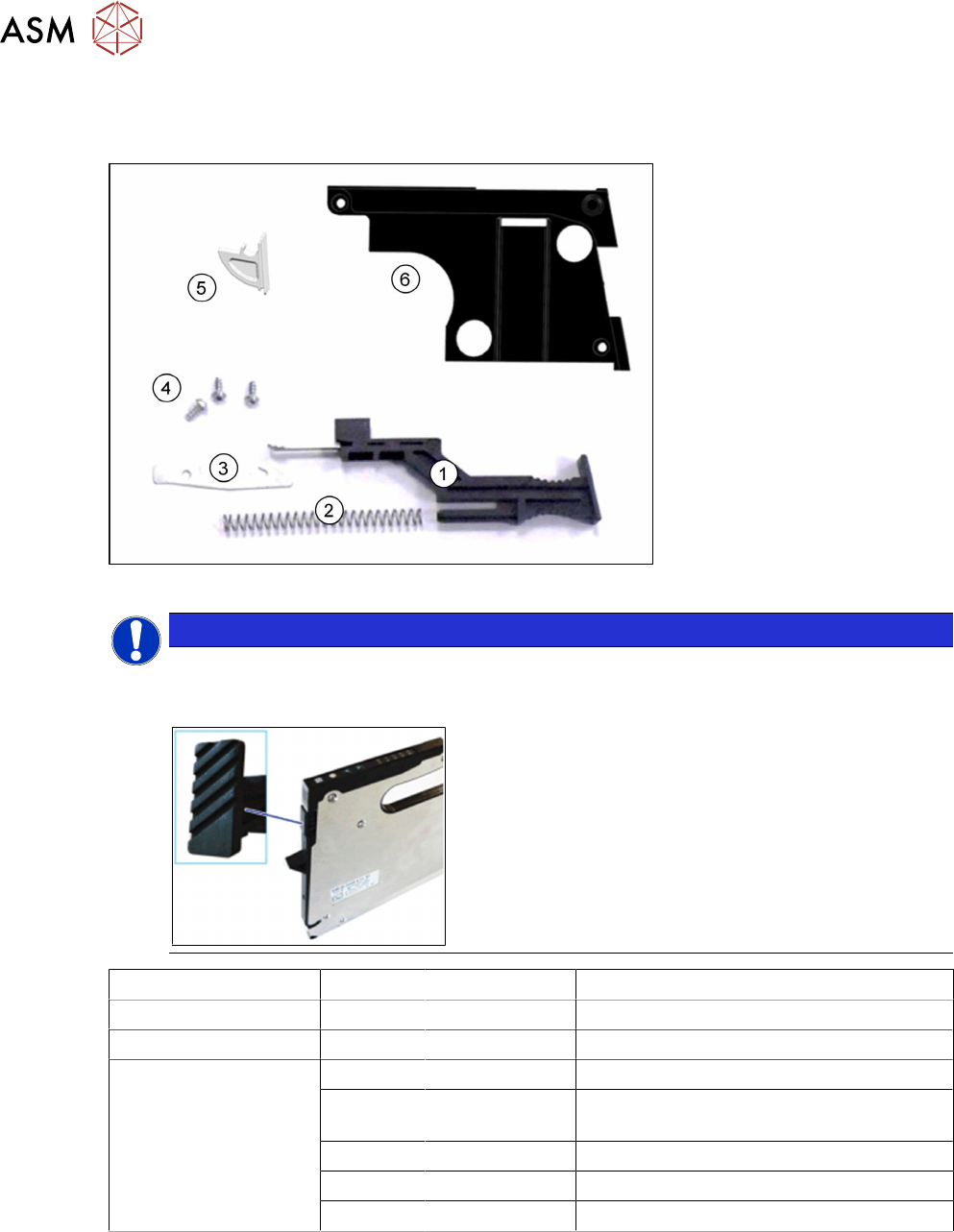
7.15.3 Individual parts on the handle
Spare parts required
Fig.51: Individual parts on the handle SmartFeeder 8 mm X
NOTICE
Other slide for SmartFeeder 8mmXi
In order to visually differentiate Xi feeder modules from the "normal" X feeder modules, a
different slide is used, with a clearly corrugated surface on the outside.
Feeder module Position Item no. Designation
SmartFeeder 8mmX 1 03108403Sxx Slide for foil stuffing unit assy. X8Smart
SmartFeeder 8mmXi 1 03171389-xx Slide for foil stuffing unit assy. 4/8mm Xi
SmartFeeder 8mmX
SmartFeeder 8 mm Xi
2 03009150Sxx Pressure spring VD-090V
3 03095505-xx Retaining springs for foil stuffing unit X8S-
mart
4 03033796-xx RF-SN75-2.5 x 6-9.8
5 03101437Sxx Window for control panel X8Smart
6 03101508Sxx Cover for foil stuffing unit X8Smart
Tools required
●
Phillips screwdriver 0.9Nm
●
TORX screwdriver 0.6Nm, size T8
●
Tweezers or flat pliers
7 Repairs to SmartFeeder 8 mm X / Xi
7.15 Handle with control panel
Service Manual SIPLACE SmartFeeder 4 - 8 mm X / Xi SIPLACE SmartFeeder 2 x 8 mm X / Xi 11/2020 155
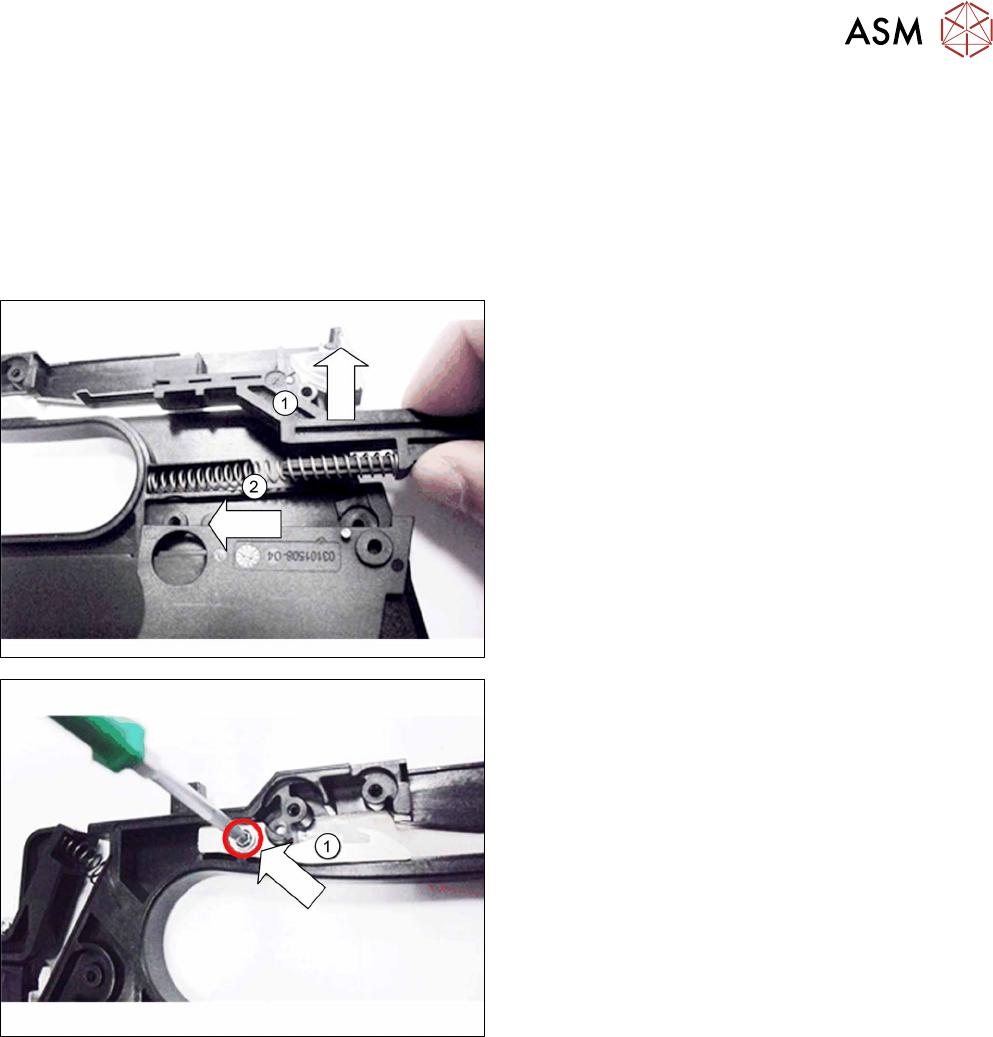
7.15.3.1 Removing individual parts from the handle
► Carefully place the feeder module with the right side down on a stable, level and clean sur-
face.
► Remove the left side cover (see 7.3.1 "Removing the Left Side Cover" [}102]).
► Remove the operating panel (see 7.15.2.1 "Removing the Control Panel and Board" [}152]).
If you have removed the operating panel, the cover on the foil stuffing unit will be accessible and
can be replaced if necessary.
► Pull the slide up and out of the handle. (1)
► Remove the pressure spring. (2)
► Remove the screw which fastens the spring
hook(1)
to the handle.
► Remove the spring hook.
7 Repairs to SmartFeeder 8 mm X / Xi
7.15 Handle with control panel
156 Service Manual SIPLACE SmartFeeder 4 - 8 mm X / Xi SIPLACE SmartFeeder 2 x 8 mm X / Xi 11/2020
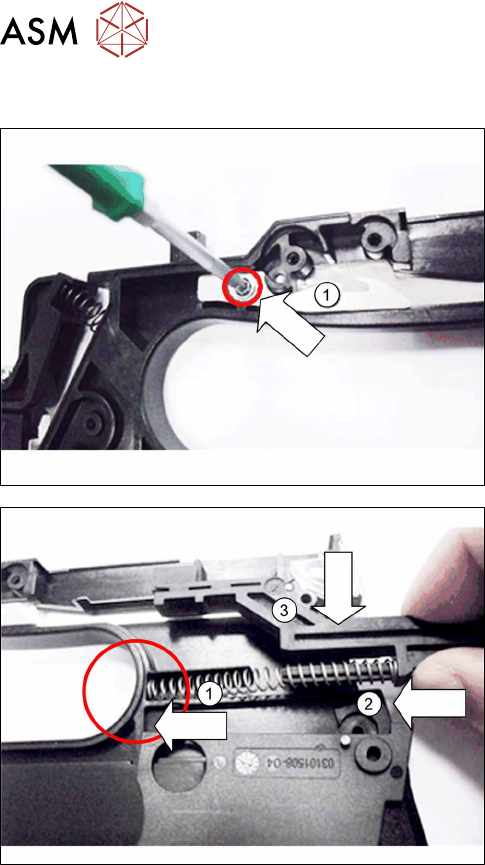
7.15.3.2 Fitting individual parts to the handle
► Hold the spring hook as shown(1) by the handle,
so that you can look through the opening and see
the hole for the screw.
► Screw the spring hook to the handle. Use a size
T8 TORX screwdriver with 0.6 Nm for this.
► Push one end of the pressure spring in the
handle, as shown.(1)
► Insert the slide into the other end of the pressure
spring.(2)
► Press the slide into the pressure spring and insert
it from above, into the handle.(3)
At this point, the cover on the foil stuffing unit will be accessible and can be replaced if necessary,
before you fit the operating panel.
► Fasten the operating panel (see 7.15.2.2 "Fitting the Control Panel and Board" [}153]).
► Fasten the left side cover (see 7.3.2 "Fitting the left side cover" [}102]).