Service Manual SIPLACE SmartFeeder.pdf - 第239页
8 Repairs to SmartFeeder 2x8 mm X / Xi 8.16 Handle with control panel Service Manual SIPLACE SmartFeeder 4 - 8 mm X / Xi SIPLACE SmartFeeder 2 x 8 mm X / Xi 11/2020 239 8.16.3.2 Fitting individual parts to the handle ► H…
8 Repairs to SmartFeeder 2x8 mm X / Xi
8.16 Handle with control panel
238 Service Manual SIPLACE SmartFeeder 4 - 8 mm X / Xi SIPLACE SmartFeeder 2 x 8 mm X / Xi 11/2020
8.16.3.1 Removing individual parts from the handle
► Carefully place the feeder module with the right side down on a stable, level and clean sur-
face.
► Remove the left side cover (see 7.3.1 "Removing the Left Side Cover" [}102]).
► Remove the operating panel (see 7.15.2.1 "Removing the Control Panel and Board" [}152]).
If you have removed the operating panel, the cover on the foil stuffing unit will be accessible and
can be replaced if necessary.
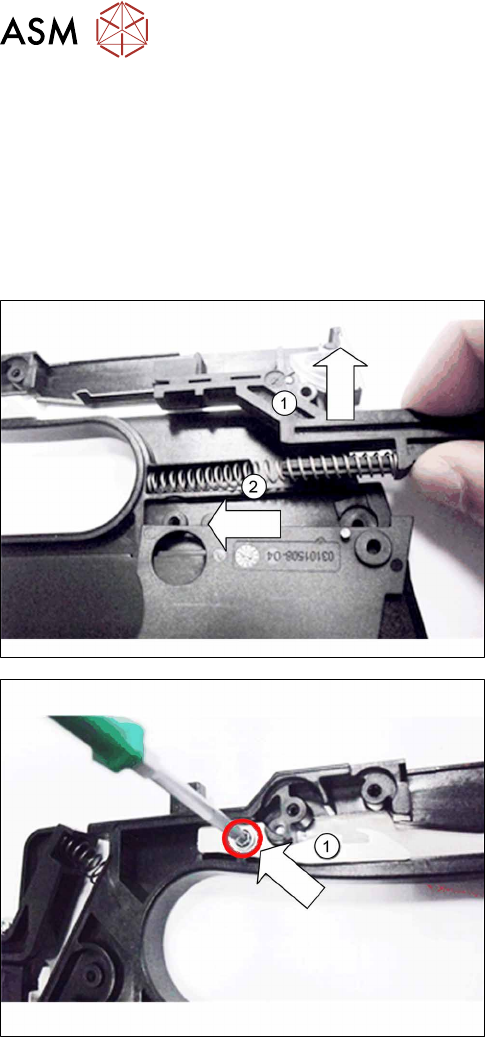
► Pull the slide up and out of the handle. (1)
► Remove the pressure spring. (2)
► Remove the screw which fastens the spring
hook(1)
to the handle.
► Remove the spring hook.
8 Repairs to SmartFeeder 2x8 mm X / Xi
8.16 Handle with control panel
Service Manual SIPLACE SmartFeeder 4 - 8 mm X / Xi SIPLACE SmartFeeder 2 x 8 mm X / Xi 11/2020 239
8.16.3.2 Fitting individual parts to the handle
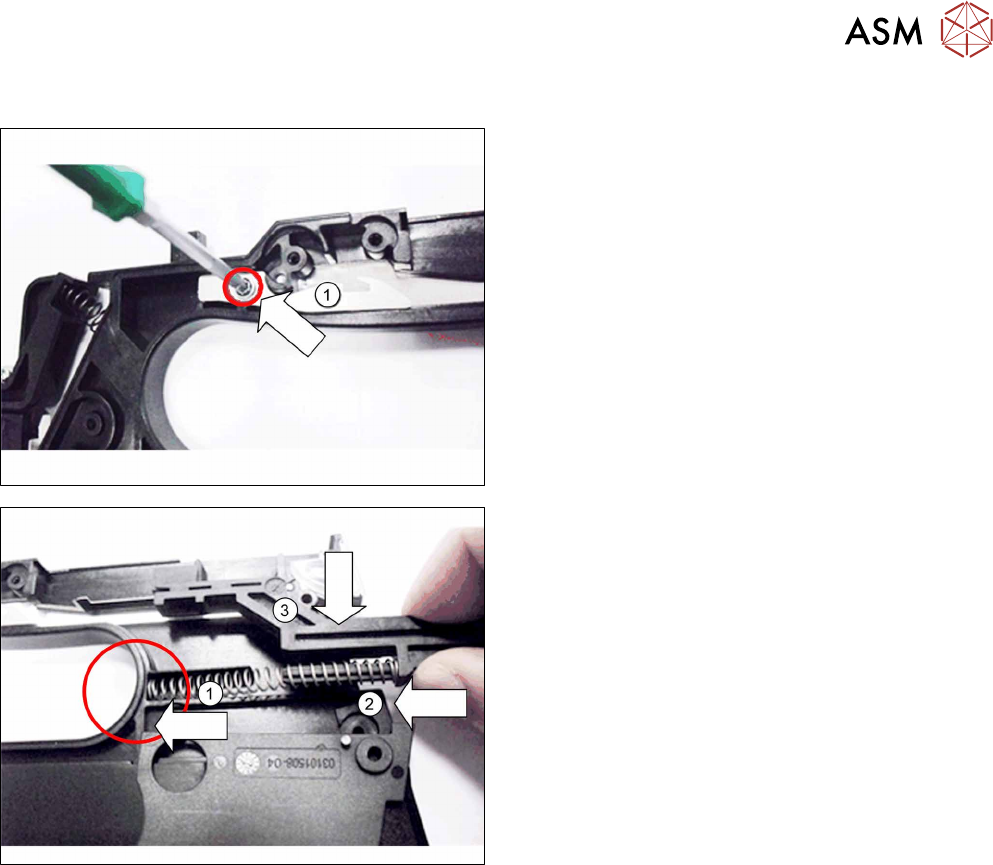
► Hold the spring hook as shown(1) by the handle,
so that you can look through the opening and see
the hole for the screw.
► Screw the spring hook to the handle. Use a size
T8 TORX screwdriver with 0.6 Nm for this.
► Push one end of the pressure spring in the
handle, as shown.(1)
► Insert the slide into the other end of the pressure
spring.(2)
► Press the slide into the pressure spring and insert
it from above, into the handle.(3)
At this point, the cover on the foil stuffing unit will be accessible and can be replaced if necessary,
before you fit the operating panel.
► Fasten the operating panel (see 7.15.2.2 "Fitting the Control Panel and Board" [}153]).
► Fasten the left side cover (see 7.3.2 "Fitting the left side cover" [}102]).
8 Repairs to SmartFeeder 2x8 mm X / Xi
8.16 Handle with control panel
240 Service Manual SIPLACE SmartFeeder 4 - 8 mm X / Xi SIPLACE SmartFeeder 2 x 8 mm X / Xi 11/2020
8.16.3.3 Removing the control panel, board and window for the control panel
► Carefully place the feeder module with the right side down on a stable, level and clean surface.
► Remove the left side plate (see Removing/fitting the left side plate).
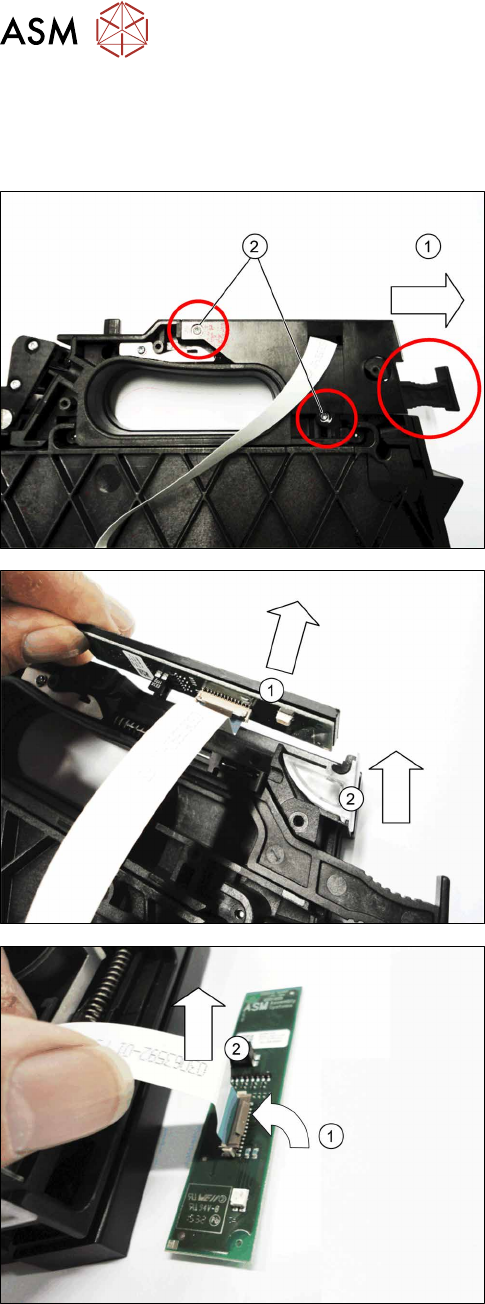
► Release the removal handle lock.(1)
► Remove the two screws marked in the diagram.
Use a size T8 TORX screwdriver for this.
► Lift the cover plate a little to the side, to give you
access to the parts below.
► Pull the control panel with its board straight up
and out of the handle.(1)
► If you want to replace it, lift the control panel win-
dow up and out of the handle.(2)
If you want to replace the control panel and/ or the
board:
► Open the bar on the flat ribbon connection (1) on
the printed circuit board
► Unplug the flat ribbon cable form the connec-
tion.(2)