Service Manual SIPLACE SmartFeeder.pdf - 第243页
8 Repairs to SmartFeeder 2x8 mm X / Xi 8.17 Control board Service Manual SIPLACE SmartFeeder 4 - 8 mm X / Xi SIPLACE SmartFeeder 2 x 8 mm X / Xi 11/2020 243 8.17 Control board The control board for the SmartFeeder 2x8mm…
8 Repairs to SmartFeeder 2x8 mm X / Xi
8.16 Handle with control panel
242 Service Manual SIPLACE SmartFeeder 4 - 8 mm X / Xi SIPLACE SmartFeeder 2 x 8 mm X / Xi 11/2020
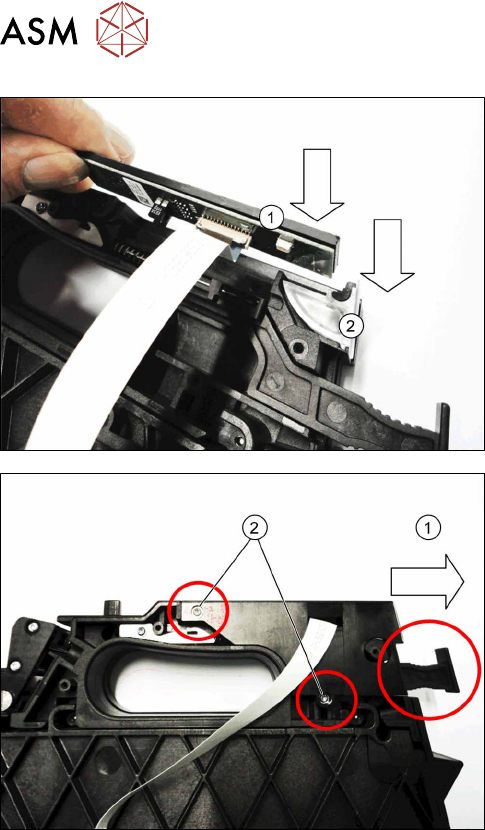
► Insert the control panel and board vertically into
the handle. (1)
► Insert the (new) control panel window from above
into the handle.(2)
► Push the cover plate on the flat ribbon cable
along the handle, until you can see the holes for
the screws through the cover plate.
► Release the removal handle lock, if neces-
sary.(1)
► Fasten the cover plate with the two screws
marked in the diagram.
Use a size T8 TORX screwdriver with 0.6 Nm for
this.

8 Repairs to SmartFeeder 2x8 mm X / Xi
8.17 Control board
Service Manual SIPLACE SmartFeeder 4 - 8 mm X / Xi SIPLACE SmartFeeder 2 x 8 mm X / Xi 11/2020 243
8.17 Control board
The control board for the SmartFeeder 2x8mmX is not available as a spare part, because the cali-
bration data for the pickup position are saved in the EEPROM of this board.
A new calibration of the pickup position is therefore only possible at the final inspection point of the
feeder module production at ASM.

8 Repairs to SmartFeeder 2x8 mm X / Xi
8.17 Control board
244 Service Manual SIPLACE SmartFeeder 4 - 8 mm X / Xi SIPLACE SmartFeeder 2 x 8 mm X / Xi 11/2020