Service Manual SIPLACE SmartFeeder.pdf - 第30页
6 Repairs to SmartFeeder 4 mm X / Xi 6.3 Side Covers 30 Service Manual SIPLACE SmartFeeder 4 - 8 mm X / Xi SIPLACE SmartFeeder 2 x 8 mm X / Xi 11/2020 6.3.1 Removing the Left Side Cover NOTICE Avoiding damaging the board…
6 Repairs to SmartFeeder 4 mm X / Xi
6.3 Side Covers
Service Manual SIPLACE SmartFeeder 4 - 8 mm X / Xi SIPLACE SmartFeeder 2 x 8 mm X / Xi 11/2020 29
6.3 Side Covers
NOTICE
Avoiding damaging the board
To avoid damaging the threaded bolts on the printed circuit board, only remove the side
cover if the other side cover has been fully fitted i.e. with all screws.
Spare part required
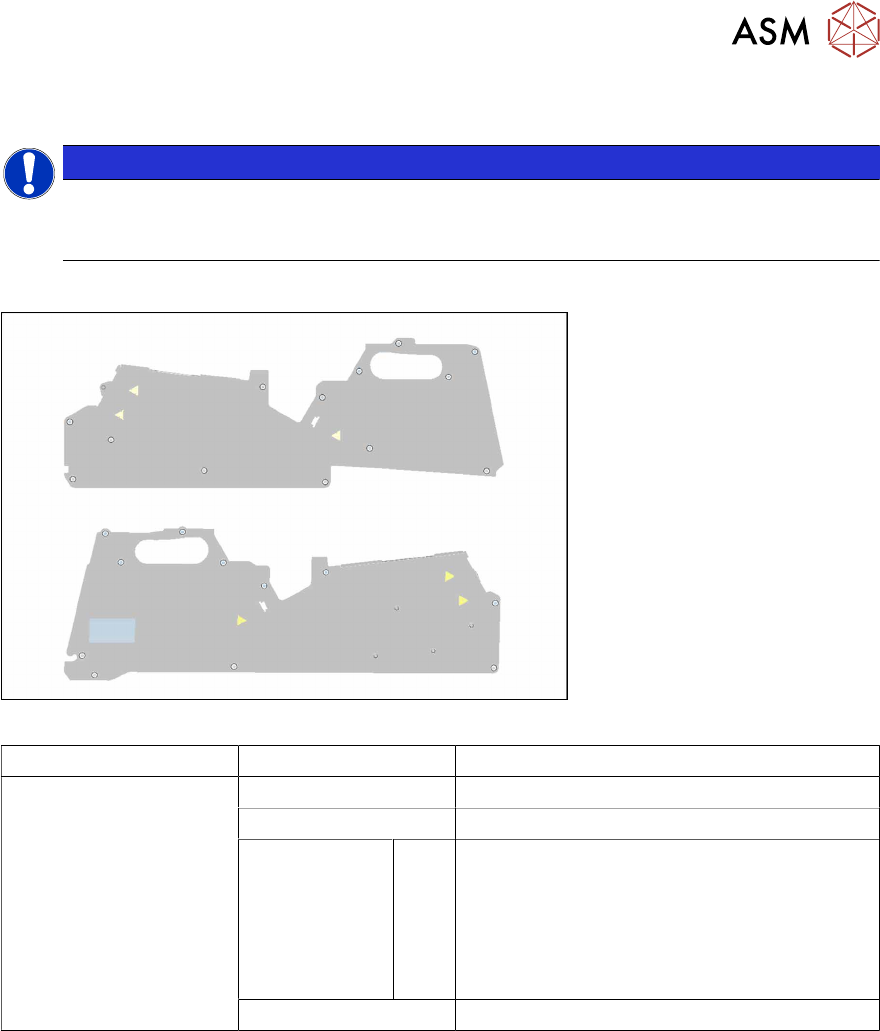
Fig.4: Side plate left assy. X8Smart (top), side plate right assy. X8Smart (bottom)
Feeder module Item no. Designation
SmartFeeder 4mmX
SmartFeeder 4 mm Xi
03100525Sxx Side plate left assy. X8Smart
03100526Sxx Side plate right assy. X8Smart
03033796-xx
03071822-xx
03023227-xx
03071821-xx
03044543-xx
A
B
C
D
E
Screws:
RF-SN75 2.5 x 6-9.8 (14x)
SN 213307-H-M2.5 x 5-A2-70 (8x)
ISO 7046-2-M2.5 x 5-A2-70-H (4x)
SN 213307-H-M2.5 x 3-A2-70 (2x)
RF-SN85-2.5 x 7.5-9.8 (1x)
03225465-xx Foam sealing top 4 mm
Tools required
●
Phillips screwdriver 0.9Nm
●
TORX screwdriver 0.6Nm, size T8
6 Repairs to SmartFeeder 4 mm X / Xi
6.3 Side Covers
30 Service Manual SIPLACE SmartFeeder 4 - 8 mm X / Xi SIPLACE SmartFeeder 2 x 8 mm X / Xi 11/2020
6.3.1 Removing the Left Side Cover
NOTICE
Avoiding damaging the board
Before you remove the left side cover, make sure that the right side cover has been com-
pletely fixed in place with all screws. If not, the threaded bolts could be damaged on the
board.
► Carefully place the feeder module with the right
side down on a stable, level and clean surface.
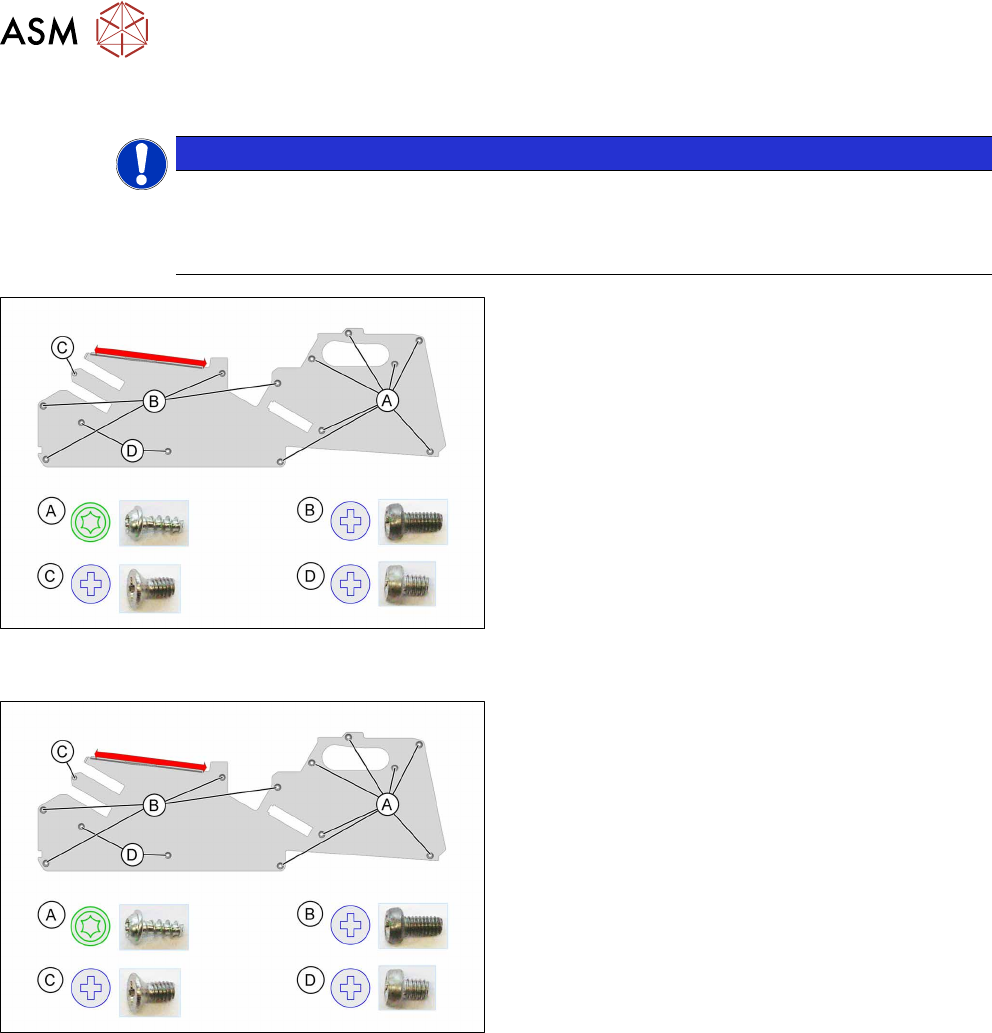
► Loosen the screws as shown in the diagram.
You need a TORX screwdriver for the screws marked
A
.
You need a Phillips screwdriver for the screws marked
B
, Cand D.
The side cover is only inserted in the upper part of the
frame in the area marked red.
► Pull the side cover down and out.
6.3.2 Fitting the Left Side Cover
► Carefully place the feeder module with the right
side down on a stable, level and clean surface.
► Push the side cover (area marked in red) under
the rail as shown, as far as the stop.
► Fix the screws as shown in the diagram. Begin
with the inner screws and work towards the out-
side.
You need a Phillips screwdriver with 0.9 Nm for the
screws marked B
, Cand D.
You need a TORX screwdriver with 0.6 Nm for the
screws marked A
.
6 Repairs to SmartFeeder 4 mm X / Xi
6.3 Side Covers
Service Manual SIPLACE SmartFeeder 4 - 8 mm X / Xi SIPLACE SmartFeeder 2 x 8 mm X / Xi 11/2020 31
6.3.3 Removing the Right Side Cover
NOTICE
Avoiding damaging the board
Before you remove the right side cover, make sure that the left side cover has been com-
pletely fixed in place with all screws. If not, the threaded bolts could be damaged on the
board.
► Carefully place the feeder module with the left
side down on a stable, level and clean surface.
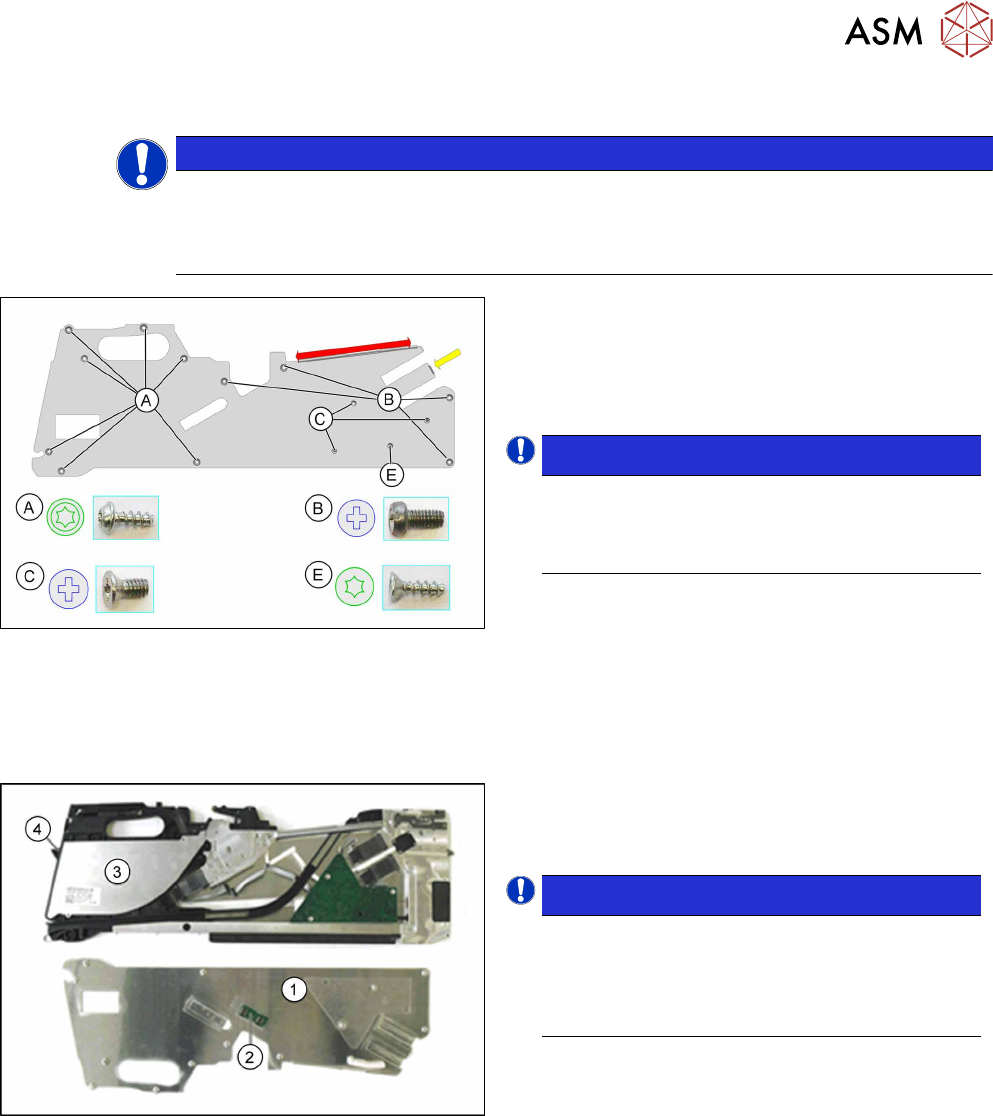
► First loosen screw E with a TORX screwdriver.
This screw fixes the EDIF connector on the main
board.
NOTICE!
To avoid damaging the connector, observe
the installation guide after this description
for the right side cover with the relevant
torques!
.
► Loosen the screws marked A with a TORX
screwdriver.
► Loosen the screws marked B and C with a
Philips screwdriver.
The side cover is only inserted in the upper part of the
frame in the area marked red.
► Pull the side cover down and out.
► Carefully lift the side cover (1).
► Place the side cover (1) with the board (2) facing
upwards on a clean and even surface.
NOTICE!
Please note that the foil container cover (3)
and the foil container flap (4) are only clipped
or placed on! Remove these two parts before
you change the position of the feeder mod-
ule.
.
A description of how to remove the cover and the foil
container flap can be found at 6.12.1
"Replacing the
flap on the drip tray and shaft" [}72].