Service Manual SIPLACE SmartFeeder.pdf - 第75页
6 Repairs to SmartFeeder 4 mm X / Xi 6.15 Handle with control panel Service Manual SIPLACE SmartFeeder 4 - 8 mm X / Xi SIPLACE SmartFeeder 2 x 8 mm X / Xi 11/2020 75 6.15 Handle with control panel 6.15.1 Handle assembly …
6 Repairs to SmartFeeder 4 mm X / Xi
6.14 Leaf spring
74 Service Manual SIPLACE SmartFeeder 4 - 8 mm X / Xi SIPLACE SmartFeeder 2 x 8 mm X / Xi 11/2020
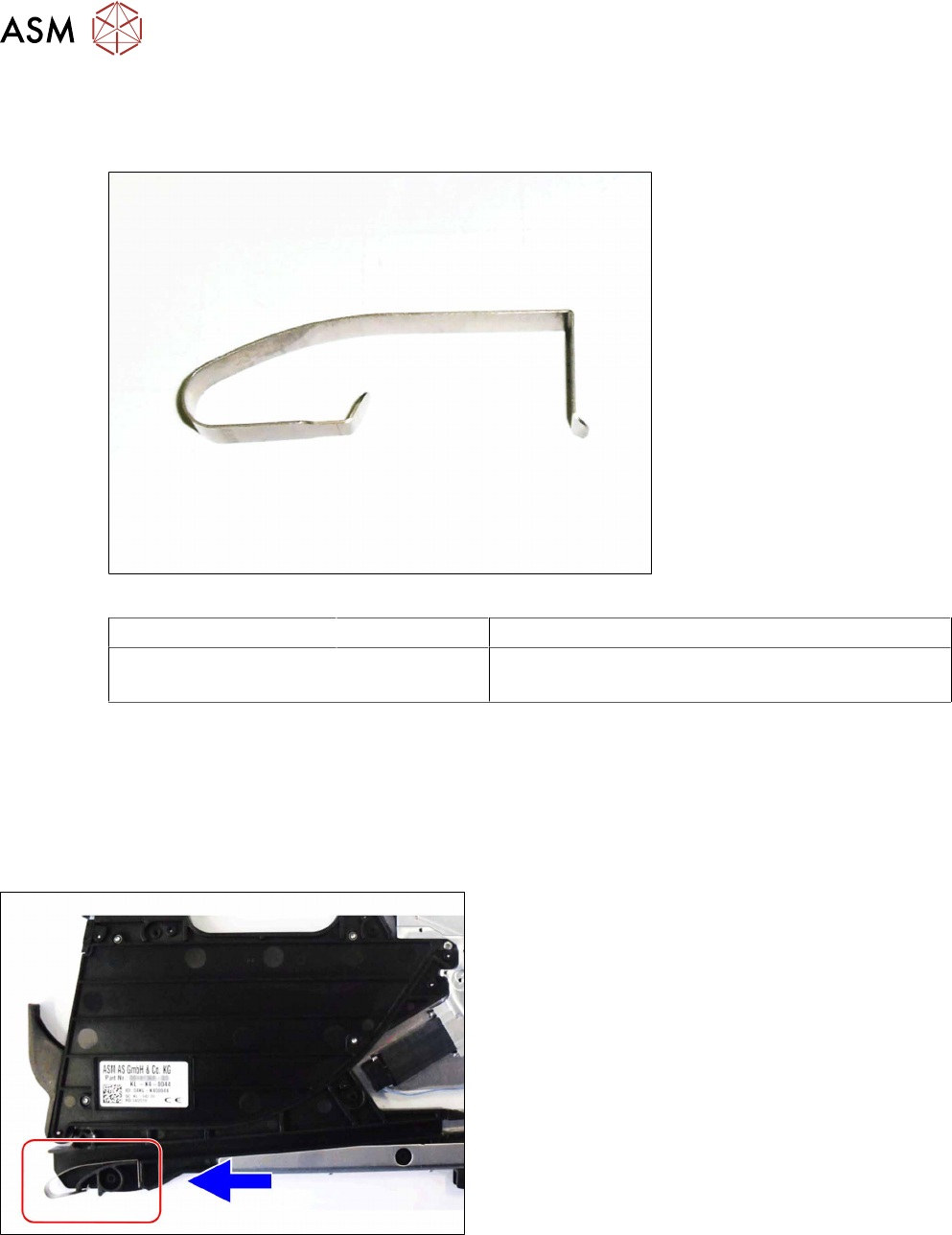
6.14 Leaf spring
Required spare part
Fig.20: Leaf spring
Feeder module Item no. Designation
SmartFeeder 4mmX
SmartFeeder 4 mm Xi
03071618-xx Leaf spring tape infeed /X2x8 PT V1
Tools required
●
Phillips screwdriver 0.6Nm
●
TORX screwdriver 0.6Nm, size T8
●
Flat or universal pliers
6.14.1 Replacing the leaf spring
► Carefully place the feeder module with the left
side down on a stable, level and clean surface.
► Remove the right side cover (see 6.3.3 "Remov-
ing the Right Side Cover" [}31]).
► Use a pair of pliers to pull the leaf spring up and
out of the feeder module.
► Fit the new leaf spring into the feeder module as
shown.
► Make sure that the end of the leaf spring can
move freely downwards.
► Fasten the right side cover (see6.3.4 "Fitting the
Right Side Cover" [}32] ).
6 Repairs to SmartFeeder 4 mm X / Xi
6.15 Handle with control panel
Service Manual SIPLACE SmartFeeder 4 - 8 mm X / Xi SIPLACE SmartFeeder 2 x 8 mm X / Xi 11/2020 75
6.15 Handle with control panel
6.15.1 Handle assembly
The handle assembly can not be replaced and is not available as a spare part.
6.15.2 Replacing the control panel
Required spare part
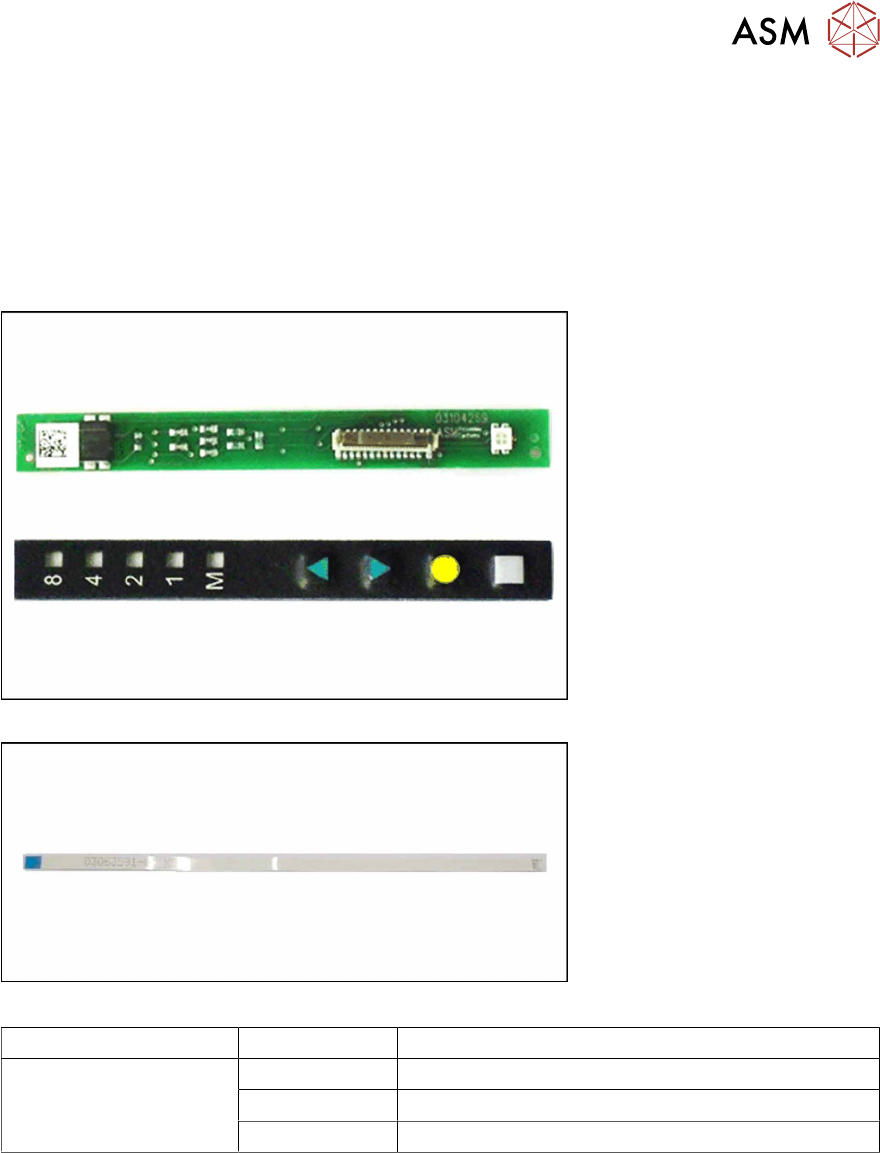
Fig.21: Board assy. control panel (top), control panel assy. (bottom)
Fig.22: Cable control panel
Feeder module Item no. Designation
SmartFeeder 4mm X
SmartFeeder 4 mm Xi
03104269-xx Board assy. control panel X8Smart
03102428 -xx Control panel assy. X8Smart
03063592-xx Cable control panel X2x8
Tools required
●
TORX screwdriver size T8, 0.6Nm
●
Tweezers or small screwdriver
6 Repairs to SmartFeeder 4 mm X / Xi
6.15 Handle with control panel
76 Service Manual SIPLACE SmartFeeder 4 - 8 mm X / Xi SIPLACE SmartFeeder 2 x 8 mm X / Xi 11/2020
6.15.2.1 Removing the Control Panel and Board
► Carefully place the feeder module with the right
side down on a stable, level and clean surface.
► Remove the left side cover (see 6.3.1 "Removing
the Left Side Cover" [}30]).
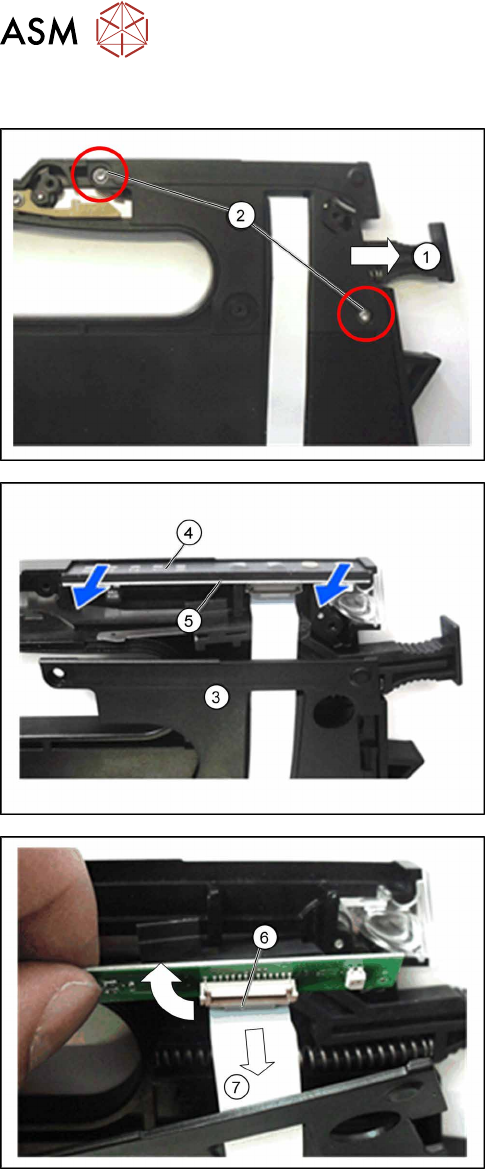
► Loosen the lock(1) in the position "unlocked".
► Open the two marked TORX screws(2), with
which the cap on the foil stuffing unit is fixed.
► Carefully lift the cap on the foil stuffing unit(3) a
little from the base of the feeder module. Make
sure that the flat ribbon cable is still fastened to
the control panel board.
► Pull the control panel(4) out of the guidance, to-
gether with the board(5)
.
► Open the bracket on the flat ribbon cable connec-
tion(6)
at the board.
► Pull the flat ribbon cable(7) out of the flat ribbon
cable connection.
► Pull the flat ribbon cable out of the foil stuffing
unit cap.