YSD_Users_E.pdf - 第123页
3-10 3 Q & A 3. Reducing paper consumption This section describes the function for reducing consumption of paper in the dot station. 3.1 Predispensing inter val setting T his function specifies the intervals in the p…
3-9
3
Q & A
Possible cause and corrective action
The nozzle stopper hits so hard on the board that dent marks are left on the board surface.
Cause The lower end position of the head is too low.
Action Recheck the height of the board surface or the target height for the specified dispensing sequence.
Cause The nozzle is not installed correctly.
Action Reinstall the nozzle correctly.
Adhesive forms strands.
Cause Incorrect dispense data (larger than the nozzle's dispensing capacity) was entered.
Action Check the data or exchange the nozzle with a nozzle having greater dispensing capacity.
Cause The heater temperature setting is too low.
Action Set the optimum temperature.
Cause The head ascent speed is too fast.
Action
Open the VmSpec window with the [Machine] button, select "Dispense Sequence" to display the Dispense
Sequence grid, and reduce the "UP Speed" settings.
Cause An object is adhering to the nozzle tip.
Action Remove it by using a soft brush.
Adhesive is splashing around the dispensing point
Cause The head ascent speed is too fast.
Action
Open the VmSpec window with the [Machine] button, select "Dispense Sequence" to display the Dispense
Sequence grid, and reduce the "UP Speed" settings.
Cause Object is adhering to the nozzle tip.
Action Remove by using a soft brush.
The dispensing point shifts.
Cause Incorrect dispense data was entered.
Action Correct the dispense data.
Cause The nozzle is not installed securely.
Action Reinstall the nozzle securely.
The dispensing angle of a two-shot nozzle varies.
Cause The board is warped excessively.
Action Readjust the push-up pin positions.
Cause The nozzle is not installed correctly.
Action Reinstall the nozzle correctly.
Cycle time becomes longer as the remaining amount of syringe barrel becomes low.
Cause
As the liquid amount of a syringe barrel becomes low, the dispensing amount also bellows low and so the
offset timer increases.
Action
Make setting for the dispensing correction limit check. (For more details, see “5.3 Dispensing correction limit
check” in Chapter 4.)
Dispensing state excessively varies between each machine or between each head.
Cause Valves have deteriorated.
Action
Replace the deteriorated valve or clean the air path to find and eliminate the cause.
As a temporary measures, make overall adjustment by changing the “Nozzle Data” - “Coefficient” value in the
VmSpec window.
Default value: 1
→
Dispensing amount after changing the coefficient value: 0.9 (small) < 1 < 1.1 (large)
XYR fluctuates between each nozzle.
Cause Each nozzle has individual difference.
Action
Use the position correction dispensing function. (For more details, see “4. Position correction dispensing” in
Chapter 4.)
3-10
3
Q & A
3. Reducing paper consumption
This section describes the function for reducing consumption of paper in the dot station.
3.1 Predispensing interval setting
This function specifies the intervals in the predispensing operation by number of boards or by time. Specifying
the predispensing interval reduces the dispensing count (number of dispensing operations) onto the paper in
the dot station and allows reducing the paper consumption quantity. (This is settable for each head.)
n
Setting range
• Board count interval : 0 to 999 boards
• Time interval (sec) : 0 to 30000 seconds
Either the time interval or board interval can set to run predisposing.
n
Example of operation by board interval
The table below shows an example where the setting for Head 1 is “2” and the setting for Head 2 is “4” as the number of
boards.
Head No. / Number of boards First board Second board Third board Fourth board Fifth board
Head 1 Run - Run - Run
Head 2 Run - - - Run
Set the interval.
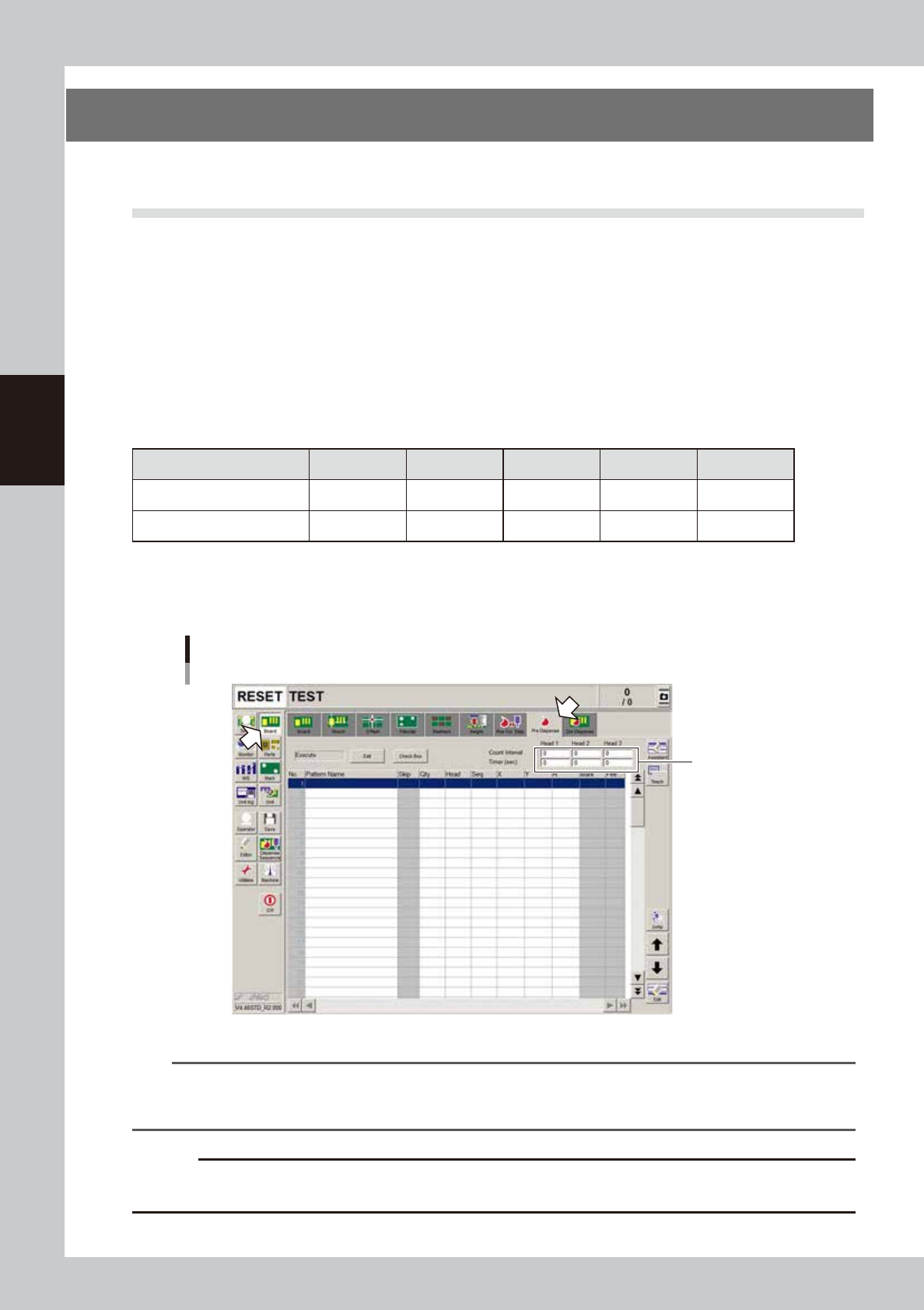
1. Open the [Board] – [Pre-dispense] screen
2. Enter the board count interval and time interval (sec.).
Predispensing interval setting
Enter the interval settings.
64300-N7-00
n
NOTE
In continuous production, first set an interval of every 2 boards as shown below.
• Board count interval : 2 boards
• Time interval : Cycle time + about 10 seconds
c
CAUTION
If the interval is set too large, then the initial number of dots from will be extremely little. Increase the interval gradually
so that no problem occurs with the dispensing operation.
3-11
3
Q & A
4. Low-liquid sensor functions
This section describes the functions that are effective when the normal low-liquid sensing cannot detect
whether the liquid has run out.
4.1 Remaining amount detection angle setting
When the normal low-liquid sensing cannot detect the liquid and so fails to determine whether the liquid has
run out, use the function that detects the reflected light from the piston. To enable this function, set the amp
output selector switch is set to “D_ON” and set the detection angle.
TIP
This function can be used with either “D_ON” or “L_ON” setting. But in most cases, set the amp output selector switch
to “D_ON” when detecting the piston.
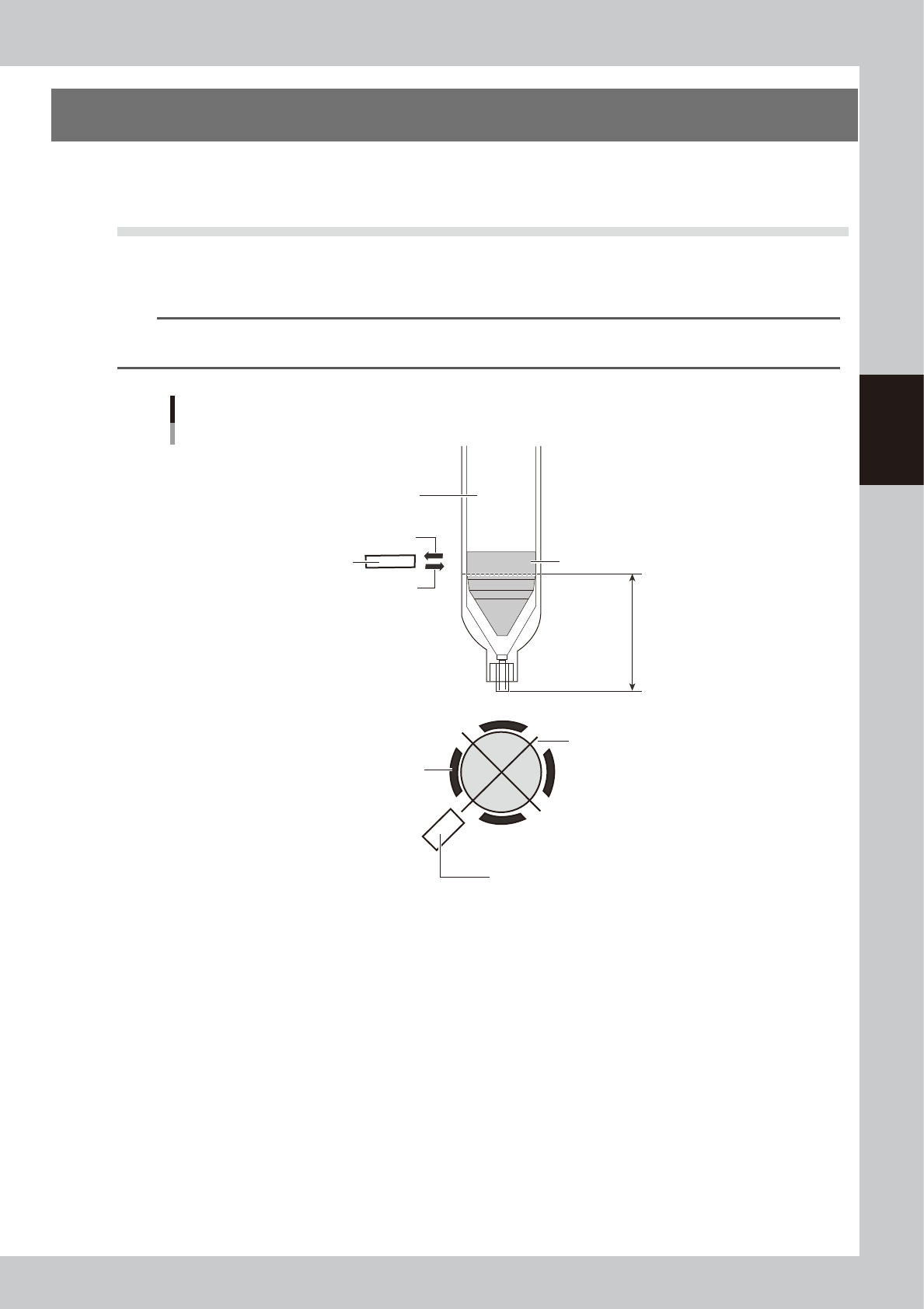
Overview of angle setting
Piston detection position
Low-liquid sensor
Syringe holder
Piston bottom end
(no liquid remains)
Hole in the syringe holder
opens each 90 degrees
Low-liquid sensor
Syringe (clear)
Sensor optical axis (reflected light)
Sensor optical axis (emitted light)
63301-N7-00
n
Operation overview
After producing one board, this function makes a remaining liquid check at the 4 angles of +90°+180°+270°and the
specified angle. (Four angles are used because correct detection is sometimes impossible with only one point due to the
portions where the liquid was not scraped evenly.)
If a liquid outage is detected, then an error appears after one board is produced.
(Error display timing might be somewhat delayed compared to normal remaining liquid detection)
n
Item restrictions
• The remaining liquid might not be detected due to the syringe being used.
• All heads must detect the remaining liquid at the same R-axis angle.
• Cycle time might be slow depending on the board data.
On the [Board] - [Board] screen, “Precede Check” should be set to “Use”.
* Cycle time might sometimes be slow or delayed when the distance from the final dispensing coordinates to standby
position is short.