YSD_Users_E.pdf - 第168页
4-40 4 Making the dispensing stable 3 Set the station datum. Set the left side edge position of the plastic plate to the dot station. 4 In "Size" (X, Y), enter the X and Y siz es of the area where predispense i…
4-39
4
Making the dispensing stable
5.1.2 Entering the pre-dispensing position
To enter the pre-dispensing XY positions on the dot station, proceed as follows.
1
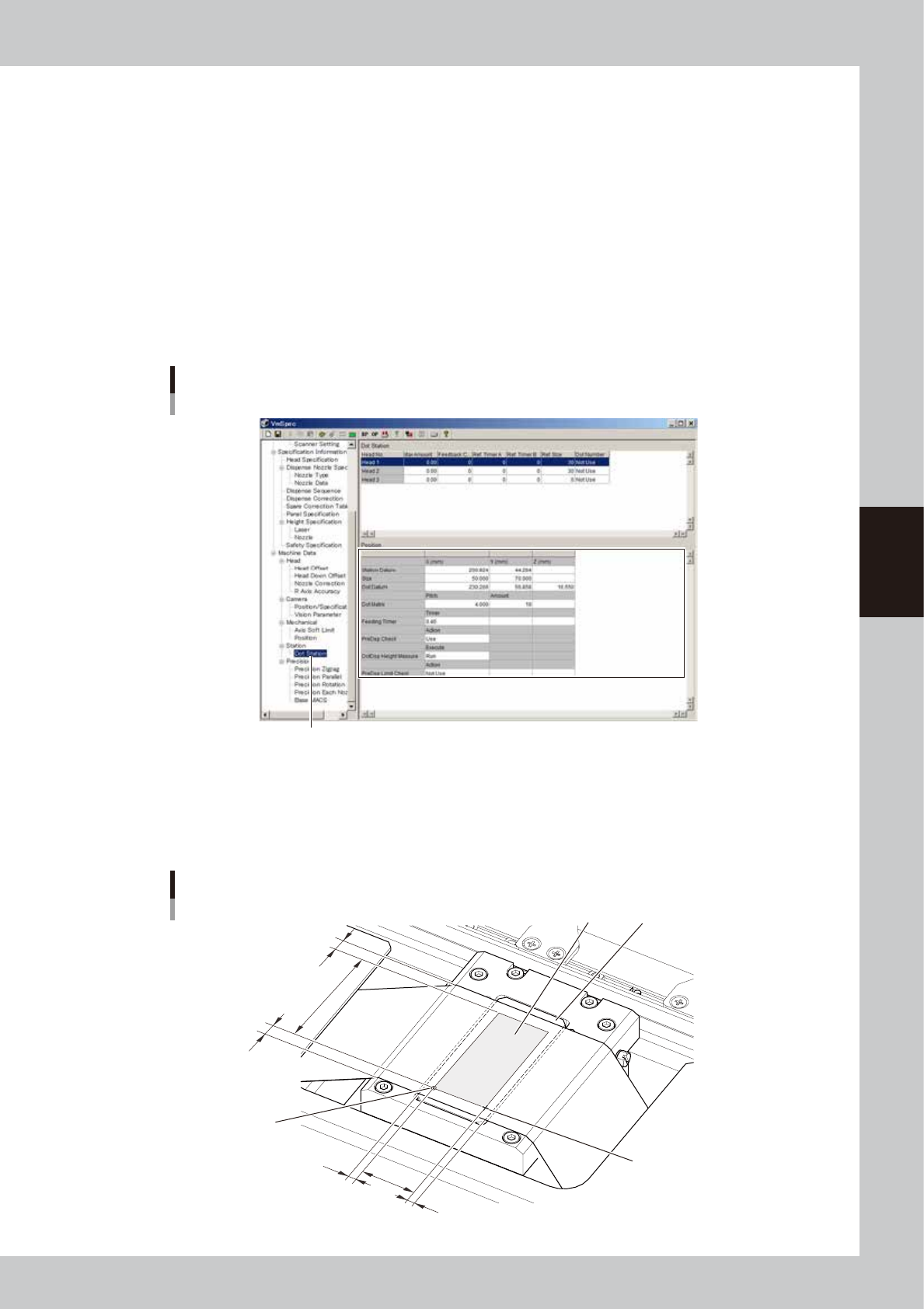
Set the "Dot Datum" parameter.
The dot datum indicates the position at which predispensing starts on the dot station.
1. Select the "Dot Station" in the tree view to display the "Dot Station" and "Position" grids in the main
view.
2. Set the X and Y positions in the "Dot Datum" row.
The pre-dispensing position must be set to a position which is 3mm inward from the right edge of the
paper in the X direction and 5mm inward from the edge of the paper in Y direction.
3. Set the Z position in the “Dot Datum” row.
Check the height where the stopper of Head 1 just contacts the paper on the dot station. Then, as
the Z position, enter a value 0.2 mm greater than that height.
Dot station
Pre-dispensing position
Dot station
64408-N7-00
2
Set the "Dot Matrix" parameter.
Set the predispensing pitch and the number of dots in the "Dot Matrix" row.
1. In "Pitch", enter the interval (mm) to automatically predispense on the dot station.
2. In "Amount", enter the number of predispensing dots in Y direction.
Dot station
Predispensing position
Station datum
Dot datum
Dispense area
Diffuser
24mm
45mm
5mm
5mm
3mm
3mm
63405-N7-10
4-40
4
Making the dispensing stable
3
Set the station datum.
Set the left side edge position of the plastic plate to the dot station.
4
In "Size" (X, Y), enter the X and Y sizes of the area where predispense is to be
performed.
Set "24 mm" for X and “45 mm” for Y.
These values should not be changed.
5
Set the feeding timer
In "Timer", enter the period of time during which power is to be supplied to the dot station's paper feed
motor. This period of time means the amount of paper feed. The time can be set to a maximum of 0.50
seconds in steps of 0.05 seconds.
5.1.3 Setting the dot station data
1
Display the dot station data.
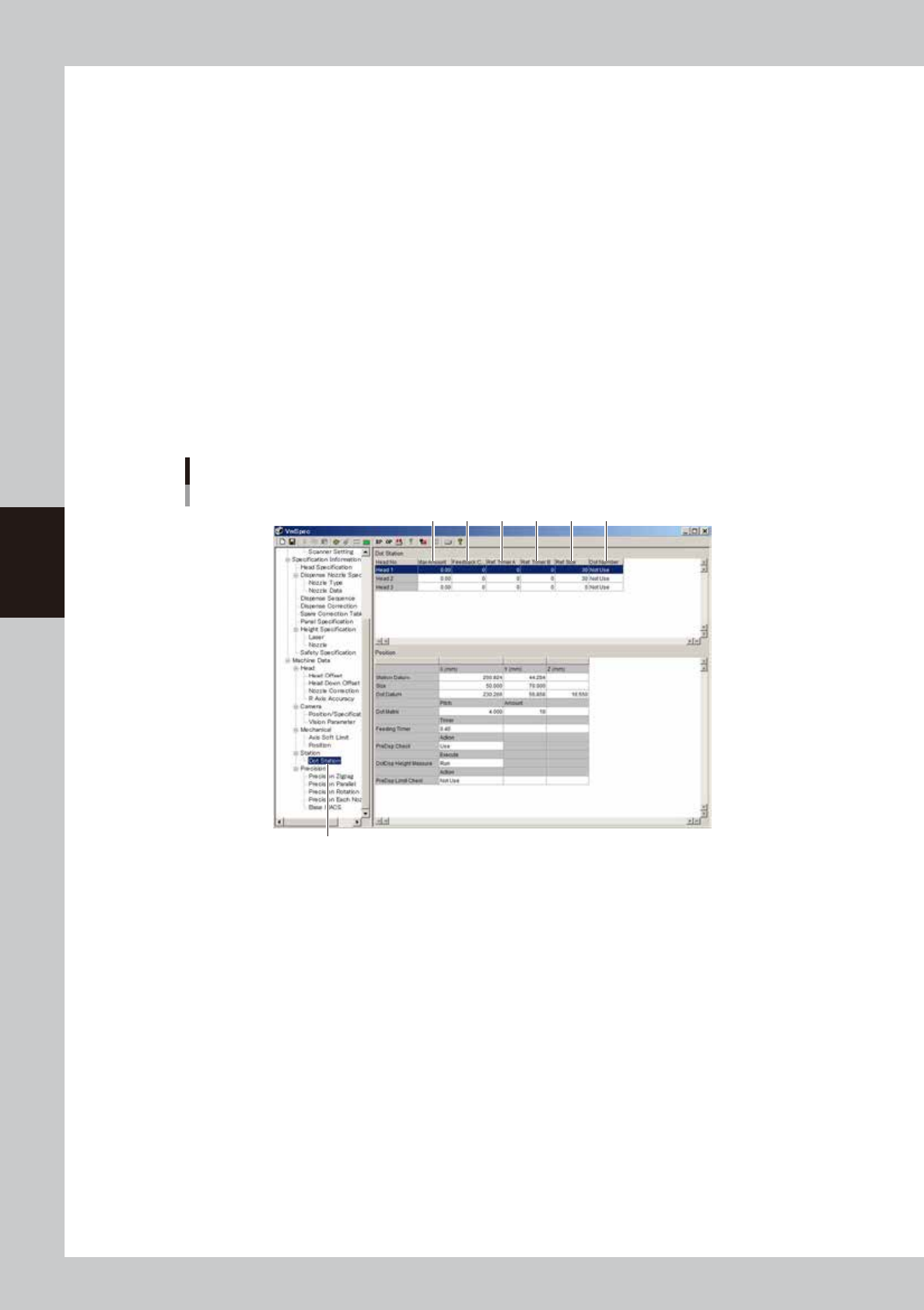
Select "Dot Station" in the tree view to display the "Dot Station" grid in the main view.
2
Set the dot station data.
Dot station data
Dot station
1 2 3 54 6
64409-N7-00
1. Max Amount
Divide the total dispense consumption (equivalent to one whole syringe) measured during automatic operation by 1000,
and enter the result in "Max Amount". This parameter is used to issue a warning when the dispensing liquid has run out.
(Max. 99999.99)
For instance, enter "1357.46" if the total dispense consumption is "1357456".
When this value is reached, the warning buzzer will sound and a message will appear. If the machine has the optional
adhesive run-out sensor or if you are not going to use this function, enter "0".
2. Feedback Condition
Enter the number of boards for which recognition feedback is to be performed.
After dispense is completed for the specified number of boards, dot recognition correction will be performed on the next
board according to the predispensing data. (Max. 9999)
4-41
4
Making the dispensing stable
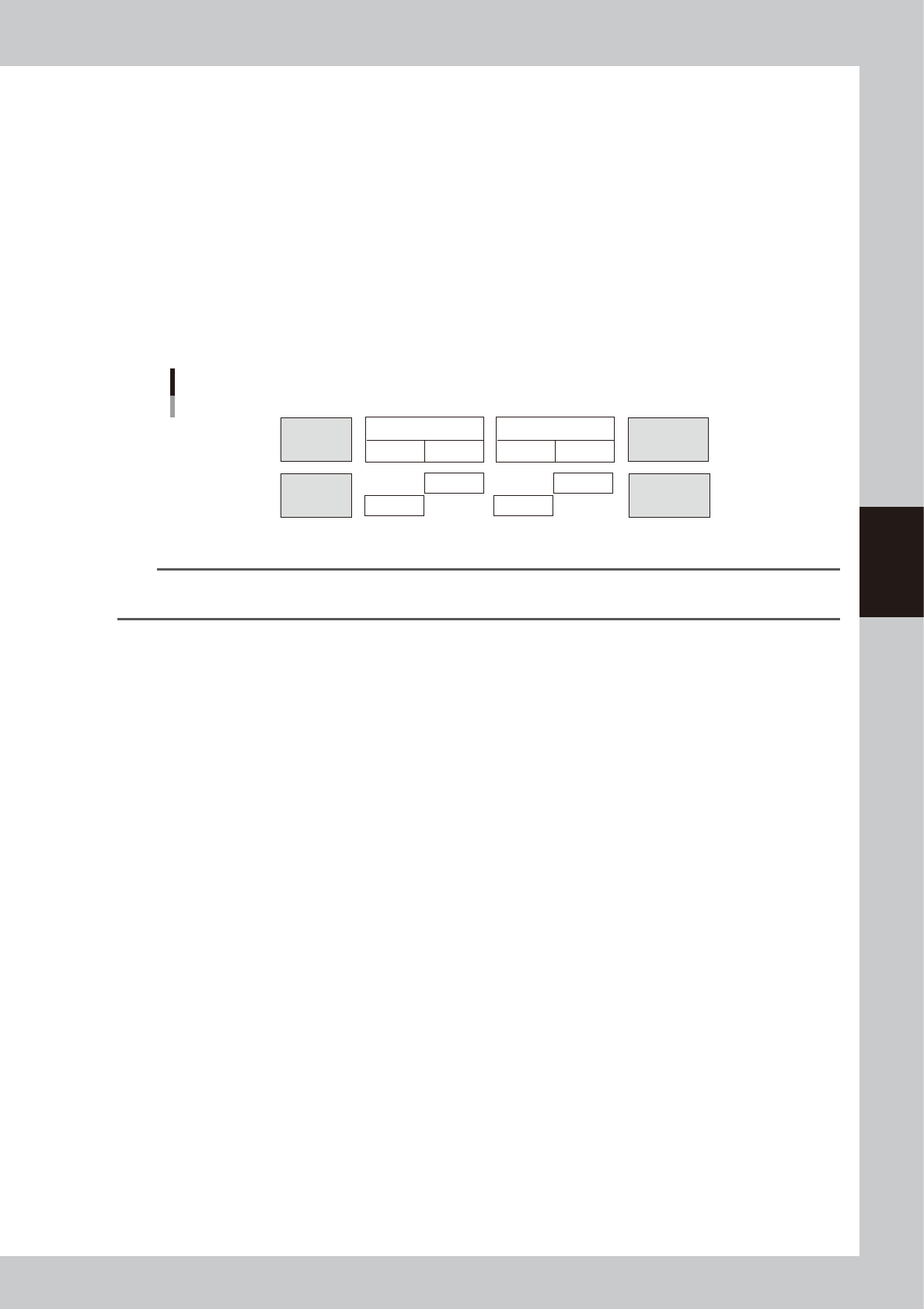
3. Ref. Timer A
Enter the period of time (0 to 99999 seconds) during which automatic predispensing is to be performed.
If no dispense is performed for a long period of time, the dispensing liquid at the nozzle tip will harden, causing unstable
dispensed dots. To prevent this problem, automatic predispensing is performed each time this time is exceeded in cases
where the head used has not dispensed for a certain period of time during board transfer or standby state (Ref, Timer A).
Predispensing is performed during automatic operation and the timer is counted even during STOP or emergency stop.
Predispensing is first performed at the timing when automatic operation starts next time.
4. Ref. Timer B
Enter the period of time (0 to 99999 seconds) during which automatic predispensing is to be performed.
When exchanging the head during dispensing, predispensing will be performed automatically if this "Ref. Timer B" is
exceeded by the remaining time for the head you are exchanging. Predispensing is performed during automatic operation
and the timer is counted even during STOP or emergency stop. Predispensing is first performed at the timing when
automatic operation starts next time.
Head 1
<Stop time>
Head 2
Time conditions A and B
Transferring
board
Time
conditions A
Time
conditions B
Time
conditions B
Time
conditions B
Time
conditions B
Time
conditions A
Waiting for
board
Predispensing
Had 1
Head 1
Head 2
Head 2
Dot dispensing
63417-N7-00
n
NOTE
As time condition A, enter a value that is about 2 to 4 times larger than the normal cycle time and increase or
decrease it while checking the production.
5. Ref Size
Set the size difference for predispensing.
When dispensing small dots after large dots, the size of the small dots is sometimes not constant. To prevent this problem,
predispensing is performed automatically after large dots are dispensed. For this parameter, set the size difference that
triggers automatic predispensing. (Max. 255)
For instance, when this parameter is set to 10, predispensing will be automatically performed if the difference in the
liquid amount for the next dispensing exceeds 10.
(Example) When a liquid amount of 24 is dispensed after a liquid amount of 35 is dispensed, automatic predispensing
will be performed.
When a liquid amount of 25 is dispensed after a liquid amount of 35 is dispensed, automatic predispensing will not be
performed.
6. Not Number
Set the number of predispensing dots.
3
Save the settings you have made and exit.