YSD_Users_E.pdf - 第203页
5-14 5 Creating the board data 4.1 Board parameters Selecting the [Board] tab opens the screen that allows y ou to set or chec k the following board parameters. Board parameter screen 64505-N7-00 A, B: board Size XY Ente…
5-13
5
Creating the board data
4. Creating the board information
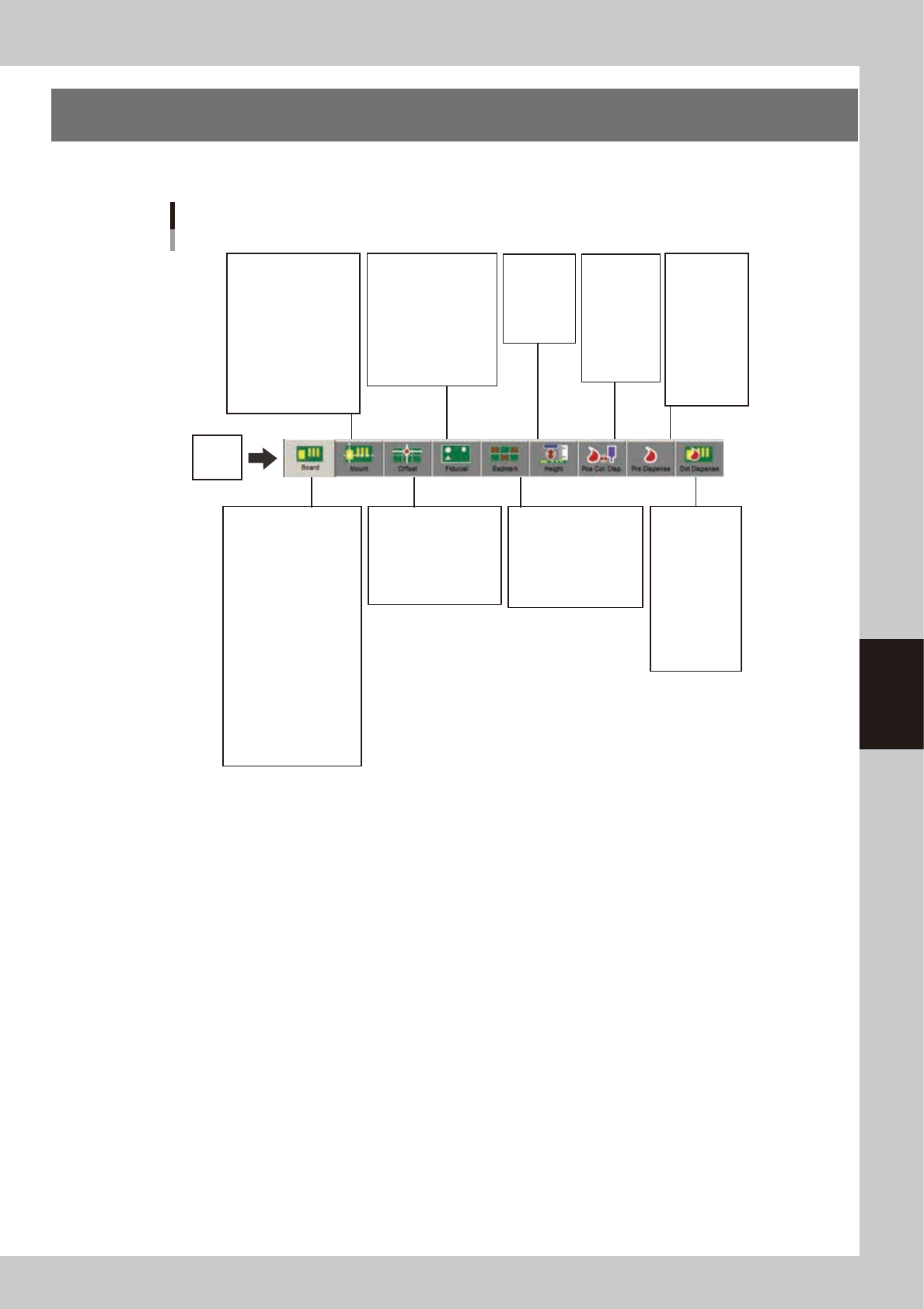
This section describes how to create board information such as for board size and production methods.
Board
Board data parameters
Data No.
Pattern Name
Skip
X, Y, R
P. No.
Part Name
Head
Bad.
Fid.
Original Block No.
Data No.
Pattern Name
Type
Skip
X, Y, R
Original Block No.
Data No.
Pattern Name
Type
X1, Y1
Mark 1
X2, Y2
Mark 2
Original Block No.
Data No.
Pattern Name
Type
X, Y
Mark
Original Block No.
Board Size XY
Board Size Height
Board Comment
Prod. Board Counter
Prod. Board Count Max.
Prod. Block Counter
Unloader Counter
Unloader Count Max.
Board Fix Device
Pre Fix Timer sec
Trans Height
Conveyor Timer sec
Dot Checking
Refresh Dispense
Conveyor Motor Speed
Conveyor Transfer Way
Data No.
Pattern Name
Skip
Qty.
Head
Sequence
X, Y, R
Mark
Feedback
Data No.
Pattern Name
Skip
Qty.
Head
Sequence
X, Y, R
Fid.
Bad.
Height
Data No.
Comment
Mode
Mark
X, Y
Data No.
Pattern Name
Skip
Qty.
Head
Sequence
X, Y, R
Mark
64304-N7-00
5-14
5
Creating the board data
4.1 Board parameters
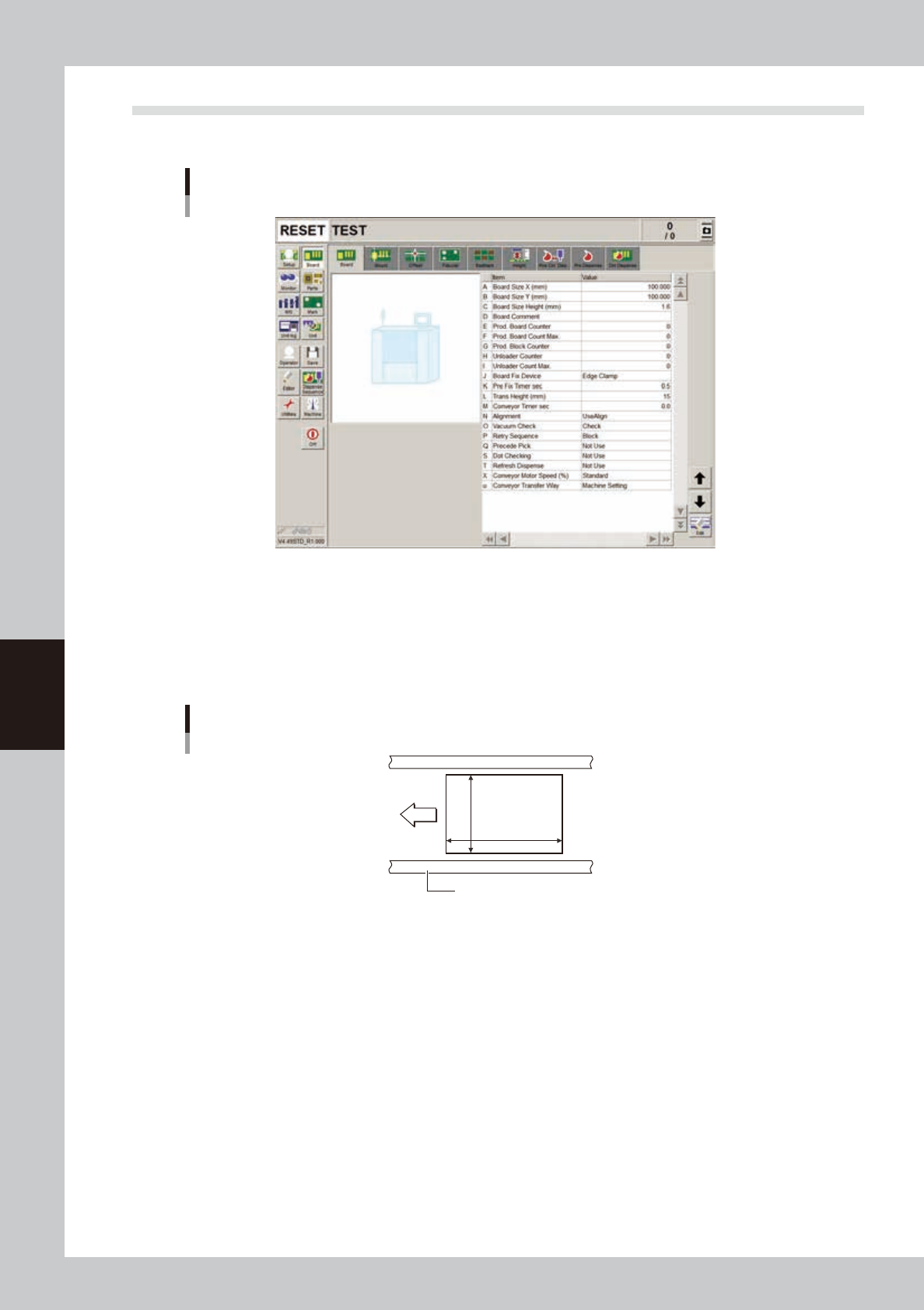
Selecting the [Board] tab opens the screen that allows you to set or check the following board parameters.
Board parameter screen
64505-N7-00
A, B: board Size XY
Enter the length of the board in the XY directions in millimeters. The conveyor width (W-axis) will be adjusted according
to the Y length in automatic operation.
X: Length in the board flow direction
Y: Length in the conveyor width direction
Board Size
X [mm]
Y [mm]
Board
Board flow direction
Conveyor rail
64301-N7-00
C: Board Size Height
Enter the thickness of the board in millimeters.
D: Comment
You can enter a comment for the board as necessary.
E: Prod. board Counter
Enter the number of boards already produced. Set this value to “0” as a start.
F: Prod. board Count Max.
Enter the number of boards that you want to produce. When this is set to “0”, the machine continues to produce boards
as long as they are fed on the conveyor.
G: Prod. Block Counter
Enter the number of blocks on one board when producing multi-block boards.
H: Unloader Counter
Specify the number of boards transferred into the unloader. Set this value to “0” as a start.

5-15
5
Creating the board data
I: Unloader Count Max.
Specify the number of boards that can be stored in one rack of the unloader. When the specified number of boards has
been produced and transferred out into the unloader, the machine stops transfer of the production board until the
unloader replaces the rack. If this is set to “0”, the machine continues production without checking the number of boards
transferred out into the unloader. Enter “0” in the following cases.
• The unloader being used provides a rack switching signal output.
• This setting data is to be used for the machine just before reflowing.
J: Board Fix Device
Set to "Edge Clamp"in most cases.
Board is clamped on the conveyor with the edge clamps and push-up pins.
K: Pre-Fix Timer
The machine begins to clamp the board immediately after it passes above the board sensor installed just before the main
stopper. The optimum clamping timing (delay time with respect to the sensor detection) depends on the board size and
conveyor speed. Use this parameter to set the clamp timing (0.0 to 1.9 sec.).
L: Trans Height
After components are mounted, the machine permits the conveyor to carry out the board when the push-up unit is
lowered. If components have already been mounted on the reverse side of the board, the push-up unit must be lowered
sufficiently to avoid interference from push-up pins with those components. This parameter specifies the height of the
push-up unit at which the conveyor is allowed to carry out each type of board. Enter the distance in millimeters from the
point where the push-up unit is raised to clamp the board. This distance can be 5 to 30 mm.
M: Conveyor Timer
Set to “0.0” sec. for normal shape boards. If specially configured boards (for example, boards with cutout parts or
through-holes) are used and the exit sensor cannot detect them reliably, try setting this timer in the range of 0.0 to 9.9
sec. The conveyor motor continues turning for the specified time even after the board sensor turns off.
N: Alignment (Not used with this machine.)
O: Vacuum Check (Not used with this machine.)
P: Retry Sequence (Not used with this machine.)
Q: Precede Pick
Set to “Use” in most cases.
S: Dot Checking
Set to “Use” to perform predispensing.
When set to “Use”, the image of the predispensed dot is recognized to check the dispensing liquid run-out, nozzle
clogging, cobwebbing, etc. according to the mark number specified in advance by the predispense data.
T: Refresh Dispense
Set this parameter when pre-dispensing adhesive on the dot station (option) to refresh the dispense dot size.
For details of the setting method, refer to "5.1.1 Setting the dot station function" in Chapter 4.
X: Conveyor Motor Speed (%)
Set the conveyor motor speed (Board transfer speed). With respect to the machine setting speed, the conveyor speed can
be adjusted to 50% on the plus side and 90% on the minus side in 10% steps.
U: Conveyor Transfer Way
The conveyor transfer method can be set for each board data. Select the desired method from among “Machine Setting”,
“Normal” and “Fast”.
• Machine Setting
This uses the transfer method that is specified by the machine setting (VmSpec).
• Normal
When dispensing on a board is finished, the finished board is unclamped and starts being transferred to the conveyor
exit. When the finished board has passed the WorkOut sensor on the conveyor, another board at the standby position
is conveyed into the work position.
• Fast
When dispensing on a board is finished, the finished board is unclamped and starts being transferred to the conveyor
exit. When the finished board is detected by the WorkOut sensor on the conveyor, another board at the standby
position is conveyed into the work position. The main stopper rises when the finished board has passed the WorkOut
sensor.