YSD_Users_E.pdf - 第233页
5-44 5 Creating the board data Shape parameters for SOP A : Body Size X B : Body Size Y C : Body Size Z G : Lead Pitch H : Lead Width I : Reflect LL Bottom view N S E W B C A N S W E G H I 63527-N7-00 Dispense parameters…
5-43
5
Creating the board data
5.3.2 SOP components
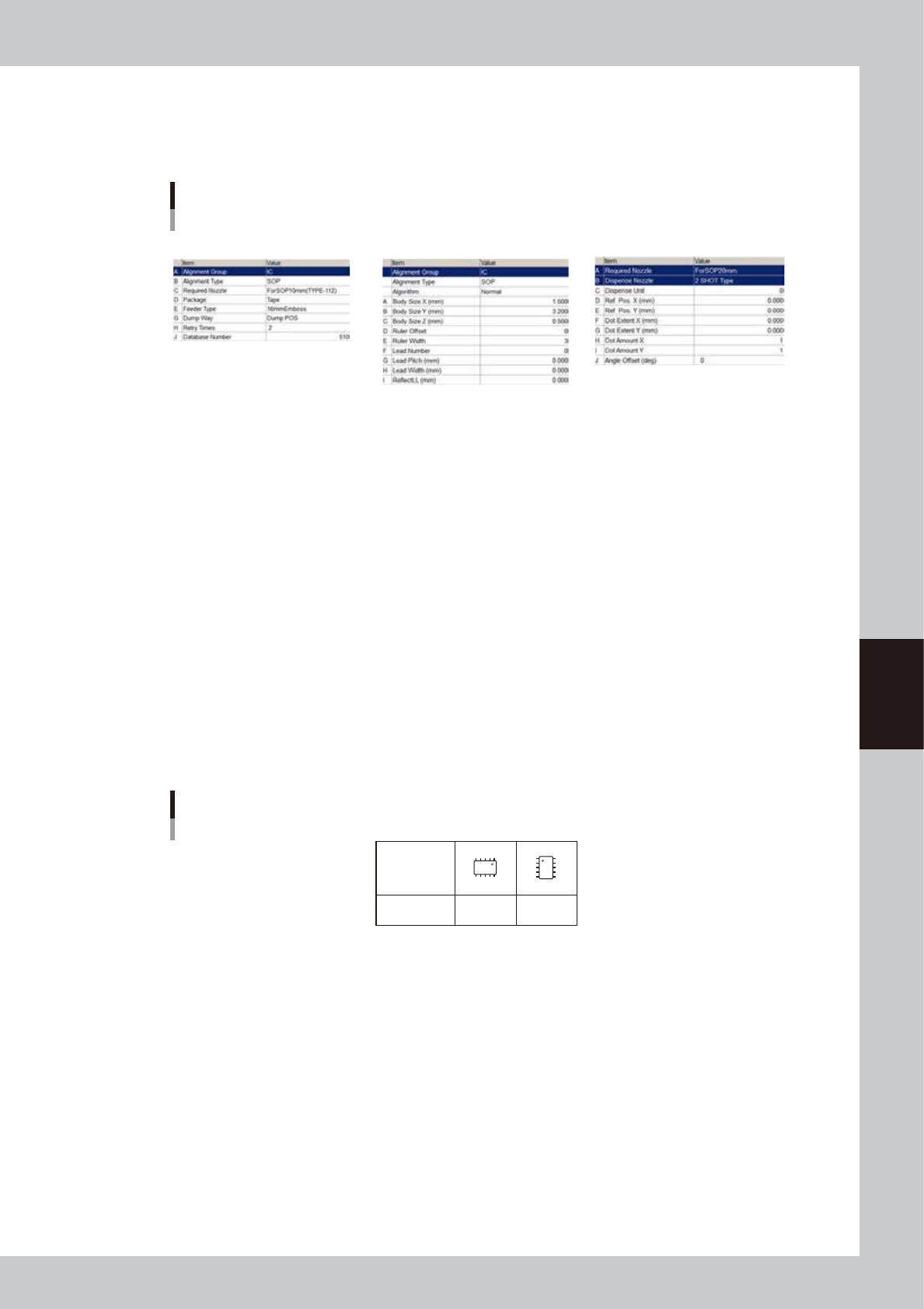
SOP components are registered with the parameters shown below. Refer to the description in "5.2 Chip components" for
parameters not explained here.
SOP component parameters
Basic Shape Dispense
64525-N7-00
Basic parameters
A: Alignment Group
Set this parameter to “IC”.
B: Alignment Type
Set to “SOP”.
Shape parameters
Set these parameters after specifying “Alignment Type”. If “Alignment Type” is undefined, the following parameters are
not displayed.
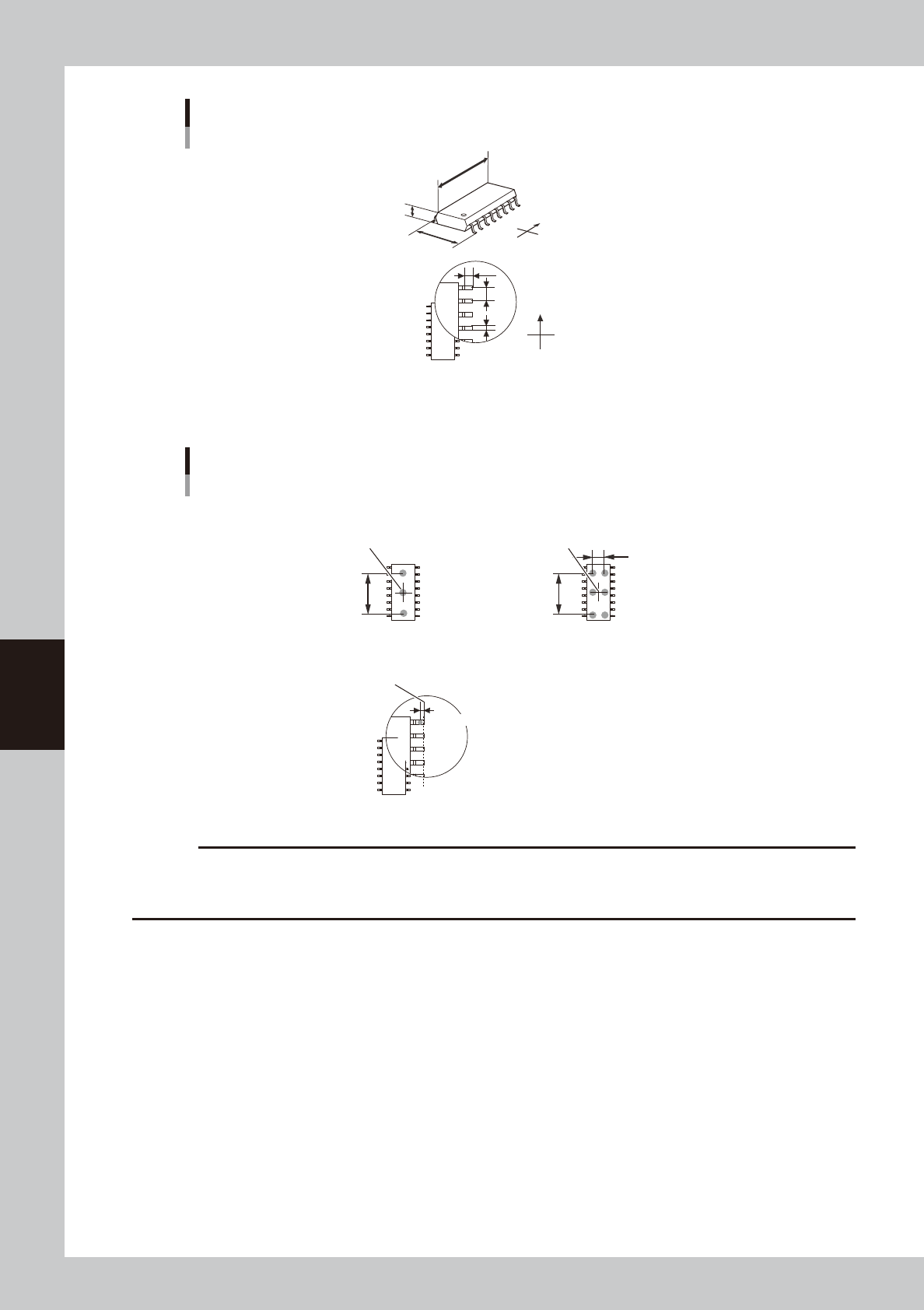
A, B: Body Size X, Body Size Y
Enter the correct dimensions (mm) including the leads, measured with a vernier caliper or micrometer.
D: Ruler Offset (Not used with this machine.)
E: Ruler Width (Not used with this machine.)
F: Lead Number
Enter the number of leads existing in the E or W direction.
SOP directions
0° 90°
Loading
position
Pickup angle
NS
E
W
N
S
WE
63525-N7-00
G: Lead Pitch
Enter the correct lead pitch (lead-to-lead spacing).
H: Lead Width (Not used with this machine.)
Enter the correct lead width
I: ReflectLL (Not used with this machine.)
Enter the projected length of leads which reflect light during recognition. Use the default setting in most cases.
5-44
5
Creating the board data
Shape parameters for SOP
A : Body Size X
B : Body Size Y
C : Body Size Z
G : Lead Pitch
H : Lead Width
I : Reflect LL
Bottom view
N
S
E
W
B
C
A
N
S
W
E
G
H
I
63527-N7-00
Dispense parameters
Dispense for SOP components
■ 2-shot nozzle (bond)
(3-point dispense)
Y-directional
dot extent
Center of component
Varies with 2-shot
nozzle pitch.
Lead end position
■ 1-shot nozzle (bond)
Reference position (0.00)
Reference position X
■ 1-shot nozzle (bond)
(3-point dispense)
Center of component
Y-directional
dot extent
63528-N7-00
c
CAUTION
• When using solder paste for SOP components, the amount of solder paste may be insufficient if dispense is
performed only twice for each lead.
• When using solder paste for SOP components, dispense may not be possible if the lead pitch is 0.8 mm or narrower.
5-45
5
Creating the board data
5.3.3 QFP components
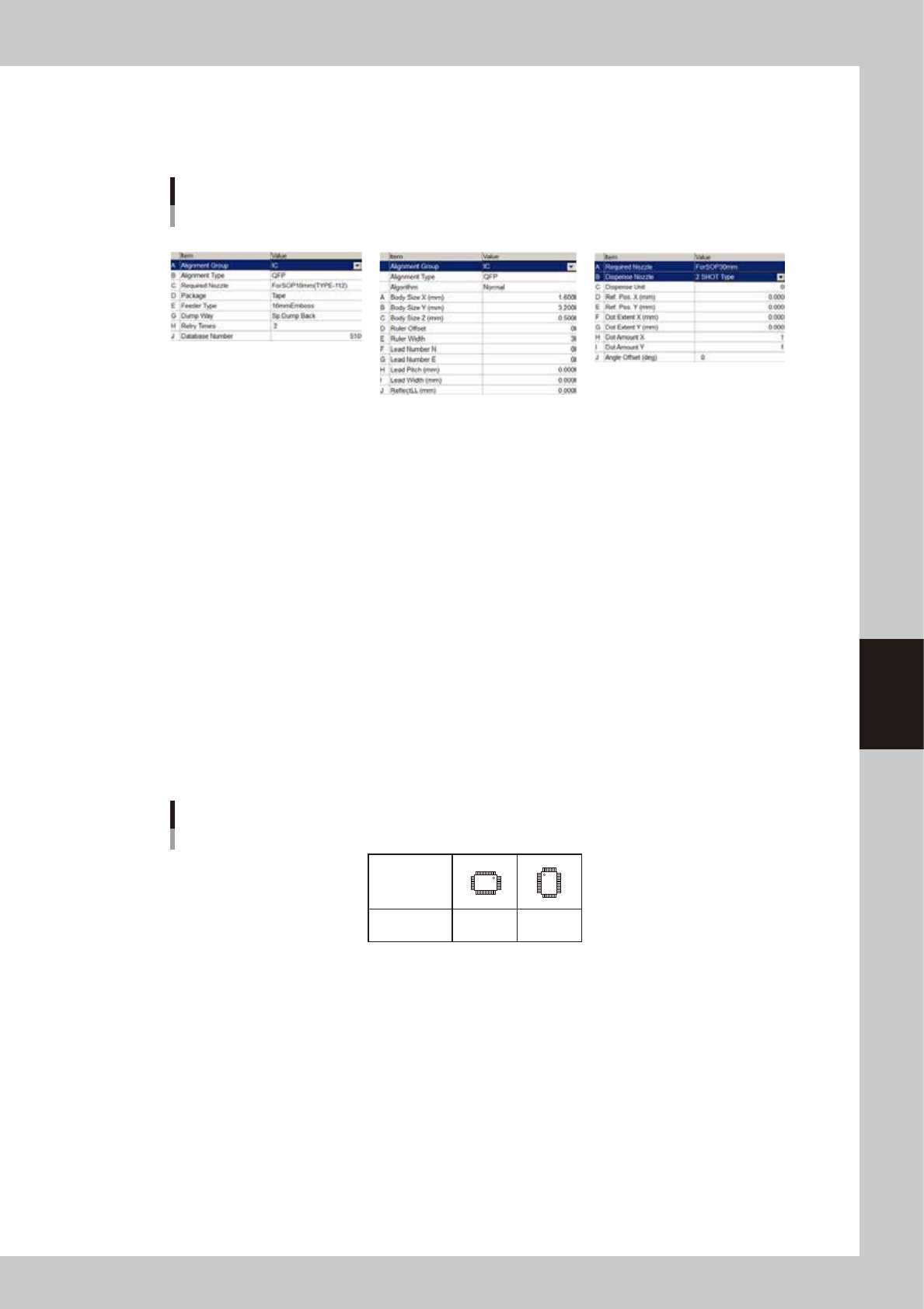
QFP components are registered with the parameters shown below. For parameters not explained here, refer to
the description in "5.2 Chip Components" of this chapter.
QFP component parameters
Basic Shape Dispense
64526-N7-00
Basic parameters
A: Alignment Group
Set this parameter to “IC”.
B: Alignment Type
Set to “QFP”.
Shape parameters
Set these parameters after specifying “Alignment Type”. If “Alignment Type” is undefined, the following parameters are
not displayed.
A, B: Body Size X, Body Size Y
Enter the correct dimensions (mm) including the leads, measured with a vernier caliper or micrometer.
D: Ruler Offset (Not used with this machine.)
E: Ruler Width (Not used with this machine.)
F, G: Lead Number NE
Enter the number of leads existing in the N or E direction.
QFP directions
0° 90°
Loading
position
Pickup angle
NS
E
W
N
S
WE
63529-N7-00
H: Lead Pitch
Enter the correct lead pitch (lead-to-lead spacing).
I: Lead Width (Not used with this machine.)
Enter the correct lead width
J: ReflectLL (Not used with this machine.)
Enter the projected length of leads which reflect light during recognition. Use the default setting in most cases.
K: Bumper Mask (Not used with this machine.)
This parameter is used for QFPs with bumpers. Enter the distance in millimeters from the cross point of the imaginary
lines so as to specify the area by which bumpers are masked and not detected during component recognition. Set this
parameter to a value between 0 and 10.0 in 0.25 mm steps. Enter “0.00” for normal QFPs with no bumpers.