YSD_Users_E.pdf - 第39页
ii About this manual 1.2 Page layout T he description below shows a typical page la yout used in this manual. 2-34 2 Basic operation 4.3 F inis h in g board productio n To f inis h boa r d p r oduc t ion , fo l lo w t he…

i
About this manual
1. About this manual
This manual is intended for machine operators, and mainly describes how to handle and operate YAMAHA
surface mounters and related equipment.
To use the machines safely and correctly, be sure to read this manual thoroughly before use.
c
CAUTION
Before using the machines, always read the "Safety instructions" in this manual and comply with instructions and rules
regarding safety.
c
CAUTION
The contents of these manuals are subject to change without prior notice. Please be sure to contact our sales office or
representative to obtain the latest information on part names and part numbers.
1.1 Contents of each chapter
This manual is comprised of the following chapters. An index is also provided at the end of this manual.
Chapter 1 Part names and functions
Explains major part names and functions of the machine that you should know before attempting operation.
Chapter 2 Basic operation
This chapter describes the operation and tasks mainly performed by the operators in the production line.
• Describes the basic operation and tasks needed for board production, including the procedure from how to start the
machine to how to turn it off.
• Describes the basic operation of how to use optional equipment.
Chapter 3 Q & A
This chapter describes how to troubleshoot when a dispensing error or a problem occurs.
Chapter 4 Making the dispensing stable
This chapter describes the functions for dispensing liquid stably on a board.
Chapter 5 Creating the board data
This chapter describes the procedure for creating the board data and also explains the basic parameters.
Chapter 6 Using the advanced functions
This chapter explains the advanced functions that help improve the operation efficiency when used with standard
functions.
Chapter 7 Editing the board data
This chapter describes how to use the Editor for data editing, file format conversion, and addition or deletion of
dispensing points.
Chapter 8 Managing the data
This chapter describes how to make a backup of data, as well as how to make use of database.
Index
The index at the end of this manual helps you quickly find where necessary items are explained.
ii
About this manual
1.2 Page layout
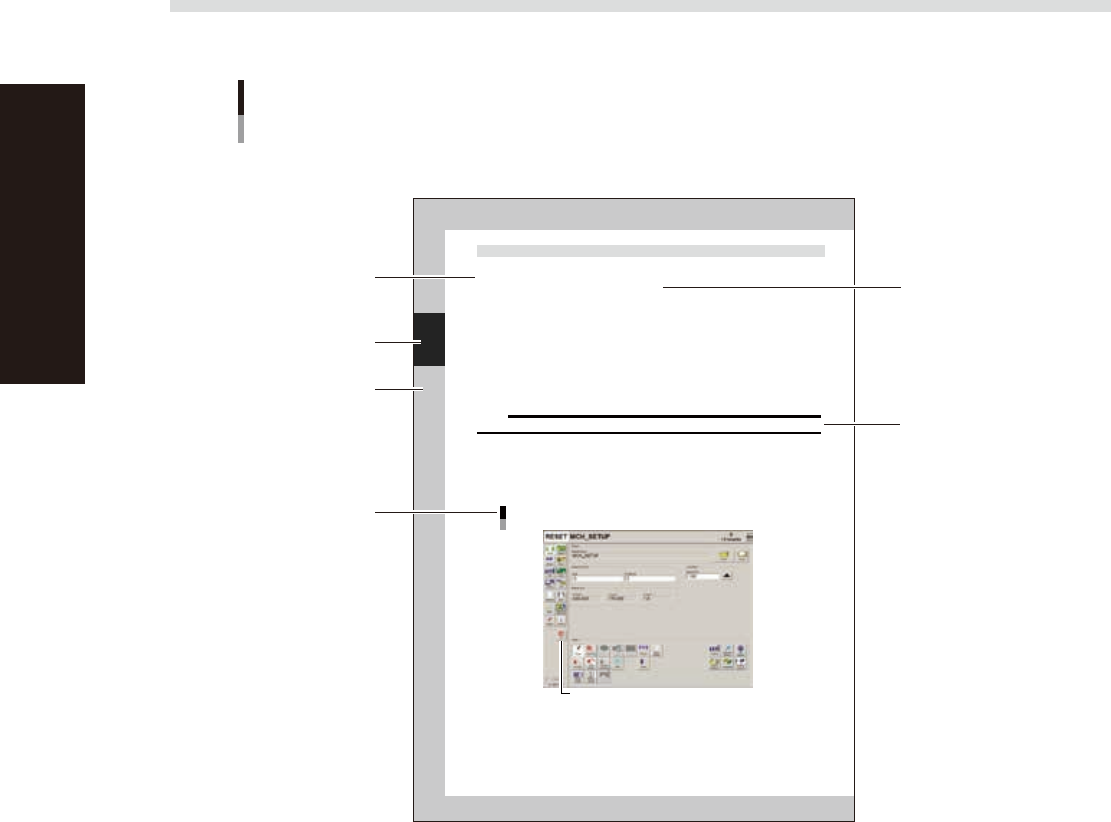
The description below shows a typical page layout used in this manual.
2-34
2
Basic operation
4.3 Finishing board production
To finish board production, follow these steps.
1
Stop machine operation.
The re are three meth ods for stopping the machine.
1. Emergency stop button:
Press this button to trigger emergency stop. Do not use this button in normal operation.
e
2. [STOP] button (operation panel):
Pressing the [STOP] button stops the machine immediately. To resume operation, press the [START]
button on the operation panel.
3. [Cycle Stop] button:
Pressing this button stops the machine when dispense operation for the current board is completed.
4. [ConveyOut Stop] button:
Use this button when you want to finish production after adhesive is dispensed on the boards
currently on the conveyor. All boards on the conveyor are transferred to the downstream side after
adhesive dispensing, but new boards are not transferred from the upstream side.
c
CAUTION
Do not press the emergency stop button during operation except in case of emergency.
2
Reset the operation.
Press the [RESET] button on the operation panel. The machine stops operation immediately and returns
to the board production standby status.
3
Press the [Off] button.
Press the [Off] button located in the button area.
[Off] button
[Off] button
64223-N7-00
Typical page layout
Step
Chapter number
Chapter title
Substep or
description of step
Figure, picture
or table caption
Note, Caution
or Warning
63000-N7-00
n
Step
This describes the procedure for each operation.
n
Substep or description of step
This provides detailed information on each step.
n
Figure or table caption
This is the title of the figure or table and appears at the upper left.
n
Note, Caution or Warning
These are explained in detail in "Safety instructions".

Chapter 1 Part names and functions
Contents
1. Machine main unit 1-1
2. Operation panel and data input unit 1-3
2.1 Operation panel buttons 1-4
2.2 Keyboard (option) 1-5
3. Head assembly 1-6
3.1 Dispenser head 1-6
3.2 Nozzle types 1-7
3.2.1 Two-shot nozzles 1-7
3.2.2 One-shot nozzles 1-8
3.2.3 Narrow-pitch type nozzles 1-9
3.3 Dot plate 1-10
3.4 Dot station (option) 1-11
4. Front panel switches 1-12
5. Conveyor unit 1-13
6. Axis configuration 1-14
7. Air regulator unit 1-15
8. Connection between machines 1-16
8.1 PREVIOUS INTERFACE connector 1-17
8.2 NEXT INTERFACE connector 1-18
9. Power connection terminals 1-19