YSD_Users_E.pdf - 第97页
2-37 2 Basic operation • [Reset] button Resets the production control information, including each data and current production quantity , current unloader quantity , sc heduled production quantity and scheduled unloader q…
2-36
2
Basic operation
[Error Clear] button
After correcting the error or completing the instructions or warning that are listed in the “Select Operative Position”
dropdown list, press this button to clear the error and resume automatic operation. However, if an error (other than
warning) remains uncorrected, automatic operation cannot resume.
4. Information display area
Displays information on each head.
n
Monitor: Main
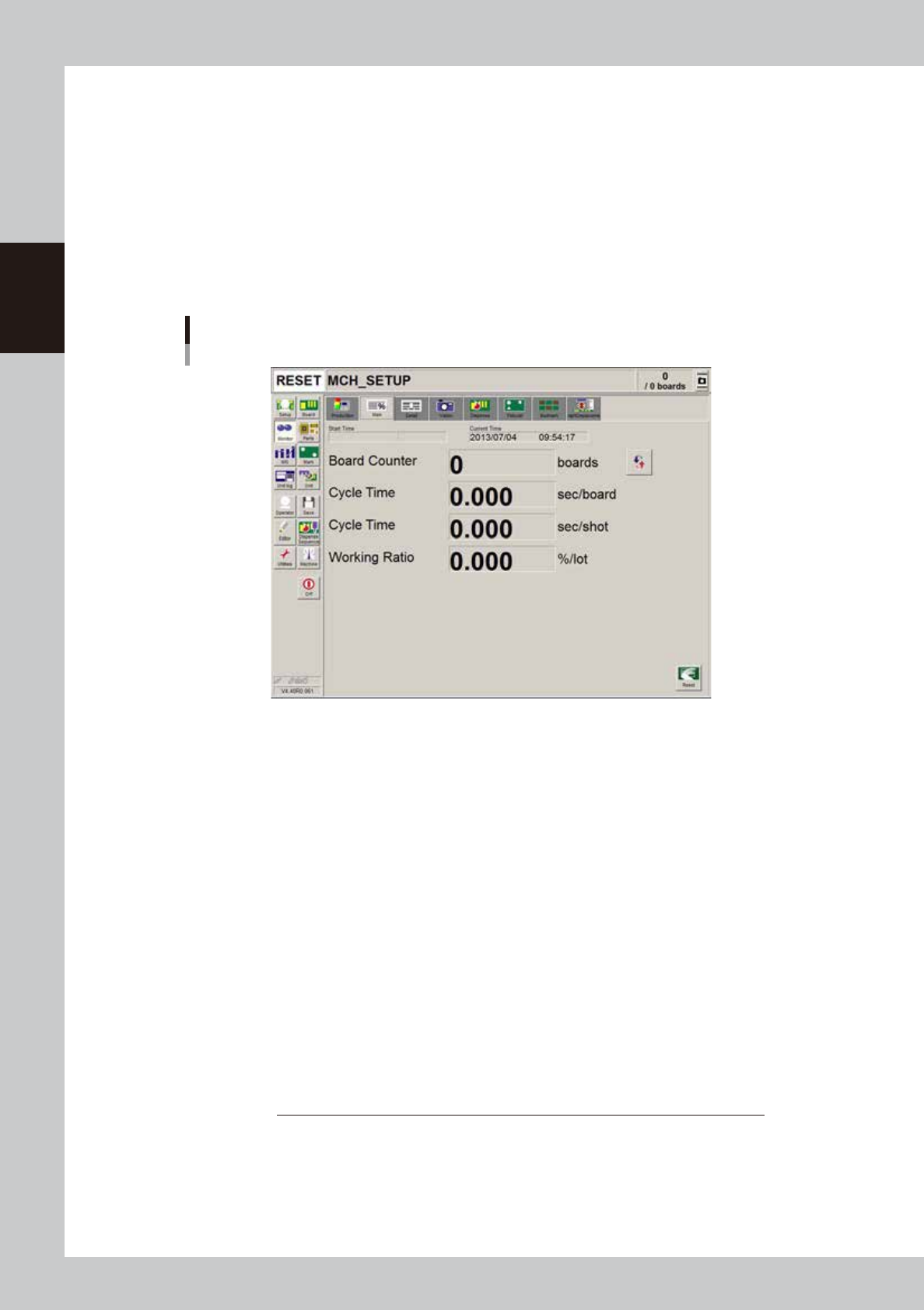
The [Monitor]-[Main] tab screen shows you the real-time production status such as the board count and cycle time.
Displaying this screen during production is handy. All information will be cleared when the board type is changed.
Monitor
Main
64217-N7-00
• Start Time
Displays the date and time that the board data currently being produced was changed.
• Current Time
Shows the current date and time (system clock time in the machine).
• Board Counter
Displays the number of boards produced after changing to the current board data. The board data reset midway is not
counted unless mounted midway.
• Cycle time (sec/board)
Shows the average (second/board) of the dispensing time per board. The data is updated when adhesive dispensing is
complete. The cycle time includes the mark (including fiducial and bad marks) recognition time and adhesive dispensing
time. The board transfer time and stop time (time stopped with error or [STOP] button) is not included.
• Cycle Time (sec/shot)
Shows the time (second) required to dispense one dot of adhesive.
• Working Ratio
This is the machine unit's working ratio. This ratio is not affected by the status of the upstream and downstream
machines, and is calculated with the following expression. Generally, the mounter working ratio is 40 to 70%.
Working ratio (%) =
Cumulative mounting time + cumulative transfer time
× 100
[(Production completion time - setup completion time) - cumulative standby time]
Cumulative mounting time :Total time that head is operating
Cumulative board transfer time :Total board transfer time (loading/unloading)
Cumulative standby time :Total time upstream or down stream machine stands by
Production completion time :Time changed to next production board
Setup completion time :Time [START] button was pressed and operation started
2-37
2
Basic operation
• [Reset] button
Resets the production control information, including each data and current production quantity, current unloader
quantity, scheduled production quantity and scheduled unloader quantity. The "Board Counter" value on the [Setup]
screen is also reset when this production data is reset.
n
Monitor: Detail
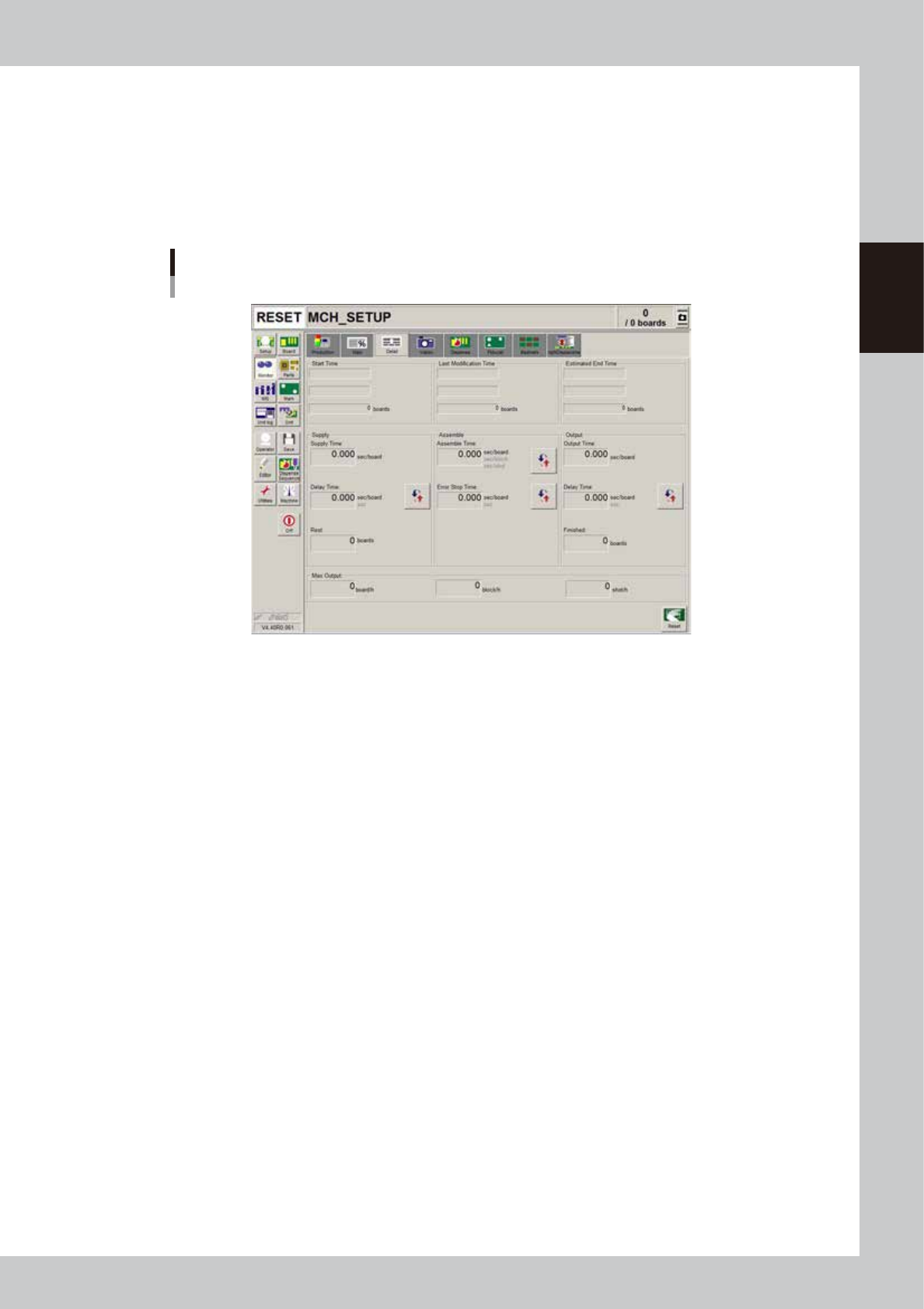
The [Monitor]-[Detail] tab screen shows you the detailed production status of the current production board data.
Monitor
Detail
64218-N7-00
• Start Time
Shows the time that production was started. The quantity at the start time is normally zero boards.
• Last Modification Time
Shows the display data update time. The number of boards produced up to the last update time is shown in the "boards"
box.
• Estimated End Time
Shows the estimated production end time. The number shown in the "boards" box is the scheduled production quantity
you entered on the Setup screen. This will be blank if the scheduled production quantity has not been specified.
• Supply Time (sec/board)
Shows the average loading time per board.
• Delay Time (sec/board or sec)
Shows the time that the machine has waited for board loading. The average delay time per board (sec per board) or the
cumulative delay time (sec) can be displayed by pressing the unit change button on the right.
• Rest (boards)
This is the value obtained by subtracting the production completed board quantity from the scheduled production
quantity.
• Assemble Time (sec/board, sec/block, sec/shot)
Shows the time for dispensing adhesive on a board. This time includes the mark (including fiducial and bad marks)
recognition time and adhesive dispensing time. The average time per board, average time per block or the average time
per shot can be displayed by pressing the unit change button on the right.
• Error Stop Time (sec/board or sec)
Shows the time that the machine has been stopped with an error, and is the total time from when the error occurs to
when the [CLEAR] button is pressed. The average error stop time per board (sec per board) or the cumulative error stop
time (sec) can be displayed by pressing the by pressing the unit change button on the right.
• Output Time (sec/board)
Shows the average unloading time per board.

2-38
2
Basic operation
• Delay Time (sec/board or seconds)
Shows the time that the machine has waited for board unloading. The average unloading delay time per board (sec per
board) or the cumulative unloading delay time (sec) can be displayed by pressing the unit change button on the right.
• Max. Output (boards/h)
• boards/h
This is the number of boards that can be produced in an hour. This is calculated in reverse from the average dispensing
time and average board transfer time. The board supply delay time and error stop time are not included.
• block/h
This is the number of blocks that can be produced in an hour. This is calculated in reverse from the average dispensing
time and number of blocks per board in the board information.
• shot/h
This is the number of shots that can be dispensed in an hour. This is calculated in reverse from the "Cycle Time (sec/
shot)" displayed on the [Main] tab screen.
• [Reset] button
Resets the production control information, including the various data, current production quantity, current unloader
quantity, scheduled production quantity and scheduled unloader quantity displayed on the screen. The "Board Counter"
value on the [Setup] screen is also reset when this production data is reset.