00192393-02.pdf - 第54页
Modular Head P CB on S -23, S-25 HM, F5 HM, HS- 50 Retrofitting Instructions SIPLACE 2.6 Installing the Head PCB, Modular 02/2003 Edition 52 , QVW DOOLQJWKH +HDG3&%0RGXODU Å Continue to wear t he ESD br ac…
Retrofitting Instructions SIPLACE Modular Head PCB on S-23, S-25 HM, F5 HM, HS-50
02/2003 Edition 2.6 Installing the Head PCB, Modular
51
.H\
1. 4 spacer bolts removed (fastening of the PCB unit), size 5.5 mm open-end wrench
Å Wear the ESD bracelet (see CAUTION text above).
Å CAREFULLY detach all connectors on the top of the "Conversion PCB, small axis" / on the
"old" Head PCB with processor board (on all placement heads).
Å In each case, remove the two wide and the narrower ribbon cable (see Fig. 2.6.1 -> 3) from the
placement head because they are being replaced by the new cables in the retrofit kit.
Å Set the remaining cables to one side such that there is no contact between them.
– For the S-23, S-25 HM, F5 HM:
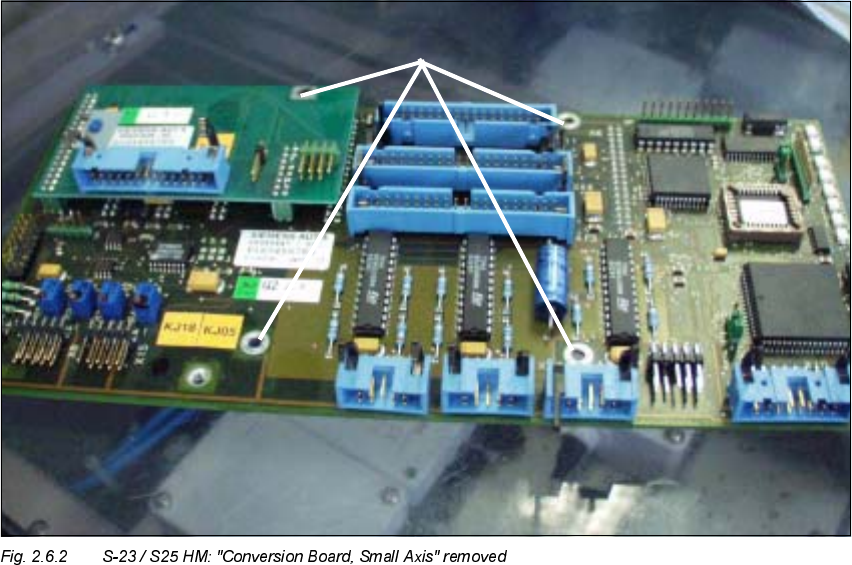
4 spacer bolts on the "Conversion PCB, small axis" (see Fig. 2.6.2 / in like manner to that
shown in Fig. 2.6.3)
– For the HS-50:
4 socket hex head cap screws on the "old" head PCB with processor boards (see Fig.
2.6.1).
Å Lift the PCB slightly and unplug the 4 ribbon cable connectors on the bottom of the PCB.
Å Remove the PCB and place it in an antistatic package immediately.
Modular Head PCB on S-23, S-25 HM, F5 HM, HS-50 Retrofitting Instructions SIPLACE
2.6 Installing the Head PCB, Modular 02/2003 Edition
52
,QVWDOOLQJWKH+HDG3&%0RGXODU
Å
Continue to wear the ESD bracelet (see CAUTION text above).
Å Pick up the pertinent new modular head PCB assembly:
(Item no.: see Section 2.4.1, Section 2.4.2 or Section 2.4.3).
.H\
1. Gantry head distributor, modular, basic board
2. Processor board 80 C515C
Retrofitting Instructions SIPLACE Modular Head PCB on S-23, S-25 HM, F5 HM, HS-50
02/2003 Edition 2.6 Installing the Head PCB, Modular
53
.H\WR)LJFRQWLQXHG
3. SM-Board modular
4. Vision-Board modular
5. Spacer bolts with rubber buffer to fasten the head cover (open-end wrench, size 5.5 mm) *)
6. Spacer bolts to support the head cover (open-end wrench, size 5.5 mm) *)
*) and to fasten the head PCB assembly to the 4 spacer bolts on the head support
Å Comply with the ESD regulations. Use ESD tools and the ESD bracelet.
Å On each of the Placement head make the connections of the 4 ribbon cables on the bottom of
the "Gantry head distributor board" again.
Å Carefully place the new PCB assembly on the existing spacer bolts.
Å For the HS-50:
Re-use the 4 socket hex head cap screws M3 (size 2.5 mm) removed during disassembly to
fasten the PCB assembly to the 4 spacer bolts of the head support.
Å For the S-23, S-25 HM, F5 HM:
Use the 4 spacer bolts that were removed while working from the top of the PCB during the
disassembly of the "Conversion board, small axis".
With these 4 spacer bolts (open-end wrench size 5.5 mm) fasten the new PCB assembly on
the spacer bolts of the head support.
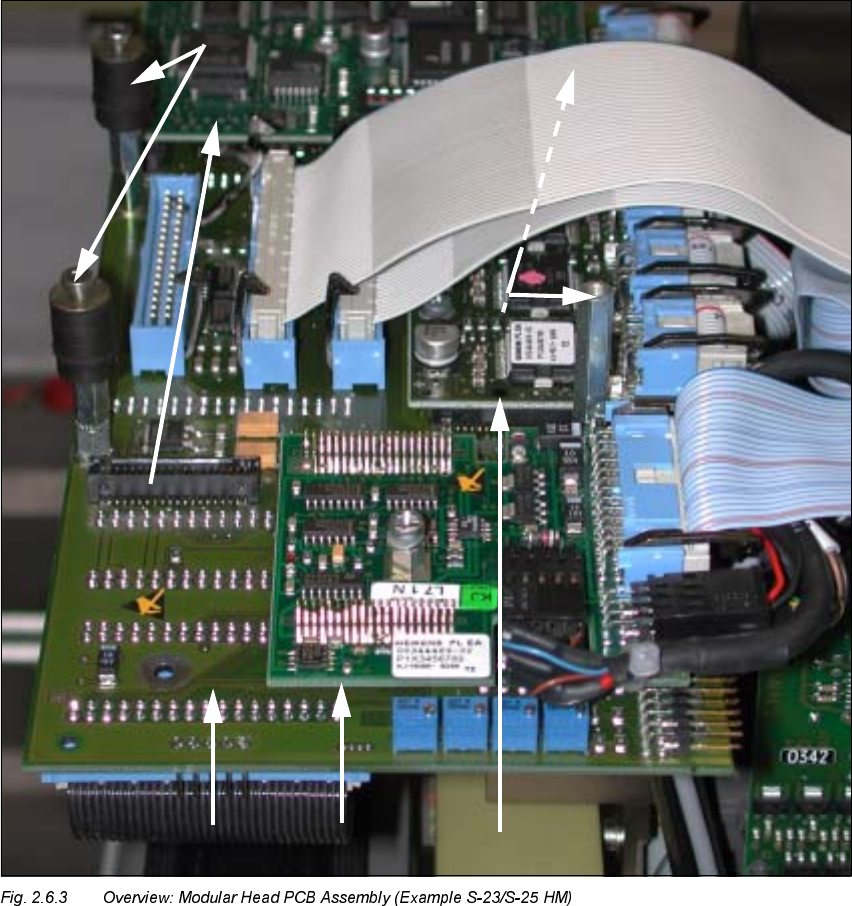
Refer to Fig. 2.6.3 to see how the spacer bolts are arranged:
- 2 spacer bolts that the head cover (Pos. no. 6) will rest on and
- 2 spacer bolts with rubber vibration dampers to fasten the head cover (Pos. no. 5).
Å The next step in the case of older S-23 or S-25 HM machines that have been upgraded from
older S-23 machines is to check whether the strain relief devices on the connectors of the new
PCBs still match the jack connectors on the existing ribbon cables.
To do so, proceed as described in Section 2.6.3.
Å The next step is to check the PIN allocation (see Section 2.6.4).