00192393-02.pdf - 第67页
Retrofitting Instr uctions SIP LACE Modular Head PCB on S-23, S-25 HM, F5 HM, HS-50 02/2003 Edition 2.6 Installing the Head PCB, Modular 65 $VVHPEOLQJWKH3 ODFHPHQW+HDGDQGW KH0DFKLQH Å Place t he cover s prev …
Modular Head PCB on S-23, S-25 HM, F5 HM, HS-50 Retrofitting Instructions SIPLACE
2.6 Installing the Head PCB, Modular 02/2003 Edition
64
1HZ-XPSHU6HWWLQJRQWKH1HZ3URFHVVRU%RDUG
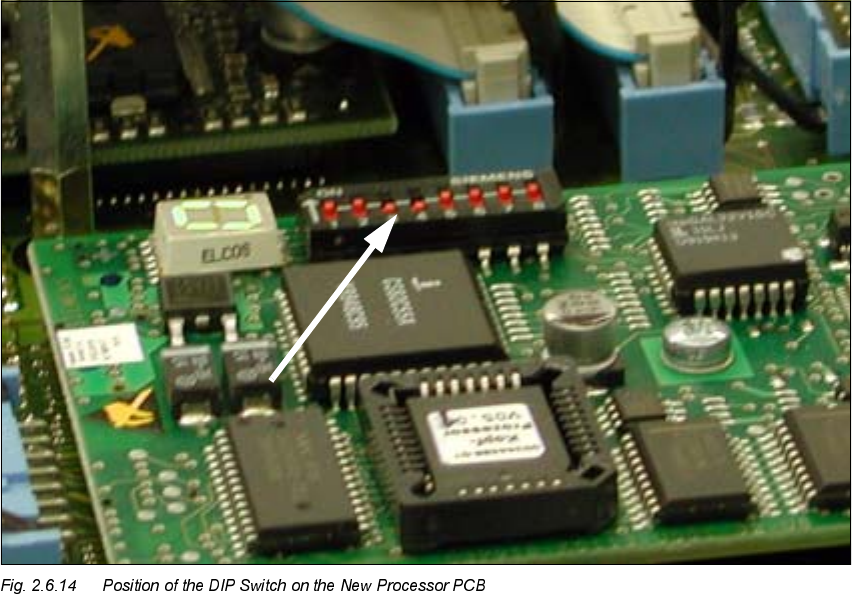
Set the DIP switch on the processor board on the basis of the following data.
You will see the position of the switch in Fig. 2.6.14, below.
7KHZLULQJRIWKHVZLWFKGHSHQGVRQWKHSODFHPHQWPDFKLQHLQYROYHG
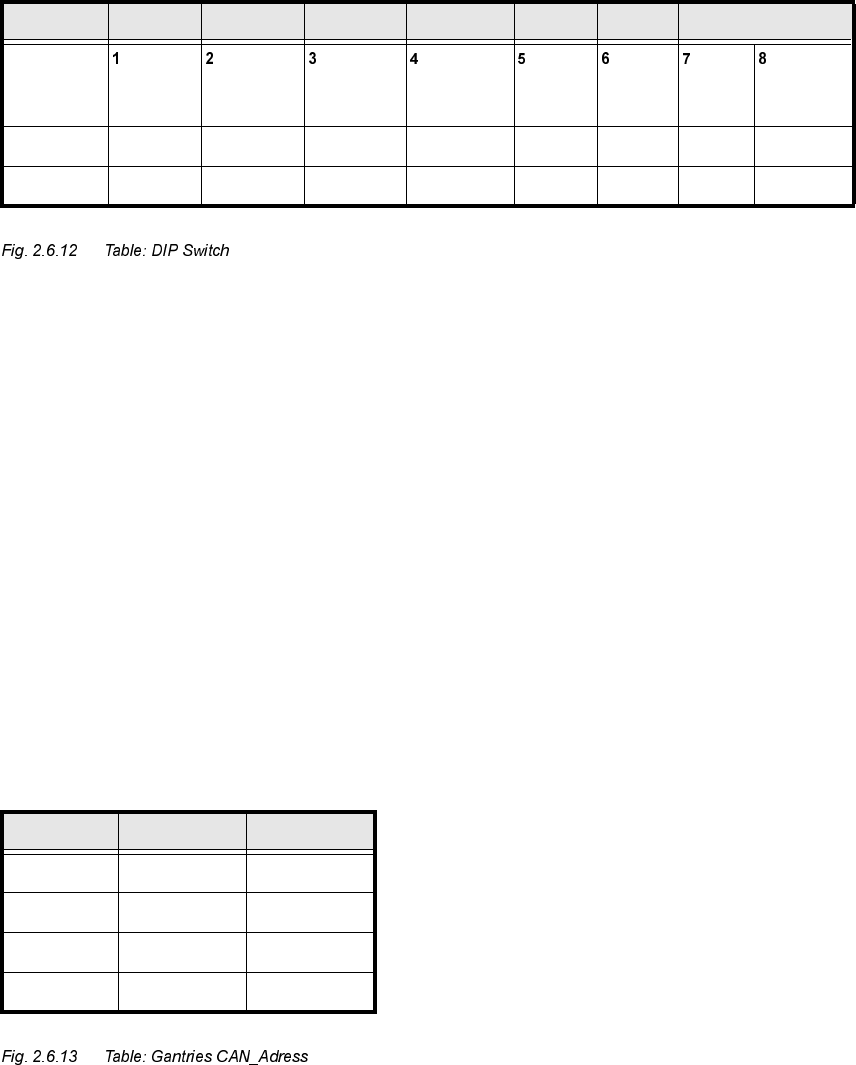
Jumper 1: ON -> CAN matching resistor on the placement head is set
(S-20, F4, F5), S-23, 6+0, F5 HM.
OFF ->CAN_matching resistor is not wired on the head (+6 default)
Jumper 2: ON -> Setting during the download
OFF -> Default status
Jumper 3: ON -> Test mode
OFF -> Default status
Jumper 4: ON -> Test mode (setting of CAN ID)
OFF -> Default status
Jumper 5: ON -> Default status
Jumper 6: ON -> Default status
Jumper 7, 8: CAN_ID:
6WDQGDUG 2)) 2)) 2)) 2)) 21 21 &$1B$GUHVV
Position
of switch
CAN_R120 EPROM_WE Test_Mode CAN_ERR_
SWITCH
Jumper 5 Jumper 6 CAN_ID1 CAN_ID0
21 ; ;
2)) ; ; ; ;
*DQWULHV -XPSHU -XPSHU
Gantry 1 21 21
Gantry 2 21 2))
Gantry 3 2)) 21
Gantry 4 2)) 2))
Retrofitting Instructions SIPLACE Modular Head PCB on S-23, S-25 HM, F5 HM, HS-50
02/2003 Edition 2.6 Installing the Head PCB, Modular
65
$VVHPEOLQJWKH3ODFHPHQW+HDGDQGWKH0DFKLQH
Å
Place the covers previously removed back on the placement heads (see NOTE in Section 2.1).
Fasten the covers with 5 screws each.
Currently there is no cover on the HS-50.
Å Remove all of the tools, etc., from the machine’s working area.
Å Before docking the movable component changeover table, push the gantry until it is over the
PCB conveyor area.
-> During this process, be careful to observe the minimum distances of the X-gantries so that
the crash switch(es) is/are not actuated.
Å Lock the doors of the machine frame.
Å If the component changeover tables have been undocked:
Å Turn the machine ON at the main switch. The compressed air must be connected
Å Dock all movable component changeover tables (if applicable the MTC an S-25 HM) with
the previous allocation.
Å Install the cover of the feeder modules over the component changeover tables.
Å Close the safety doors and safety hoods.
Å On S-25 HM and S-23 continue with the setting of the X-track signals (see Section 2.6.8).
Modular Head PCB on S-23, S-25 HM, F5 HM, HS-50 Retrofitting Instructions SIPLACE
2.6 Installing the Head PCB, Modular 02/2003 Edition
66
2QO\RQ6DQG6+06HWWLQJ;7UDFN6LJQDOV
The identical procedure is followed when setting the S-23 and the S-25 HM. Therefore you can
also proceed for the S-23 as specified in the Setting Instructions for SIPLACE S-25 HM, Item no.
00192192-02 (G + E).
For the setting on S-23/25 HM you will need the auxiliary test equipment specified in the Setting
Instructions (section "Gantries" -> "Track Signals" -> "Auxiliary Equipment").
As the final step, set the X-track signals on the head PCB, modular, on the S-23 and the S-25
HM as described in the section "Gantries" -> "Track Signals".
2QO\66+0)+0
After installing the new head board modular head board S25 (00353198-02) or gantry head distri-
butor board F5 HM (00354432-02), on older S23 / S25 HM / F5HM machines, the error message
" 272 Vision system not providing meas. results“ is issued and components are often rejected.
&DXVHRIWKHIDXOW
On the gantry converter board C0003 (see diagram) the brown wire is not connected to Pin 2 on
connector X25 (was not used previously). This means that the second flash line from ICOS was
not passed to the head board and the new head board returns errors.
6ROXWLRQ
Å Remove the shrink-sleeve from the brown wire and connect it. (see plan next page).