88192278-01-19 Installation Master.pdf - 第161页
PRINTER PREPARATION PRINTER ASSEMBLY Chapter Issue 15, May 20 Installation Manual 4.59 below). 5. Release the thumbscrew to engage the threa d into the mount hole. 6. T ighten the thumbscre w to secure the mounting block…
PRINTER PREPARATION
PRINTER ASSEMBLY
4.58 Installation Manual Chapter Issue 15, May 20
Fit Transfer Head
MANDATORY
TOXIC CHEMICALS MAY BE PRESENT. SAFETY GLOVES MUST BE WORN.
MANDATORY
TOXIC CHEMICALS MAY BE PRESENT. EYE PROTECTION MUST BE WORN.
To adjust the mount brackets and fit a transfer head to the ProFlow ATx mount,
carry out the following:
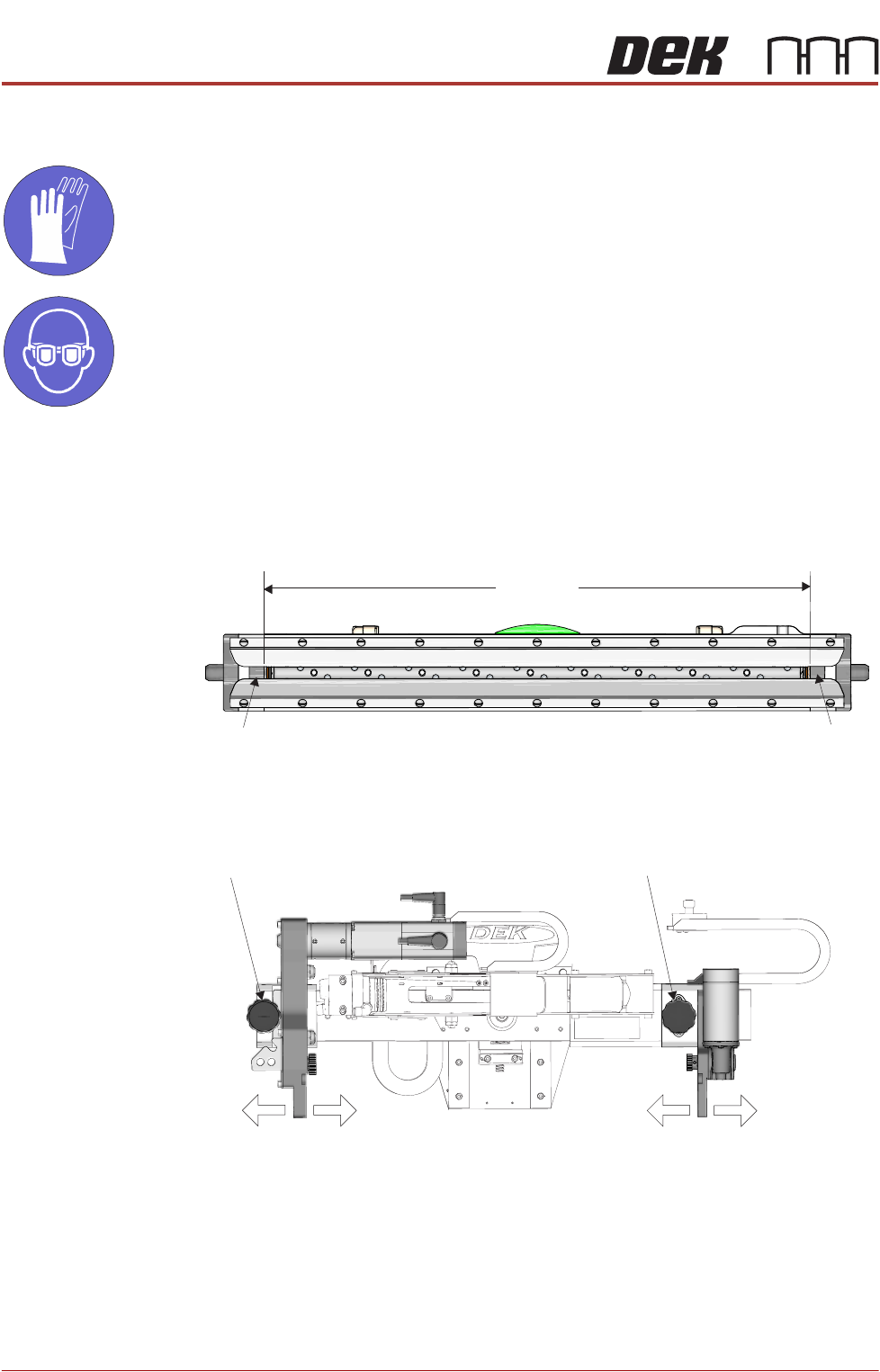
1. Determine the size of the transfer head to be fitted. If the size of the transfer
head is not known, measure the distance between the inside edges of the
skis.
2. On the ProFlow ATx mount, unscrew the left hand side thumbscrew until the
thread is released.
3. Pull on the left hand side thumbscrew until it is free from the mount hole.
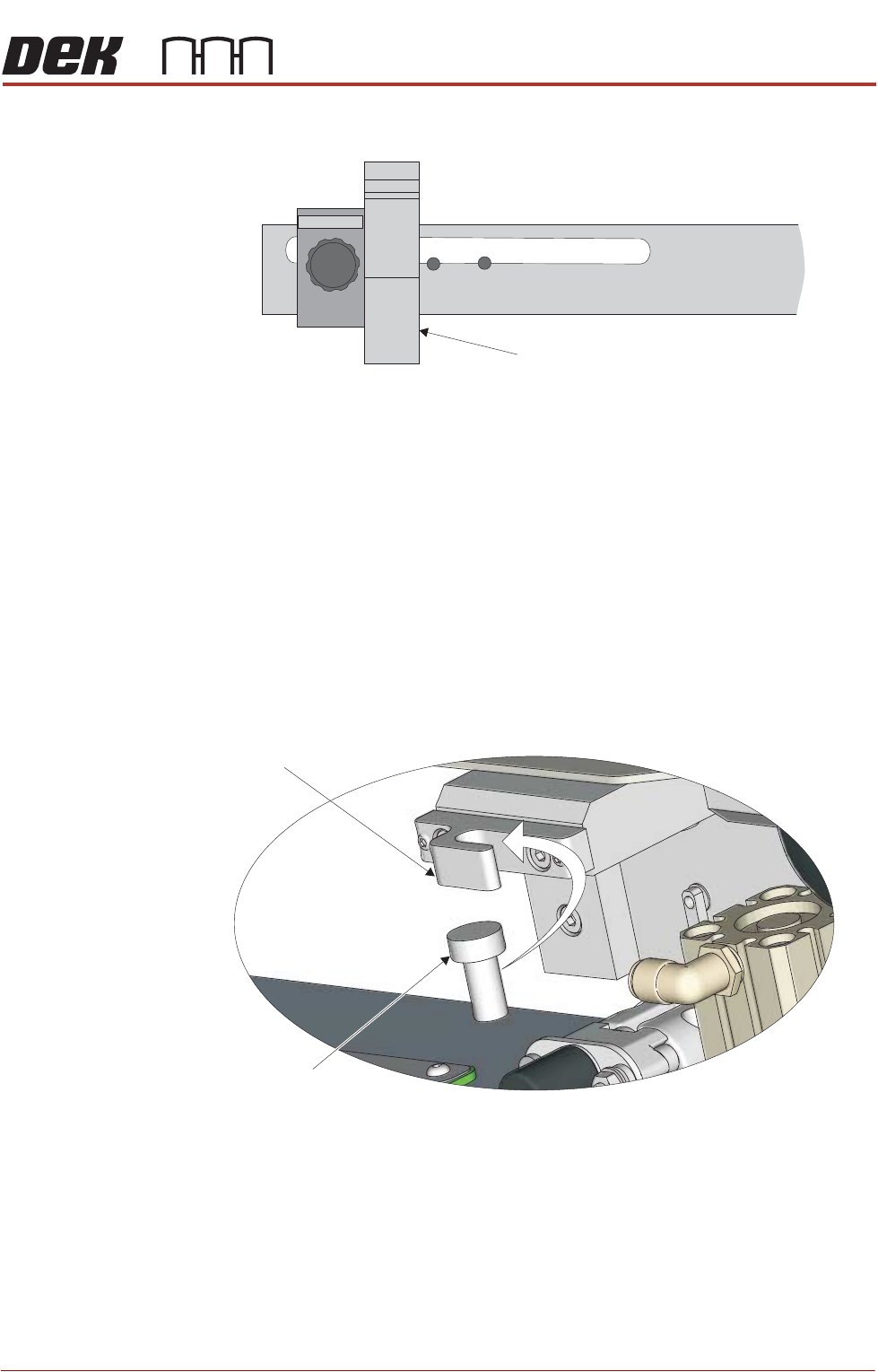
4. Slide the left hand side mount bracket until it is aligned with the correct hole
for the size of the transfer head being used (for guidance on how to select
the correct mount hole for the transfer head being installed, see the diagram
Transfer Head Underside View
XXXmm
Ski
Ski
View On Front of Transfer Head
Left Thumbscrew
Right Thumbscrew
Left Mount Bracket Right Mount Bracket
PRINTER PREPARATION
PRINTER ASSEMBLY
Chapter Issue 15, May 20 Installation Manual 4.59
below).
5. Release the thumbscrew to engage the thread into the mount hole.
6. Tighten the thumbscrew to secure the mounting block to the beam.
7. Unscrew the right hand side thumbscrew.
8. Pull on the right hand side thumbscrew until it is free from the mount hole.
9. Slide the right hand side mount bracket fully to the right so there is sufficient
space to attach the transfer head; it is not necessary to tighten the right hand
side thumbscrew at this stage.
10. Raise the transfer head to the ProFlow ATx mount and slot the transfer head
vertical mount pin into the vertical mount pin hook.
NOTE
Ensure no cables or air feed lines are trapped between the transfer head
and the ProFlow mount.
Align Left Side Mount Bracket to
Reveal Intended Transfer Head Size.
Example Set to .400mm
View on Left Side of the Mount Beam
Left Side of ProFlow ATx Mount Beam
300 200
400 350 250
View on Front of ProFlow ATx Mount
Vertical Mount
Pin Hook
Transfer Head
Vertical Mount Pin
PRINTER PREPARATION
PRINTER ASSEMBLY
4.60 Installation Manual Chapter Issue 15, May 20
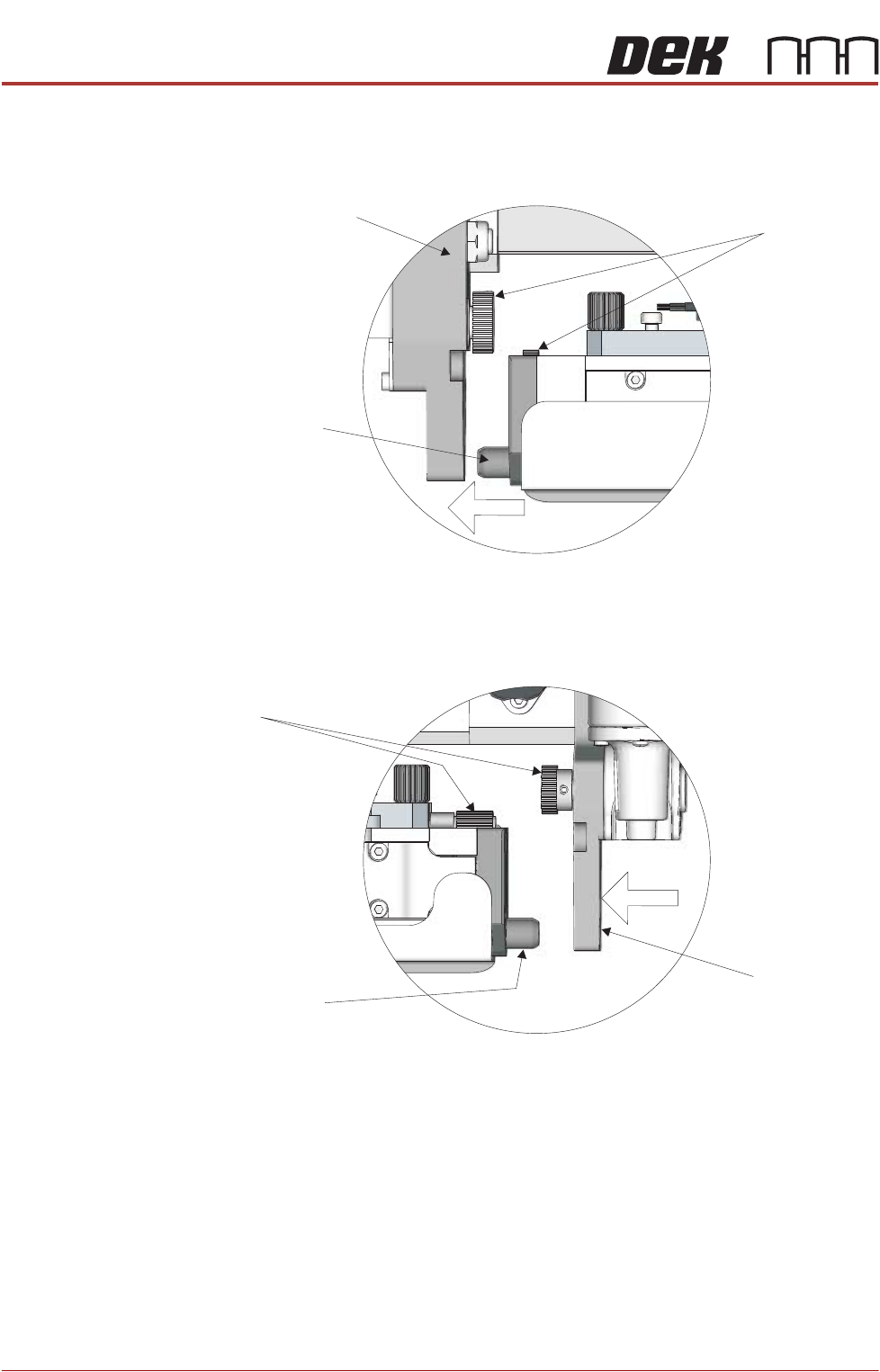
11. As the transfer head moves to the left, fit the transfer head’s left hand side
locator dowel into the mount bracket on the ProFlow ATx mount. Ensure the
conditioning grid gears engage smoothly.
12. Pull on the right hand side thumbscrew and slide the right hand side mount
bracket to the left so it engages with the transfer head locator dowel. Ensure
the Archimedes screw gears engage smoothly.
13. Tighten the right hand side thumbscrew to secure the mount bracket to the
beam.
14. Connect the following transfer head cable and air feed connectors to the
connectors on the left hand side of the ProFlow ATx mount:
• Print Medium Demand Sensor (9PL106)
• Pistons Down Air Feed
View on Left Side of the Mount
Conditioning
Grid Gears
Transfer Head
Locator Dowel
ProFlow ATx Mount
Transfer Head
Locator Dowel
Archimedes Screw
Gears
ProFlow ATx
Mount
View on Left Side of the Mount