00195447-02_Installation_604_01_SP1_EN_DE - 第37页
Installation Manual, Station Software Version 604.01 SP1 Issue 12/2007 Fig. 5-23: Shutting down the station comput er, machine controller and Vision computer → Switch the machine off when the computer systems have shut d…
Installation Manual, Station Software Version 604.01 SP1 Issue 12/2007
The installation program now installs the additional programs on the station computer.
5.5.7 Finalizing the installation
Note:
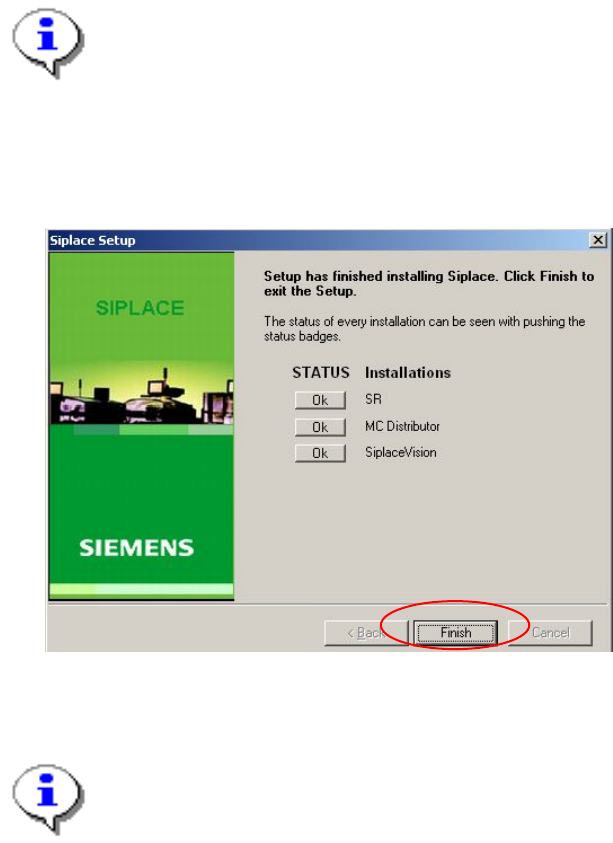
The status only lists the programs that have just been installed. If, for instance, the current
version of SIPLACE Vision was already installed, it is not listed here.
If errors occurred during installation, the status is indicated by the Error button being
displayed next to the program name instead of the Ok button.
→ If you wish to read the log of the installation of any program, click the Ok (or Error) button next to the
name of the program. The Notepad is started and displays the appropriate file.
Fig. 5-22: Finalizing the installation
→ Click the Finish button.
Note:
To establish the connection between the station computer and the machine controller after
installation has been completed, the station computer, machine controller and Vision
computer (if present) must first be run down and the machine must then be switched off
completely.
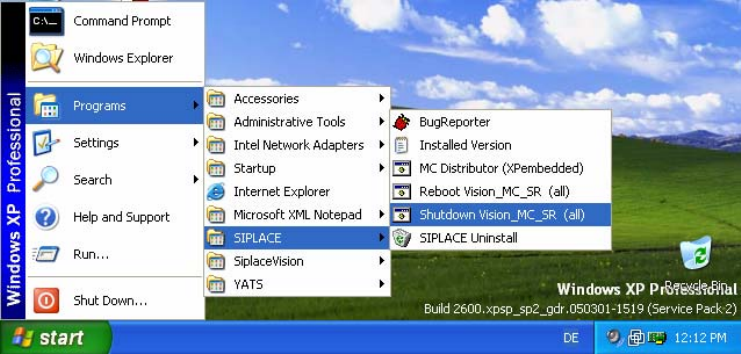
→ To do this, open the Start menu and select Programs Æ SIPLACE Æ Shutdown_Vision_MC_SR
(all).
36 of 47
Installation Manual, Station Software Version 604.01 SP1 Issue 12/2007
Fig. 5-23: Shutting down the station computer, machine controller and Vision computer
→ Switch the machine off when the computer systems have shut down.
→ Switch the machine back on again. This then reboots the station computer, the machine controller and
the Vision computer (if present).
37 of 47

Installation Manual, Station Software Version 604.01 SP1 Issue 12/2007
5.6 Finish the Installation
5.6.1 Machine files
There are 2 databases in Version 604 of the software, MA-Daten.mdb and MA-Achsen.mdb.
Machine-related configuration, measurement and parameter data is stored in *.XML and *.MA files.
The MA-Daten.mdb database contains all standard data except the standard data for the axes. This data is
stored in the MA-Achsen.mdb database.
Note:
All machine data and the database (see machine data database feature) must be of revision
level 90 (version 90.604.01). Current machine data must not
be replaced by revision levels o
f
an earlier version, either completely or partially, e.g. revision level 60 (version 60.603.01).
5.6.2 Miscellaneous
• Check the eSW firmware version and download if necessary
• Start the reference run of the machine
• After an upgrade to the 604.xx software version, calibrate the heads of the D1, D2 and D4
machines. The temperature compensation is activated for these machines.
38 of 47