00198228-02_IM-MaterialSetupAssistant_DE_EN - 第6页
Table of Contents 6 SIPLACE Material Setup Assistant 2.2 SIPLACE Material Setup As sistant 2.2
Table of Contents
SIPLACE Material Setup Assistant 2.2 SIPLACE Material Setup Assistant 2.2 5
Table of Contents
1 Introduction 55
1.1 Overview 55
1.2 Scope of Delivery 56
1.3 Installation Notes 56
2 Installing the SIPLACE Order Manager 59
2.1 Starting the Installation - First Steps 59
2.2 Order Manager Server Installation 60
2.2.1 Successfully Installed SIPLACE Order Manager Service 64
2.3 Order Manager Client Installation 65
2.3.1 Successfully Installed SIPLACE Order Manager Client 67
2.4 Complete Installation 67
3 Configuration 69
3.1 Configuration Settings in ASM OIB 69
3.1.1 Starting the Factory Explorer 70
3.1.2 Defining the Factory Layout 72
3.1.2.1 Example of a Factory Layout 73
3.1.2.2 Assigning Setup Center Adapter with AFP 74
3.1.2.3 Connecting the SIPLACE Pro Line Control Adapter to MSA 75
3.1.3 Defining the Flow of Materials 75
3.1.4 Defining Configurations for the Setup Area 78
3.1.5 Defining Warehouse Configurations 79
3.1.6 Defining Factory Configurations 80
3.1.6.1 Constant Tables and Refill Material 81
3.1.7 Configurations for SIPLACE Pro 83
3.1.8 Setting up E-Mail Messages 84
3.1.9 Production Order Manager Configurations 85
3.1.10 EDM Configuration 86
3.1.10.1 Defining EDM Scenarios 86
3.1.10.2 EDM Settings 88
3.2 Configuration Settings in ASM Setup Center 88
3.2.1 Configuring Communication with ASM Setup Center 89
3.2.2 Configuring the ASM Setup Center Application 91
3.2.3 Configuring Feeder Racks 93
3.2.4 Configuring the ASM Setup Center Server 94
3.3 Configuration Settings in the ASM Material Manager 95
3.3.1 Activating the Order Manager 95
3.3.2 Selecting Material Reuse 97
3.4 Configuration Settings in EDM 98
3.4.1 Disabling the Production Schedule Inserter 98
3.4.2 Suppressing the Display of a Callback When Changing the EDM Production Schedule 98
Table of Contents
6 SIPLACE Material Setup Assistant 2.2 SIPLACE Material Setup Assistant 2.2
Einleitung
Übersicht
SIPLACE Material Setup Assistant 2.2 SIPLACE Material Setup Assistant 2.2 7
1
1 Einleitung
Einleitung
Diese Installationsanleitung dient als Arbeitsanweisung für die Installation und Konfiguration von ASM
Material Setup Assistant (MSA) Version 2.2.
Diese Installationsanleitung enthält Informationen über den Lieferumfang und die Voraussetzungen für
eine erfolgreiche Installation.
1.1
1.1 Übersicht
Übersicht
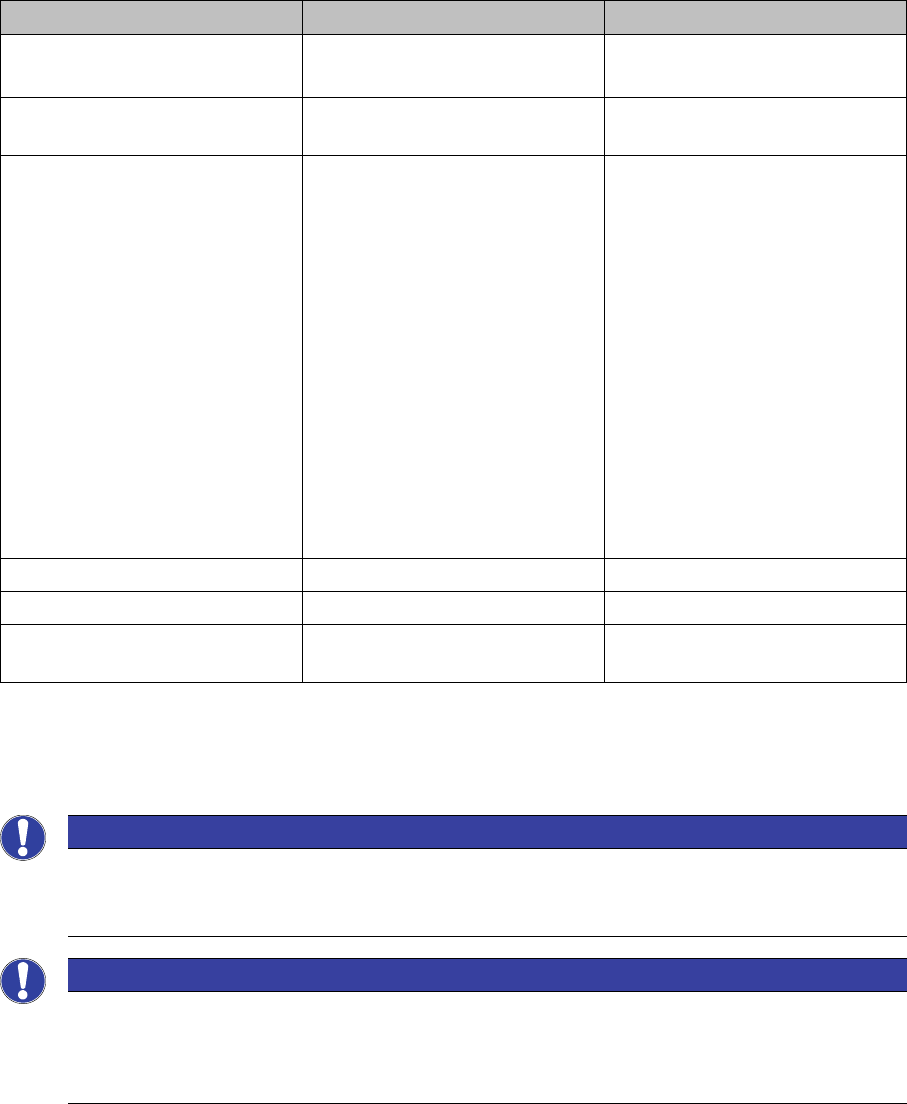
Die Workflow Lösung des SIPLACE Material Setup Assistant (MSA) besteht aus folgenden Applikation
und deren Komponenten:
In dieser Installationsanleitung wird die Installation des Order Manager, sowie die Konfiguration der be
-
teiligten Systeme beschrieben.
Es wird vorausgesetzt, dass die folgenden Systeme bereits korrekt installiert und funktionsfähig sind.
Zur Installation sehen Sie bitte die jeweilige Installationsanleitung.
Applikation Komponenten Softwareversion
Order Manager ▪ Modul Auftragsverwaltung
▪ Modul Überwachung
2.2
ASM Setup Center (Offline) ▪Ansicht - Rüstungsvorberei
-
tung
9.0.1
ASM Material Manager ▪ Vollversion
– Vollversion des ASM Ma
-
terial Managers zur La
-
gerverwaltung mit ASM
Material Manager.
– Ansicht – Materialbe
-
darfsliste
Oder
▪ ASM Material Manager für
MSA
– Eingeschränkte Version
des ASM Material Mana
-
gers zur Lagerverwaltung
mit einem Kundensys
-
tem.
2.3
SIPLACE Pro mit LCGUI Komplett 14.0 oder höher
ASM OIB Komplett 5.0
ASM Engineering Data Manager
(EDM) - Optional
Komplett 3.1 oder höher
HINWEIS
Vor der ersten Inbetriebnahme alle Linien sowie alle Wechseltische abrüsten
Bei der Neueinführung des ASM Material Setup Assistant müssen vor der ersten Inbetriebnah
-
me alle Linien sowie alle Wechseltische abgerüstet werden.
HINWEIS
Konfiguration
Damit ASM Material Setup Assistant mit den beteiligten Applikationen funktioniert und kommu
-
nizieren kann, müssen an den jeweiligen Applikationen Konfigurationseinstellungen durchge
-
führt werden. Sehen Sie dazu Konfiguration.