00198228-02_IM-MaterialSetupAssistant_DE_EN - 第70页
Configuration Configuration Settings in ASM OIB 70 SIPLACE Material Setup Assistant 2.2 SIPLACE Material Setup Assistant 2 .2 3.1.1 3 . 1 . 1 S t a r t in g t h e F a c t o r y E x p lo r e r Starting the Factory Explore…
Configuration
Configuration Settings in ASM OIB
SIPLACE Material Setup Assistant 2.2 SIPLACE Material Setup Assistant 2.2 69
3
3 Configuration
Configuration
3.1
3.1 Configuration Settings in ASM OIB
Configuration Settings in ASM OIB
The configuration settings in ASM OIB are divided into mandatory, recommended and advanced config
-
urations.
Mandatory configurations
The mandatory configurations are required for the SIPLACE Material Setup Assistant workflow.
You need to define the following configurations:
"3.1.2 Defining the Factory Layout" [ ➙ 72]
"3.1.2.2 Assigning Setup Center Adapter with AFP" [ ➙ 74]
"3.1.2.3 Connecting the SIPLACE Pro Line Control Adapter to MSA" [ ➙ 75]
"3.1.3 Defining the Flow of Materials" [ ➙ 75].
Recommended configurations
To enable SIPLACE Material Setup Assistant to calculate realistic schedules, you need to define the
known scheduling times for your factory. For example, these are the known setup times, changeover
times or the picking times for your warehouse. Default times are predefined during the installation.
The following configurations need to be checked and adjusted where necessary.
"3.1.4 Defining Configurations for the Setup Area" [ ➙ 78]
"3.1.5 Defining Warehouse Configurations" [ ➙ 79]
"3.1.6 Defining Factory Configurations" [ ➙ 80]
Set up an e-mail notification service so that errors and problems can be recognized.
"3.1.8 Setting up E-Mail Messages" [ ➙ 84]
To apply the scheduling information for the boards from the SIPLACE Pro comments, you can display
the relevant information in the Order Manager. Define these comment columns.
"3.1.9 Production Order Manager Configurations" [ ➙ 85]
Advanced configurations
The following advanced configurations can be defined when needed:
"3.1.7 Configurations for SIPLACE Pro" [ ➙ 83]
"3.1.10 EDM Configuration" [ ➙ 86]
Configuration
Configuration Settings in ASM OIB
70 SIPLACE Material Setup Assistant 2.2 SIPLACE Material Setup Assistant 2.2
3.1.1
3.1.1 Starting the Factory Explorer
Starting the Factory Explorer
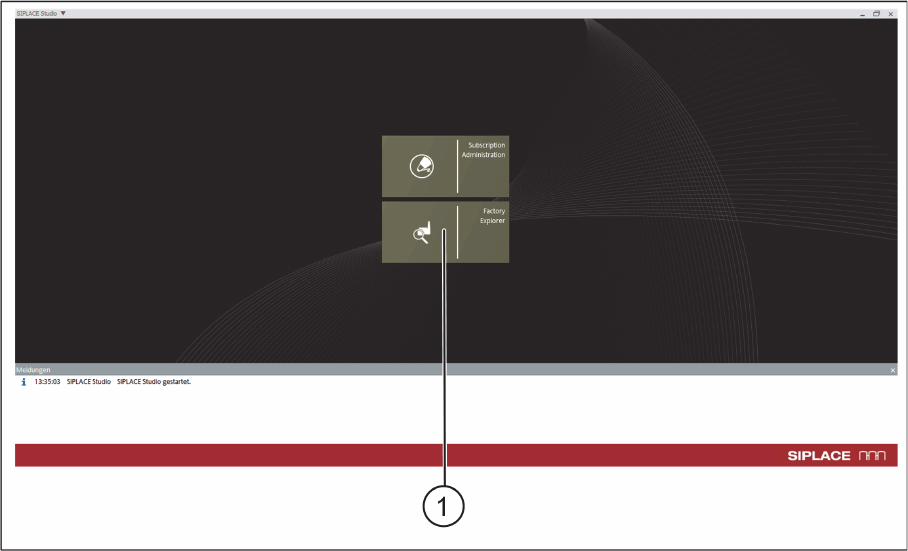
► Go to the ASM Studio and start the Factory Explorer (1) module.
ASM Studio – Start Factory Explorer
Configuration
Configuration Settings in ASM OIB
SIPLACE Material Setup Assistant 2.2 SIPLACE Material Setup Assistant 2.2 71
► The Factory Explorer will open.
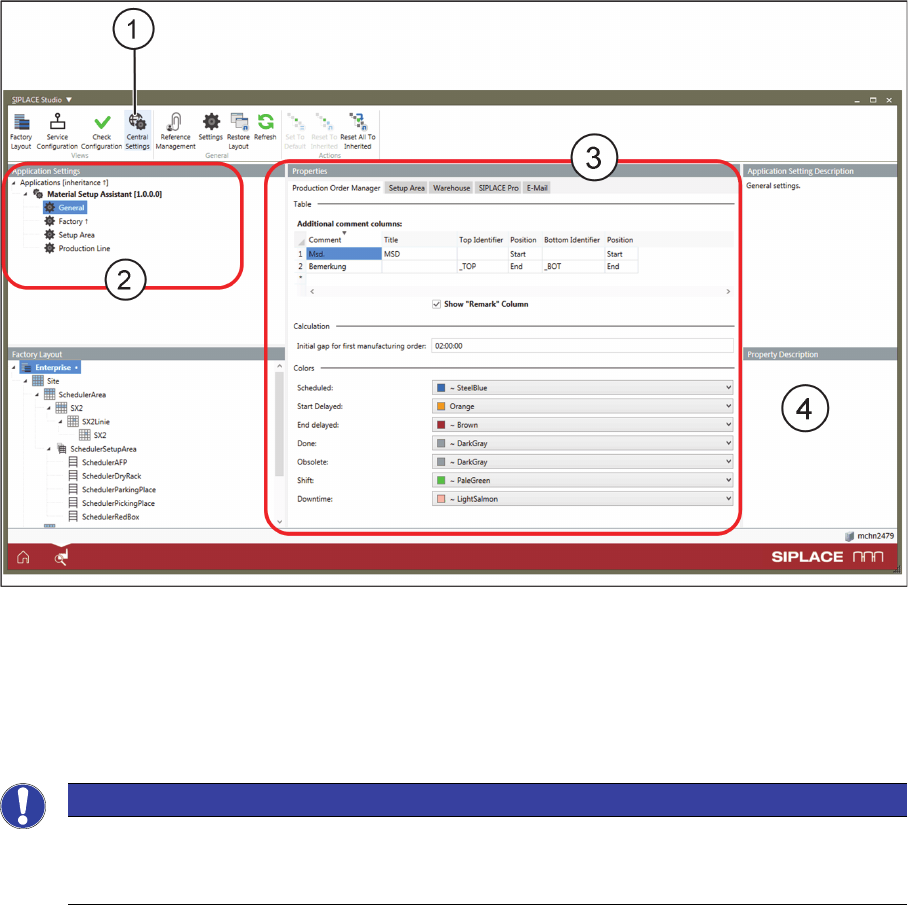
Factory Explorer – Central Settings
► Select Central Settings (1).
⇨ If the Order Manager is installed, the Application Settings => Material Setup Assistant (2) are avail
-
able in OIB.
► Go to Application Settings => Material Setup Assistant (2) and define the relevant settings for the
corresponding Properties (3).
NOTICE
Help with the settings
Helpful information about the individual parameters and settings is shown on the software in
-
terface at Properties Description (4).