00198228-02_IM-MaterialSetupAssistant_DE_EN - 第77页
Configuration Configuration Settings in ASM OIB SIPLACE Material Setup Assistant 2.2 SIPLACE Material Set up Ass istant 2.2 77 Assigning the presetup area to the production line Define which presetup area is to be as sig…
Configuration
Configuration Settings in ASM OIB
76 SIPLACE Material Setup Assistant 2.2 SIPLACE Material Setup Assistant 2.2
► Select Central Settings.
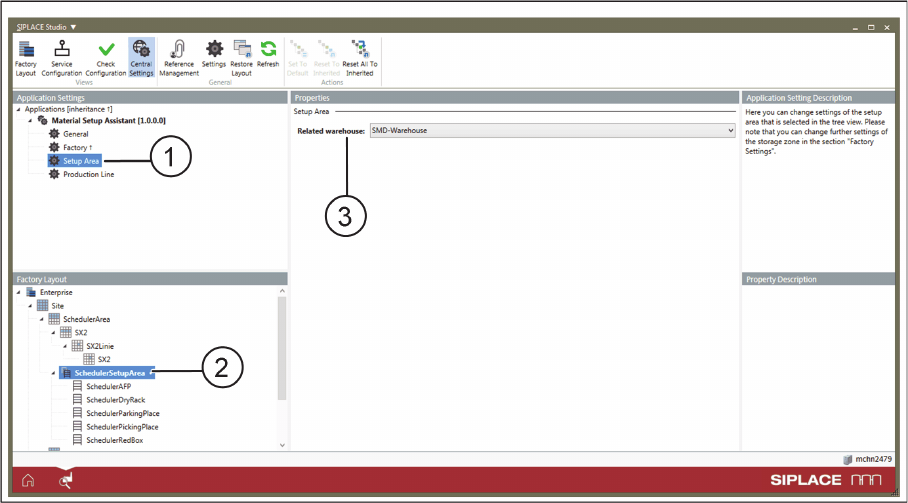
Application Settings: Setup Area
► Go to Application Settings => Material Setup Assistant and select Setup Area (1) from the tree struc
-
ture.
► Go to Factory Layout (2) and select the pre-setup area.
► Go to Properties => Related warehouse (3) and assign the required warehouse to the selected pre-
setup area.
Configuration
Configuration Settings in ASM OIB
SIPLACE Material Setup Assistant 2.2 SIPLACE Material Setup Assistant 2.2 77
Assigning the presetup area to the production line
Define which presetup area is to be assigned to the respective production line. The flow of materials and
the reuse of materials takes place between the selected production line and the warehouse.
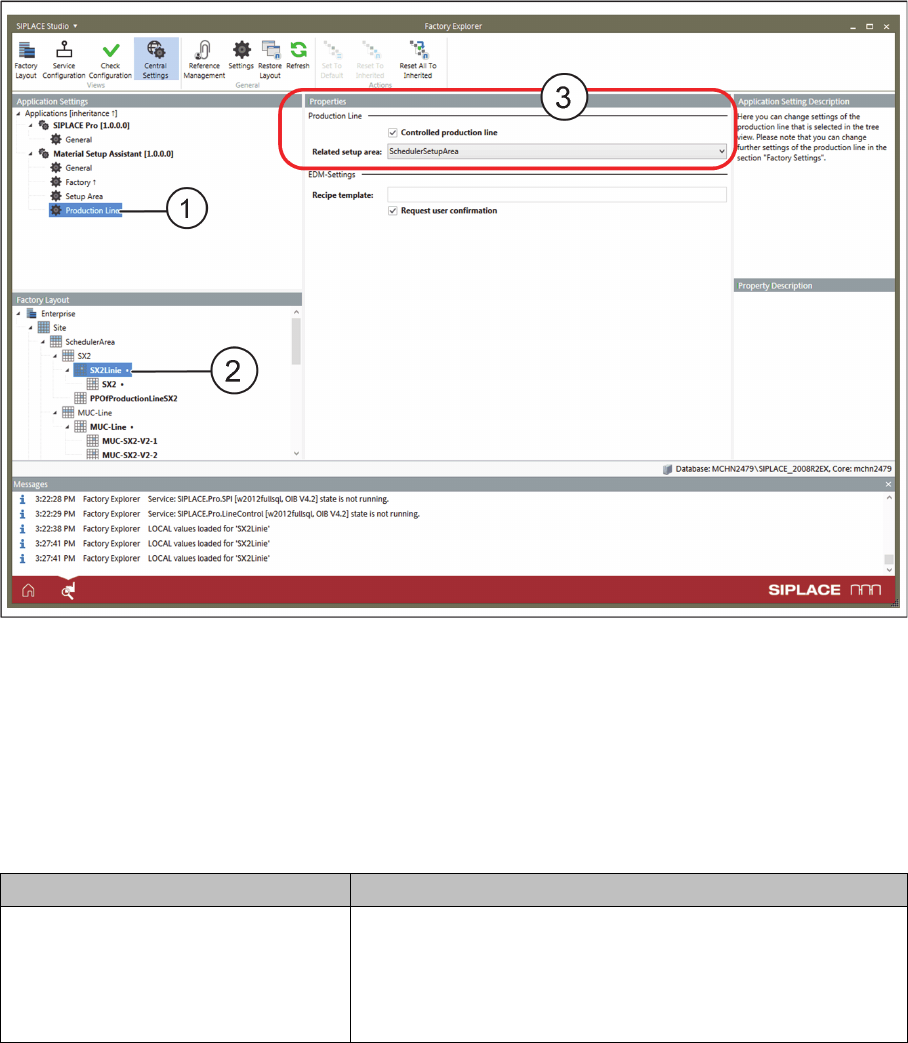
Application Settings: Production Line - Properties
► Go to Application Settings => Material Setup Assistant and select Production Line (1) from the tree
structure.
► Go to Factory Layout (2) and select the production line.
► Go to Properties => Related setup area (3) and assign the required pre-setup area to the selected
production line.
Optional settings
Parameters Function
Is controlled production line Enabled: This line is controlled via the Material Setup Assistant
workflow.
If the factory has lines which you do not want to control via the
Material Setup Assistant, this option can be disabled for the re
-
spective lines.
Configuration
Configuration Settings in ASM OIB
78 SIPLACE Material Setup Assistant 2.2 SIPLACE Material Setup Assistant 2.2
3.1.4
3.1.4 Defining Configurations for the Setup Area
Defining Configurations for the Setup Area
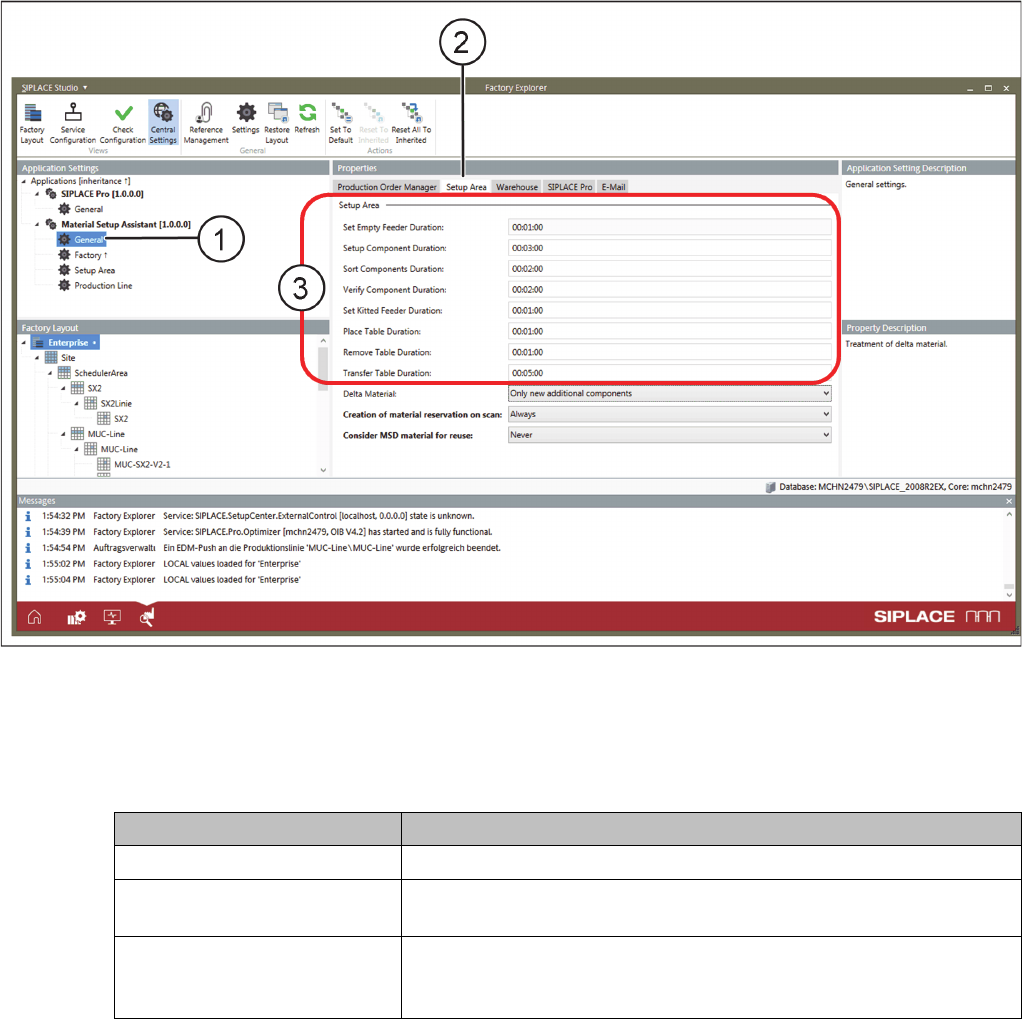
► Select Central Settings.
► Go to Application Settings => Material Setup Assistant and select General (1) from the tree structure.
► Go to Properties and select the Setup Area (2) tab.
Application Settings – General: Tab - Setup Area
► Enter the times (3) for the individual steps scheduled in the setup area of your production. During
scheduling, these times will be added in the timeline for the setup area.
Optional settings
Parameter Function
Delta Material Select how the delta material is to be treated.
Creation of material reservation
on scan
The material reservation is updated either on scanning the setup list
or on the first scan only.
Consider MSD material for re
-
use
When determining the material for reuse, the MSD material is either
not considered at all or considered to a preset level or always consid
-
ered.