00198228-02_IM-MaterialSetupAssistant_DE_EN - 第85页
Configuration Configuration Settings in ASM OIB SIPLACE Material Setup Assistant 2.2 SIPLACE Material Set up Ass istant 2.2 85 3.1.9 3 . 1 . 9 P r o d u c t io n O r d e r M a n a g e r C o n f ig u r a t io n s Producti…
Configuration
Configuration Settings in ASM OIB
84 SIPLACE Material Setup Assistant 2.2 SIPLACE Material Setup Assistant 2.2
3.1.8
3.1.8 Setting up E-Mail Messages
Setting up E-Mail Messages
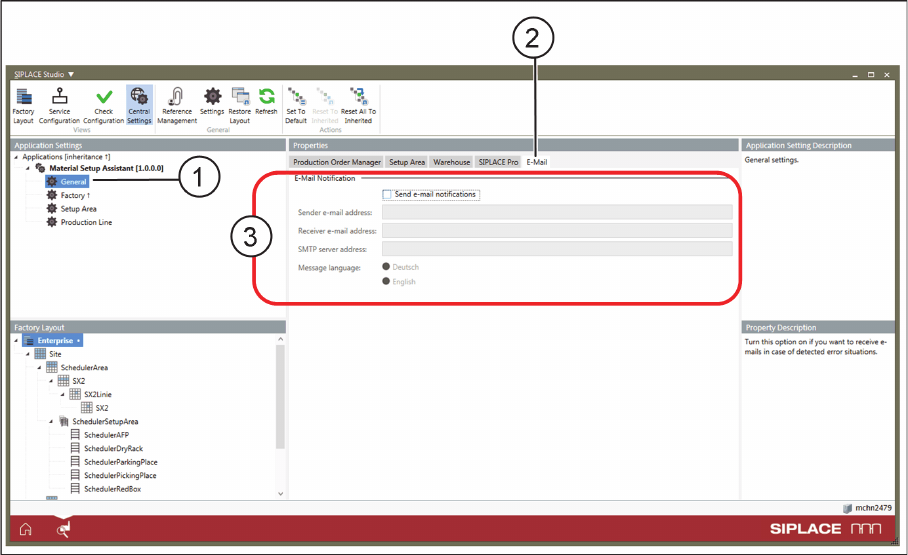
Configuration of an e-mail messaging service is recommended for monitoring and recording errors and
problems. If errors and problems occur, these will be sent by the system to the specified e-mail address.
► Select Central Settings.
► Go to Application Settings => Material Setup Assistant and select General (1) from the tree structure.
► Go to Properties and select the E-Mail (2) tab.
Application Settings – General: Tab - E-Mail
► Define the required settings (3).
Configuration
Configuration Settings in ASM OIB
SIPLACE Material Setup Assistant 2.2 SIPLACE Material Setup Assistant 2.2 85
3.1.9
3.1.9 Production Order Manager Configurations
Production Order Manager Configurations
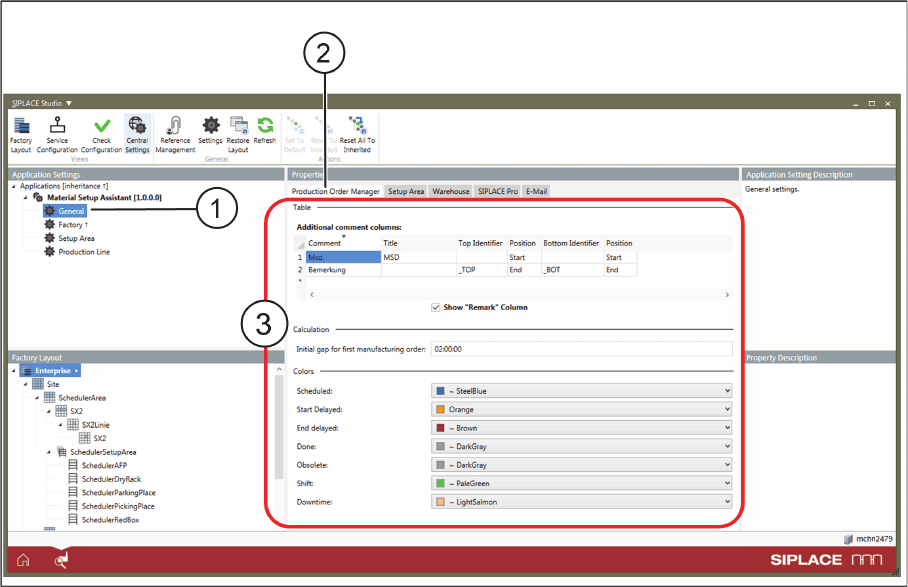
► Select Central Settings.
► Go to Application Settings => Material Setup Assistant and select General (1) from the tree structure.
► Go to Properties and select the Production Order Manager (2) tab.
Application Settings – General: Tab - Production Order Manager
► Define the following settings (3).
Additional comment columns
For scheduling information, you can assign and display the board comments defined in SIPLACE Pro in
the Order Manager. These are additional, customized comments fields (such as furnace profile, solder
-
ing or printing details etc.), which can be defined in the SIPLACE Pro settings. These additional com
-
ments are shown in extra columns in the Order Manager. The option Show "Remark" Column, enables
you to hide or display the Remarks column.
Initial gap for first manufacturing order
Define the time that you need to start the first scheduled production with the SIPLACE Material Setup
Assistant. This time is only relevant for the first commissioning of the system to the start of the first pro
-
duction job.
Colors
Defines the colors of the individual column in the timeline and the various statuses.
Configuration
Configuration Settings in ASM OIB
86 SIPLACE Material Setup Assistant 2.2 SIPLACE Material Setup Assistant 2.2
3.1.10
3.1.10 EDM Configuration
EDM Configuration
3.1.10.1
3.1.10.1 Defining EDM Scenarios
Defining EDM Scenarios
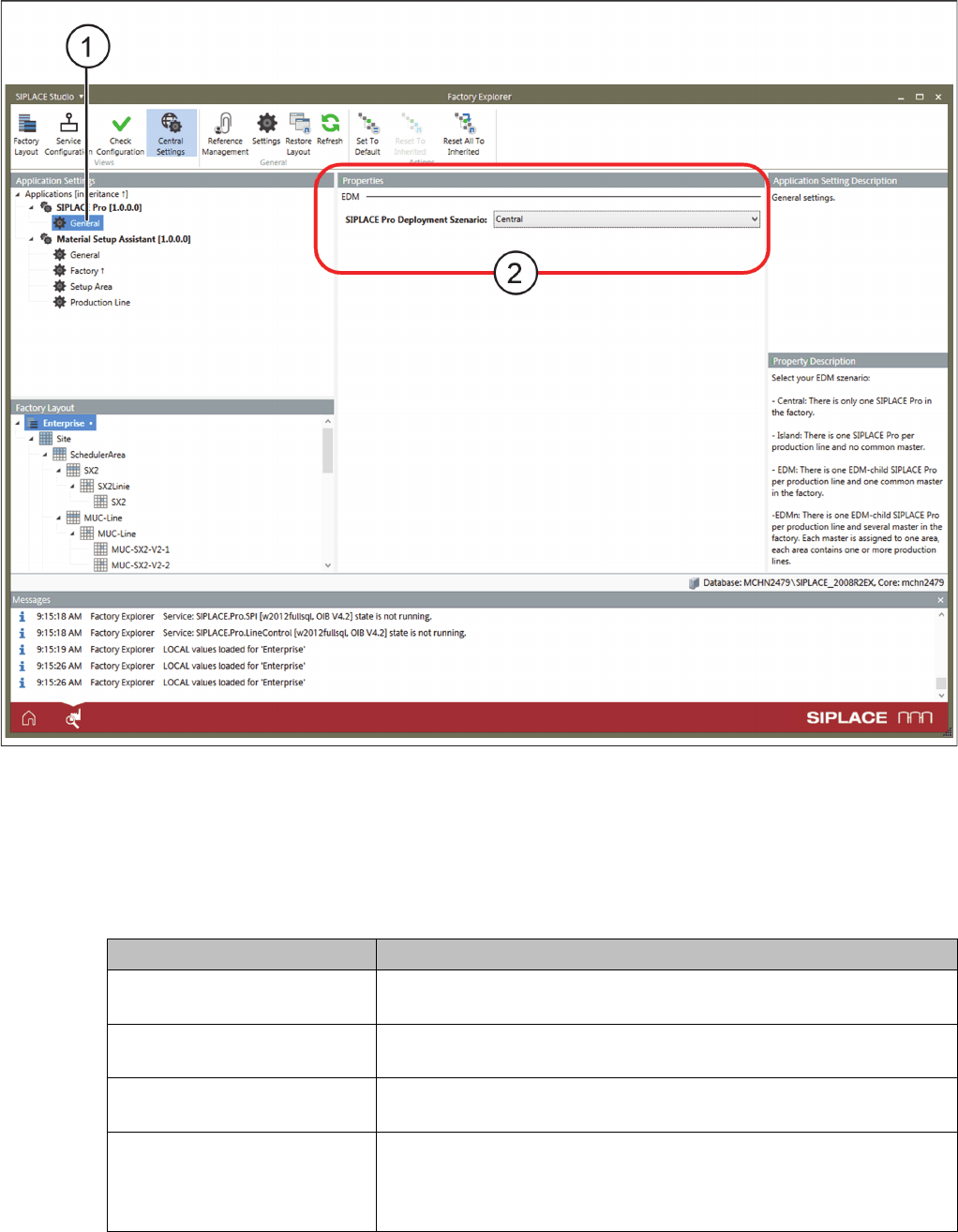
With this setting, you select the EDM scenario of your production.
Application Settings – SIPLACE Pro Adapter - EDM
► Select Central Settings.
⇨ If the ASM Material Manager - full version or the ASM Material Manager for MSA is installed, the
Application Settings => SIPLACE Pro are available in OIB.
► Go to Application Settings and select => SIPLACE Pro => General (1).
► Go to Properties and select the => SIPLACE Pro Deployment Scenario:
Parameters Function
Central There is only one SIPLACE Pro application in the factory. This is the
default configuration without EDM.
Isle There is one SIPLACE Pro application per production line but no com
-
mon master.
EDM In the factory, there is one EDM child of a SIPLACE Pro application
per production line and a common master.
EDMn In the factory, there is one EDM child of a SIPLACE Pro application
per production line and there are several common masters. Each
master is assigned to an area. Each area includes one or more pro
-
duction lines that are assigned to this master.