00198228-02_IM-MaterialSetupAssistant_DE_EN - 第88页
Configuration Configuration Settings in ASM Setup Center 88 SIPLACE Material Setup Assistant 2.2 SIPLACE Material Setup Assistant 2 .2 3.1.10.2 3 . 1 . 1 0 . 2 E D M S e t t in g s EDM Settings Application Settings: Prod…
Configuration
Configuration Settings in ASM OIB
SIPLACE Material Setup Assistant 2.2 SIPLACE Material Setup Assistant 2.2 87
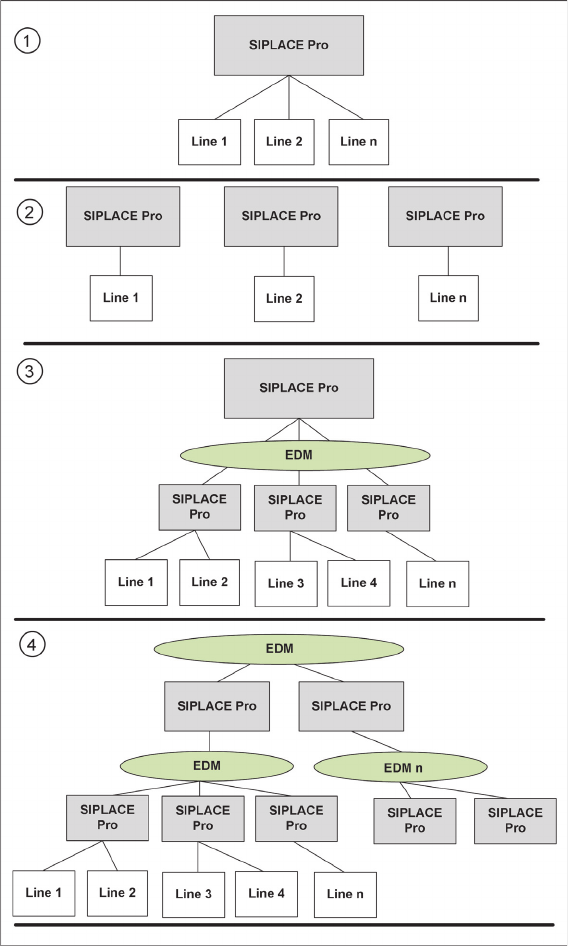
SIPLACE Pro Deployment Scenario - Overview
SIPLACE Pro Deployment Scenario - Overview
1. Central
2. Island
3. EDM
4. EDMn
Configuration
Configuration Settings in ASM Setup Center
88 SIPLACE Material Setup Assistant 2.2 SIPLACE Material Setup Assistant 2.2
3.1.10.2
3.1.10.2 EDM Settings
EDM Settings
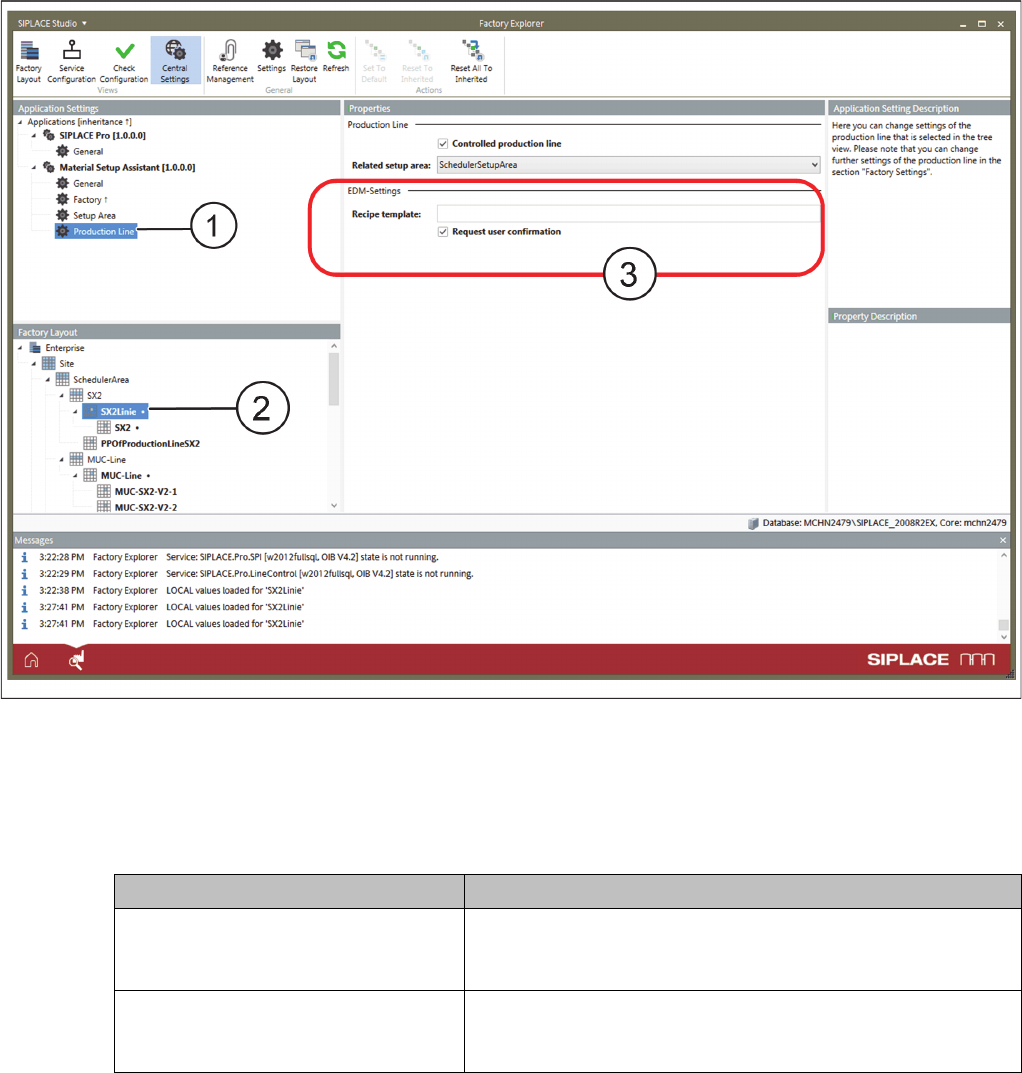
Application Settings: Production Line - EDM Properties
► Go to Application Settings => Material Setup Assistant and select Production Line (1) from the tree
structure.
► Go to Factory Layout (2) and select the production line.
► Go to Properties (3) => EDM and select the appropriate EDM properties.
3.2
3.2 Configuration Settings in ASM Setup Center
Configuration Settings in ASM Setup Center
The SIPLACE Material Setup Assistant (MSA) workflow solution requires ASM Setup Center for the set
-
up preparation. To enable the SIPLACE Material Setup Assistant to communicate and work with ASM
Setup Center, you need to perform the following configurations in ASM Setup Center:
▪ "3.2.1 Configuring Communication with ASM Setup Center" [ ➙ 89]
▪ "3.2.2 Configuring the ASM Setup Center Application" [ ➙ 91]
▪ "3.2.4 Configuring the ASM Setup Center Server" [ ➙ 94]
Parameters Function
Recipe template Enter the EDM template to be used. For detailed information
on EDM and templates, refer to the current User Manual of the
ASM Engineering Data Manager.
Request user confirmation Before the data are pushed by EDM, an update of the EDM
data is requested. A dialog is displayed that must be confirmed
by the user before the data push will be executed.
Configuration
Configuration Settings in ASM Setup Center
SIPLACE Material Setup Assistant 2.2 SIPLACE Material Setup Assistant 2.2 89
3.2.1
3.2.1 Configuring Communication with ASM Setup Center
Configuring Communication with ASM Setup Center
In order for ASM Setup Center to communicate with the systems involved in the SIPLACE Material Setup
Assistant workflows, you need to configure the connection to ASM OIB.
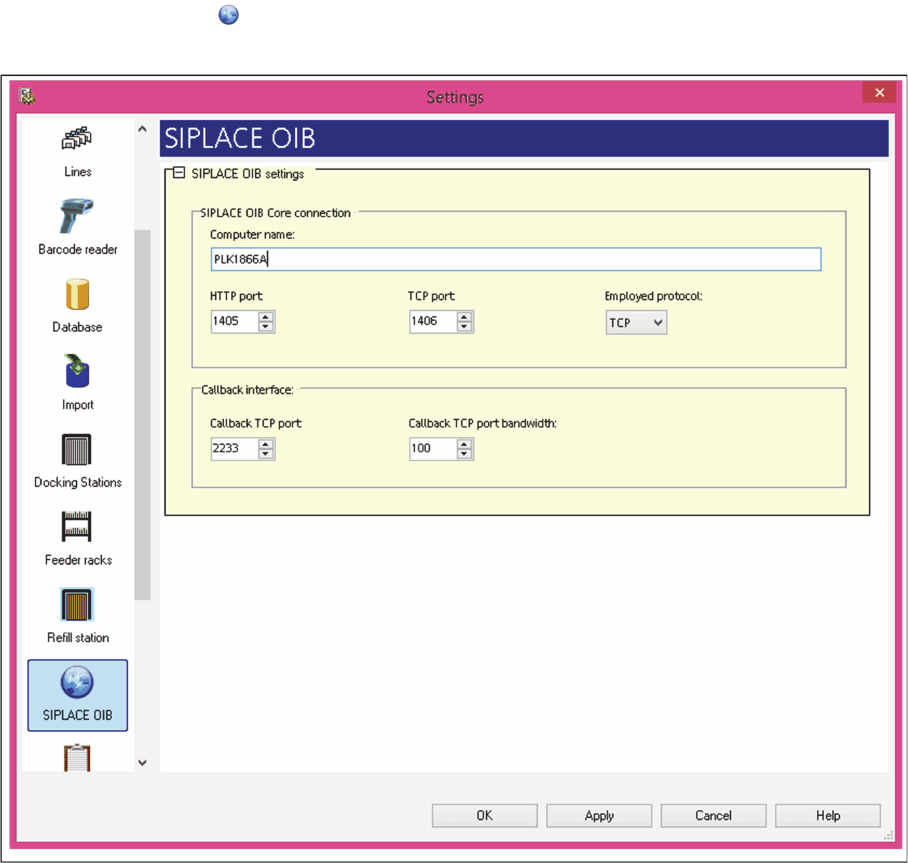
► In the main menu open Extras > Settings and the Settings window will open.
► Select the category ASM OIB.
⇨ The ASM OIB Settings dialog box will be shown.
Settings – ASM OIB
► Perform the relevant settings at ASM OIB Core Connections.