00198228-02_IM-MaterialSetupAssistant_DE_EN - 第96页
Configuration Configuration Settings in the ASM Material Man ager 96 SIPLACE Material Setup Assistant 2.2 SIPLACE Material Setup Assistant 2 .2 Installation folder for ConfigurationHelper ► Double click on the ASM.AS.SiM…
Configuration
Configuration Settings in the ASM Material Manager
SIPLACE Material Setup Assistant 2.2 SIPLACE Material Setup Assistant 2.2 95
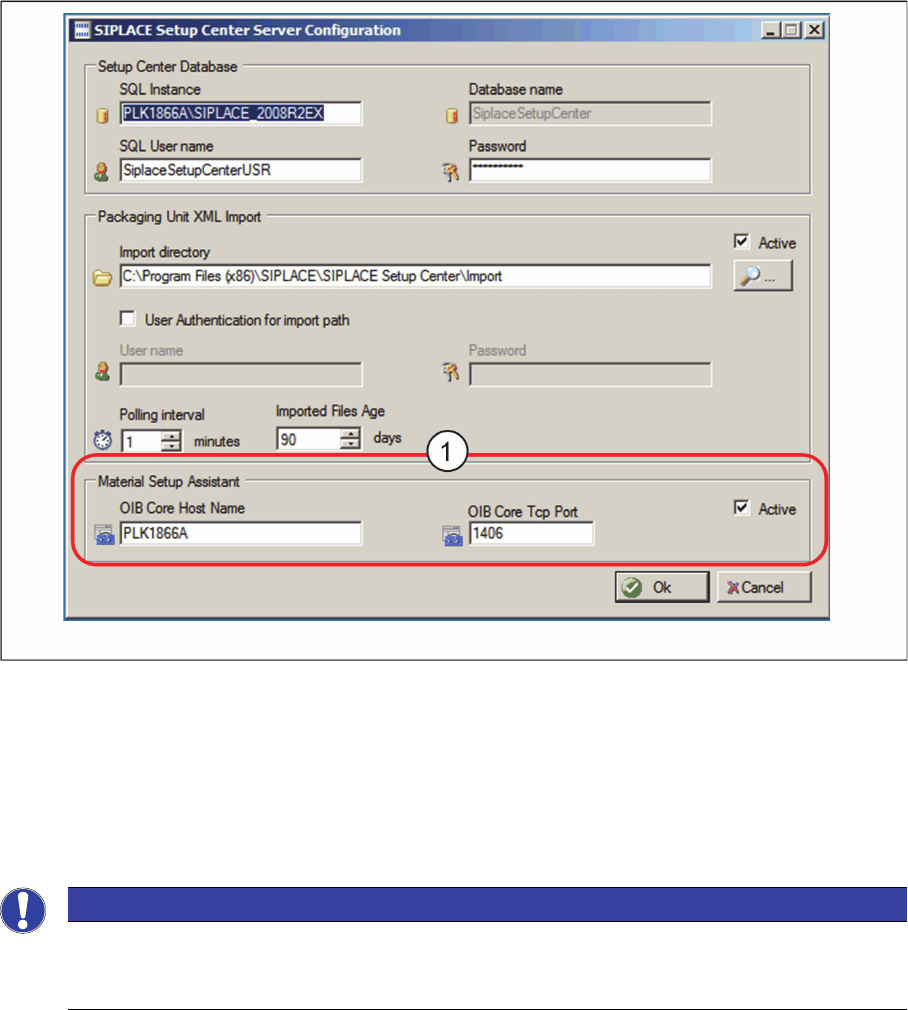
⇨ The ASM Setup Center Server Configuration dialog box will be shown.
ASM Setup Center Server Configuration dialog box
► Go to Material Setup Assistant (1) and enable the option Active.
► Enter the OIB Core Hostname and the OIB Core Tcp Port.
► Confirm with OK.
3.3
3.3 Configuration Settings in the ASM Material Manager
Configuration Settings in the ASM Material Manager
3.3.1
3.3.1 Activating the Order Manager
Activating the Order Manager
Enable the communication between the ASM Material Manager and the Order Manager if you have not
done this during the installation of the ASM Material Manager.
► Switch over to the installation folder for ASM Material Manager => ConfigurationHelper.
NOTICE
Workflow with ASM Material Manager for MSA
During the installation of ASM Material Manager for MSA, the required settings are configured
automatically. No configuration settings need to be done in ASM Material Manager.
Configuration
Configuration Settings in the ASM Material Manager
96 SIPLACE Material Setup Assistant 2.2 SIPLACE Material Setup Assistant 2.2
Installation folder for ConfigurationHelper
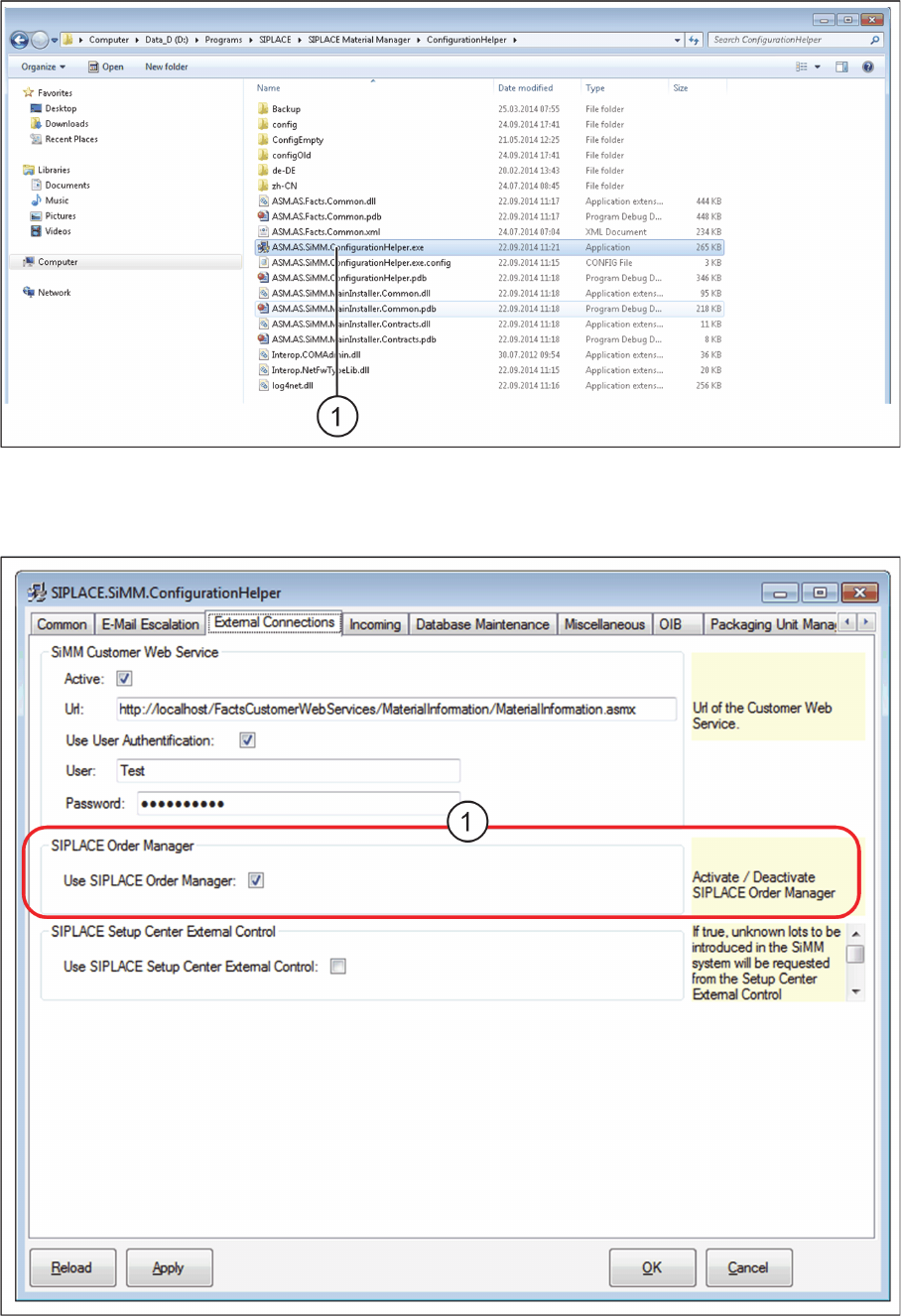
► Double click on the ASM.AS.SiMM.ConfigurationHelper.exe (1) file.
⇨ The SIPLACE.SiMM.ConfigurationHelper dialog box will be shown.
Dialog box: SIPLACE.SiMM.ConfigurationHelper
► Enable the Order Manager option (1).
► Confirm with OK.
Configuration
Configuration Settings in the ASM Material Manager
SIPLACE Material Setup Assistant 2.2 SIPLACE Material Setup Assistant 2.2 97
3.3.2
3.3.2 Selecting Material Reuse
Selecting Material Reuse
Use the option to specify if components are to be kept in the pre-setup area or not.
► Open the ASM Material Manager.
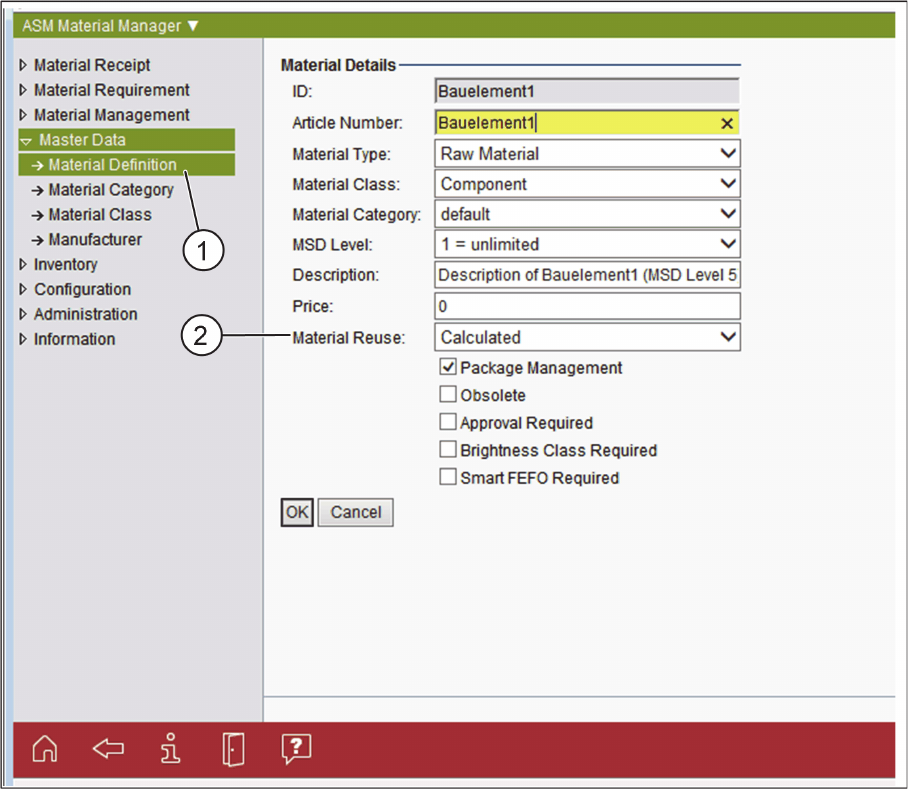
ASM Material Manager- Selecting the Material Reuse Option
► In the tree structure of the ASM Material Manager, select Master Data => Material Definition (1).
► In the Material Details, select the Material Reuse option for the relevant material (2).
Material Reuse
Select if the material is to be kept ready in the Active Feeder Pool. The following options are available:
▪ Calculated
– It is calculated if the material is to be kept ready in the Active Feeder Pool or if it is to be returned
to the warehouse.
▪ Permanent
– The material is to be kept ready permanently in the Active Feeder Pool. For example, this is the
case for standard material that is always used even if there is currently no reuse specified for this
material. This material is not put into the warehouse but is kept in the pre-setup area (e.g. on the
AFP hardware).
▪ Never
– The material is never to be kept ready in the Active Feeder Pool.
► Confirm with OK.