YS24X_Mainte_E - 第111页
3-44 3 Periodic maintenance items 4.7 Dual stage only: Cleaning and lubrication of U axis (W2 axis) In case the specification is the dual stage machine, cleaning and lubrication of the ball screw of U axis (W2 axis), gui…
3-43
3
Periodic maintenance items
4
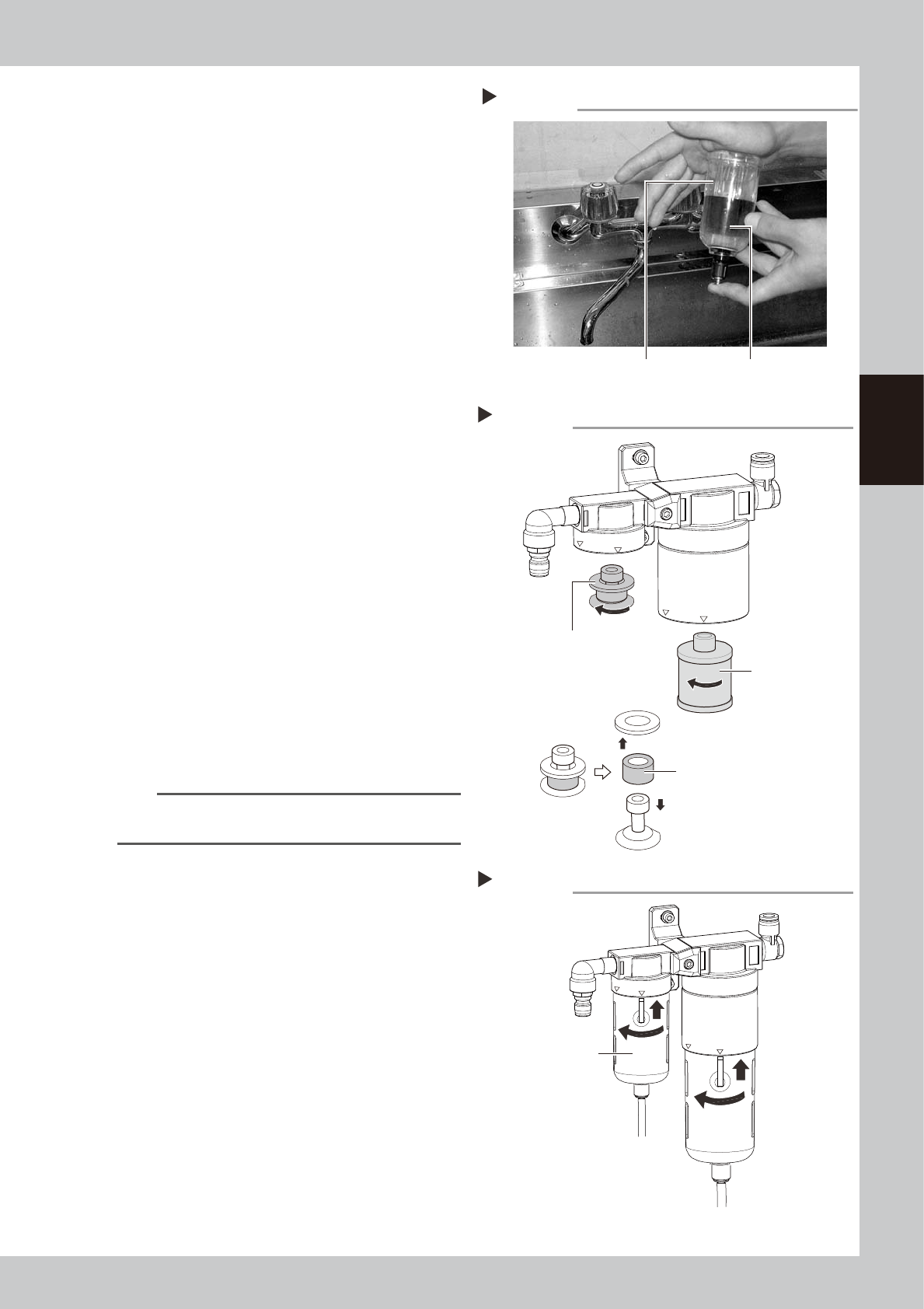
Clean the inside of the filter cup.
1. Lightly clean the filter cup with water.
2. Pour water-diluted neutral detergent into
the filter cup and clean the inside.
3. After blowing air to the filter cup, wipe
away any moisture with cloth.
53342-L4-00
5
Remove the filter element.
Air filter:
Turn the element ASSY counterclockwise
to remove.
The filter element is set between the top
and bottom adapters.
Oil mist filter:
Turn the filter element counterclockwise
to remove.
53367-L4-00
6
Check the state of element.
Check there is no dirt and clogging in the
filter element. If dirt and clogging are found,
replace with a new filter element.
7
Attach the filter element.
Follow the reverse order of removing the
element to remove the filter element.
8
Attach the cup.
1. Match the cup’s button to the displayed
location of “IN” on the filter housing, and
push the cup up.
2. Turn the cup counterclockwise to the
displayed location of “LOCK”.
53395-L4-00
TIP
You hear a click sound when the cut is set on the
“LOCK” location properly.
9
Reconnect the air coupler.
1. After reconnecting the air coupler, check
that no air is leaking.
2. Turn the air supply/exhaust switch
counterclockwise to restart air supply.
Cleaning the filter cup
Step 4
Filter cup
Water-diluted
neutral detergent
Removing the filter element
Step 5
Mist filter element
(Air) filter element
Filter element ASSY
Lock
IN
Lock
IN
Reattaching the filter cup
Step 8
Filter cup
3-44
3
Periodic maintenance items
4.7 Dual stage only: Cleaning and lubrication of U axis (W2 axis)
In case the specification is the dual stage machine, cleaning and lubrication of the ball screw of U axis (W2
axis), guide, and hex spline approx. every three months. For lubrication places, refer to "Chapter 5 Lubrication
points and schedule" also.
1
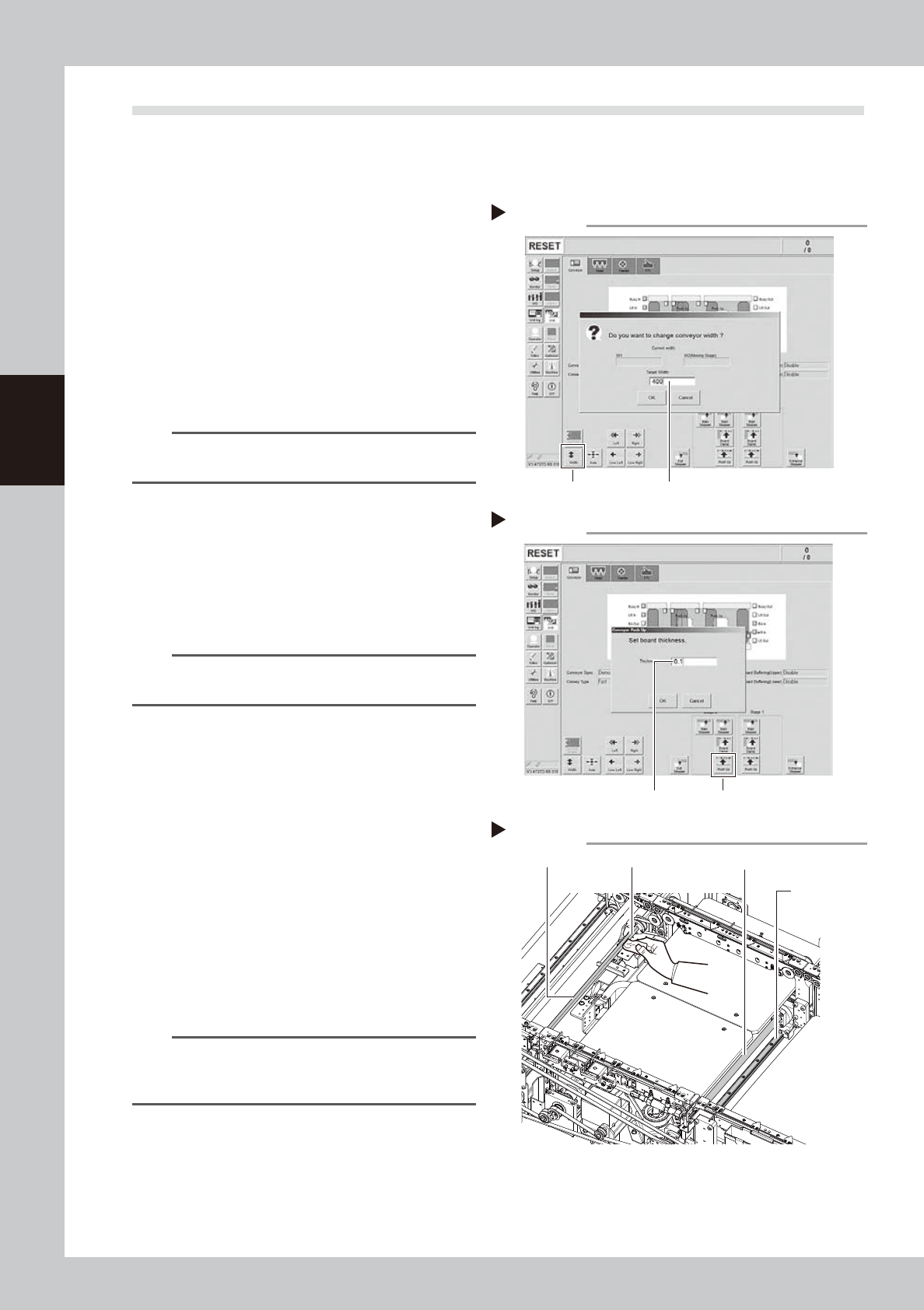
Change the conveyor width to its
maximum width.
1. Press the [Conveyor Width] button on the
[Unit] – [Conveyor] screen to display the
“Conveyor Width” screen.
2. Enter the maximum value of the
conveyor width in the “Changed
conveyor width”, press [OK]. The
conveyor is changed to the width that
was just entered.
54315-L4-00
TIP
The maximum value of the conveyor width is 460 mm as
the standard specification.
2
Move the stage 2 up.
1. Push the [Stage 2] - [Pushup] button to
display the “Conveyor Pushup” screen.
2. Enter “0.1 mm” in Thickness, and press
the [OK] button. The stage 2 moves up.
54316-L4-00
n
NOTE
By moving up the stage 2, it becomes easier to access
the ball screw and guide.
e
3
Clean each part of U-axis (W2 axis).
1. Press the emergency stop button, and
open the machine’s safety cover.
2. If the machine is equipped with a
carriage, remove to the carriage for
easy access to the U-axis.
3. Remove everything affected by
magnetism such as wrist watches,
magnetic ID card, etc.
4. Clean the old grease and dirt of the
whole U axis ball screw (2), guide (2),
and hex spline (1) with a lint-free cloth
that does not raise dust.
53334-L4-10
n
NOTE
When performing cleaning, clean the lead groove part
of the ball screw and the groove of the guide rail
carefully. Also, make sure no dust is generated.
Changing the conveyor width
Step 1
[width] button Enter the maximum conveyor value
Enter the pushup board thickness
Step 2
[Push Up] buttonEnter the thickness
Cleaning the each part of U-axis
Step 3
Guide
Lint-free clothHexagon spline
Ball screw
3-45
3
Periodic maintenance items
4
Change the conveyor width to its
minimum width.
1. Close the machine' safety cover, and
cancel the emergency stop. If the
machine could be equipped with a
carriage, set the carriage.
2. Press the [Width] button to display the
"Conveyor Width" screen.
3. Enter the minimum value of the conveyor
width "50 mm" in the "Target Width" box
and press the [OK] button. The conveyor
width is changed to the specified width.
4. Follow the procedure described in Step 2,
and move the push-up plate up.
TIP
When the conveyor width is changed, the push-up
plate moves down automatically.
e
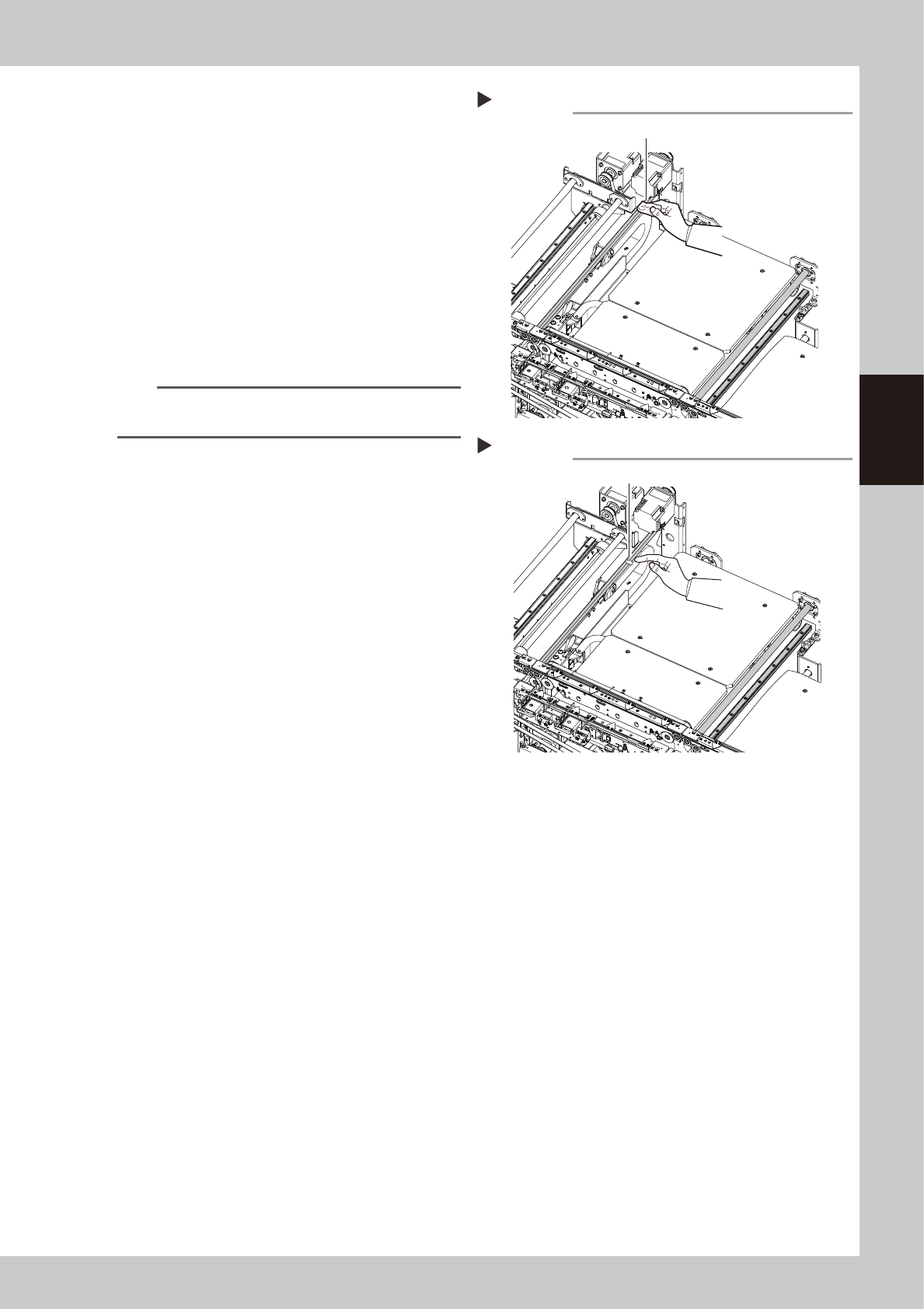
5
Clean the rest of the part.
1. Press the emergency stop button and
then open the machine safety cover.
2. If the machine is equipped with a
carriage, remove to the carriage for
easy access to the U-axis.
3. Wipe off the remaining grease or soiling
describes in Step 3 with a lint-free cloth.
53368-L4-00
6
Apply grease.
1. While the conveyor width is minimum,
apply the specified grease (NSL) by hand
uniformly over the surface of hex spline,
the surface and groove of ball screw,
and the surface and groove of guide.
2. Close the machine' safety cover, and
cancel the emergency stop. If the
machine could be equipped with a
carriage, set the carriage.
3. Follow the procedure of Step 1, and set
the conveyor width to maximum.
4. Follow the procedure of Step 2, move
the push-up plate up.
e
5. Press the emergency stop button and
open the machine’s safety cover. If the
machine is equipped with a carriage,
remove the carriage.
6. Apply grease to the positions where the
grease could not be applied in 1.
53369-L4-00
7
Spread the grease.
1. Close the machine' safety cover, and
cancel the emergency stop. If the
machine could be equipped with a
carriage, set the carriage.
2. Change the conveyor width from
maximum to minimum several times with
the procedures of Step 1 and 4.
Cleaning the each part of U-axis 2
Step 5
Wipe off remaining grease or soiling.
Applying grease
Step 6
Grease (Apply grease in a uniform manner.)