YS24X_Mainte_E - 第114页
3-47 3 Periodic maintenance items 5. Six-month or one-year inspection 5.1 Cleaning the fiducial camera T he fiducial camera is mounted on the right side of the head unit (the left side camera is optional). Dust ma y be a…

3-46
3
Periodic maintenance items
e
8
Wipe away excess grease.
1. Press the emergency stop button and
then open the machine safety cover.
2. If the machine is equipped with a
carriage, remove to the carriage for
easy access to the U-axis.
3. Use a lint-free cloth that does not raise
dust to wipe the excessive grease on the
end of hex spline, ball screw, and end of
guide.
3-47
3
Periodic maintenance items
5. Six-month or one-year inspection
5.1 Cleaning the fiducial camera
The fiducial camera is mounted on the right side of the head unit (the left side camera is optional). Dust may
be attached to the lighting unit of this camera, and therefore, it is recommended to perform periodical
cleaning.
c
CAUTION
Do not apply strong force or shock to the camera unit and lighting unit during cleaning. Optical axis adjustment might
become unreliable.
c
CAUTION
If trouble occurs with the lighting unit, then contact YAMAHA sales representative. Disassembly and cleaning of the
lighting unit by the user will void the warranty.
1
Move the head unit.
e
1. Remove everything affected by
magnetism such as wrist watches,
magnetic ID card, etc.
2. Press the emergency stop button and
then open the machine safety cover.
3. If the machine is equipped with a
carriage, remove the carriage to allow
you to easily access the head unit.
4. Move the head unit to make cleaning
easy.
2
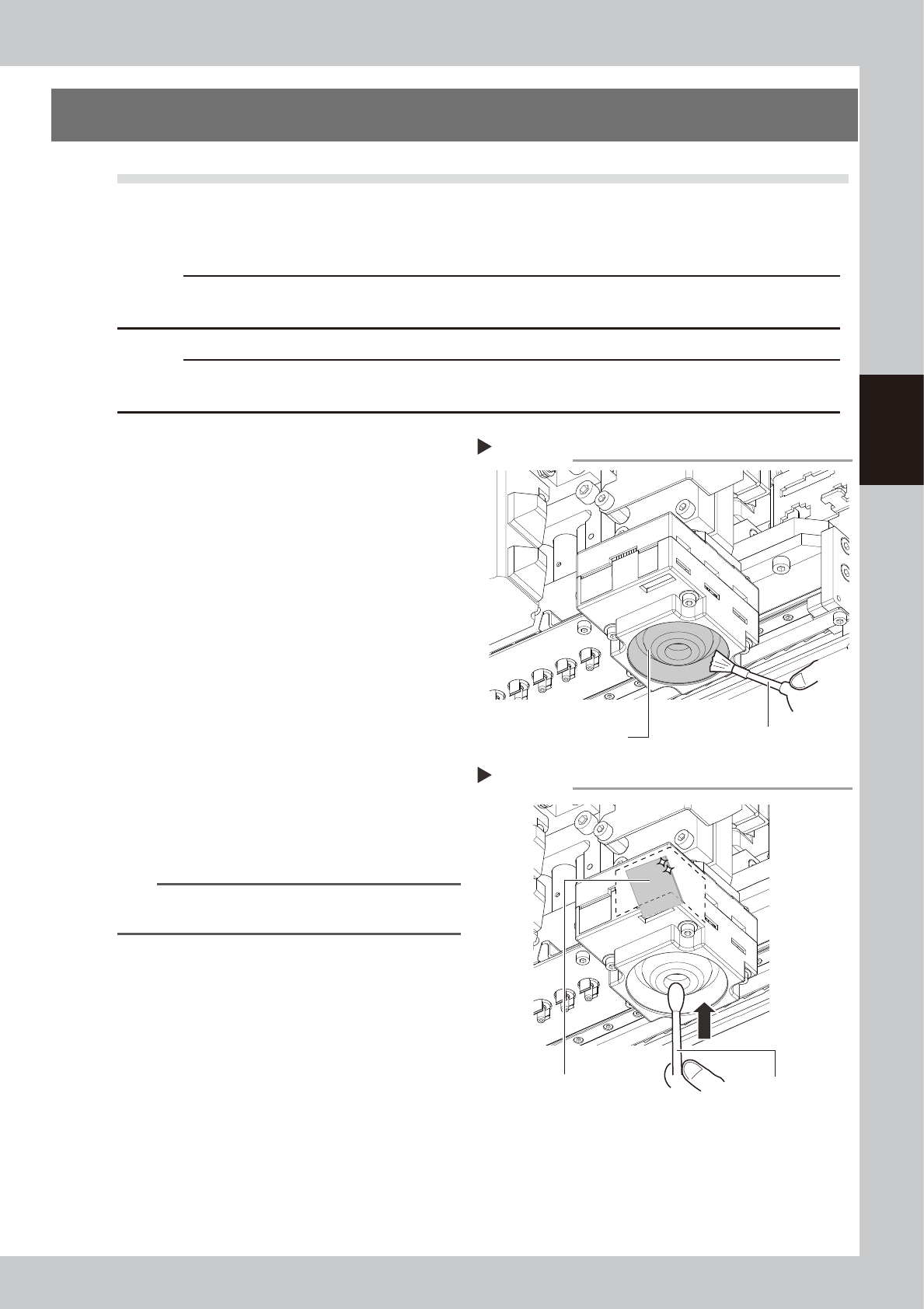
Clean the lighting unit.
Remove dust on the lighting unit with the
blower brush.
53351-L4-00
3
Clean the diffuser plate.
Put a few drops of lens cleaner on a cotton
swab, and clean the diffuser plate unit as
shown in the right figure.
53352-L4-00
TIP
The blower brush and lens cleaner must be purchased
as option.
Lighting unit for fiducial mark camera
Remove dust with the blower brush.
Step 2
Blower brush
The cotton swab
with lens cleaner
Cleaning the diffuser plate.
Step 3
Diffuser plate
3-48
3
Periodic maintenance items
5.2 Cleaning and lubricating the W-axis
Every six months, cleaning and lubrication of the ball screw, guide, and hex spline of W axis are necessary. For
lubrication locations, see "Chapter 5 Lubrication points and schedule". For lubrication of the dual stage W2
axis (U axis), see "4.7 Dual stage only: Cleaning and lubrication of U axis (W2 axis)" in this chapter.
1
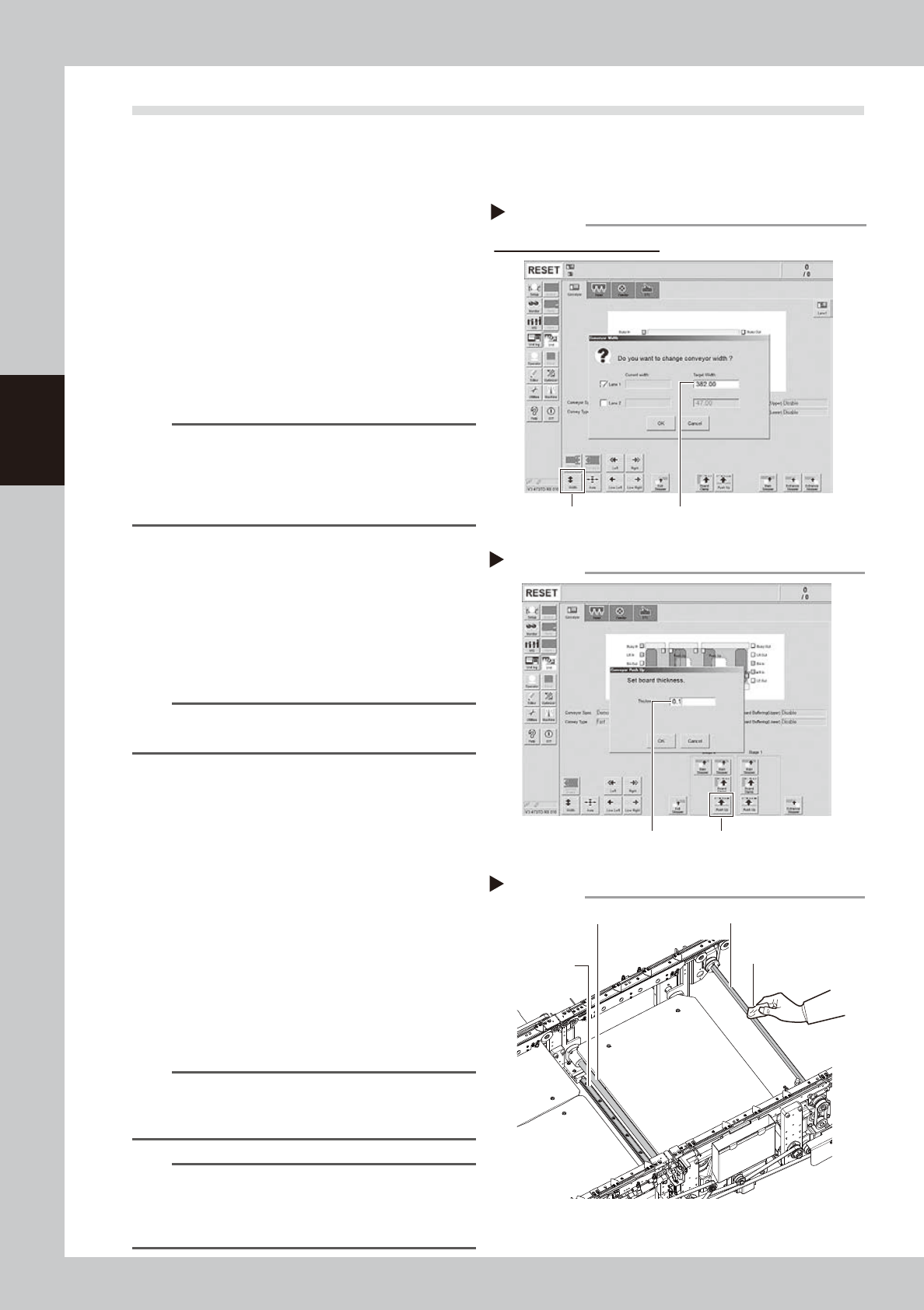
Change the conveyor width to its
maximum width.
1. Press the [Conveyor Width] button on the
[Unit] – [Conveyor] screen to display the
“Conveyor Width” screen.
2. Enter the maximum value of the
conveyor width in the “Changed
conveyor width”, press [OK]. The
conveyor is changed to the width that
was just entered.
54317-L4-00
TIP
The maximum value of the conveyor width is 460 mm
for the single lane and dual stage specifications. In
case of the dual lane specification, the maximum value
of the conveyor width in one side lane is 382 mm. Enter
382 mm on lane 1.
2
(For dual stage specification only)
Move the stage 2 up.
1. Push the [Stage 2] - [Pushup] button to
display the “Conveyor Pushup” screen.
2. Enter “0.1 mm” in Thickness, and press
the [OK] button. The stage 2 moves up.
54318-L4-00
n
NOTE
By moving up the stage 2, it becomes easier to access
the W3-axis ball screw and guide.
e
3
Clean the each part of W-axis.
1. Press the emergency stop button, and
open the machine’s safety cover.
2. If the machine is equipped with a
carriage, remove to the carriage for
easy access to the w-axis.
3. Remove everything affected by
magnetism such as wrist watches,
magnetic ID card, etc.
4. Wipe the old grease and soiling from the
W-axis ball screw, guide, and the whole
hexagon spline with a lint-free cloth that
does not raise dust.
53370-L4-00
n
NOTE
When performing cleaning, clean the lead groove part
of the ball screw and the groove of the guide rail
carefully. Also, make sure no dust is generated.
n
NOTE
The number of cleaning areas (ball screw, guide, and
hex spline) differs depending on the specification of the
machine. See "Chapter 5 Lubrication points and
schedule".
Changing the conveyor width
Step 1
[width] button Enter the maximum conveyor value
Dual lane specification screen
Enter the pushup board thickness
Step 2
[Push Up] buttonEnter the thickness
Cleaning the each part of W-axis
Step 3
Guide
Lint-free cloth
Hexagon spline
Ball screw