YS24X_Mainte_E - 第124页
4-5 4 Maintenance of options 3. Nozzle station 3.1 Checking the nozzle station status and cleaning the nozzle station (1 year) When the machine is equipped with the nozzle station (option), it is necessary to periodicall…
4-4
4
Maintenance of options
2. UPS (Uninterruptible Power Supply)
2.1 Replacing the UPS battery (3 year)
The battery is a consumable item. Even though the service life of the UPS may vary depending on the operating
environment, such as ambient temperature, it is recommended to replace the battery with a new one at
reference intervals of 3 years. The following describes how to replace the battery that is incorporated into the
UPS.
w
WARNING
BATTERY REPLACEMENTS SHOULD BE PERFORMED ONLY BY THOSE WITH ELECTRICAL WORK EXPERIENCE.
1
Turn the machine power OFF.
Turn OFF the UPS power several seconds
after turning OFF the machine power.
w
WARNING
DO NOT ATTEMPT THIS BATTERY REPLACEMENT
PROCEDURE WHILE THE UPS FUNCTION IS RUNNING
(DURING AN EMERGENCY STOP, ETC.).
2
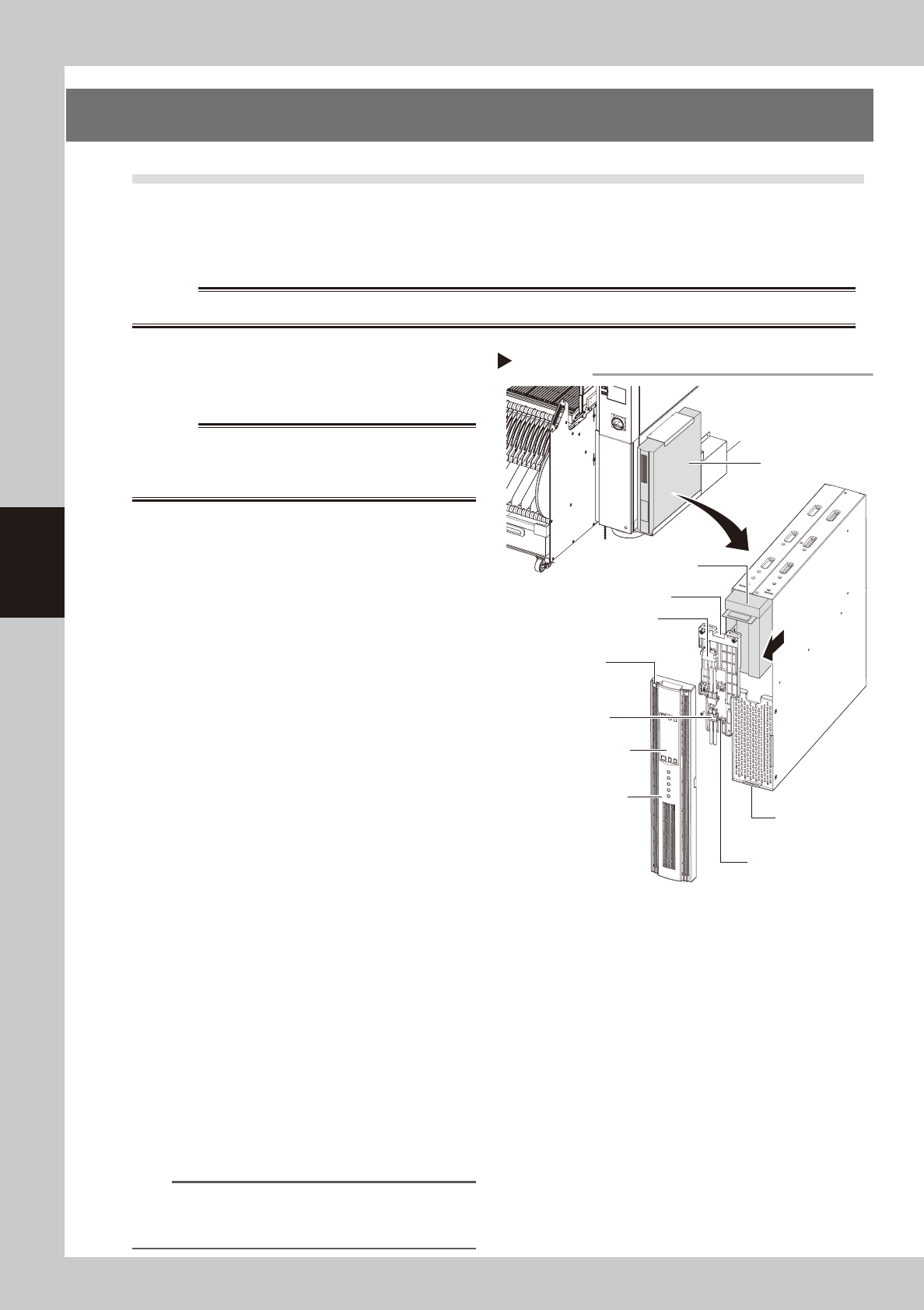
Remove the front panel.
Use a Phillips screwdriver to remove the
screws which secure the front panel, then
remove the front panel.
53408-L4-00
3
Disconnect the battery connector.
Disconnect the UPS side and internal battery
side connectors.
4
Remove the battery securing
fixture.
Remove the battery fixture mounting screws,
then remove the battery securing fixture.
5
Replace the removed battery with a
new one.
Extract the old battery and insert a new
battery in its place.
6
Reinstall the battery.
Reverse Steps 2 to 4 above to reinstall the
battery.
7
Check the UPS status.
1. Turn the machine power ON.
2. Press the ON button on the UPS operation
panel to check that the BATTERY LED is
OFF.
8
Write the battery replacement date.
Write the battery replacement date on the
UPS WARNING label (see "Safety instructions"
Safety instructions" in this manual).
n
NOTE
For UPS details, refer either to the optional manual "UPS
(Uninterruptible power supply unit)" or to the
manufacturer's operation manual.
Step 2-6
Replacing the internal battery
UPS operation panel
Lower right portion on the front
UPS unit
Internal battery
Internal battery
side connector
UPS side battery
connector
Battery securing fixture
Front panel
Front panel hook
Battery securing fixture
mounting screw
Front panel
mounting screws
4-5
4
Maintenance of options
3. Nozzle station
3.1
Checking the nozzle station status and cleaning the nozzle station (1 year)
When the machine is equipped with the nozzle station (option), it is necessary to periodically check the nozzle
detection sensor status.
c
CAUTION
If the nozzle station sensor cannot detect the nozzle correctly, the nozzle change does not operate correctly or the
production cannot continue due to nozzle detection error.
1
Make the preparations for work.
e
1. Return all nozzles to the nozzle station.
2. Press the emergency stop button and
then open the machine safety cover.
2
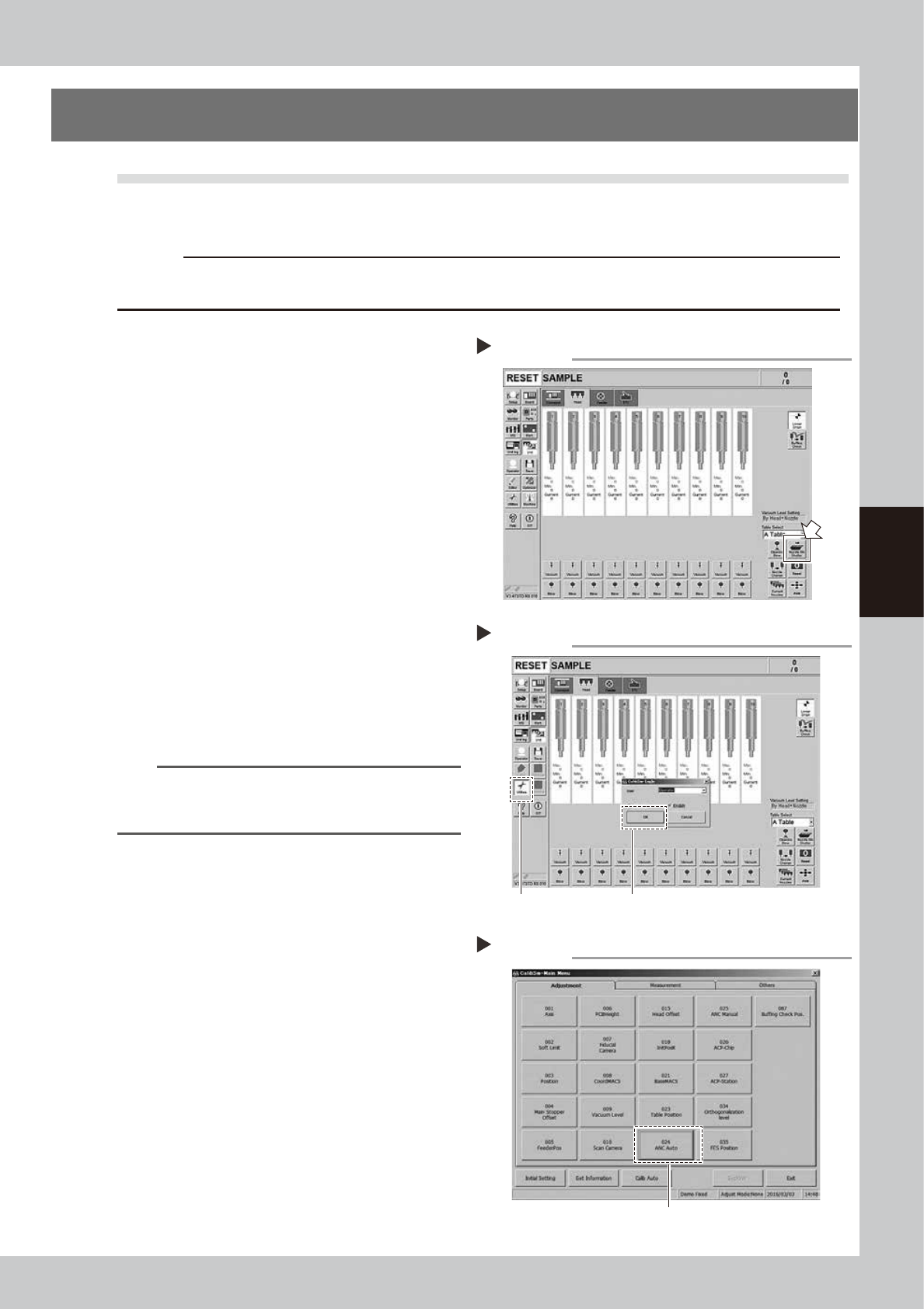
Open the shutter of the nozzle
station (hereafter referred to as
"ANC").
1. Open the [Unit] - [Head] screen.
2. Press the [Nozzle Stn Shutter] button to
open the ANC shutter.
54400-L4-10
3
Open the Utilities mode.
1. Press the [Utilities] button on the left of
the screen.
2. The "LogIn" screen will appear. Check
that "Operator" is shown in the “User”
field, and then press the [OK] button.
54402-L4-10
n
NOTE
When logging-in to the Utilities mode with "User:
Operator", the machine set values cannot be changed
or saved.
4
Select [ANC Auto].
Press the [024 ANC Auto] button.
54403-L4-00
Opening the Utilities mode
Step 3
Select [Utilities].
Select [OK] with "User: Operator".
Selecting [ANC Auto]
Step 4
Select [024 ANC Auto].
Opening the nozzle station shutter
Step 2
4-6
4
Maintenance of options
5
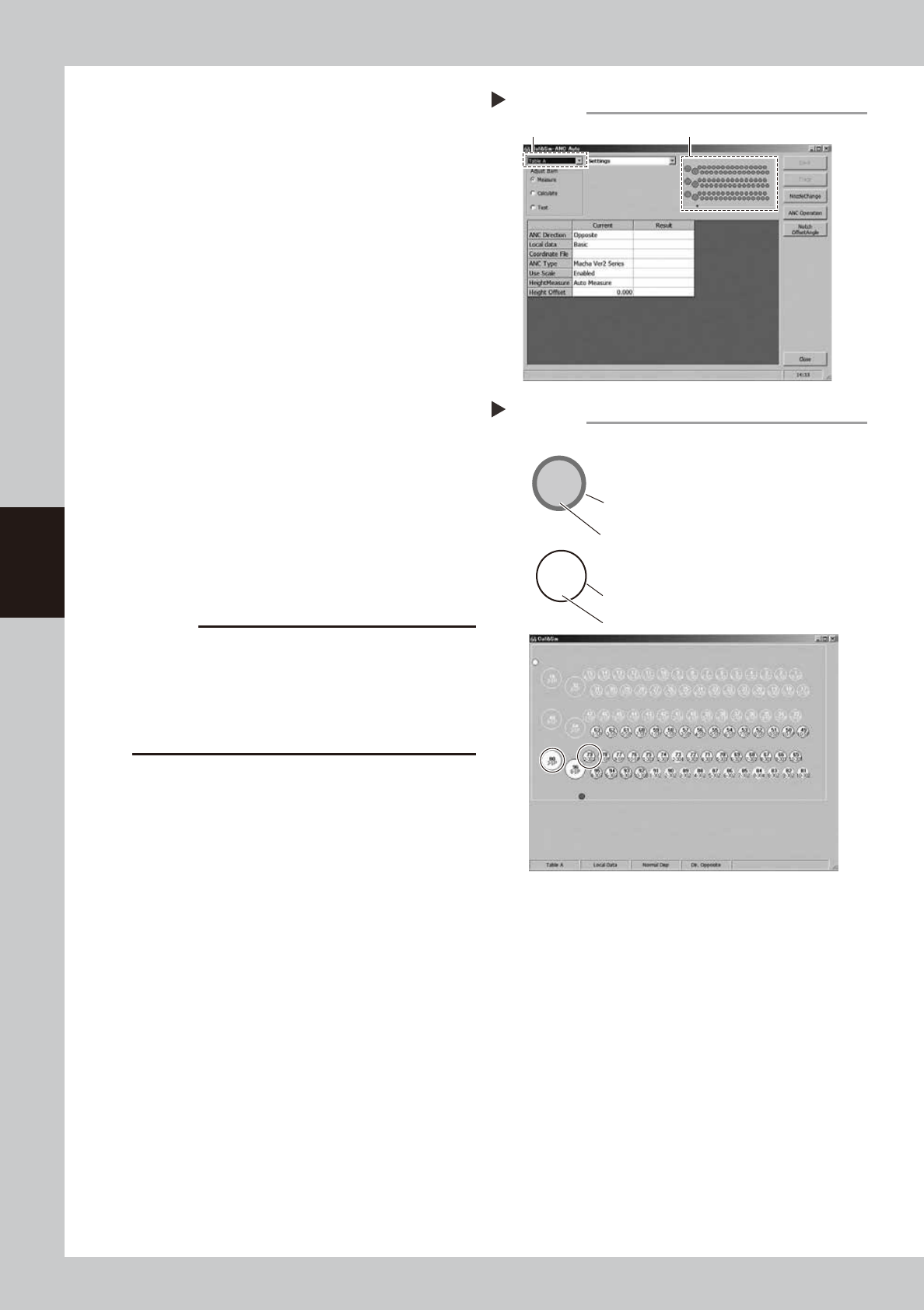
Open the ANC Auto screen.
Press the [024 ANC Auto] button.
1. Select a desired table from the pull-down
menu at the upper left portion of the
screen.
2. Click the ANC illustration on the right.
54404-L4-00
6
Check the ANC sensor operation.
1. Check that the nozzle storage status
shown on the screen is the same as the
actual nozzle storage status while
referring to the nozzle storage position/
sensor status in the illustration.
2. Remove the nozzle by hand and check
that no nozzle is displayed at the target
storage position.
54405-L4-00
7
Clean the ANC.
If the nozzle detection status is different from
the actual nozzle presence status, remove
the nozzle and visually check the inside. If
any dust or chip is found, remove it and
clean the inside of the nozzle using the
vacuum assembly.
c
CAUTION
If the nozzle detection status inside the ANC does not
become stable for a reason other than clear reason,
such as dust, etc., or if the nozzle cannot be detected,
contact YAMAHA sales representative. The disassembly
and cleaning performed by the customer are not
covered by the warranty.
8
Close the ANC shutter.
Press the [Nozzle Stn Shutter] button to close
the ANC shutter.
Opening the ANC Auto screen
Step 5
Select the table A or table B. Click the ANC illustration.
2-303
79
3-SP
80
Checking the ANC sensor operation
Step 6
303 nozzle to be used for head 2
Storage position: No. 79
Colored frame (red/blue/yellow/green, etc.):
Nozzle is already registered.
Special nozzle to be used for head 3
Storage position: No. 80
Black frame: Nozzle is not registered.
Gray out: Nozzle is present currently.
White: Nozzle is not present currently.
Example of nozzle storage position/sensor status