YS24X_Mainte_E - 第95页
3-28 3 Periodic maintenance items Loosen the conveyor belt Example of Dual-lane ■ Lane 1 ■ Lane 2 Mark the position of the bolt fastening the pulley . Lane-1 conveyor Loosen this pulley . Direction to move the pulley . D…
3-27
3
Periodic maintenance items
4
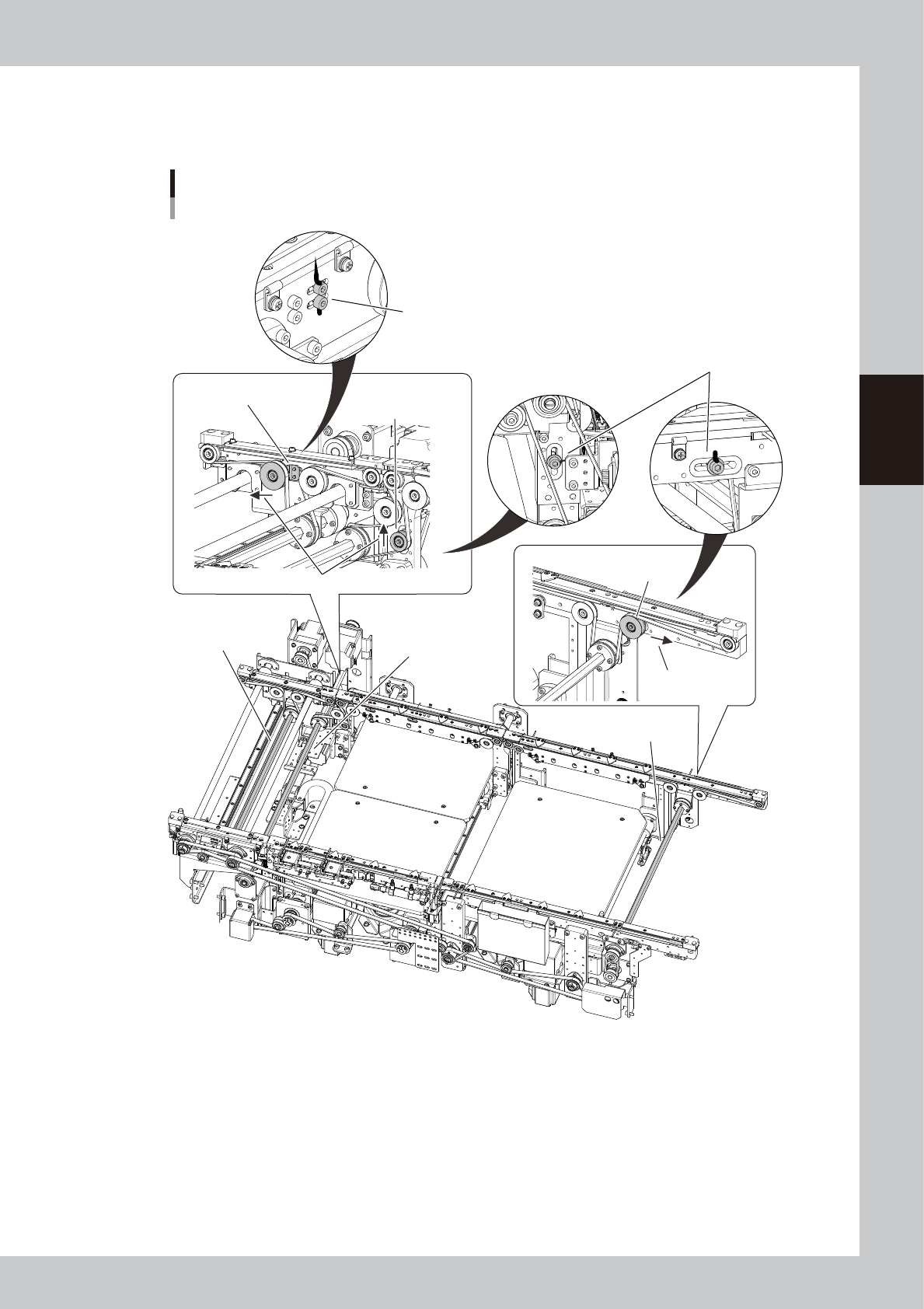
Mark the tensioner position with permanent marker.
Before loosening the tensioner (pulley/pulley bracket), mark the positions of the bolts fastening the
tensioner with an oil-based permanent marker.
Loosen the conveyor belt
Example of Dual-stage
■ W2-axis
(Stage 2)
■ W2-axis
(Exit conveyor)
■ W1-axis
(Stage 1)
Mark the positions of the bolts fastening the
pulley bracket with permanent marker.
Directions to move the pulleys.
W2 conveyor
Loosen this pulley.
W1 conveyor
Loosen this pulley.
Direction to move
the pulley.
Exit conveyor
Loosen the pulley bracket.
Mark the position of the bolt fastening
the pulley with permanent marker.
533D3-L4-10
3-28
3
Periodic maintenance items
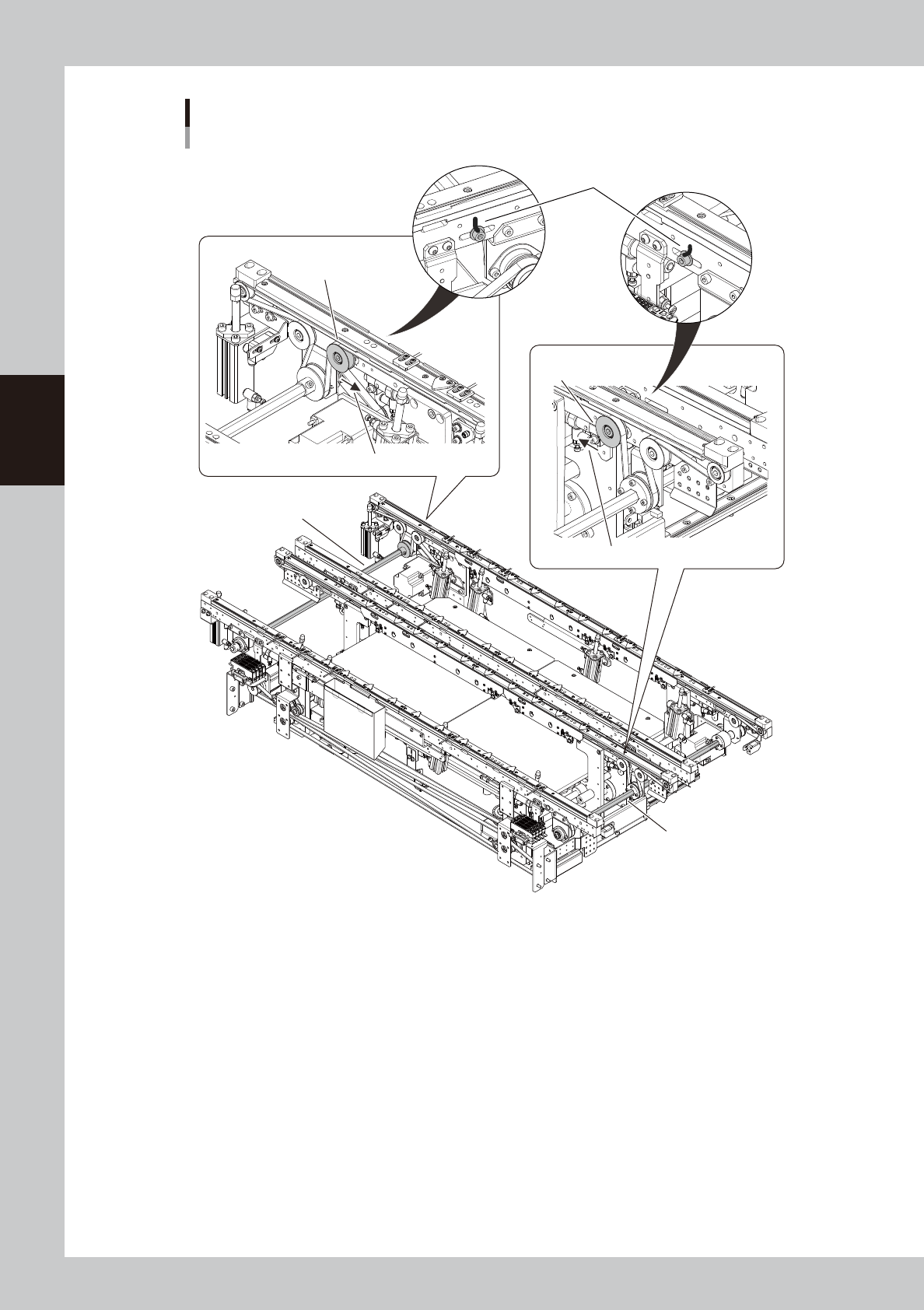
Loosen the conveyor belt
Example of Dual-lane
■ Lane 1
■ Lane 2
Mark the position of the bolt
fastening the pulley.
Lane-1 conveyor
Loosen this pulley.
Direction to move the pulley.
Direction to move the pulley.
Lane-2 conveyor
Loosen this pulley.
533D4-L4-10
3-29
3
Periodic maintenance items
5
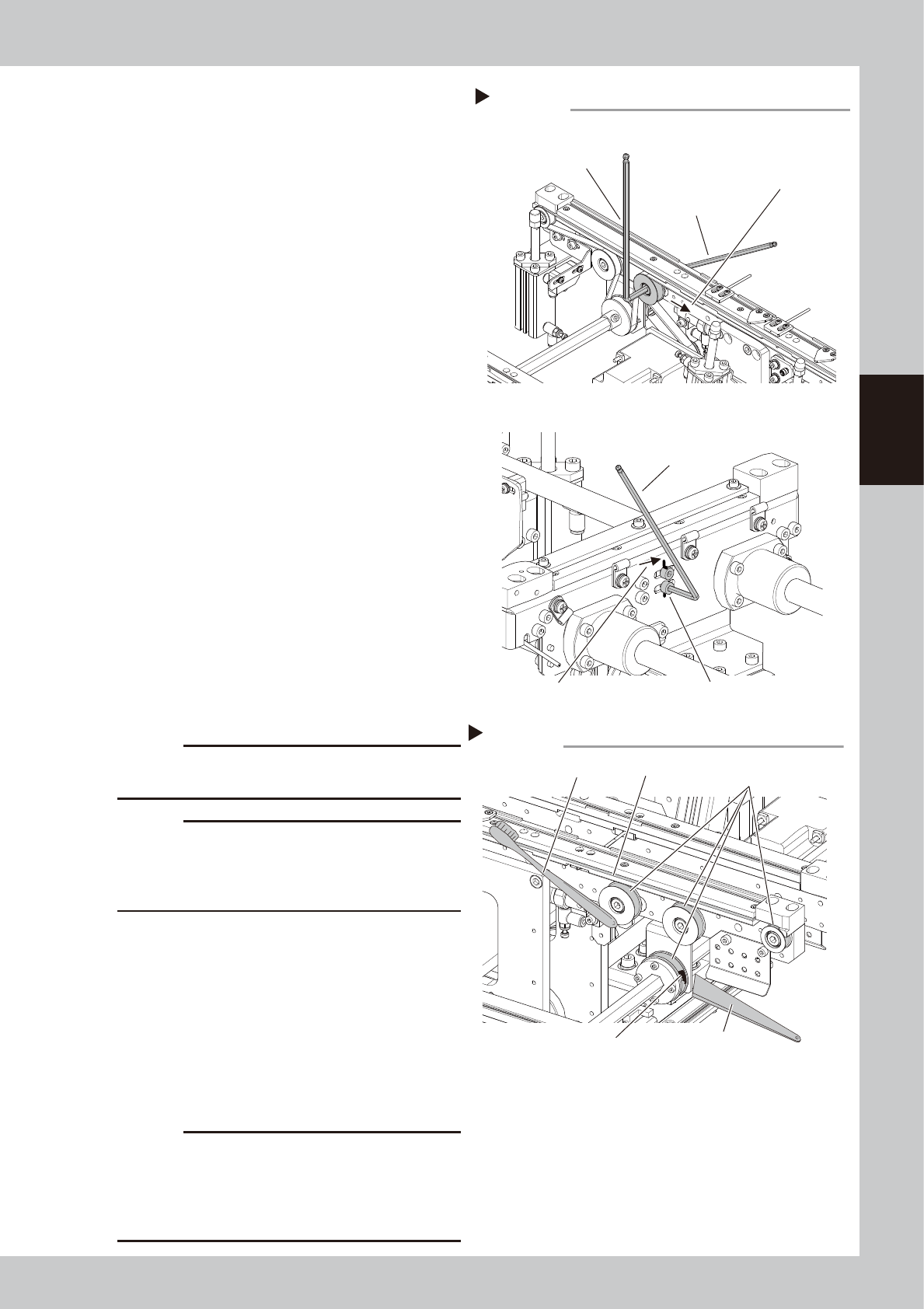
Loosen the belt.
1. Use two hex wrenches to loosen the
mounting bolt of the belt tensioner pulley.
Hex wrench on pulley side : 5mm
Hex wrench size on mounting bolt side : 4mm
2. For DS exit conveyor (W3 - axis) only:
Use a hex wrench (3) to loosen the bolts
that secure the pulley bracket.
3. Move the tensioner (pulley/pulley bracket)
to the end of the tension adjusting slot in
the loosening direction.
533D5-L4-00
6
Remove the belt from the conveyor.
Detach the conveyor belt from the pulleys
and belt grooves of the conveyor guide.
7
Check the belt for wear and scuffing.
If wear or scuffing of the belt is obvious,
replace the conveyor belt referring to "4.1
Replacing the conveyor belt" in Chapter 6.
8
Clean the guides and pulleys.
1. Use a vacuum assembly (option) to
suction the belt wear debris on the belt
guides and sensors, etc.
2. Use a plastic spatula or similar tool to
remove the belt wear debris adhering to
the outer peripheral surface of the pulleys.
3. Use a brush or similar tool to remove the
belt wear debris caught in the belt
guides.
533D6-L4-00
c
CAUTION
Use a plastic spatula and brush to avoid scratching the
pulleys and guides.
c
CAUTION
Do not use a solvent (IPA, etc.) unless the guides and
pulleys are excessively dirty. If using a solvent, be
careful not to spill the solvent on the bearing in the
pulleys during cleaning.
9
Replace the conveyor belt.
1. Reattach a new belt temporarily while
putting it on the tensioner (pulley).
2. Move the tensioner (pulley/pulley
bracket) to the position you have put the
marking in Step 4 and mount the bolts.
3. If looseness of the belt is found, adjust the
position of the tensioner (pulley/pulley
bracket) to apply necessary tension.
c
CAUTION
Tighten the mounting bolts of the pulley and pulley
bracket to the following torques:
• Pulley mounting bolt : 5.5N•m.
• Pulley bracket mounting bolt : 3.8N•m.
Be careful not to tighten the bolts excessively.
Loosening the belt
Step 5
Dual-lane Lane 2
Hex wrench (5)
Move the pulley to loosen the belt.
Pulley bracket mounting bolt
Move the pulley to
loosen the belt.
Hex wrench (4)
(Mounting bolt side)
Hex wrench (3)
Dual-stage Exit conveyor (W3-axis)
Cleaning the guide and pulleys
Step 8
Brush
Belt guides
Belt wear debris
sticking to pulley
Spatula
(made of plastic)
Outer peripheral surface
of pulley