00196674-01 - VD SetupCenter V3.3_de_en.pdf - 第8页
Introduction Recommendation 8 Version Description SIPLACE Setup Center 3.3 1.1 Recommendation For a temporary operation (e. g. during an upgra de) it is possible to use different Setup Center GUI versions. ATTENTION: Uni…

Introduction
Version Description SIPLACE Setup Center 3.3
7
1Introduction
SIPLACE Setup Center is an application for performing setup verification on SIPLACE machines (online)
and in the pre-setup area (offline).
Setup verification is the term used for step-by-step verification of the assignment of a component from
the target setup to a track in the actual setup. SIPLACE Setup Center obtains the data on the target setup
through the SIPLACE Pro Interface (SPI). The component is identified by barcode labels on the
packaging unit, which SIPLACE Setup Center reads by means of a scanner system and processes via
a flexible barcode label definition. The track is then assigned to the component via the track barcode on
the machine or via the component verification button on the X feeder. The data acquired during a setup
verification is stored by SIPLACE Setup Center in a separate database.
SIPLACE Setup Center can currently handle packaging units that are uniquely identifiable and
packaging units that are assigned to a batch. The groups are differentiated by the fact that a packaging
unit has a unique barcode (UID) or a batch identification (ICL), such as a serial number. For technical
reasons, Setup Center cannot provide all functions with the same degree of user-friendliness in ICL
mode, so we recommend equipping packaging units with a unique identification.
SIPLACE Setup Center currently supports online setup verification for all SIPLACE placement machines
(except F3 and S15). SIPLACE Setup Center also differentiates between unforced and forced setup
verification. Unforced setup verification is carried out without a connection to the station. This means
there is no compulsion to perform setup verification and the production process can take place without
it. Forced setup verification is carried out with a connection to the station and requires successful setup
verification before production. This is implemented as follows: once an order or a packaging unit
changeover has been downloaded, the machine deactivates all divisions in which there are packaging
units for which no setup verification data has been received. Before production can start, the line
operator must have therefore successfully verified all components/batches necessary for the product.
Forced online setup verification is not supported by C series machines.
SIPLACE Setup Center also allows you to perform offline setup verification in the pre-setup area. The
offline setup verification is performed for the changeover table of a selected setup. After completing the
setup via the offline setup verification, the changeover table can be moved out of the pre-setup area and
over to the production line, where it can be logged on to the station via the "Changeover table
management". This once again supports all SIPLACE machines.
The concept of device recognition for machines (Unique Machine ID), changeover tables (Unique Table
ID) and feeders (Unique Feeder ID) was introduced with the support of X series machines. The
equipment of the X series supports the concept directly by way of the hardware. For the F, S, H-, HS and
C series the identification labels still need to be ordered, like described below.
In contrast to previous setup verification systems, the SIPLACE Setup Center uses a radio scanner
system, which displays the current setup data for the user. The radio scanner system offers easy-to-
follow user prompts. The four-line display gives the user information and is also used to control certain
processes. The menu structures are modeled on those used for the operation of mobile phones. In
addition, the scanner indicates the successful or unsuccessful completion of actions by various audible
and visual signals.
ATTENTION:
The line ID used in Setup Center 2.0 and 2.1 is no longer supported and is replaced by the
machine ID.
For this reason it is necessary to remove all existing barcode labels for online setup verification,
for example ‚Table Verification’, ,Refill’, ‚Shift Change’, ‚Component Search’ etc. and to
overwrite these with new labels.
Introduction
Recommendation
8 Version Description SIPLACE Setup Center 3.3
1.1 Recommendation
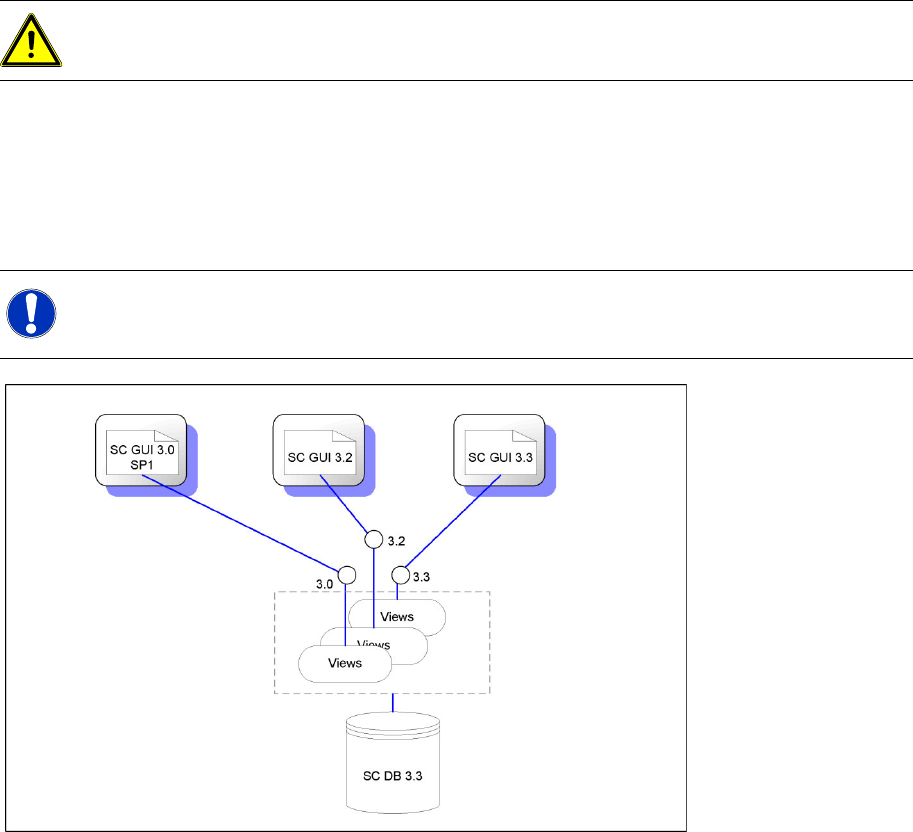
For a temporary operation (e. g. during an upgrade) it is possible to use different Setup Center GUI
versions.
ATTENTION:
Unique Feeder ID for S-feeders is no longer supported.
NOTE:
However, the new functions are not available in the old Setup Center GUIs.
System Overview
Version Description SIPLACE Setup Center 3.3
9
2 System Overview
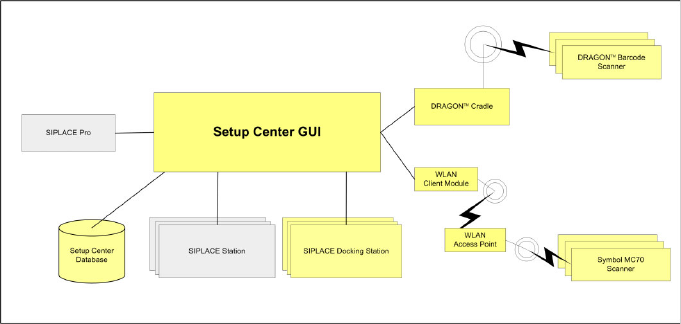
The SIPLACE Setup Center package comprises the following subsystems:
Setup Center GUI
Setup Center database
Barcode Reader
Docking Station
SIPLACE Setup Center loads the target setup from SIPLACE Pro. After the download of a recipe at the
line, Setup Center automatically loads target setup during online setup verification. In the case of offline
setup verification, the operator selects the target setup manually.
During setup verification, packaging unit data are recorded via the barcode reader, then checked against
the currently loaded target setup and finally stored in the Setup Center database. During the process of
forced setup verification, the resulting data is transferred to the machine via the station interface.