Micron Technical Reference V9 Volume 1.pdf - 第14页
INTRODUCTION CONVENTIONS 1.4 Technical Reference Manual Chapter Issue 12, Feb 18 CONVENTIONS General The manual follows a logical method of portraying information to the user . This philosophy is consistent across the co…
INTRODUCTION
MANUAL STRUCTURE
Chapter Issue 12, Feb 18 Technical Reference Manual 1.3
MANUAL STRUCTURE
The Technical Reference Manual is composed around four defined areas:
• Manual Introduction and Overview
• Printer Electrical and Electronics Areas
• Printer Modules
• Miscellaneous Information
Based upon the areas above, the manual is divided into chapters. A listing of
all chapters is detailed in the contents pages of this manual.
Chapter Structure The structure of each chapter within the manual may vary dependent upon
layout of information, (with the exception of module chapters).
All printer module chapters are given a common generic structure, enabling the
user to become familiarized with a standard module information layout. The
breakdown of a typical module chapter is detailed in the table below:
Section Heading Description
Overview Includes a diagrammatic overview with a description of the
module operation, detailing relevant sequences and/or posi-
tional information.
Pneumatic and/or Electrical
Schematic
Block diagram detailing the electrical system, including signals,
electronic components etc, (and pneumatics if necessary).
Adjustments and Settings Provides information on any adjustment and/or setting in order
to enable correct module functionality.
Replacement Procedures Where applicable, details technical instruction for the replace-
ment of individual components within the module.
Calibrations Where applicable, describes how to calibrate the module follow-
ing installation, adjustment or replacement procedures.
INTRODUCTION
CONVENTIONS
1.4 Technical Reference Manual Chapter Issue 12, Feb 18
CONVENTIONS
General The manual follows a logical method of portraying information to the user. This
philosophy is consistent across the complete range of manuals.
The following briefly describes the conventions typical of any DEK technical
publication.
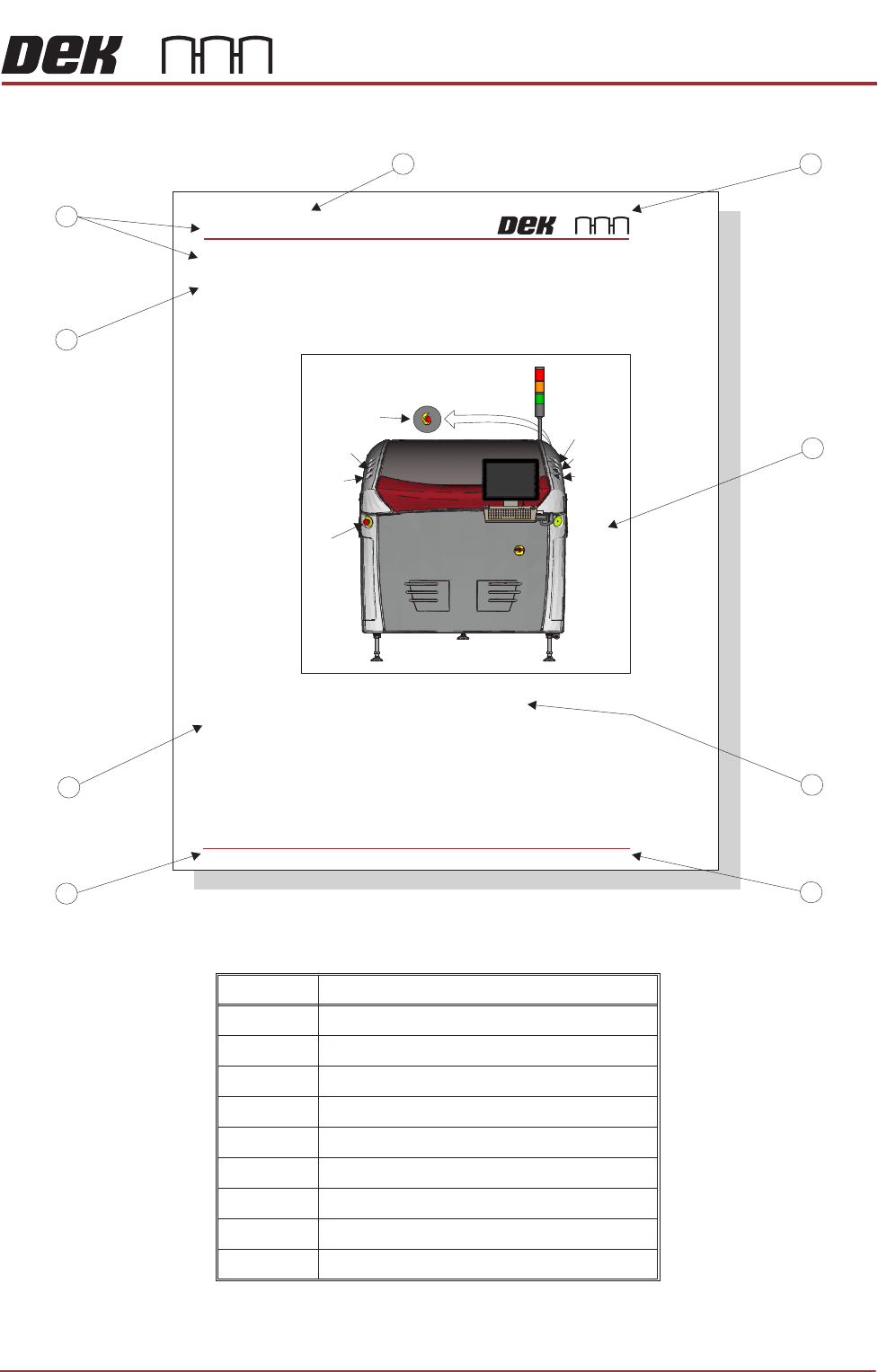
Page Layout An example of a typical chapter page layout is detailed in the Typical Page
Layout figure.
Safety Notices Safety notices and associated symbols are utilized throughout the complete
manual range to highlight to the user the possible risks that may cause injury to
personnel (for further information refer to the Safety Features Chapter). An
example is shown below:
WARNING
BOARD CLAMPS. EXTREME CARE MUST BE EXERCISED WHEN WORKING IN
THE TOOLING AREA OF THE MACHINE TO AVOID INJURY. THE FOILS ON THE
FRONT AND REAR BOARD CLAMPS ARE VERY SHARP.
Notes Notes are used extensively throughout the manuals both in text and graphics to
provide additional information to the user. Notes are displayed in italic text
prefixed by the word in uppercase. An example is shown below:
NOTE
Detailed information regarding print processing in general is highlighted......
Bold Text Bold text is used throughout the manuals to identify the following occurrences:
• An action on the user, (example shown below):
1. Select Run Diagnost.
• A message displayed on the monitor screen, (example shown below):
The following message is displayed: ‘Ensure that the correct squeegees are
fitted.’
• A dimension, (example shown below):
1. Loosen the securing screw using a 4mm Allen key.
INTRODUCTION
CONVENTIONS
Chapter Issue 12, Feb 18 Technical Reference Manual 1.5
Figure 1-1 Typical Page Layout
Item Description
1 Company Logo
2 Figure
3 Figure Chapter-Number and Title
4 Chapter Issue State
5 Chapter Number and Page
6 Subject Subtitle
7 Subject Title
8 Main Subject Title
9 Chapter Title
System Button
Right
Jog Button
Right
Jog Button
View on Front of Machine
Start Button
EMO (at rear)
SAFETY FEATURES
GENERAL
2.6 Technical Reference Manual Chapter Issue 2 Nov 07
GENERAL DEK printing machines incorporate safety features that provide a safe operating
environment for the operator and the machine.
EStop The machine is fitted with emergency push buttontwo machine off (EMO)
control switches located at the front and rear of the machine. Operation of either
EMO initiates immediate hutdown of the machines.
The printhead cover is fitted with a cam interlock switch to protect personnel
from internal moving parts.
1
2
3
4
5
6
7
8
9
GENERAL
Emergency
Machine Off
Covers
Lid Bolt
Figure 2-1 Machine Controls
A lid bolt is fitted to the machine to prevent the front printhead cover from being
raised during the print cycle.
The lid bolt is withdrawn and the printhead cover may be raised:
• When Open Cover is requested by the software
• When Pause or Stop is selected during a print cycle
• When the EMO is pressed
Left
Jog Button
Left
Jog Button
EMO
Internal Light