Micron Technical Reference V9 Volume 1.pdf - 第259页
PROACTIV MECHANICAL DETAIL Chapter Issue 5, Jan 15 Technical Reference Manual 10.9 proximity switches to trigger , if ProActiv is on, the active drive to the squeegee blades turns ON. The active squeegee remains on until…
PROACTIV
MECHANICAL DETAIL
10.8 Technical Reference Manual Chapter Issue 5, Jan 15
MECHANICAL DETAIL
NOTE
Handling active squeegees. Do not mishandle or drop active squeegees. This
may cause damage to the active elements. Always stow away securely. Do not
clean too vigorously or by fully immersing in a liquid.
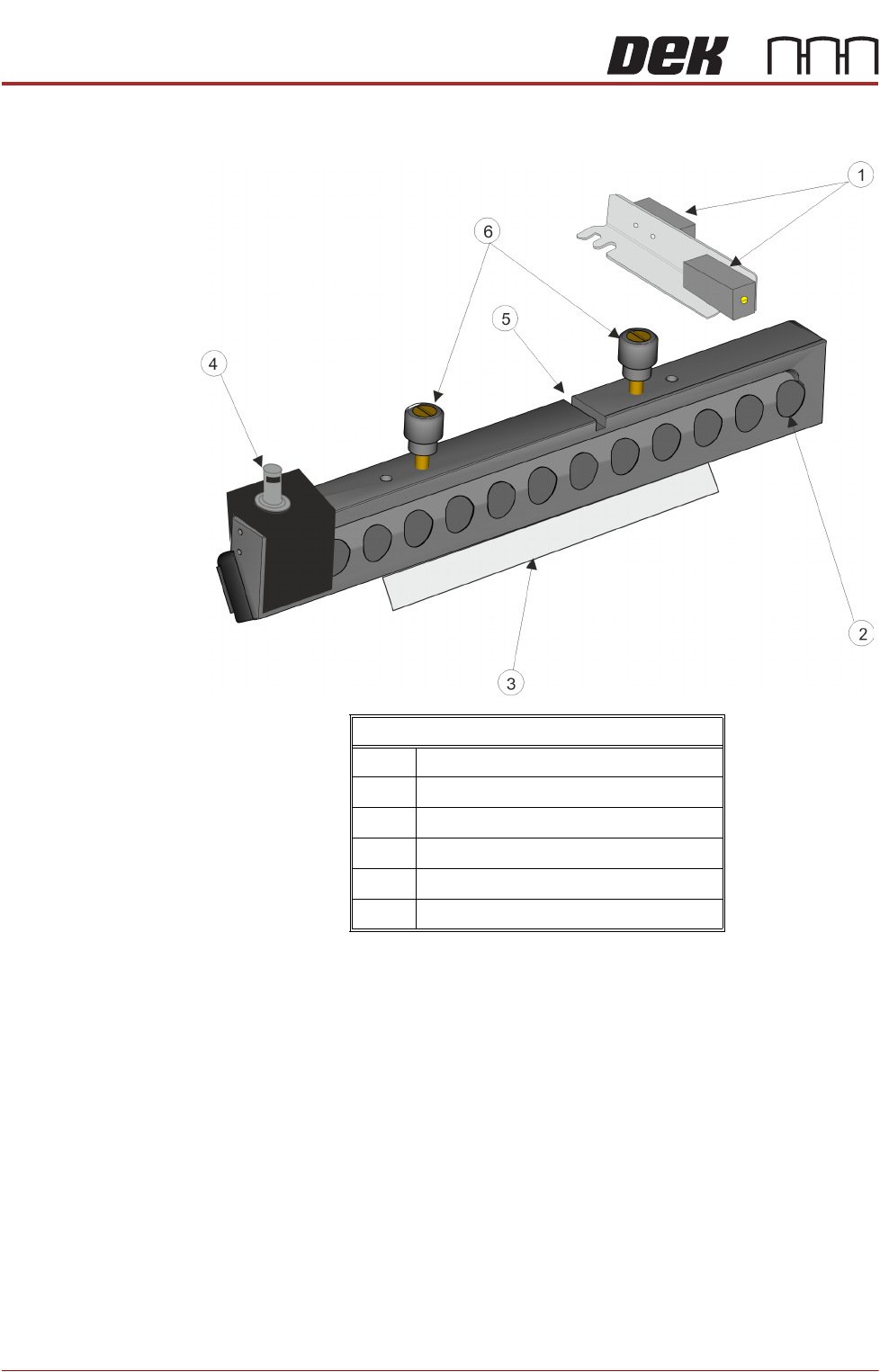
The active squeegees are fitted to the squeegee mechanism using the top
mounted locking thumbscrews. To prevent the squeegees from being fitted to
the wrong holder each squeegee is constructed with a keyway and a pair of
locking thumbscrews. The thumbscrews on the rear squeegee have their hole-
centres further apart than the hole-centres on the front squeegee. The keyway
aligns with the dowel pins on the squeegee holder.
The electrical cables connect each squeegee to the drive board via connectors
on the mount assembly bracket (9SK74/75). The cables carry power and
signals to drive the active elements in each squeegee. The cables are loomed
through the drag chain back to the drive board to plug (N18PL14).
Proximity switches located above each squeegee are used to sense when the
squeegee moves from dwell height to contact height. This movement causes
Front Active Squeegee
1 Front and Rear Proximity Sensors
2 Active Elements
3 Squeegee Blade
4 Electrical Connector Assembly
5 Locking Thumbscrews
6Keyway

PROACTIV
MECHANICAL DETAIL
Chapter Issue 5, Jan 15 Technical Reference Manual 10.9
proximity switches to trigger, if ProActiv is on, the active drive to the squeegee
blades turns ON. The active squeegee remains on until it is: turned off by the
operator, or the machine is powered down, or emergency stopped, or the
squeegee returns to either the dwell position or the home position.

PROACTIV
ADJUSTMENTS AND SETTINGS
10.10 Technical Reference Manual Chapter Issue 5, Jan 15
ADJUSTMENTS AND SETTINGS
This section details the adjustments and settings required to set up the active
squeegee mechanism (it assumes that standard Squeegees have been fitted
to the printer).
Preparation 1. Power up and initialise the printer.
2. With the printer in the ready page; select Maintenance.
3. Select Machine Setup.
4. Select Options.
5. Select Pressure Hardware.
6. Select Fitted.
7. Select Back.
8. Select Back.
9. Select Back.
10. Select Open Cover Commands.
11. Select Carriage To Front.
12. Open the front printhead cover.
13. Remove the squeegees.
14. Clean and Stow the squeegees.
15. Close the printhead front cover.
16. Press the System Button.